• Administrator
  •  
    Support Ukraine
    If you experience any problems with the forum (it is not visible, there is no way to post messages, or some functionality does not work), please let us know. If you have problems with registration or you did not receive confirmation letter, let us know and we will activate your account manually.
    If you get an "The submitted form was invalid. Try submitting again" error, delete cookies, then try again.
     

AmazFaces for Android [Support]

AmazFaces application for Android & iOS.

Moderators: asoo, Internal error, Watchmens

User avatar
GIK-Team
root
Posts: 1014
Joined: 22 Mar 2018, 10:00
Location: Ukraine
Has thanked: 1105 times
Been thanked: 266 times
Contact:

AmazFaces for Android [Support]

Post by GIK-Team »

In this topic, you may report a problem with our AmazFaces app for Android.
To do this, please, provide the following information:

App version (Stable or Beta)
Watch model
Phone model
OS version

Description of your problem

Filling example:

Code: Select all

App version: 2.0.111 Stable
Watch model: GTR
Phone model: Samsung S10
OS version: Android 10

Not able to sync watch faces to zepp
Messages that does not meet these requirements will not be considered.
All information is transmitted to the developer, even if you do not receive a response in this thread.
"sometimes it's scary but it's still just you and me” — Leaving Laurel
roigreenberg
Posts: 4
Joined: 06 Oct 2020, 12:27
Location: Israel
Contact:

Post by roigreenberg »

There is no error.
It just does nothing.
Zarelion
Posts: 1
Joined: 13 Dec 2022, 21:29
Location: France
Contact:

Post by Zarelion »

App version: 4.0.269
Watch model: MiBand 7
Phone model: Redmi Note 9
OS version: MIUI 13.0.2

Downloaded tab says "storage permission not granted" but settings tab says storage permissions granted.

Ok I reinstalled the app now the tab says "Null check operator used on a null value."

Can't use the app to upload my watchface. Thanks for any advice.
User avatar
Ricardfs
Posts: 36
Joined: 29 Sep 2022, 16:10
Location: Spain
Has thanked: 1 time
Been thanked: 3 times
Contact:

Post by Ricardfs »

Code: Select all

App version: 4.0.274 Stable
Watch model: Amazfit Bip U Pro
Phone model: Samsung Galaxy A22
OS version: Android 13
In this new version of the APP I have performance problems on my mobile device, the APP does not work as it should, I will detail some of the problems I have with my mobile device:
  • The APP does not remember my session, every time I open the APP I have to log in again.
  • Most of the times I try to log in, the APP sends me to the Web login form.
  • Normally when I enter my username and password and click on the submit button, the APP stays locked and leaves the mobile device locked for about 30 or 45 seconds until it responds.
  • The previous version of the APP was in all languages, this version is only in one language, or I have not been able to find how to change the language.
  • When the APP is blocked the Zepp APP is unlinked from the watch.
  • When trying to upload a watch face if it is larger than 1MB the APP gets stuck and the watch is unlinked from uploading the watch face.
At the moment I have not seen any more errors, I hope that my comment is welcome and helps to improve as much as possible this APP and this platform that I like so much.
User avatar
GIK-Team
root
Posts: 1014
Joined: 22 Mar 2018, 10:00
Location: Ukraine
Has thanked: 1105 times
Been thanked: 266 times
Contact:

Post by GIK-Team »

Ricardfs wrote: 21 Jan 2023, 12:37
At the moment I have not seen any more errors, I hope that my comment is welcome and helps to improve as much as possible this APP and this platform that I like so much.
It would be cool if everyone wrote like this. Thanks for the information! ;)
"sometimes it's scary but it's still just you and me” — Leaving Laurel
Liquid4653
WF maker
Posts: 25
Joined: 21 Jan 2023, 10:28
Location: Kent
Been thanked: 3 times
Contact:

Post by Liquid4653 »

App version: 4.0.275
Watch model: Amazfit T-Rex Pro
Phone model: Samsung Galaxy S20FE
OS version: Android 13

Hi,

Tonight I have updated to the latest version and it has been a problem.

I have been adding my own pesonal files with the 'add file' button locally up till the time I updated. I had already set all permissions for the app on my device and it was fine until the update. When I tried to put another WF on via the 'add file' button it told me I had to give permissions, and when I did this, it completely deleted the installed files in the Amazfaces TRex-Trex Pro folder. I checked the permissions in the app and they are correct and allowed.

Now when I hit the 'add file' button the app does nothing and keeps telling me to allow permissions when they are already granted on my device and in the application. I get the yellow 'give access' banner and when I click it and allow permissions it just goes straight back to the yellow banner telling me to allow permissions again.

I have tried uninstalling and re-installing fresh adn the problem remains.

Any advice on how to remove every trace of the application footprint would be welcome as I probably have to do this to try and get it working again.
Liquid4653
WF maker
Posts: 25
Joined: 21 Jan 2023, 10:28
Location: Kent
Been thanked: 3 times
Contact:

Post by Liquid4653 »

App version: 4.0.275
Watch model: Amazfit T-Rex Pro
Phone model: Samsung Galaxy S20FE
OS version: Android 13

Hi,

Small update - I have removed the app and re-installed it. The app will not allow me to grant file permissions in the options anymore and when I hit the 'add file' button, it does nothing, not even aasking me to grant permissions anymore.

I included this info in case it helps.

Regards
User avatar
Stas
Posts: 184
Joined: 22 Jan 2019, 21:18
Location: Ukraine
Has thanked: 4 times
Been thanked: 34 times
Contact:

Post by Stas »

Hello,

For Android 13 and above, it must be provided separately for the download/amazfaces folder

Example
https://youtube.com/shorts/Z5cZ2SL9eQc

If this is not the problem, write again.

Regards
Liquid4653 wrote: 26 Jan 2023, 20:48
App version: 4.0.275
Watch model: Amazfit T-Rex Pro
Phone model: Samsung Galaxy S20FE
OS version: Android 13

Hi,

Small update - I have removed the app and re-installed it. The app will not allow me to grant file permissions in the options anymore and when I hit the 'add file' button, it does nothing, not even aasking me to grant permissions anymore.

I included this info in case it helps.

Regards
Liquid4653
WF maker
Posts: 25
Joined: 21 Jan 2023, 10:28
Location: Kent
Been thanked: 3 times
Contact:

Post by Liquid4653 »

Hi Stas,

Thanks for responding.

I was doing this before and it worked no problem.

When I load the app now, fresh install, I hit 'add File' and it does nothing at all, just stay there. It does not go to permissions.

Also, I can download a WF from the site on the app but it does not go into downloaded page.

Whatever the problem is, it is left behind on uninstall because the problem remains on fresh installation.

Is there a tool to remove every trace of the app?
User avatar
Stas
Posts: 184
Joined: 22 Jan 2019, 21:18
Location: Ukraine
Has thanked: 4 times
Been thanked: 34 times
Contact:

Post by Stas »

Thank you, I understand what you mean, in the next update the function will return.

Liquid4653 wrote: 27 Jan 2023, 09:08
Hi Stas,

Thanks for responding.

I was doing this before and it worked no problem.

When I load the app now, fresh install, I hit 'add File' and it does nothing at all, just stay there. It does not go to permissions.

Also, I can download a WF from the site on the app but it does not go into downloaded page.

Whatever the problem is, it is left behind on uninstall because the problem remains on fresh installation.

Is there a tool to remove every trace of the app?
Liquid4653
WF maker
Posts: 25
Joined: 21 Jan 2023, 10:28
Location: Kent
Been thanked: 3 times
Contact:

Post by Liquid4653 »

Awesome, many thanks for the swift response.

When it becomes available, I will test and report back here.

Regards;)
Liquid4653
WF maker
Posts: 25
Joined: 21 Jan 2023, 10:28
Location: Kent
Been thanked: 3 times
Contact:

Post by Liquid4653 »

Hi Stas,

First, thankyou for such a quick response to my problems. I see that an updated version was available this morning and I am delighted to report that when I updated to the new version, the app is working perfectly now. I can now use the 'add file' button and it's perfect. I can now test my watchfaces again.

Thanks again Stas for such a prompt response and resolution.

Cheers.
Liquid4653
WF maker
Posts: 25
Joined: 21 Jan 2023, 10:28
Location: Kent
Been thanked: 3 times
Contact:

Post by Liquid4653 »

@Stas

App version: 4.0.283
Watch model: Amazfit T-Rex Pro
Phone model: Samsung Galaxy S20FE
OS version: Android 13

Hi Stas,

My app has been updated to 4.0.283 and now I have the same problem as before. The app storage permission is denied and I cannot enable it on the app or phone settings.

This is the same problem I reported on the 26/01/23.

Also the 'download' page this time has disappeared completely.

Please help.

If the team can send me a link to 4.0.277 version, then i could install and prevent updating in the future. This version worked perfectly.

Thanks.
Liquid4653
WF maker
Posts: 25
Joined: 21 Jan 2023, 10:28
Location: Kent
Been thanked: 3 times
Contact:

Post by Liquid4653 »

App version: 4.0.284
Watch model: Amazfit T-Rex Pro
Phone model: Samsung Galaxy S20FE
OS version: Android 13

Hi,

I got another update today to 4.0.284 but sadly it has not fixed the problem. The downloaded page is gone in both versions.

Is there any chance the team can pm me the 4.0.277 version?

Regards.
User avatar
Stas
Posts: 184
Joined: 22 Jan 2019, 21:18
Location: Ukraine
Has thanked: 4 times
Been thanked: 34 times
Contact:

Post by Stas »

Hi,
Access to the download folder/amazfaces for Android 13 and above for security purposes, you need to specify access rights at each complete reinstallation of the application.

https://www.youtube.com/watch?v=Z5cZ2SL9eQc

I don't quite understand what you mean

"Also the 'download' page this time has disappeared completely."

a screenshot or video may help to solve this problem.


Best regards


Liquid4653 wrote: 08 Feb 2023, 18:57

Hi,

I got another update today to 4.0.284 but sadly it has not fixed the problem. The downloaded page is gone in both versions.

Is there any chance the team can pm me the 4.0.277 version?

Regards.
Liquid4653
WF maker
Posts: 25
Joined: 21 Jan 2023, 10:28
Location: Kent
Been thanked: 3 times
Contact:

Post by Liquid4653 »

Hi,

It is not possible for me to enable storage permissions on v4.0.284, it is nothing to do with the youtube video you send me, when i write about problem before, you say same thing.

I can set permissions on my android 13 no problem for any app that will allow it.

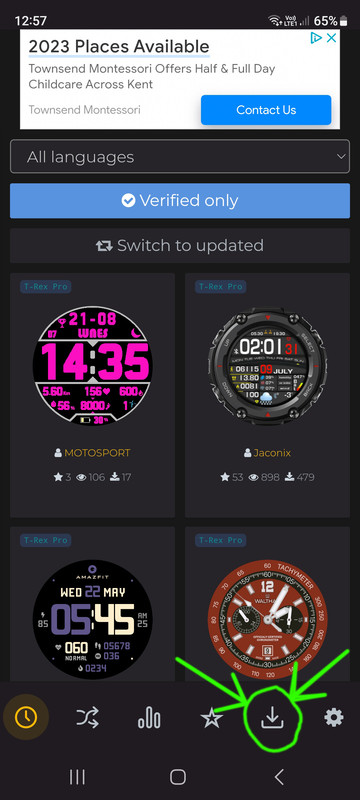
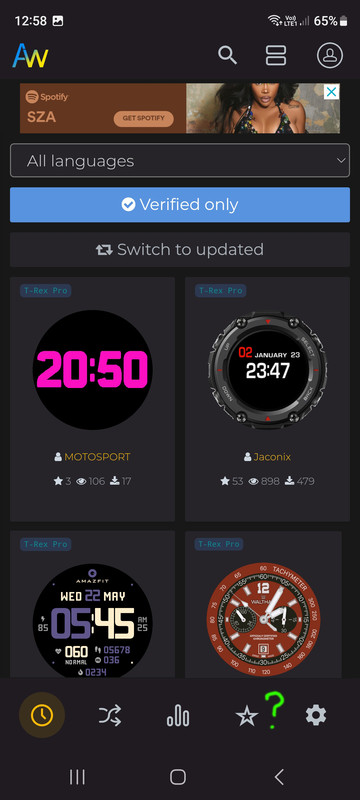
See the pictures below, one is version 4.0.269 which I download apk, and the other picture is from v4.0.284.

I make marks on the pictures, hope it helps. Also, please google translate my words, might help understand me better.


This is V4.0.269
Image

This is V4.0.284
Image

You see?

Version 4.0.269 is working for me but is buggy and v4.0.277 was perfect for me. Can I get the apk for v4.0.277, is possible?

Thanks,
User avatar
GIK-Team
root
Posts: 1014
Joined: 22 Mar 2018, 10:00
Location: Ukraine
Has thanked: 1105 times
Been thanked: 266 times
Contact:

Post by GIK-Team »

Liquid4653

4.0.283/4.0.284
Spoiler
Image
"sometimes it's scary but it's still just you and me” — Leaving Laurel
Liquid4653
WF maker
Posts: 25
Joined: 21 Jan 2023, 10:28
Location: Kent
Been thanked: 3 times
Contact:

Post by Liquid4653 »

GIK-Team wrote: 09 Feb 2023, 13:34
@Liquid4653

4.0.283
Spoiler
Image
is this what should be there?
User avatar
GIK-Team
root
Posts: 1014
Joined: 22 Mar 2018, 10:00
Location: Ukraine
Has thanked: 1105 times
Been thanked: 266 times
Contact:

Post by GIK-Team »

Liquid4653 wrote: 09 Feb 2023, 13:35
GIK-Team wrote: 09 Feb 2023, 13:34
@Liquid4653

4.0.283
Spoiler
Image
is this what should be there?
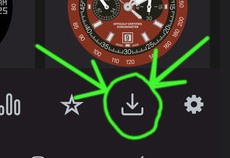
This is similar to this button.
Image
"sometimes it's scary but it's still just you and me” — Leaving Laurel
Liquid4653
WF maker
Posts: 25
Joined: 21 Jan 2023, 10:28
Location: Kent
Been thanked: 3 times
Contact:

Post by Liquid4653 »

i will uninstall, clear all cache and data from the app, and re-install the app.

Will report back here when i am done.

Cheers.
Liquid4653
WF maker
Posts: 25
Joined: 21 Jan 2023, 10:28
Location: Kent
Been thanked: 3 times
Contact:

Post by Liquid4653 »

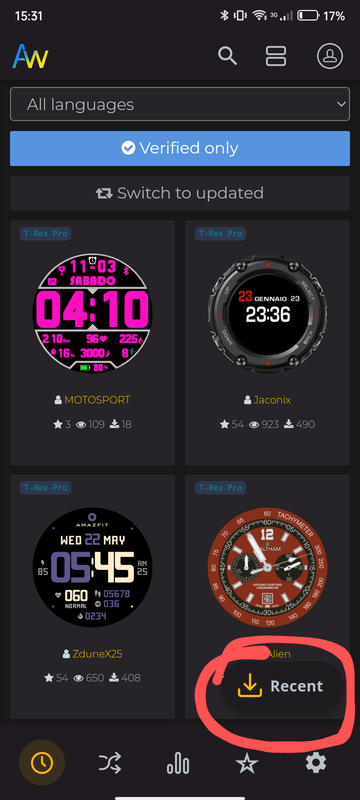
I now have the same as the pictue showing the 'recent' and download icon, which before was not there.

I have downloaded and installed a watchface no problem.

The '+ add file' button is not working and storage permissions are denied.
Liquid4653
WF maker
Posts: 25
Joined: 21 Jan 2023, 10:28
Location: Kent
Been thanked: 3 times
Contact:

Post by Liquid4653 »

Ok, I have some new information for the dev team, might help in future.

I removed v4.0.284 and re-installed v4.0.269, everything work perfect in v4.0.269.

I then updated to v4.0.284 from play store(not fresh install) and everything is working correct. All permissions good and '+ add file' button is now working.

I do not know why but when i fresh install v4.0.284, it is impossible for storage permissions to be granted for me.
User avatar
Stas
Posts: 184
Joined: 22 Jan 2019, 21:18
Location: Ukraine
Has thanked: 4 times
Been thanked: 34 times
Contact:

Post by Stas »

Thanks for the message and testing, very strange behavior. I will try to fix it in the next update.


Liquid4653 wrote: 09 Feb 2023, 13:58
Ok, I have some new information for the dev team, might help in future.

I removed v4.0.284 and re-installed v4.0.269, everything work perfect in v4.0.269.

I then updated to v4.0.284 from play store(not fresh install) and everything is working correct. All permissions good and '+ add file' button is now working.

I do not know why but when i fresh install v4.0.284, it is impossible for storage permissions to be granted for me.
Liquid4653
WF maker
Posts: 25
Joined: 21 Jan 2023, 10:28
Location: Kent
Been thanked: 3 times
Contact:

Post by Liquid4653 »

thanks, I am back up and running properly again, so all is well lol.

Cheers guys.
flymiller
Posts: 1
Joined: 28 Jun 2022, 16:07
Location: 中国
Contact:

Post by flymiller »

google上的amazfacese下载不了了?哪位大神知道可以在哪下最新版吗?
User avatar
GIK-Team
root
Posts: 1014
Joined: 22 Mar 2018, 10:00
Location: Ukraine
Has thanked: 1105 times
Been thanked: 266 times
Contact:

Post by GIK-Team »

flymiller wrote: 13 Feb 2023, 02:38
google上的amazfacese下载不了了?哪位大神知道可以在哪下最新版吗?
4.0.284
"sometimes it's scary but it's still just you and me” — Leaving Laurel
Post Reply

Return to “AmazFaces app”

Who is online

Users browsing this forum: No registered users and 1 guest