• Administrator
  •  
    Support Ukraine
    If you experience any problems with the forum (it is not visible, there is no way to post messages, or some functionality does not work), please let us know. If you have problems with registration or you did not receive confirmation letter, let us know and we will activate your account manually.
    If you get an "The submitted form was invalid. Try submitting again" error, delete cookies, then try again.
     

order of the layers

Topics for the request of watch faces development.

Moderators: asoo, Watchmens

Forum rules
All communication in this branch should only be in English.
Post Reply
User avatar
d4rk26
Posts: 1
Joined: 18 Feb 2022, 14:19
Location: Spain
Contact:

order of the layers

Post by d4rk26 »

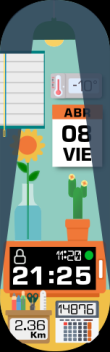
hello I have made a watchface for the mi band 6 made with the software published here called "Mi Band 5 & 6 WatchFace Editor GUI" of @Johnson070 (viewtopic.php?t=1895), this is the right tool for my band 6? I have a problem in the order of the layers that show the functions of bluetooh and do not disturb, I leave the screenshot as I have tried several options directly from the json or from the status options and statussimplified and I can not get the blinds to be seen below the layer of the shadow of the bulb, that below the shutter must be the weather, because if I put the bluetooh option in the status section the weather notifications are above the shutter,

I also leave the images used ie:

above the bulb

Image


below the blinds
Image


final result

Image
Attachments
ROOMING_6_ESP_2.1.bin
(1006.25 KiB) Downloaded 180 times
Last edited by d4rk26 on 29 Apr 2022, 00:09, edited 1 time in total.
Post Reply

Return to “Watchfaces creation (order table)”

Who is online

Users browsing this forum: No registered users and 2 guests