• Administrator
  •  
    Support Ukraine
    If you experience any problems with the forum (it is not visible, there is no way to post messages, or some functionality does not work), please let us know. If you have problems with registration or you did not receive confirmation letter, let us know and we will activate your account manually.
    If you get an "The submitted form was invalid. Try submitting again" error, delete cookies, then try again.
     

AmazFaces for Android [Support]

AmazFaces application for Android & iOS.

Moderators: asoo, Internal error, Watchmens

User avatar
GIK-Team
root
Posts: 1019
Joined: 22 Mar 2018, 10:00
Location: Ukraine
Has thanked: 1137 times
Been thanked: 275 times
Contact:

AmazFaces for Android [Support]

Post by GIK-Team »

In this topic, you may report a problem with our AmazFaces app for Android.
To do this, please, provide the following information:

App version (Stable or Beta)
Watch model
Phone model
OS version

Description of your problem

Filling example:

Code: Select all

App version: 2.0.111 Stable
Watch model: GTR
Phone model: Samsung S10
OS version: Android 10

Not able to sync watch faces to zepp
Messages that does not meet these requirements will not be considered.
All information is transmitted to the developer, even if you do not receive a response in this thread.
"sometimes it's scary but it's still just you and me” — Leaving Laurel
Ritvik1882
Posts: 1
Joined: 07 Nov 2021, 13:02
Location: India
Contact:

Post by Ritvik1882 »

App version: 3.1 stable
Watch model: Mi Band 4
Phone model: Oppo k1
OS version: Android 9

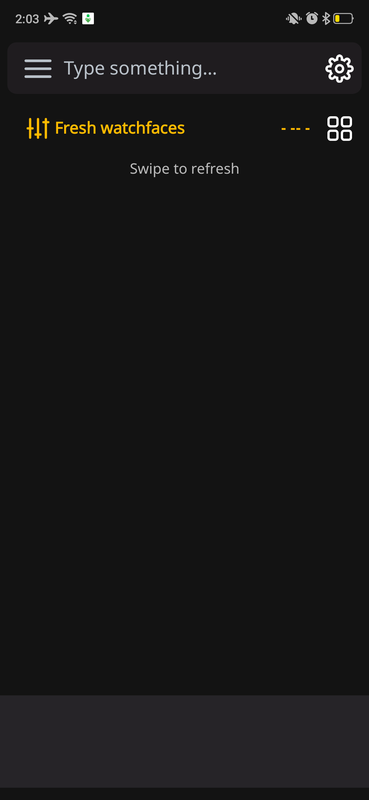
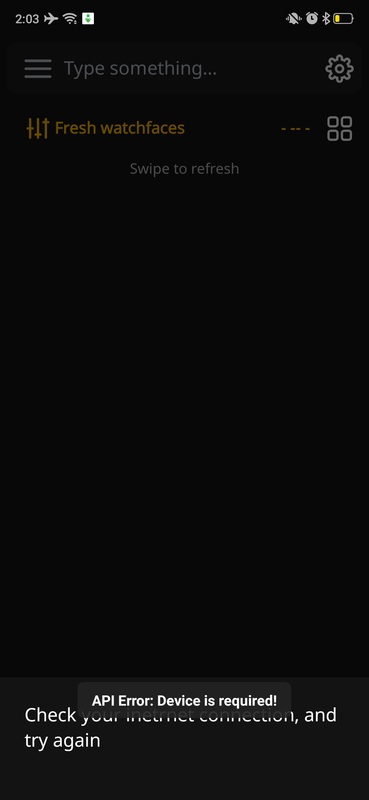
App is not working at all for me. As soon as i open the app, it shows "API error: device required".
Also, when i try to refresh, it displays "Check your internet connection and try again", even though my internet is working properly.
Ps: I am using Notify for Mi band, instead of mi fit.
Image
Image
Pumpk1in
WF maker
Posts: 3
Joined: 08 May 2021, 00:07
Location: France
Has thanked: 1 time
Contact:

Post by Pumpk1in »

App version: 2.6.164
Watch model: GTR2
Phone model: Redmi Note 10 Pro
OS version: Android 11

Hi,

I'm still on 2.6 (May 2021) version because EVERY new versions failed to sync to GTR2.

The LATEST version of the app, (3.1) is now sort of syncing the watchface without visual glitches, BUT, the synced watchface is missing in the GTR2 settings. So you can't select the watchface from the watch settings.

Could you please, fix this ?
A lot of people are complaining about sync problems on the Play store since months...

Also, favorites are not working anymore on the app. "service temporarily unavailable". But maybe this is due to 2.6 version now outdated.

Thanks !
weiweitw
Posts: 1
Joined: 08 Jul 2021, 09:43
Location: Taiwan
Contact:

Post by weiweitw »

App version: 3.1.188
Watch model: Mi Band 6
Phone model: Xperia 5 III
OS version: Android 11

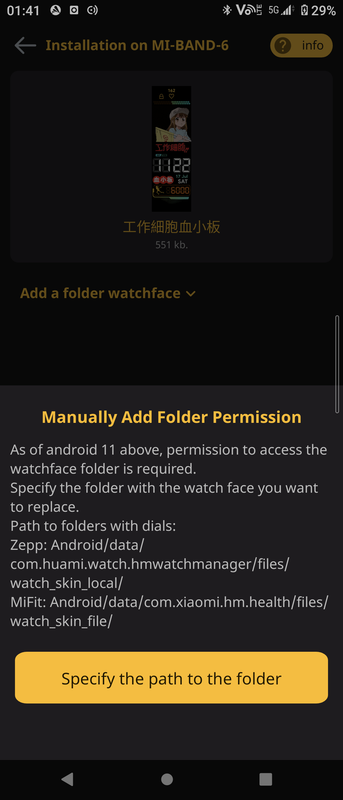
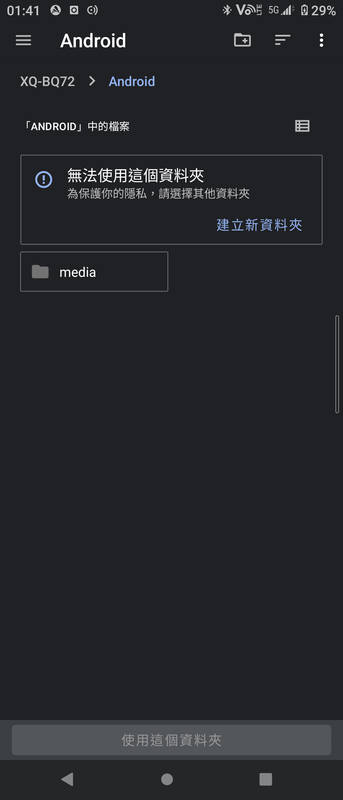
Android 11 需要档案存取权限
提示要存在
Android/data/com.huami.watch.hmwatchmanager/files/watch_skin_local/

Android/data/com.xiaomi.hm.health/files/watch_skin_file/
Image

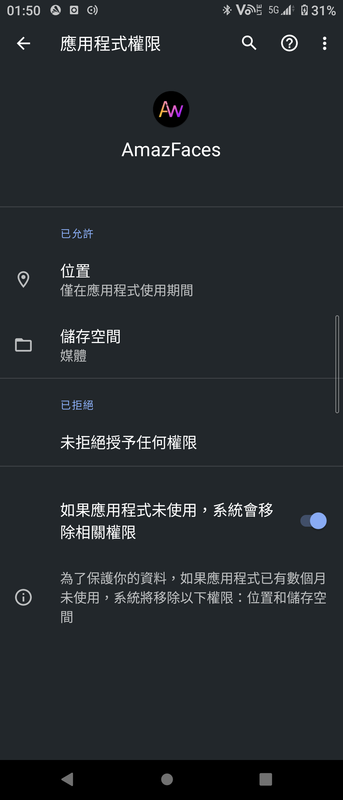
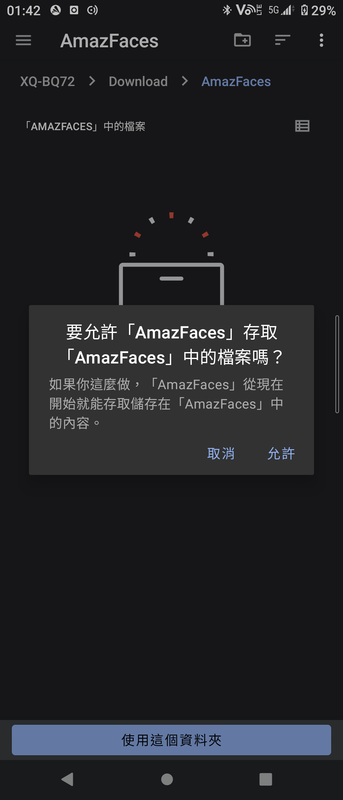
但 AmazFaces 的储存空间权限只有"媒体"
Image

并无法存取 Android/data/ 系统资料夹下的子资料夹
Image

故不可能将资料的存取权限设为提示中的资料夹
Image

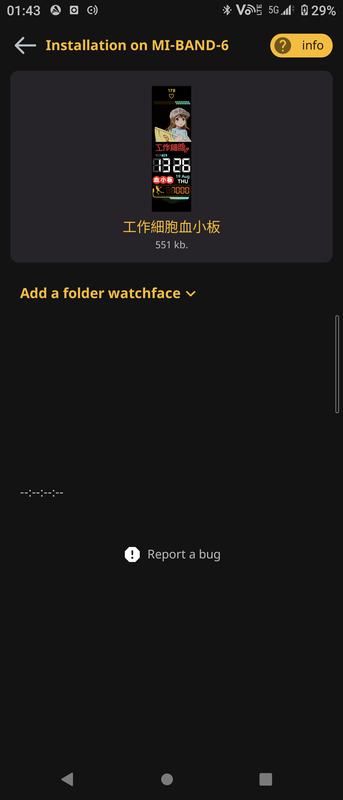
建议下载的錶盘档案可以另设资料夹,否则无法存取。
Image
Last edited by weiweitw on 15 Nov 2021, 18:15, edited 1 time in total.
Maxilogan_aw
Posts: 1
Joined: 06 Dec 2021, 13:07
Location: Bologna
Contact:

Post by Maxilogan_aw »

App version: 3.2 from Play Store
Watch model: GTR 2
Phone model: Oneplus 7 PRO
OS version: Android 11

Syncing watchface through the app seems to work but the graphics are all messed and glitched. Used the BT MAC address to transfer, tested both methods (slow and fast)
User avatar
Stas
Posts: 184
Joined: 22 Jan 2019, 21:18
Location: Ukraine
Has thanked: 4 times
Been thanked: 34 times
Contact:

Post by Stas »

Update the app to version 3.2.191, remove the device in the app and reconnect then try downloading again

Maxilogan_aw wrote: 09 Dec 2021, 08:42
App version: 3.2 from Play Store
Watch model: GTR 2
Phone model: Oneplus 7 PRO
OS version: Android 11

Syncing watchface through the app seems to work but the graphics are all messed and glitched. Used the BT MAC address to transfer, tested both methods (slow and fast)
andysoft83
Posts: 13
Joined: 28 Dec 2019, 11:14
Location: Romania
Has thanked: 3 times
Contact:

Post by andysoft83 »

How can I sync watchface on a Miband6 NFC if I don't use Zepp or MiFit apps, I use the new Xiaomi Wear app, the android app doesn't know how to search for the folder of the Xiaomi Wear app( on my galaxy S10, os android 11) in order to replace the skins from there. Thank you
User avatar
Stas
Posts: 184
Joined: 22 Jan 2019, 21:18
Location: Ukraine
Has thanked: 4 times
Been thanked: 34 times
Contact:

Post by Stas »

Thanks for the message, within a week there will be an update with support for Xiaomi Wear app
andysoft83 wrote: 20 Dec 2021, 10:31
How can I sync watchface on a Miband6 NFC if I don't use Zepp or MiFit apps, I use the new Xiaomi Wear app, the android app doesn't know how to search for the folder of the Xiaomi Wear app( on my galaxy S10, os android 11) in order to replace the skins from there. Thank you
andysoft83
Posts: 13
Joined: 28 Dec 2019, 11:14
Location: Romania
Has thanked: 3 times
Contact:

Post by andysoft83 »

Perfect that's good news 👍
carsten_h
WF maker
Posts: 9
Joined: 06 Sep 2018, 04:50
Contact:

Post by carsten_h »

Stas wrote: 09 Dec 2021, 09:26
Update the app to version 3.2.191, remove the device in the app and reconnect then try downloading again

Maxilogan_aw wrote: 09 Dec 2021, 08:42
App version: 3.2 from Play Store
Watch model: GTR 2
Phone model: Oneplus 7 PRO
OS version: Android 11

Syncing watchface through the app seems to work but the graphics are all messed and glitched. Used the BT MAC address to transfer, tested both methods (slow and fast)
I also have the problem with the distorted graphics with a GTR 2.
If I upload the watchfaces to a GTR 2 or GTR 2e with the iOS App everything is working fine. never had problems like this!
Only the Android version isn‘t working at all.

I can not tell you which Android version the phone has or which version of the app is installed (it is the newest from the Appstore) as it is not my phone and I am not near it.
User avatar
FeRu
Posts: 39
Joined: 06 May 2021, 11:46
Location: Poland
Has thanked: 14 times
Been thanked: 8 times
Contact:

Post by FeRu »

Samsung Galaxy S10+
Android 11

Amazfitfaces app crash when I try load comments below every watchfaces :/
I have this problem since few days, and reinstalling app, wiping data, and system cache didn't solve problem
User avatar
Stas
Posts: 184
Joined: 22 Jan 2019, 21:18
Location: Ukraine
Has thanked: 4 times
Been thanked: 34 times
Contact:

Post by Stas »

What version of amazfaces app do you have ?

FeRu wrote: 23 Jan 2022, 21:30
Samsung Galaxy S10+
Android 11

Amazfitfaces app crash when I try load comments below every watchfaces :/
I have this problem since few days, and reinstalling app, wiping data, and system cache didn't solve problem
User avatar
FeRu
Posts: 39
Joined: 06 May 2021, 11:46
Location: Poland
Has thanked: 14 times
Been thanked: 8 times
Contact:

Post by FeRu »

Ver 3.2.191
6thflow
Posts: 1
Joined: 04 Feb 2022, 15:21
Location: Czech republic

Post by 6thflow »

целевая папка должна быть названа "watch_skin_local" вместо "watch_skin_file".
the target folder should be named "watch_skin_local" instead of "watch_skin_file".
Android 11.
Fryw
Posts: 2
Joined: 22 Jan 2020, 01:31
Location: Czech
Contact:

Post by Fryw »

In app Is not possible choose gtr 3 pro.

App version: 3.1.188
Gtr 3 pro
Xiaomi 11t
Android 12
User avatar
GIK-Team
root
Posts: 1019
Joined: 22 Mar 2018, 10:00
Location: Ukraine
Has thanked: 1137 times
Been thanked: 275 times
Contact:

Post by GIK-Team »

Fryw wrote: 20 Feb 2022, 21:52
In app Is not possible choose gtr 3 pro.

App version: 3.1.188
Gtr 3 pro
Xiaomi 11t
Android 12
You are using an outdated version of the application.
"sometimes it's scary but it's still just you and me” — Leaving Laurel
deepblue2000
Posts: 17
Joined: 28 Mar 2020, 18:42
Location: Germany
Has thanked: 5 times
Been thanked: 1 time
Contact:

Post by deepblue2000 »

since days I only get:
"Something went wrong" we´ve been notified and will fix this issue as sonn as we can...

"Refresh"

AmazFaces v3.4
Android 12 (Miui13)
Mi11 (xiaomi.eu 22.1.19)
RobertV56
Posts: 73
Joined: 06 Dec 2021, 10:06
Location: Nijverdal
Has thanked: 1 time
Been thanked: 5 times
Contact:

Post by RobertV56 »

The app no ​​longer works, only gives the message closed, please fix it.
mimidudu
WF maker
Posts: 6
Joined: 08 Nov 2021, 17:38
Location: Rio de Janeiro
Contact:

Post by mimidudu »

Android 12 - The smartphone no longer recognizes the application, before if I clicked on the bin file and opened it in amazfit, it opened and just told me to install it, now not even through the application, it shows CONNECT, then SET ON WATCH and nothing happens.

AWapp (Android) 3.4.204
trunksis77
Posts: 3
Joined: 04 Jan 2022, 08:38
Location: Greece
Contact:

Post by trunksis77 »

3.4 beta
T-rex
Xiaomi 10T Pro
Android 11 miui 12.5.11
You have fixed the previus bugs but now we can't install watchfaces to our watch it doesn't synchronize when it did the previous month
User avatar
GIK-Team
root
Posts: 1019
Joined: 22 Mar 2018, 10:00
Location: Ukraine
Has thanked: 1137 times
Been thanked: 275 times
Contact:

Post by GIK-Team »

Due to the war in our country (Russia attacked Ukraine), we cannot quickly correct errors. At the moment we do not have the technical capability.
"sometimes it's scary but it's still just you and me” — Leaving Laurel
A0953080603a
Posts: 3
Joined: 12 Nov 2021, 14:15
Location: Київ
Has thanked: 1 time
Been thanked: 1 time
Contact:

Post by A0953080603a »

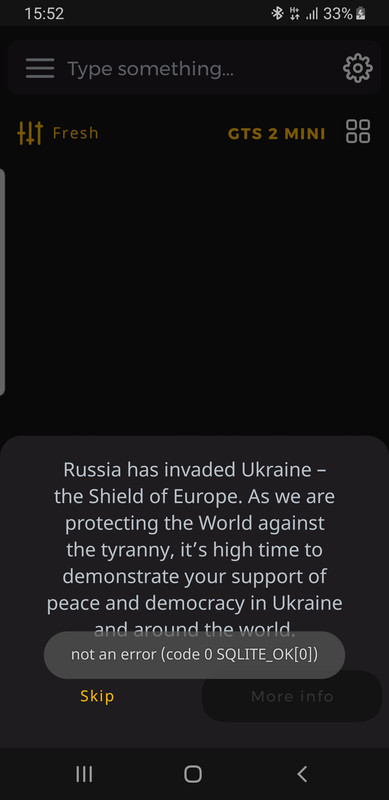
Пристрій amazfit gts 2 mini
Spoiler
Image
deepblue2000
Posts: 17
Joined: 28 Mar 2020, 18:42
Location: Germany
Has thanked: 5 times
Been thanked: 1 time
Contact:

Post by deepblue2000 »

since firmware 4.4.1.1 update of Amazfit GTS2, the app can not connect anymore

edit: sorry today it is working again
Dale_a
Posts: 1
Joined: 28 Mar 2022, 15:03
Location: Philippines
Contact:

Post by Dale_a »

App version (Stable or Beta) : Stable
Watch model : Xiaomi M6 1.0.6.16
Phone model: OPPO F11 CPH1911
OS version: Android 11

Error syncing and installing faces.
Couldn't sync
pa5t1s
Posts: 7
Joined: 12 May 2018, 15:22
Location: Paris
Has thanked: 7 times
Been thanked: 1 time
Contact:

Post by pa5t1s »

App version : Amazfaces 3.4
Watch model: GTS 3
Phone model : OnePlus 9
Android 12

It has been a month or so that I'm unable to use the app: right after the launch, there's an error message 'something went wrong, we have been informed bla bla...' with a refresh buttons that doesn't help much.
I've tried to clear cache,clear data but no luck so far...
mshkvtz
Posts: 1
Joined: 31 Jul 2020, 12:18
Location: Warsaw
Contact:

Post by mshkvtz »

pa5t1s just install older version of this app. I've got 3.2 and everything works fine ;)
Post Reply

Return to “AmazFaces app”

Who is online

Users browsing this forum: No registered users and 0 guests