Support Ukraine
If you experience any problems with the forum (it is not visible, there is no way to post messages, or some functionality does not work), please let us know . If you have problems with registration or you did not receive confirmation letter, let us know and we will activate your account manually.
If you get an "The submitted form was invalid. Try submitting again" error, delete cookies , then try again.
Ad blocker detected: Our website is made possible by displaying online advertisements to our visitors. Please consider supporting us by disabling your ad blocker on our website.
This forum is designed to discuss and develop tools creating watch faces.
Moderadores: asoo , lvpokka , Internal error , Watchmens
Regras do fórum
All communication in this branch should only be in English.
To discuss tools that are not in this section, use the “Watchfaces tools (discussion)” forum.
jefoce
Mensagens: 33 Registrado em: 07 Jul 2019, 17:28
Localização: Ukraine
Has thanked: 11 times
Been thanked: 18 times
Contato:
Mensagem
por jefoce » 25 Nov 2020, 14:16
lvpokka thanks a lot for *.bin support
My WatchFaces
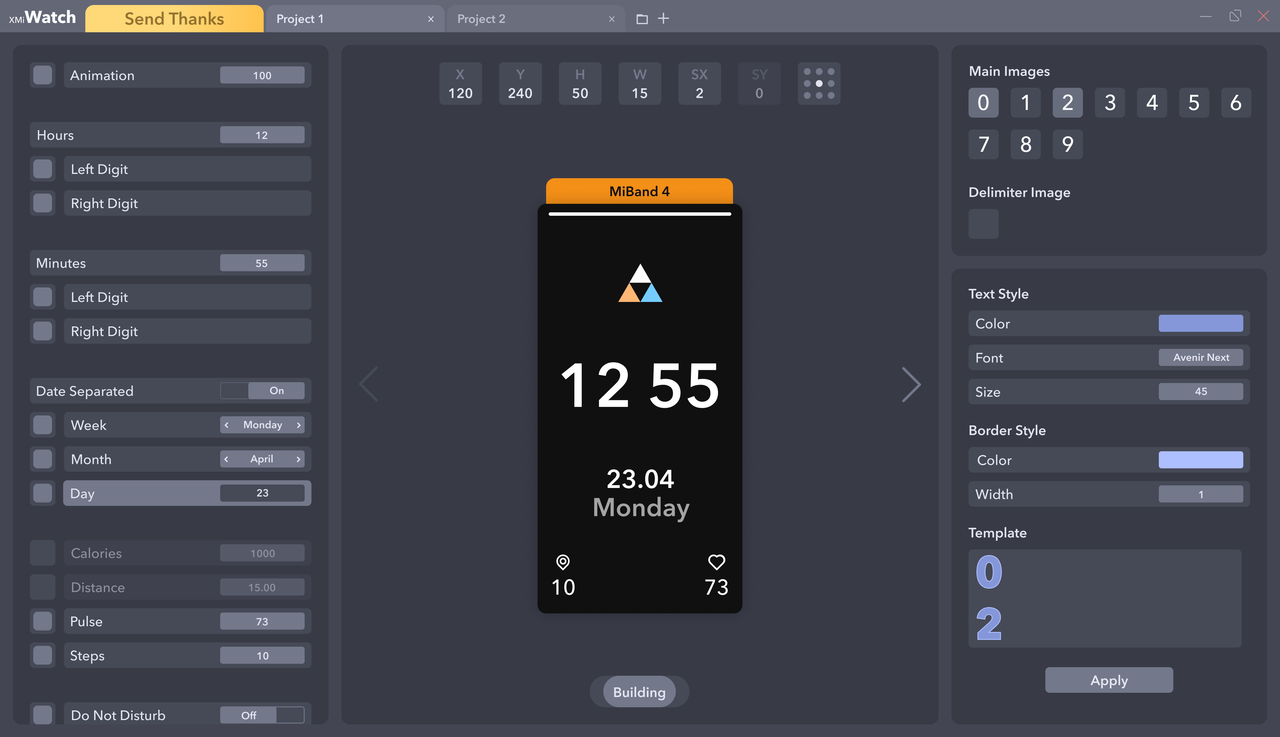
XMI Watch
Download
Version: 4.0
Release (auto-update)
Platform: Windows (
.NET Core 3.1 )
Developer: jefoce
Official site: xmi
Documentation: docs
New:
Saving format for app *.xmi (contains styles and all series)
New:
Mi Band 6 support (only json open for now)
Add background option in the left side
Update:
New:
Split creating and opening project
Fix:
Battery status (showing on Mi Band 4)
New:
Margin for project buttons
New:
Styling
Image DPI correction
Update:
New:
Global core (changed more than 50% code)
Update preview images on import/paste
Update:
Previewer adaptation
Date Inline → Date Separate
Image managing system
Smart converting system (save positions for elements and resize background by screen size)
Optimize:
Open
Convert
Build
Weeks saving
New:
Screen adaptation for 1366x768
Series converting (Mi Band 4/5)
Fix:
Images scrolling
Distance suffix for Mi Band 5
New:
Mi Band 5 support
Optimized speed open/build for Bin and Json formats
Preview image after build for Bin format
Tooltip with full name on project button mouse hover
Update:
Saving system
Image compressing
Fix:
Closing last project
Temp clearing
New:
Fix:
Images preview changing, when select other project
New:
Optimizing saving system
Notify for closing projects, app
Fix:
Fix:
Opening file with spacing name. (example: "xmi watch.exe")
If system notify about installation .NET Core - download x86 version
Microsoft escreveu:
Full support for Windows 10 (1607, 1709+)
Additional dependencies are required if you're installing the .NET Core:
Windows Vista (SP2)
Windows 7 (SP1)
Windows 8.1
Install the following:
Description
Design program for Mi Band watchfaces
You can easily open, edit and build:
Json - folder must contains 0000.png → screen sized
Bin
On / off watch elements (even not include)
Copy or import images from opened projects or files
Watchfaces converting
Text styling
Dev: Presets
Watch series
Mi Band 4
Mi Band 5
Mi Band 6
Elements support
Time
Date
Inline / Separate
Week
Month
Day
Activity
Calories
Distance
Pulse
Steps
Widgets
Do Not Disturb
Bluetooth
Lock
Battery
Other
Controls
Change value - ↑↓ keys
Move - WASD or ↑←↓→ keys and mouse
Unselect - Escape key
Unvisible - Delete key
Selecting in Previewer or Elements bar
Previewer - render on change
Previewer limits
H, Y (+-Screen height)
W, X (+-Screen width)
SX (+-20)
Render limits
Activity (99999)
Real time
Real date
Battery (100)
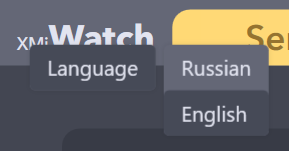
Languages
Russian
English (default)
* Right button click on opened app name
Editado pela última vez por
jefoce em 19 Set 2021, 19:32, em um total de 69 vezes.
jefoce
Mensagens: 33 Registrado em: 07 Jul 2019, 17:28
Localização: Ukraine
Has thanked: 11 times
Been thanked: 18 times
Contato:
Mensagem
por jefoce » 19 Set 2021, 11:42
KrakeCZ escreveu: 02 Ago 2021, 12:53
Added (but only json for now to open, because idk how to analyze mi band 6 version from bin) and you can save to bin and json
jefoce
Mensagens: 33 Registrado em: 07 Jul 2019, 17:28
Localização: Ukraine
Has thanked: 11 times
Been thanked: 18 times
Contato:
Mensagem
por jefoce » 19 Set 2021, 11:45
vitorprado escreveu: 26 Fev 2021, 14:58
How to add a gif? Thanks!
I think to release this idea, but for now you need to put extracted images from gifs
jefoce
Mensagens: 33 Registrado em: 07 Jul 2019, 17:28
Localização: Ukraine
Has thanked: 11 times
Been thanked: 18 times
Contato:
Mensagem
por jefoce » 19 Set 2021, 11:49
Maybe you means XMI Converter, it's just optimize image sizes to the watch screen proportion
mi4face
WF maker
Mensagens: 6 Registrado em: 19 Set 2019, 01:52
Localização: GB
Has thanked: 1 time
Been thanked: 1 time
Contato:
Mensagem
por mi4face » 20 Set 2021, 03:16
jefoce escreveu: 19 Set 2021, 11:40
mi4face escreveu: 06 Set 2021, 03:28
Thanks for your support
Added background option to the left side
Hey. Thank you. Happy to see the app development still working. Had a question, do you have a plan to add analog dial to work? Will be fantastic.
Your tool is much easier than other to use, honestly.
Thank you.
用户4472
Mensagens: 2 Registrado em: 06 Nov 2021, 00:54
Localização: 中国
Contato:
Mensagem
por 用户4472 » 06 Nov 2021, 01:01
How to run on win10?This software seems unfriendly to ordinary people.
mi4face
WF maker
Mensagens: 6 Registrado em: 19 Set 2019, 01:52
Localização: GB
Has thanked: 1 time
Been thanked: 1 time
Contato:
Mensagem
por mi4face » 23 Nov 2021, 11:50
用户4472 escreveu: 06 Nov 2021, 01:01
How to run on win10?This software seems unfriendly to ordinary people.
Hey. You have to install first the dependency as in the main thread. I am running it on Windows10 without issue.
mi4face
WF maker
Mensagens: 6 Registrado em: 19 Set 2019, 01:52
Localização: GB
Has thanked: 1 time
Been thanked: 1 time
Contato:
Mensagem
por mi4face » 25 Nov 2021, 09:09
Dear Jefoce the genius,
Please make an update of the app by correcting the battery icon section in MI4 face, where we have just 9 images option for import. Its need to be 10 image options. Otherwise i checked that at the 40% and 50% of the battery level the level dont change. Please fix that.
It will be great.
Thank you again.
Messirve
WF maker
Mensagens: 1 Registrado em: 10 Out 2021, 16:05
Localização: Madrid
Been thanked: 1 time
Contato:
Mensagem
por Messirve » 27 Dez 2021, 11:13
It doesn't work for me, I import images but none are shown, the preview always stays black
Sahturk
Mensagens: 1 Registrado em: 25 Fev 2022, 10:54
Localização: Turkiye
Contato:
Mensagem
por Sahturk » 25 Fev 2022, 10:56
Tskler Uygulama Icin
brcisneros
Mensagens: 2 Registrado em: 15 Jul 2022, 09:38
Localização: Argentina
Been thanked: 1 time
Contato:
Mensagem
por brcisneros » 17 Jul 2022, 03:40
Background not working
tokyoteddy
Mensagens: 1 Registrado em: 23 Abr 2023, 13:06
Localização: Bandung
Contato:
Mensagem
por tokyoteddy » 25 Abr 2023, 09:37
how to set animation only play once?
Ucci93
Mensagens: 1 Registrado em: 17 Abr 2023, 17:01
Localização: Italia
Has thanked: 2 times
Contato:
Mensagem
por Ucci93 » 15 Mai 2023, 20:36
Is there a tutorial on how to use it ? I wanted to create a theme of my own but I don't know how to use it (first time)
bjk8kds
WF maker
Mensagens: 9 Registrado em: 27 Abr 2019, 16:45
Localização: Indonesia
Has thanked: 12 times
Contato:
Mensagem
por bjk8kds » 20 Fev 2024, 15:30
Nice tools. Thanks!
Usuários navegando neste fórum: Nenhum usuário registrado e 3 visitantes