• Administrator
  •  
    Support Ukraine
    If you experience any problems with the forum (it is not visible, there is no way to post messages, or some functionality does not work), please let us know. If you have problems with registration or you did not receive confirmation letter, let us know and we will activate your account manually.
    If you get an "The submitted form was invalid. Try submitting again" error, delete cookies, then try again.
     

Mi Band 5 & 6 WatchFace Editor GUI

This forum is designed to discuss and develop tools creating watch faces.

Moderators: asoo, lvpokka, Internal error, Watchmens

Forum rules
All communication in this branch should only be in English.
To discuss tools that are not in this section, use the “Watchfaces tools (discussion)” forum.
User avatar
Johnson070
WF maker
Posts: 12
Joined: 02 Jan 2021, 16:22
Location: Москва
Has thanked: 5 times
Been thanked: 13 times
Contact:

Mi Band 5 & 6 WatchFace Editor GUI

Post by Johnson070 »

Author
Johnson070

Thank you very much for your help in creating the project
lvpokka

Tool description
  • All widgets support
  • Easy creation of watchfaces
  • Unpacking .bin
  • Create or modyfing watchfaces
  • Support Mi Band 5
  • Support Mi Band 6
How to
1. Unzip Mi Band WatchFace Editor.zip
2. Open MiBandWatchFaces.exe
3. Create watchface or click File => Open
4. Save file File => Save
5. Choose .bin(.json will also be saved in the directory) or .json file save
6. Copy the newly generated bin file to the corresponding directory of the mobile phone, and the synchronization will be completed. (This step is not very clear, you can refer to the original tutorial) above, you're done!
Changelog
1.0.1.8 (2021-06-09)

- Fixed Circle Scale bug

- Fixed alarm on/off add image

- Fixed oneline date

- Fixed bug number size 0

- Fixed ImageSufficCN2 to ImageSuffixCN2 (lol)

1.0.1.2 (2021-04-22)

- Bug fixes

- Add full support MiBand 6(With building a bin file yet)

- Add simple select images(Hold down the left mouse button to select, and to delete with shift)

- Animation preview(use carefully, the program uses more than 100 MB of RAM)

- (FIXED) If you have a problem with the image, try changing the scale of windows to 100%

- (FIXED) Month/Date add

- (FIXED) Add wind error and today separate temperature

1.0.1.0 (2021-03-14)

Bug fixes

Add convert GIF to PNG frames

Animation preview(use carefully, the program uses more than 100 MB of RAM)

(Maybe solved) If you have a problem with the image, try changing the scale of windows to 100%

Thank you for downloading the program.

If you find a bug, please write to github or telegram: @vveber

1.0.0.7 (2021-03-14)
  • Bug fixes
  • Bug fix time form, when add minutes tens(ERROR)
  • Add download zip file update

1.0.0.6 (2021-03-13)
  • Bug fix images form(Use image removal with care)
  • Bug fixes
  • Add json manual editor(Advanced user) RobCraftStudio for you)
  • Add culture(Add in github excel file with translations)
  • Add delete button in properties forms

1.0.0.5 (2021-03-12)
  • Bug fix images form(Use image removal with care)
  • Bug fix steps progress form
  • Fix circle scale form
  • Add delete button in properties forms
  • Start work for languages

1.0.0.4 (2021-03-10)
  • Bug fix images form(Use image removal with care)
  • Add open .bin file and decompile

1.0.0.3 (2021-03-10)
  • Bug fix status simple form
  • Bug fix images form(Use image removal with care)

1.0.0.2 (2021-03-10)
  • Bug fix status simple form

1.0.0.1 (2021-03-09)
  • First release!
Screenshots
Preview.png
Preview.png (122.77 KiB) Viewed 183985 times
Support
https://paypal.me/j0hnson070

Download:
https://github.com/Johnson070/MiBand-5- ... r/releases

Click Assets

GitHub: https://github.com/Johnson070/MiBand-5-watchface-editor
Last edited by Johnson070 on 21 May 2021, 17:35, edited 6 times in total.
Dr.Uberveguad
WF maker
Posts: 1
Joined: 29 Jun 2021, 02:43
Location: Rio
Contact:

Post by Dr.Uberveguad »

Can't downloaod this because windows said it has a virus.
Goublin
WF maker
Posts: 7
Joined: 28 Jul 2020, 11:29
Location: Barcelona
Contact:

Post by Goublin »

Thank you very much for the program.
ssyar
Posts: 1
Joined: 15 Aug 2021, 05:52
Location: Pakistan
Contact:

Post by ssyar »

pepe pepon wrote: 15 May 2021, 12:50
I am getting a "Trojan:Win32/Zpevdo.B" warning from Windows Security
i am too having same issue on Win 10
jasonberry8017.369
Posts: 1
Joined: 24 Aug 2021, 06:14
Location: France
Contact:

Post by jasonberry8017.369 »

Hi, I wanted to thank you for your program, it was very useful to me. I also wanted to ask you if you could add more features.

E.g: In my watchface there is an animation, I would like the animation to change at a specific time or a specific day, etc.

Thanks again for everything .
Nickrosfire
WF maker
Posts: 1
Joined: 18 Aug 2021, 19:16
Location: La Banda
Contact:

Post by Nickrosfire »

a little problem, i save my file as .bin but nothing appears... is that a bug? or i am doing something wrong?¡
luridfox
Posts: 1
Joined: 31 Aug 2021, 18:12
Location: United States
Contact:

Post by luridfox »

I seem to be having some issues. I am trying to do a couple of basic edits on an existing one. I made the changes and saved it as a .bin file. The file is not where it says it is, nor can I find it elsewhere. I just get a log file.

How can I do this correctly?
SanKarstiko
WF maker
Posts: 1
Joined: 19 Feb 2021, 21:59
Location: México
Contact:

Post by SanKarstiko »

what is the address to paste the .bin file in MIUI?
miklav
WF maker
Posts: 1
Joined: 08 Sep 2021, 10:06
Location: Belgium
Contact:

Post by miklav »

I am also getting a warning about trojan from Windows defender when I download the package (as some other users reported above). So to be on the safe side I use it in a virtual machine (had to add an exception in Windows Defender to be able to download it).

Bin file is saved in the same folder with all the project png and json files.
pipouses

Post by pipouses »

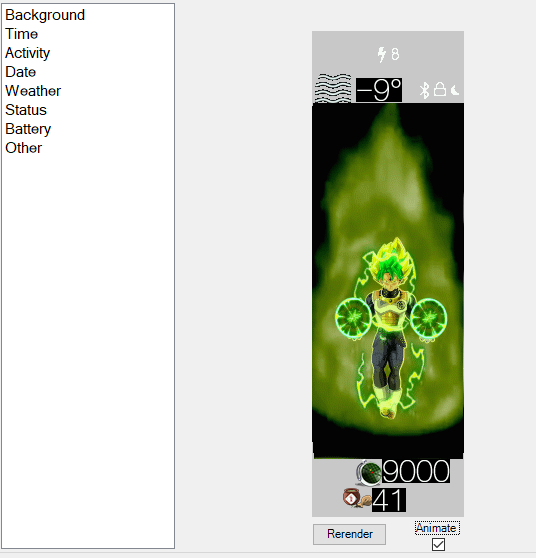
hello how do I get the time and date on top of my animation? when I but add an animation everything goes below
Spoiler
Image
sachok
WF maker
Posts: 1
Joined: 19 Sep 2021, 01:27
Location: RUSSIA, Moscow
Contact:

Post by sachok »

Hello everyone! I create a watch face for myself with a date and choose to show the date in a single value, but on mi band 6 the date is always displayed in a two-digit form. Is this a bug or is there some kind of trick?
pipouses

Post by pipouses »

I think before you are an answer you will have found all alone for a while I asked a question 0 we answered ...
I think it's a half-dead application since it doesn't respond even after 17 days
Tankudoraiba
Posts: 1
Joined: 07 Oct 2021, 19:32
Location: Poland
Contact:

Post by Tankudoraiba »

I made several other watch faces, but none of them work properly on Mi Band 6 NFC. Animations are bugged and date doesn't show up. What I don't understand, watch faces from the web work.
zengqin0825
Posts: 1
Joined: 26 Feb 2020, 09:20
Location: 江西省萍乡市湘东区
Contact:

Post by zengqin0825 »

不错
User avatar
Rosta949
WF maker
Posts: 5
Joined: 29 Nov 2019, 17:01
Location: Czechia
Contact:

Post by Rosta949 »

PsychoMatt wrote: 13 Jul 2021, 12:06
Hi

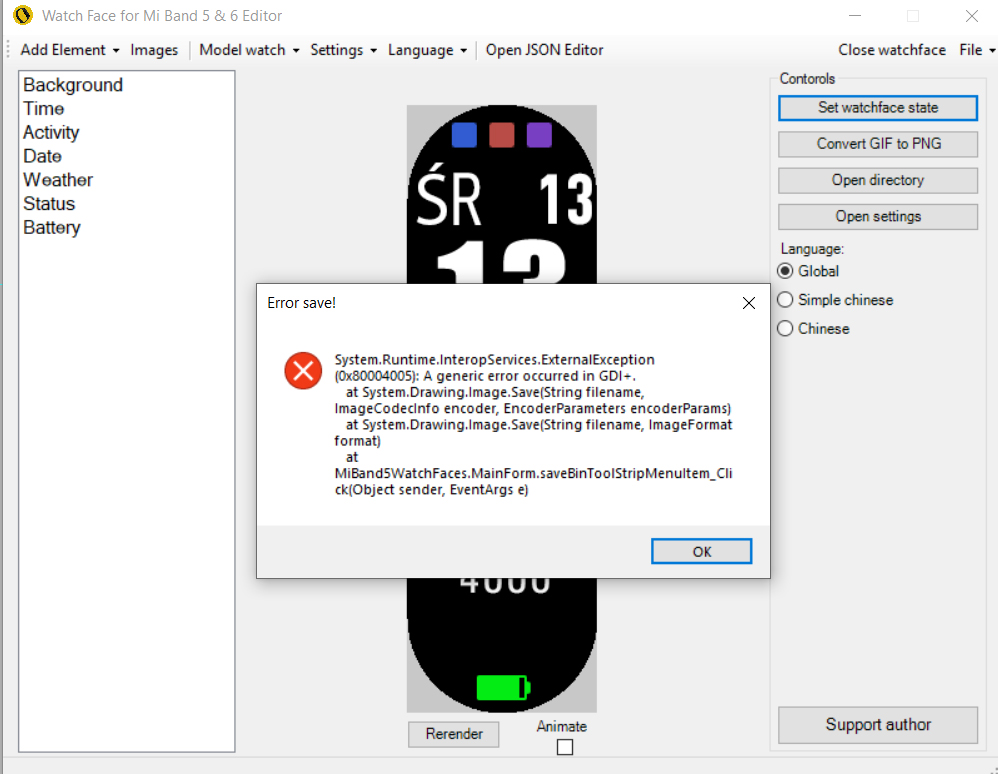
pls help me. i cant save bin file
Image
Save to mi 5 !
Aramon
Posts: 1
Joined: 22 Oct 2021, 20:38
Location: Nový Jičín - Czech
Contact:

Post by Aramon »

Does anyone know the reason why the weather is not displayed if I add UV Index or Wind Speed or Night Temperature to the dial?
dams88
Posts: 2
Joined: 02 Nov 2021, 13:03
Location: Paris
Contact:

Post by dams88 »

Aramon wrote: 31 Oct 2021, 13:56
Does anyone know the reason why the weather is not displayed if I add UV Index or Wind Speed or Night Temperature to the dial?
Hello, if you find the answer, I am very interested. Thanks Dams
Fany_VanDaal
Posts: 1
Joined: 31 Oct 2021, 16:50
Location: Novy Jicin - Czechia
Contact:

Post by Fany_VanDaal »

Hi, you're probably using an antivirus. Turn it off. Also go through the quarantine in the antivirus, some script will be stored there, so enable it.
PsychoMatt wrote: 13 Jul 2021, 12:06
Hi

pls help me. i cant save bin file
Image
User avatar
Rosta949
WF maker
Posts: 5
Joined: 29 Nov 2019, 17:01
Location: Czechia
Contact:

Post by Rosta949 »

If it is not possible to save the .bin file and the Gif animation to MB6:
Clear MiBandWatchFaces.exe in the antivirus quarantine
run MiBandWatchFaces.exe as an administrator
Last edited by Rosta949 on 03 Nov 2021, 11:04, edited 2 times in total.
User avatar
Rosta949
WF maker
Posts: 5
Joined: 29 Nov 2019, 17:01
Location: Czechia
Contact:

Post by Rosta949 »

Nickrosfire wrote: 24 Aug 2021, 19:59
a little problem, i save my file as .bin but nothing appears... is that a bug? or i am doing something wrong?¡
If it is not possible to save the .bin file and the Gif animation to MB6:
Clear MiBandWatchFaces.exe in the antivirus quarantine
run MiBandWatchFaces.exe as an administrator
Last edited by Rosta949 on 03 Nov 2021, 11:05, edited 1 time in total.
User avatar
Rosta949
WF maker
Posts: 5
Joined: 29 Nov 2019, 17:01
Location: Czechia
Contact:

Post by Rosta949 »

Fany_VanDaal wrote: 03 Nov 2021, 07:56
Hi, you're probably using an antivirus. Turn it off. Also go through the quarantine in the antivirus, some script will be stored there, so enable it.
PsychoMatt wrote: 13 Jul 2021, 12:06
Hi

pls help me. i cant save bin file
Image
run MiBandWatchFaces.exe as an administrator and put the cover in antivirus
ahmadjie80
WF maker
Posts: 9
Joined: 15 Oct 2021, 19:00
Location: South Sulawesi
Been thanked: 2 times
Contact:

Post by ahmadjie80 »

after add PAI....weather,date,week of day not working.....can anyone help?..thanks
User avatar
Rosta949
WF maker
Posts: 5
Joined: 29 Nov 2019, 17:01
Location: Czechia
Contact:

Post by Rosta949 »

dams88
Posts: 2
Joined: 02 Nov 2021, 13:03
Location: Paris
Contact:

Post by dams88 »

ahmadjie80 wrote: 09 Nov 2021, 09:23
after add PAI....weather,date,week of day not working.....can anyone help?..thanks
My issue was fixed by adding a decimal point.
ahmadjie80
WF maker
Posts: 9
Joined: 15 Oct 2021, 19:00
Location: South Sulawesi
Been thanked: 2 times
Contact:

Post by ahmadjie80 »

i will try...thanks
Xyxaba1
Posts: 1
Joined: 17 Oct 2021, 07:11
Location: India
Contact:

Post by Xyxaba1 »

Hi I'm having a problem editing an existing watch face, i wanted to switch places between hours and minutes so i changed the image selection and positionaccording to it but after changing that the other elements such as date day etc get behind the numbers whereas befoee editing they were in front of them..
Post Reply

Return to “Watchfaces tools”

Who is online

Users browsing this forum: No registered users and 1 guest