If you experience any problems with the forum (it is not visible, there is no way to post messages, or some functionality does not work), please let us know.
If you have problems with registration or you did not receive confirmation letter, let us know and we will activate your account manually.
If you get an "The submitted form was invalid. Try submitting again" error, delete cookies, then try again.
If you have problems with registration or you did not receive confirmation letter, let us know and we will activate your account manually.
If you get an "The submitted form was invalid. Try submitting again" error, delete cookies, then try again.
Search found 421 matches
- 08 Jun 2021, 14:39
- Jump to forum
- Jump to topic
Re: AmazFit WatchFace editor 2 for Windows
The size of the system font should not be more than 47, it can cause an infinite reboot watch.
- 14 Jun 2021, 14:19
- Jump to forum
- Jump to topic
Re: AmazFit WatchFace editor 2 for Windows
alex585
Количество загруженных изображений должно быть не менее 3.
Количество загруженных изображений должно быть не менее 3.
- 15 Jun 2021, 11:31
- Jump to forum
- Jump to topic
Re: AmazFit WatchFace editor 2 for Windows
Version 4.1
Added the ability to display the time in the system font.
Added the ability to display the date in the system font.
Added the ability to change the order of layers.
Added the ability to overlay the clock image on the saved png and gif files (enabled in the settings).
Added the ability to display the time in the system font.
Added the ability to display the date in the system font.
Added the ability to change the order of layers.
Added the ability to overlay the clock image on the saved png and gif files (enabled in the settings).
- 08 Jul 2021, 15:33
- Jump to forum
- Jump to topic
Re: AmazFit WatchFace editor 2 for Windows
Version 5.0
Added support for editable zones.
As far as I know, editable zones do not work on the T-Rex Pro.
Added support for editable zones.
As far as I know, editable zones do not work on the T-Rex Pro.
- 09 Jul 2021, 14:11
- Jump to forum
- Jump to topic
Re: AmazFit WatchFace editor 2 for Windows
Not. You can only extract resources from the GTR2 dial and use them to make a dial for the GTR47.[email protected] wrote: 09 Jul 2021, 08:57Is it possible to swap the watchface from GTR2 to GTR47mm?
- 12 Jul 2021, 14:26
- Jump to forum
- Jump to topic
Re: AmazFit WatchFace editor 2 for Windows
EXS
The "Watchface.ID" file can be changed or deleted. But, in order to avoid mistakes, I advise you to use the appropriate button in the editor for this.
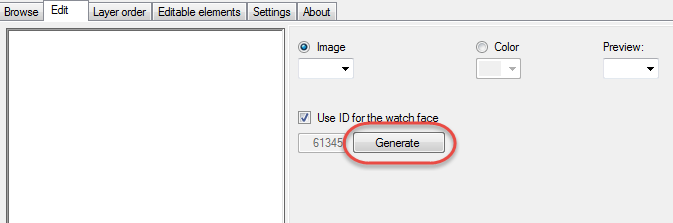
The "Watchface.ID" file can be changed or deleted. But, in order to avoid mistakes, I advise you to use the appropriate button in the editor for this.
- 12 Jul 2021, 15:57
- Jump to forum
- Jump to topic
Re: AmazFit WatchFace editor 2 for Windows
EXS
No way. Just make a separate dial for each language.
No way. Just make a separate dial for each language.
- 22 Jul 2021, 14:06
- Jump to forum
- Jump to topic
Re: AmazFit WatchFace editor 2 for Windows
LUCASREIS
Doesn't work on T-Rex Pro. On GTR 2 (e), to update the barometer readings, you need to go to the clock on the widgets > altimeter. I have no information about how this parameter works on GTS 2.
Doesn't work on T-Rex Pro. On GTR 2 (e), to update the barometer readings, you need to go to the clock on the widgets > altimeter. I have no information about how this parameter works on GTS 2.
- 24 Jul 2021, 06:44
- Jump to forum
- Jump to topic
Re: AmazFit WatchFace editor 2 for Windows
Version 5.1
Added the ability to create and update preview images of editable zones.
Added the ability to create and update preview images of editable zones.
- 01 Aug 2021, 16:13
- Jump to forum
- Jump to topic
Re: AmazFit WatchFace editor 2 for Windows
LUCASREIS
The sunrise time is 5:30 and the sunset time is 19:30 in the editor is selected conditionally. In reality, this time on the clock is constantly changing and depends on the selected city and season.
The "circle progress" indicator, in theory, should match the picture on the clock, which ...
The sunrise time is 5:30 and the sunset time is 19:30 in the editor is selected conditionally. In reality, this time on the clock is constantly changing and depends on the selected city and season.
The "circle progress" indicator, in theory, should match the picture on the clock, which ...
- 02 Aug 2021, 16:41
- Jump to forum
- Jump to topic
Re: AmazFit WatchFace editor 2 for Windows
LUCASREIS
I wrote in my message that the “circle progress” for sunrise and sunset in the dial lags behind a similar indicator in the clock itself. I assume that this is due to the incorrect work of time zones. Since there are the same errors in the dials created in the official editor from the ...
I wrote in my message that the “circle progress” for sunrise and sunset in the dial lags behind a similar indicator in the clock itself. I assume that this is due to the incorrect work of time zones. Since there are the same errors in the dials created in the official editor from the ...
- 04 Aug 2021, 12:15
- Jump to forum
- Jump to topic
Re: AmazFit WatchFace editor 2 for Windows
Version 6.1
Added support for Zepp E Circle
Added the ability to convert watch faces between different models (GTR 2 (e), Zepp E Circle, T-Rex Pro)
Update v 6.1. Fixed weather alignment.
Added support for Zepp E Circle
Added the ability to convert watch faces between different models (GTR 2 (e), Zepp E Circle, T-Rex Pro)
Update v 6.1. Fixed weather alignment.
- 26 Aug 2021, 16:20
- Jump to forum
- Jump to topic
Re: AmazFit WatchFace editor 2 for Windows
Version 7.0
Added support for independent coordinates for a set of pictures (segments).
Added support for independent coordinates for a set of pictures (segments).
- 29 Aug 2021, 19:58
- Jump to forum
- Jump to topic
Re: AmazFit WatchFace editor 2 for Windows
evileyes
The first file must be a background or preview.
This watch face is made for Zepp E Circle and not for Trex Pro.
The first file must be a background or preview.
This watch face is made for Zepp E Circle and not for Trex Pro.
- 31 Aug 2021, 20:47
- Jump to forum
- Jump to topic
Re: AmazFit WatchFace editor 2 for Windows
Version 7.1
For distance added support for separate images for miles and kilometers.
For distance added support for separate images for miles and kilometers.
- 03 Sep 2021, 14:05
- Jump to forum
- Jump to topic
Re: AmazFit WatchFace editor 2 for Windows
spidercrab
I have not seen Zepp Z watch faces and cannot say anything about them. But judging by the size of the screen, the dials from GTR 2 should work.
I have not seen Zepp Z watch faces and cannot say anything about them. But judging by the size of the screen, the dials from GTR 2 should work.
- 11 Sep 2021, 11:19
- Jump to forum
- Jump to topic
- 16 Sep 2021, 14:27
- Jump to forum
- Jump to topic
Re: AmazFit WatchFace editor 2 for Windows
Sinai
This cannot be done in the editor.
You can edit the json file in a text editor, then create a bin file in the editor. Not sure exactly what you want, but I think you need to still change the parameter "DisplayFormAnalog": true
This cannot be done in the editor.
You can edit the json file in a text editor, then create a bin file in the editor. Not sure exactly what you want, but I think you need to still change the parameter "DisplayFormAnalog": true
- 17 Sep 2021, 15:57
- Jump to forum
- Jump to topic
Re: AmazFit WatchFace editor 2 for Windows
HakunaMatmata
Shortcuts on GTR2 don't work.
AOD does not support editable zones.
For time, you can add circular progress, but it does not work correctly, so I did not add it to the editor. I have not tested the linear progress for time, but I think it does not work either.
Shortcuts on GTR2 don't work.
AOD does not support editable zones.
For time, you can add circular progress, but it does not work correctly, so I did not add it to the editor. I have not tested the linear progress for time, but I think it does not work either.
- 02 Oct 2021, 08:08
- Jump to forum
- Jump to topic
Re: hour dual in face??
It is possible only on an analog clock to draw an hour hand turned at the desired angle, and then the analog time will lag behind or ahead of the main time by a certain number of hours.
- 09 Oct 2021, 14:14
- Jump to forum
- Jump to topic
Re: AmazFit WatchFace editor 2 for Windows
If you have any questions about the GTS 2 mini, it is better to contact the neFAST user. As far as I know, he has made a lot of progress in terms of working with these dials. Maybe he wants to create a separate thread on this forum.
Those who have problems installing python can use this utility. It ...
Those who have problems installing python can use this utility. It ...
- 06 Nov 2021, 15:53
- Jump to forum
- Jump to topic
Re: AmazFit WatchFace editor 2 for Windows
I have not decided yet, but most likely I will make a new editor for GTR 3. But even so, it is unlikely that it will be ready this year.Tradis wrote: 04 Nov 2021, 16:34I have a simple question, there will be in future a GTR 3/3 Pro update?
- 12 Nov 2021, 19:19
- Jump to forum
- Jump to topic
Re: AmazFit WatchFace editor 2 for Windows
Max88
In addition to the information in the quoted message, I have no other
In addition to the information in the quoted message, I have no other
- 19 Nov 2021, 21:49
- Jump to forum
- Jump to topic
Re: MOD port to GTR 3 PRO
The dial works. But almost all elements are located above the hour hands and overlap them.
- 20 Nov 2021, 14:54
- Jump to forum
- Jump to topic
Re: MOD port to GTR 3 PRO
asoo
Now everything seems to be fine.
Now everything seems to be fine.