Multifunctional 7 Segment - v1.0.3
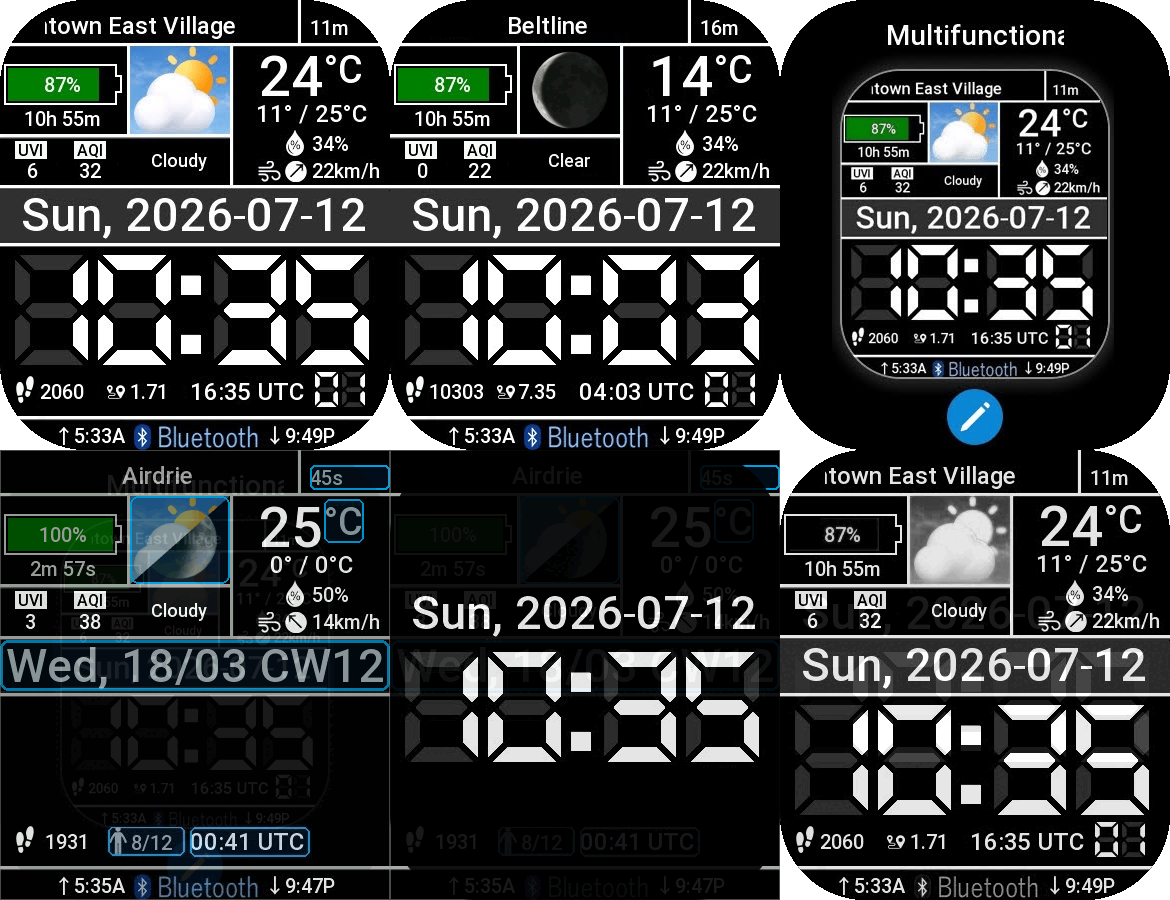
Cheetah Square en
Si prega di notare che tutti i quadranti orologio disponibili su questo sito sono opere creative dei nostri utenti e non sono affiliati con marchi ufficiali o marchi registrati. Sono creati da fan per fan, ispirati da fenomeni culturali popolari, giochi, film o serie.
Il nostro obiettivo è fornire una piattaforma per la creatività e lo scambio, ma ci impegniamo anche a rispettare i diritti intellettuali. Se detiene i diritti d'autore su qualsiasi contenuto che ritiene infranga i suoi diritti su questo sito, contattaci per un'azione appropriata.

Descrizione
This is my first watchface I've developed, done using the Zeus CLI.
This watchface was inspired by the layout and behaviour of the Pebble Multifunctional 7-Segment (MSS) watchface developed by FG (ref: https://apps.repebble.com/multifunctional-7-segment_5569c2084bebd0b90400000e). I always found myself going back to that watchface over the 10 years of being a Pebble 2 owner., so I missed it when I replaced the Pebble with an Amazfit Bip 6. Since Pebble and Zepp OS differ fundamentally in their APIs, sensor access, rendering model, and interaction paradigms, this is not a port, but a development from scratch. While the spirit of the Pebble version inspired this face, having extra real-estate and higher resolution (390x450 versus Pebble's 144x168) meant being able to use nicer fonts and graphics.
I've never developed for the Pebble and I've never laid eyes on the source code for the Pebble version, so I can't truly speak to differences, other than based on what I was or wasn't able to achieve as I developed this Amazfit version for my Bip 6. Since the Amazfit Cheetah Square shares a 390x450 rectangular screen with the Bip 6, I've built this version for the Cheetah Square, but admit I don't have an actual watch to test on -- feel free to let me know how it works!
Key differences:
- I was able to leverage in-watch configurations/customizations, whereas the Pebble version relied on configurations being pushed from the Settings page of the app.
- Weather and health are largely populated/driven by the OS and not accessible from code, so in many cases, there's no way to apply conversion factors or alter the units, or apply "decorations" through code. Also, for the most part, weather/conditions are updated by the OS so I have very little control over when these refresh, or where the data is sourced. Some data such as atmospheric pressure isn't available, hence omitting it.
- There isn't an event/signal to indicate battery charge start/end, so I had to simply read the battery percentage level and infer charging when this rises. Charging is assumed to have stopped when the level stops rising.
- I impemented a step-counter which isn't changeable, while the adjacent health field can be customized (stand hours, calories, distance, heart rate, or SpO2 readings). Being able to replace the step counter with other metrics would be an easy change, but I couldn't think of what else I'd want to put here.
- I made the current conditions icon configurable to show moon phase or not (I don't remember how the Pebble MSS handled this), and the moon phase (if enabled) kicks in after sunset, and resets back to current conditions after sunrise.
- There is no international support or getLanguage(): Zepp OS returns "unknown" for language on Bip 6. Month and day-of-week name are hardcoded in English.
- IMG_TIME hidden in edit mode: clock digits do not render in the editable watchface overlay regardless of show_level -- platform limitation.
- Wind speed: data_type.WIND_SPEED with unit_type:1 returns "14km/h", and there is no support for other units (e.g. mph). data_type.WIND appears to return a bare number in m/s. data_type.WIND_DIRECTION seems to provide a bare number 0-7 for N, NE, E, SE, S, SW, W, and NW, regardless of unit_type, but this cannot be read or action upon to convert to a string, so we don't have a good use for these fields.
- First-item bug in select_list: when the first optional_type is the active selection, the platform highlights the second item instead. The correct value is still saved and applied -- only the visual highlight is wrong. For this watchface, this only affects the UTC/UTC offset and the weather refresh interval selections.
- select_list preview images: platform reserves a left column for preview images but does not render them in select_list mode. Carousel mode works correctly with preview images.
History:
- v1.0.1 (2026-07-14): Initial release for the Cheetah Square.
- v1.0.2 (2026-07-21): Added CW as option at UTC slot, added leading 0 for hour in 24-hour mode, and fixed moon phases not updating (was due to using IMG_LEVEL widget, which only renders on build(), but does not dynamically update when setProperty prop.MORE { level } is used to try updating. Replaced with IMG widget as updating src as needed works reliably. Also widened AQI field, as 3-digit value was marquee scrolling despite fitting.
- v1.0.3 (2026-08-10): Added option to show moon phase only (regardless of day or night), changed moon phase image from 16-image array to 28-image array, and fixed weather age widget sometimes not incrementing with each passing second, even when age shows
Tag
Condividi questo quadrante
Commenti
Per rispondere ai commenti devi essere loggato .
Discussioni recenti della comunità
The source of the temperature and weather info for GTR 4
The Zepp app request the weather data from it's own backend (a REST API), wich itself gets its weather data from Xiaomi. Xiaomi has a weather service/app wich aggregates weather info from different sources worldwide wich are not disclosed....
Timezone, compass, altitude displayed on the watchface
Hi Guydu, thank you...the editor seems powerful but also terrible...I never know what will happen if I choose/select an option. Some parts are like the web Zepp editor but the rest is just a guess. I will try to do something. Is there any...
World Time Watch Face
Thankyou so much for this ....
Show your current watchface on the watch [Stratos]
https://i.postimg.cc/Ls6tZbRz/17314481656242617646848806266170.jpg Yes, it's SpongeBob. ... Yes, on purpose. I just wish it was in 12 hr format instead of 24. 🥺☹️ Details: htt...
Editor Amazfit Band 7
oook mate. thanks...
Please Help to make a new custom watch face for amazfit gts 2 mini old version
Can someone in here please make a custom watch face like this with working animations and remove fossil branding. for amazfit gts 2 mini old version. Please. https://i.postimg.cc/RCjW8zfZ/IMG-20230...
Amazfit band 7
Hello, all! Anybody knows how to upload your own picture for the background? The description says it's possible, but I can't find such function in the band or in the app. Thank y...





Nessun commento. Commenta per primo.