Fenix - Aura

Cheetah 2 Pro Click here for details.
multilingual, de, en, es, fr, it, ja, pl, pt, ru, th, zh
Si prega di notare che tutti i quadranti orologio disponibili su questo sito sono opere creative dei nostri utenti e non sono affiliati con marchi ufficiali o marchi registrati. Sono creati da fan per fan, ispirati da fenomeni culturali popolari, giochi, film o serie.
Il nostro obiettivo è fornire una piattaforma per la creatività e lo scambio, ma ci impegniamo anche a rispettare i diritti intellettuali. Se detiene i diritti d'autore su qualsiasi contenuto che ritiene infranga i suoi diritti su questo sito, contattaci per un'azione appropriata.

Descrizione
New Gesture Shortcuts added! You can now switch themes instantly: double-tap the Hour to activate the Dusk Purple theme, or double-tap the Minute to activate the Crimson theme.
Fenix - Aura | Smart Theme System & Ultimate Customization | Ver 2.0.3
Welcome to the Fenix - Aura watchface! Experience a highly customizable, feature-rich design. Enjoy 80% of the core features completely for FREE during your trial!
Visit My Website: watch.homecmf.com
Highlights & Smart Features
• 12 Auto-Languages: Automatically syncs with your system language without any manual setup!
• Smart Themes: 1-tap switch between Dusk Purple, Crimson, or Custom setups (linking ARC colors and background lines).
• Instant Theme Switching: Double-tap the Hour to switch to the Dusk Purple theme; double-tap the Minute to switch to the Crimson theme.
• Massive Data: 6 dynamic blocks + Top & Side ARC progress bars.
• Gestures & Shortcuts: Tap for app shortcuts, double-tap the Air Pressure metric to switch display units (hPa/mmHg), and long-press to swap metrics instantly.
• Sensor Control & Moon Phase: Hide the seconds hand or compass to pause the compass sensor and display the moon phase instead.
• On-Watch Profiles: Save and load up to 3 of your favorite layout combinations directly on the watch.
• Smart Toggles & Status: Features 2 distinct AOD styles featuring moon phases, Quiet Mode (screen flash instead of vibration), and Bluetooth disconnect warnings.
Deep Customization & 27 Full Metrics
• 27 Full Data Metrics: Track everything you need! Choose from a massive library of 27 metrics including Heart Rate, Battery, Steps, Weather, SpO2, Sleep, Altitude, Air Pressure, BioCharge, VO2 Max, Recovery Time, Floors, Wind, Next Sun, and much more.
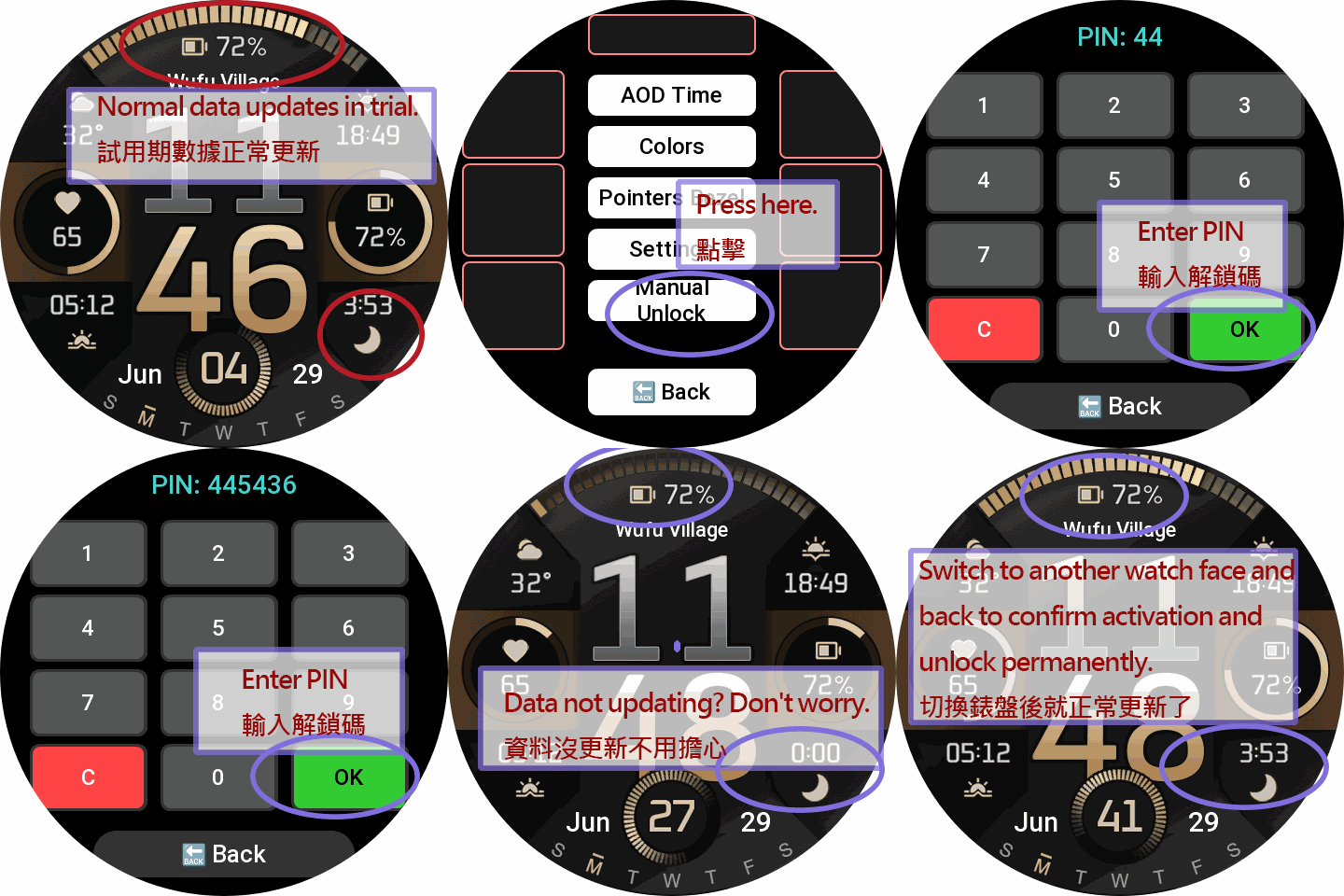
• Deep On-Watch Settings: Long-press the "DATE" area to open the main menu. Customize Themes, global text/time colors, physical seconds hands, compass styles, and background lines. Want a cleaner look? Tap an active style again to completely hide elements like progress bars or bezels.
Trial Rules (1-Day Free Trial)
• During Trial: The settings menu is fully accessible for 24 hours. Blocks can swap between 10 base metrics.
• Post-Trial Lock: After 24 hours, customization is disabled. The watchface locks to display only basic Time, Date, and essential items.
PRO Unlock (Permanent Full Access)
Sponsoring permanently unlocks the ultimate experience:
• All 27 Metrics Unlocked: Gain full access to the 10 base + 17 advanced PRO metrics.
• Full Area Swapping: Unrestricted 27-metric swapping is permanently unlocked for ALL dynamic blocks and ARC progress bars!
• Complete Settings Access: Permanently restore all trial features, layouts, and customizations.
How to Unlock Permanently:
Visit watch.homecmf.com (or scan the QR Code in the watch settings menu).
Make a small coffee donation to support the development.
Check your email! Follow the instructions provided to retrieve your unique 6-digit Unlock PIN.
Enter the PIN on your watch to permanently unlock all features!
Tag
Condividi questo quadrante
Commenti
Per rispondere ai commenti devi essere loggato .
Discussioni recenti della comunità
The source of the temperature and weather info for GTR 4
The Zepp app request the weather data from it's own backend (a REST API), wich itself gets its weather data from Xiaomi. Xiaomi has a weather service/app wich aggregates weather info from different sources worldwide wich are not disclosed....
Timezone, compass, altitude displayed on the watchface
Hi Guydu, thank you...the editor seems powerful but also terrible...I never know what will happen if I choose/select an option. Some parts are like the web Zepp editor but the rest is just a guess. I will try to do something. Is there any...
World Time Watch Face
Thankyou so much for this ....
Show your current watchface on the watch [Stratos]
https://i.postimg.cc/Ls6tZbRz/17314481656242617646848806266170.jpg Yes, it's SpongeBob. ... Yes, on purpose. I just wish it was in 12 hr format instead of 24. 🥺☹️ Details: htt...
Editor Amazfit Band 7
oook mate. thanks...
Please Help to make a new custom watch face for amazfit gts 2 mini old version
Can someone in here please make a custom watch face like this with working animations and remove fossil branding. for amazfit gts 2 mini old version. Please. https://i.postimg.cc/RCjW8zfZ/IMG-20230...
Amazfit band 7
Hello, all! Anybody knows how to upload your own picture for the background? The description says it's possible, but I can't find such function in the band or in the app. Thank y...





Nessun commento. Commenta per primo.