ProData

Cheetah 2 Pro Click here for details.
multilingual, de, en, es, fr, it, ja, pl, pt, ru, th, zh
Please note that all watch faces available on this site are creative works by our users and are not affiliated with official brands or trademarks. They are created by fans for fans, inspired by popular cultural phenomena, games, movies, or series.
Our goal is to provide a platform for creativity and exchange, but we also strive to respect intellectual rights. If you hold copyright to any content that you believe infringes your rights on this site, please contact us for appropriate action.

Description
ProData | Ultimate Customization & Rich Metrics
Welcome to the ProData watchface! Experience a highly customizable, feature-rich design. Enjoy 80% of the core features completely for FREE during your trial! Visit My Website: watch.homecmf.com
Highlights & Smart Features
• 12 Auto-Languages: Automatically syncs with your system language without any manual setup!
• Dual Time Zone: Keep track of a secondary time zone directly on your watch face. Double-tap the watch face to open the selection menu and set your preferred timezone.
• Massive Data: 6 dynamic blocks supporting up to 28 metrics.
• Gestures & Shortcuts: Tap the top/bottom screen or time digits for quick app access, double-tap the Air Pressure metric to switch display units (hPa/mmHg), and long-press to swap metrics instantly or toggle Lunar/Solar calendars (Chinese UI only).
• Sensor Control & Moon Phase: Hide the seconds hand or pointers to pause sensors and display the moon phase instead.
• On-Watch Profiles: Save and load up to 3 of your favorite layout combinations directly on the watch.
• Smart Toggles & Status: Features 3 distinct AOD styles (Classic, BlackBG, Time) featuring the moon phase, Quiet Mode (screen flash instead of vibration), and a manual City Name toggle.
Deep Customization & 28 Full Metrics
• 28 Full Data Metrics: Track everything you need! Choose from a massive library of 28 metrics including Heart Rate, Battery, Steps, Weather, SpO2, Sleep, Altitude, Air Pressure, BioCharge, VO2 Max, Recovery Time, Floors, Wind, Next Sun, Dual Time Zone, and much more.
• Deep On-Watch Settings: Long-press the 6 o'clock edge to open the main menu. Customize 2 global text colors, 3 time colors, 6 gradient backgrounds, 6 background lines, 12 date backgrounds, 11 progress bar colors, 6 pointer styles, and 3 bezel styles. Includes unique toggles for a contour line background texture, High/Low Temperature display, and an enlarged City Name font. Want a cleaner look? Tap an active style again to completely hide elements like progress bars, lines, or bezels.
Trial Rules (1-Day Free Trial)
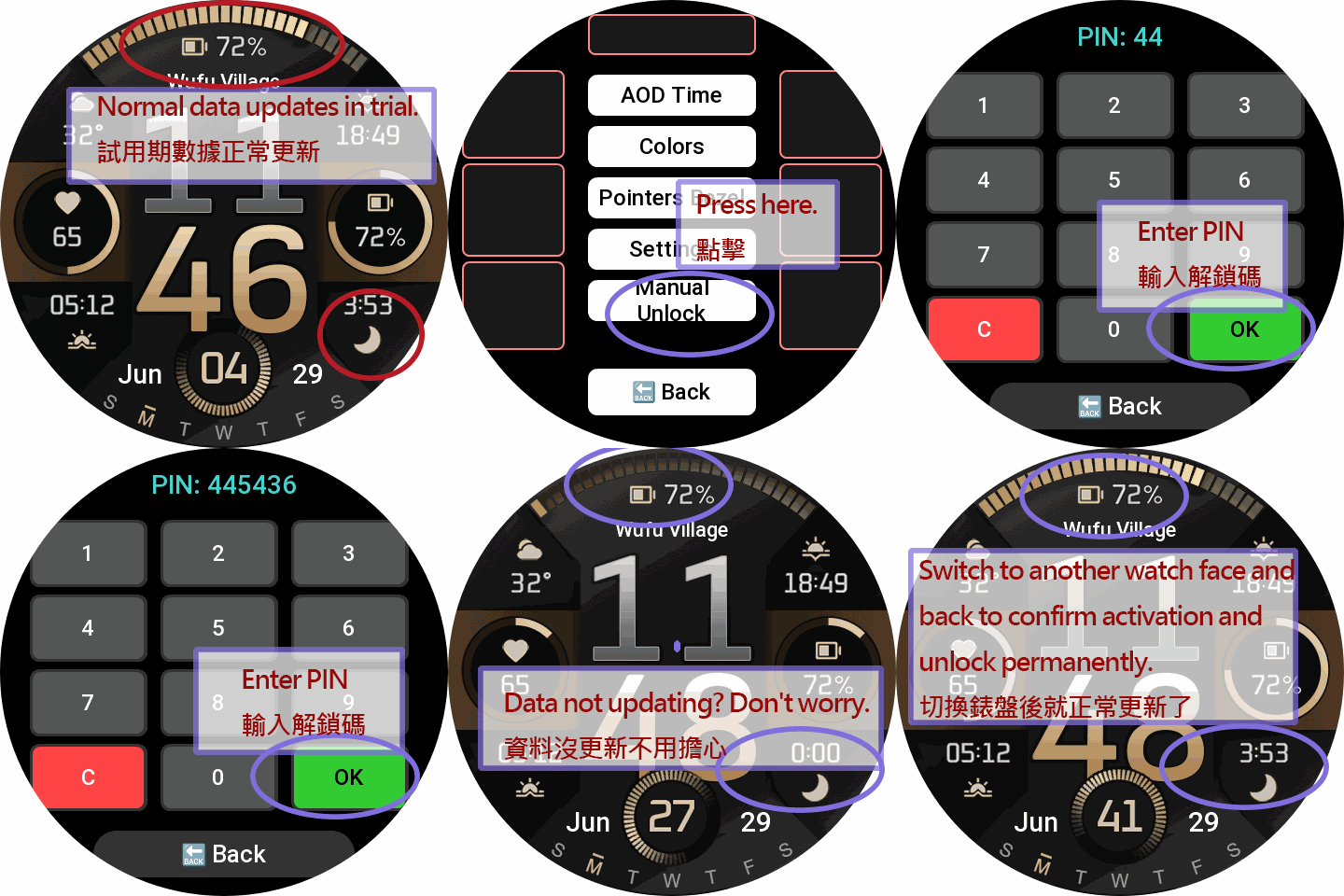
• During Trial: The settings menu is fully accessible for 24 hours. Blocks can swap between 10 base metrics.
• Post-Trial Lock: After 24 hours, customization is disabled. The watchface locks to display only basic Time, Date, and essential items.
PRO Unlock (Permanent Full Access)
Sponsoring permanently unlocks the ultimate experience:
• All 28 Metrics Unlocked: Gain full access to the 10 base + 18 advanced PRO metrics.
• Full Area Swapping: Unrestricted 28-metric swapping is permanently unlocked for ALL dynamic blocks!
• Complete Settings Access: Permanently restore all trial features, layouts, and customizations.
How to Unlock Permanently:
1. Visit watch.homecmf.com (or scan the QR Code in the watch settings menu).
2. Make a small coffee donation to support the development.
3. Check your email! Follow the instructions provided to retrieve your unique 6-digit Unlock PIN.
4. Enter the PIN on your watch to permanently unlock all features!
Tags
Share this face
Comments
You need to be logged in to post or reply to comments.
Recent community discussions
The source of the temperature and weather info for GTR 4
The Zepp app request the weather data from it's own backend (a REST API), wich itself gets its weather data from Xiaomi. Xiaomi has a weather service/app wich aggregates weather info from different sources worldwide wich are not disclosed....
Timezone, compass, altitude displayed on the watchface
Hi Guydu, thank you...the editor seems powerful but also terrible...I never know what will happen if I choose/select an option. Some parts are like the web Zepp editor but the rest is just a guess. I will try to do something. Is there any...
World Time Watch Face
Thankyou so much for this ....
Show your current watchface on the watch [Stratos]
https://i.postimg.cc/Ls6tZbRz/17314481656242617646848806266170.jpg Yes, it's SpongeBob. ... Yes, on purpose. I just wish it was in 12 hr format instead of 24. 🥺☹️ Details: htt...
Editor Amazfit Band 7
oook mate. thanks...
Please Help to make a new custom watch face for amazfit gts 2 mini old version
Can someone in here please make a custom watch face like this with working animations and remove fossil branding. for amazfit gts 2 mini old version. Please. https://i.postimg.cc/RCjW8zfZ/IMG-20230...
Amazfit band 7
Hello, all! Anybody knows how to upload your own picture for the background? The description says it's possible, but I can't find such function in the band or in the app. Thank y...





No comments. Be the first to comment.