ExactBeat V2
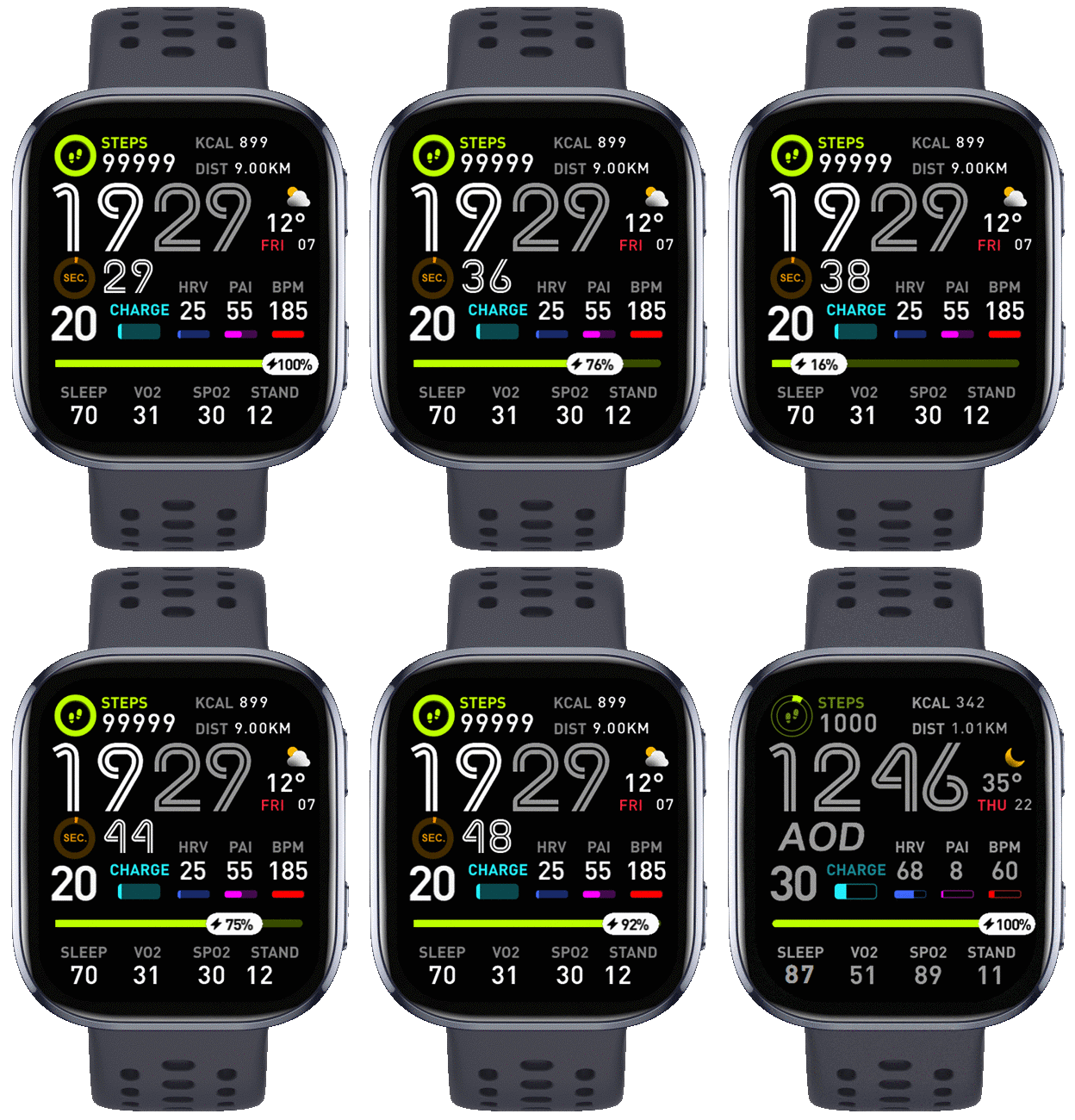
Bip 6 en
Please note that all watch faces available on this site are creative works by our users and are not affiliated with official brands or trademarks. They are created by fans for fans, inspired by popular cultural phenomena, games, movies, or series.
Our goal is to provide a platform for creativity and exchange, but we also strive to respect intellectual rights. If you hold copyright to any content that you believe infringes your rights on this site, please contact us for appropriate action.

Description
This watch face was converted from ASOO's work:
/bip/view/45324
Thank you for that.
________________________________________________________
Modify :
Upload Version 2.02 change Vo2 to Stress
Upload Version 2.01 change AOD's icon smaller
- Converted from BipMAX to Bip6 using the SashaCX75 editor.
- AOD Full ( only gray )
- Shortcut open calendar ( click on Date area)
- Open power manage by click on power area
- Can use Shortcut on widget
- Digital seconds and Seconds " Time Circle"
If after syncing the watchface doesn't display, we recommend resetting the watch. And try again.
If the owner of the work requests delete, the administrator can delete it immediately.
Tags
Share this face
Comments
You need to be logged in to post or reply to comments.
Recent community discussions
Request for Pokemon WatchFace convert [Bip 6]
I already did the steps but it didnt work, but still thank you for your response brother. Here's a manual method that I used to use: I install watchfaces from my Android ...
Request for Kingdom Come Deliverance 2 WatchFace convert [Bip 6]
Hi Everyone Can anyone help me to convert this watchface into Amazfit BIP 6 please? https://amazfitwatchfaces.com/t-rex/view/16282 Thank you so much! [...
Request to adapt or convert a Bip 5 watch face to Bip Max
..Woooooww!!!!!..wooooohaaaaa!!!!!..Thank you, thank you, thank you asoo!!!!!!...I was able to install the watch face on the Bip Max without any issues, and so far it’s working perfectly; I’ll let you know if any problems arise. Thanks ...
watchface for fitness [Bip 6]
Creating a watch face that displays a heart rate widget in Always-On Display (AOD) mode isn't difficult. However, I am unsure whether the display will strictly adhere to your custom settings—for instance, if you have configured the device...
Bip 6 custom watchface question
And if you need to create any images, just use a program to create them. Images must be saved in PNG-24. https://www.photopea.com/...
Amazfit watch sync sometimes losing data
I use the Zepp App on an Android phone with 10 Amazfit BIP 3 Pro watches to track offroad Motorcycle racers. It usually works well syncing the data, but about every other time I...
Requesting creation of watch face [Bip Max]
hello! thank you for replying this! i just tried with that tutorial on your link. but.. its too complicated for me........





I'm not sure if the "Battery Low" display is correct, as I don't let the battery drop below 30%, and at 30%, it's still displaying correctly. As for "Fully Charged 100%," as far as I can see, it's displaying correctly as shown in the example image. I don't see any "battery number display error" issue.
Here's a screenshot from my Bip6 when it's fully charged to 100%.
So I'm not sure why you're experiencing the problem you reported.
I'm sorry, I don't know anything about Spanish, and I see that only the names of the days of the week are in English, which is a standard that everyone in the world should be able to understand. Therefore, I can't assist you with anything. 20.08.2026 12:42:41 Complaint
Hello,
I would like to install ExactBeat V2 by romstemp on my Amazfit Bip 6:
/bip/view/45436
I followed the installation guide (viewtopic.php?p=17161) and enabled Developer Mode successfully. I can reach Developer Mode via Device > General > Developer Mode, and the Scan function works.
The problem: when I scan the QR code from the download page, Zepp downloads the file and then returns:
"Download failed: invalid ZIP file format"
This happens from both the Watch Face tab and the Mini Program tab. I also tried downloading the .zip directly and sharing it to Zepp — that produces a GPS track import error instead.
My understanding from the guide is that the file needs to be in .zpk format, while the download provides .zip.
My setup:
- Watch: Amazfit Bip 6, Zepp OS 5.0
- Phone: Samsung Galaxy S21+, Android
- Zepp app: latest version from Google Play
- Developer Mode: enabled
My questions:
1. Is there a working QR code or a .zpk version of this watch face for the Bip 6?
2. Is there something in my process that produces the ZIP format error?
I would appreciate any guidance. Thank you for the work you do here. 23.08.2026 16:30:53 Complaint
1. If you scan the QR code from this download page and receive any error messages, please refresh and scan again.
2. If you followed the guide:
/forum/viewtopic.php?p=17161#p17161
and encountered the problems you mentioned, it may be because you did not follow the steps correctly.
3. If you need to convert a zip file to a zpk file, please check the guide carefully. It contains explanations and programs for converting zip to zpk.
Regarding the GPS issue you mentioned, I cannot verify it because syncing a .zip file directly to the watch would almost certainly result in an error.
PS.
I tested installing this watchface via this Downloader page. It works normally. 24.08.2026 04:41:02 Complaint
you can use shortcut on weather icon for see Temp. max,min 04.09.2026 09:31:03 Complaint
Vo2max has requirements:
You must run outdoors for at least 10 minutes, and your heart rate must be at 75% of your maximum heart rate for Vo2max to be displayed.
You can see the requirements via the shortcut (it definitely works).
If you want to change it to stress, try this:
/bip/view/45550
Someone has already done it, and I don't want to repeat it.
Therefore, I will not make any changes because I use Vo2max during my workouts, and the watch face displays it correctly. 04.09.2026 09:26:00 Complaint
I tried the version another person have posted, somehow I didn't like it plus it didn't have the improvement you have done.
Anyways I'll not push you, will live with it. thanks 04.09.2026 10:28:56 Complaint
I've done my part, and I'm closing this dial editing. I won't be taking any further action. If you need to make any changes, please do so yourself. 05.09.2026 10:09:48 Complaint
on Download list Version 2.02
I've done my part, and I'm closing this dial editing. I won't be taking any further action. If you need to make any changes, please do so yourself. 05.09.2026 10:11:35 Complaint
Community is very grateful to you for providing Watchface 05.09.2026 19:24:52 Complaint