Sponge Bob Animated

Sponge Bob Animated
Compatible with
Band 7
Supported Languages
en, ru
Uploaded: 04.04.2023 03:59
Updated: 04.04.2023 05:14
97 users have this item in favourites
Important Information for Users
Please note that all watch faces available on this site are creative works by our users and are not affiliated with official brands or trademarks. They are created by fans for fans, inspired by popular cultural phenomena, games, movies, or series.
Our goal is to provide a platform for creativity and exchange, but we also strive to respect intellectual rights. If you hold copyright to any content that you believe infringes your rights on this site, please contact us for appropriate action.

Description

I don't know yet what the error is related to the display of steps (or pai, calories and pulse). I have Xiaomi Mi Band 7 on my hands.

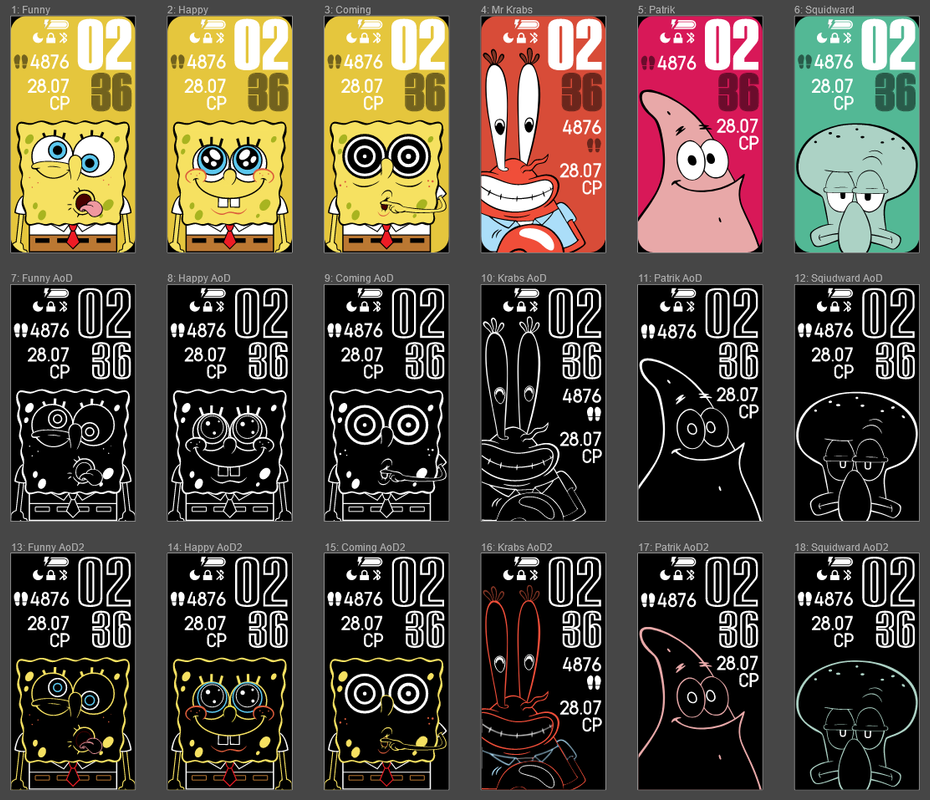
Animated dial from the Spongebob universe. There are six characters to choose from and an independent AoD setup. The graphics were redrawn from scratch. Animation is implemented programmatically.
img
You can change the character in the settings of the dial itself! The left half is responsible for choosing a character on the main screen. And the right one is Always On. By default, AoD corresponds to the main screen, but the character is turned off! This is exactly what is regulated from below (off / white/ color).

Tags

Share this face

Comments

userpic
SUPERAREG Steps count doesn't appear in English 04.04.2023 07:57:54 Complaint
userpic
IgorKH SUPERAREG,  Hi. Try to remove the dial and install it again. If you were one of the first to download it, then there was a mistake. A little later I corrected it. Unfortunately, I don't have an Amazfit Band 7 (I am the owner of Xiaomi Band 7), and I can't test the work on the Amazfit Band 7. 04.04.2023 15:00:30 Complaint
userpic
SUPERAREG IgorKH,  Still not fixed 04.04.2023 16:04:19 Complaint
userpic
IgorKH SUPERAREG,  If it works, I'll fix it. The language should not affect this in theory. 06.04.2023 06:22:07 Complaint
userpic
Syed Ahmed Hussain SUPERAREG,  same 08.02.2024 17:24:27 Complaint
userpic
MilenKoMX Hello, this watch face is now my favorite, it's funny, colorfull and fresh.
I am having the same problem: there is no way to see the number of steps, nor the bpm or any other value in that position. It World be great if you could please fix this in order to fully enjoy this watch face. Greetings from Chile
06.04.2023 15:00:23 Complaint
userpic
IgorKH MilenKoMX,  Hi. Unfortunately, I am not the owner of the Amazfit Band 7. The dial was tested by users from Russia, and just everything works fine for them, but not for foreign users. I don't know what the problem is yet, and I can't fix this error. 07.04.2023 04:54:32 Complaint
userpic
SUPERAREG IgorKH,  https://photos.app.goo.gl/uFZScdwexxFBnAyR7
Here is a photo of the bug

From Armenia
07.04.2023 20:48:34 Complaint
userpic
MilenKoMX SUPERAREG,  yes, that photo shows exactly the problem: we can only see the proper icon (steps, flame, etc.) but not the number. 07.04.2023 23:45:02 Complaint
userpic
Killakandykryptonite Character isn't changing for some reason... 08.04.2023 03:04:59 Complaint
userpic
IgorKH The left half changes the character on the main screen. And the right half changes it to AoD. In order for the character to change to AoD, the bottom widget must be "white" or "colored". By default, the character is disabled on AoD. 10.04.2023 02:36:33 Complaint
userpic
Barbarapureza I can only put the sponge Bob, the others do not appear to download 26.04.2023 01:39:12 Complaint
userpic
IgorKH Barbarapureza,  If you are doing everything correctly, try restarting the bracelet and try again. If you can't change the character, then you are doing something wrong. The dial is working. 26.04.2023 03:28:22 Complaint
userpic
Barbarapureza IgorKH,  for me it only appears to download spongebob, there is no option for the other characters 27.04.2023 02:11:10 Complaint
userpic
Barbarapureza IgorKH,  only the option "sponge bob animation ab7" appears 27.04.2023 02:13:27 Complaint
userpic
Barbarapureza IgorKH,  my phone is an iphone, is that it? 27.04.2023 02:14:27 Complaint
userpic
IgorKH Barbarapureza,  Go to the dial settings AFTER INSTALLATION and adjust the dial as you need. 29.04.2023 05:14:24 Complaint
userpic
Marcos13 hi man, i want know where you do that watch face? site? app? where? 02.05.2023 18:09:40 Complaint
userpic
IgorKH Marcos13,  Hands. Documentation: https://docs.zepp.com/docs/watchface/app-json/ 06.05.2023 01:28:09 Complaint
userpic
talex I fixed the display of steps and settings for Amazfit band 7
IgorKH,   just set initial X and Y value for TEXT_IMG widget for steps, and set wright picture size on IMG widget for person(+aod) settings (97x284 instead of 96x288)
26.08.2023 17:02:07 Complaint
userpic
xercles For anyone still wondering how to change the faces on band 7: Click and hold on display, click edit button. Should appear on a black screen with symbols at the top and bottom of the screen. Click on the screen on the Left side, change it to the face you want (shown in image of all faces with the names above ^).  Make sure the writing in edit mode is on the left side otherwise it wont work. It works this way. Unfortunately it does not show the steps or anything else you set it to see when you edit it, only the date and time. 24.12.2023 19:52:47 Complaint
userpic
Syed Ahmed Hussain I'm not getting steps pai etc help 08.02.2024 17:25:54 Complaint

You need to be logged in to post or reply to comments.

Recent community discussions

The source of the temperature and weather info for GTR 4

The Zepp app request the weather data from it's own backend (a REST API), wich itself gets its weather data from Xiaomi. Xiaomi has a weather service/app wich aggregates weather info from different sources worldwide wich are not disclosed....

moralesnery @ 07.05.2025 18:30:27

Timezone, compass, altitude displayed on the watchface

Hi Guydu, thank you...the editor seems powerful but also terrible...I never know what will happen if I choose/select an option. Some parts are like the web Zepp editor but the rest is just a guess. I will try to do something. Is there any...

AdrianMack @ 08.02.2025 01:01:07

World Time Watch Face

Thankyou so much for this ....

u6gljnuj4l @ 27.12.2024 07:45:40

Show your current watchface on the watch [Stratos]

https://i.postimg.cc/Ls6tZbRz/17314481656242617646848806266170.jpg Yes, it's SpongeBob. ... Yes, on purpose. I just wish it was in 12 hr format instead of 24. 🥺☹️ Details: htt...

justforstuff4444 @ 13.11.2024 00:16:50

Editor Amazfit Band 7

oook mate. thanks...

Max83 @ 07.04.2023 13:49:08

Please Help to make a new custom watch face for amazfit gts 2 mini old version

Can someone in here please make a custom watch face like this with working animations and remove fossil branding. for amazfit gts 2 mini old version. Please. https://i.postimg.cc/RCjW8zfZ/IMG-20230...

ashufftb @ 21.03.2023 08:22:24

Amazfit band 7

Hello, all! Anybody knows how to upload your own picture for the background? The description says it's possible, but I can't find such function in the band or in the app. Thank y...

trogoz @ 21.11.2022 13:32:59

Cookie Consent

This website uses cookie or similar technologies, to enhance your browsing experience and provide personalised recommendations. By continuing to use our website, you agree to our Privacy Policy

Customize
