Led-aod

Mi Band 5 en, uk
Please note that all watch faces available on this site are creative works by our users and are not affiliated with official brands or trademarks. They are created by fans for fans, inspired by popular cultural phenomena, games, movies, or series.
Our goal is to provide a platform for creativity and exchange, but we also strive to respect intellectual rights. If you hold copyright to any content that you believe infringes your rights on this site, please contact us for appropriate action.

Description
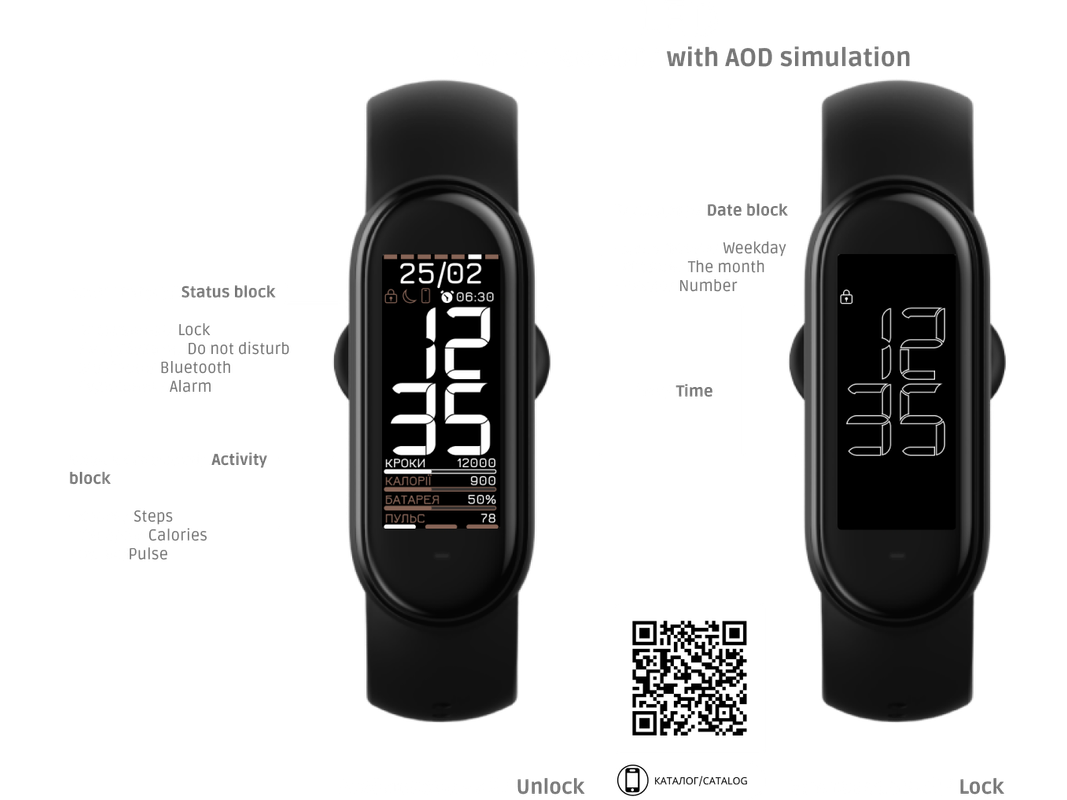
Спроба реалізувати функцію AOD на Mi Smart Band 5. Для коректної роботи циферблату потрібно включити блокування екрану. На розблокованому екрані відображається вся необхідна інформація. Дата з індикатором дня тижня (сім сегментів від понеділка до неділі). Рядок стану з відображенням блокування, "не турбувати", підключення до телефону (блютуз) та будильника. Далі величезний показник часу. Нижче розмістився блок активності з відображення кроків, калорій, заряду батареї з їх прогресом та пульс з його рівнем (3 рівня). Після блокування на екрані залишається тільки час з модифікованим шрифтом та показник заблокованого екрану.
An attempt to implement the AOD function on the Mi Smart Band 5. For the correct operation of the watch face, you need to enable the screen lock. All necessary information is displayed on the unlocked screen. Date with day of the week indicator (seven segments from Monday to Sunday). Status bar showing lock, do not disturb, phone connection (bluetooth) and alarm clock. Next is a huge indicator of time. Below is an activity block displaying steps, calories, battery charge with their progress, and heart rate with its level (3 levels). After locking, only the time with a modified font and the lock screen indicator remain on the screen.
/mi-band-6/view/4297 - Mi Smart Bamd 6
Tags
Share this face
Comments
You need to be logged in to post or reply to comments.
Recent community discussions
Heart rate ONLY face for Xiaomi Band 10
And even then, after getting my hands on a Windows laptop and an Android phone - I STILL can't get my designed face to upload to the Band 10. I'm using Notify for Xiaomi - I can get other 3rd-party faces to upload, but not all ........ and...
Please help with an issue regarding installing watchfaces on iOS (Band 10)
Hello, An iOS update for AmazFaces has been released, and Band 10 can now be selected. I still haven’t figured out how to install it yet. I think there may be a problem related to Bluetooth. Why am I getting this error, as shown in th...
How do I install apps to Xiaomi Smart Band 10 with iPhone?
Hi, I downloaded the amazfaces app on my iPhone but there is no option for the Smart Band 10, I downloade...
Simple watchface for the Redmi Watch 5 Lite with a big font for readability
Oh, thanks asoo, I'll post it there then. I have no idea if the binary will work with the Redmi Watch 5, this was done with Easy Face and in theory the layout should work with th...
Xiaomi Mi Band 4 - Help to find this watch face (solved)
Hello. I used to have this watch face shown in the image, but I don't remember the author's name, and I no longer have the file saved. https://i.imgur.com/II0XZXW.png I'd appreciate some help finding it—or ...
Watch face Xiaomi Redmi Watch 6 NFC
Redmi Watches: https://amazfitwatchfaces.com/redmi-watch/fresh Upload new: https://amazfitwatchfaces.com/upload?d=redmi-watch&next...
Xiaomi Watch S4 - Which Device to select
Thank you for the quick response. A....





02.03.2023 23:42:55 Complaint