All in One Analog EN V2
Mi Band 5 en
请注意,本网站上所有可用的手表面都是我们用户的创作作品,并且与任何官方品牌或商标无关。这些作品是由粉丝为粉丝创作的,灵感来源于流行文化现象、游戏、电影或电视剧。
我们的目标是提供一个创意交流的平台,同时我们也致力于尊重知识产权。如果您拥有本网站上任何内容的版权,并认为该内容侵犯了您的权利,请与我们联系以采取适当措施。

描述
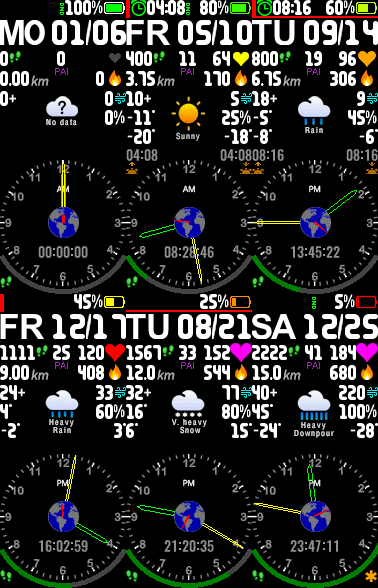
All the other WFs here share the same ID, so you can only install one of them on your MB5 at a time.
NOTES:
- Your step progress is displayed on the bottom as an arc with a high resolution (better than 1%).
When you have reached your step goal, you will be rewarded with a golden starlet.
- The heart is not an animation, it really grows and colors with the heart rate.
- The PAI value shown is the PAI you earned today, and is not the 7-day accumulated value.
- An interrupted Bluetooth connection is indicated by a continuous red line under the status bar.
- The times for sunrise and sunset are displayed according to your respective location (activate auto Weather Location).
- The values shown in this preview are for demonstration purposes only and some of them are unrealistic.
- UVI, wind force and seconds are currently not displayed on the MB5 due to the faulty firmware.
Good graphics + small file size (127kB only)
Die deutsche Version ist hier: /mi-band-5/view/449
On request, I can also make adjustments, such as the date format and weekday names,
if the desired weekday names are made available to me as PNG files in the format up to max. 45x25px with white letters on a black or transparent background (1.png ... 7.png, 1=Monday).
If you like my watch faces, you can donate: https://paypal.me/UweR
to keep me motivated to designing more watchfaces.
Instructions for quickly switching between different watch faces
Touch the activated screen (not the button) of your MB5 and hold the touch until the display changes.
Now you can swipe vertically to see another WF. Touch the desired WF to activate it.
标签
分享此表盘
评论


您需要登录才能发布或回复评论。
近期 社区论坛 讨论贴
How do I install apps to Xiaomi Smart Band 10 with iPhone?
Hi everyone! I've discovered a way to send iOS faces to the band. And I've developed a universal macOS/iOS app (Mac, iPhone, iPad) to do this. I don't know if I'll be able to publish it on the App Store in the future, but you can downloa...
Heart rate ONLY face for Xiaomi Band 10
Unfortunately, you need Windows and Android for that....
Simple watchface for the Redmi Watch 5 Lite with a big font for readability
Oh, thanks asoo, I'll post it there then. I have no idea if the binary will work with the Redmi Watch 5, this was done with Easy Face and in theory the layout should work with th...
Xiaomi Mi Band 4 - Help to find this watch face (solved)
Hello. I used to have this watch face shown in the image, but I don't remember the author's name, and I no longer have the file saved. https://i.imgur.com/II0XZXW.png I'd appreciate some help finding it—or ...
Watch face Xiaomi Redmi Watch 6 NFC
Redmi Watches: https://amazfitwatchfaces.com/redmi-watch/fresh Upload new: https://amazfitwatchfaces.com/upload?d=redmi-watch&next...
Xiaomi Watch S4 - Which Device to select
Thank you for the quick response. A....
Watchfaces for Xiaomi Watch S4
Hello. I recently bough a Xiaomi Watch S4 and i always use this web to download skins. When i looked up i saw it doesnt exist a section for this smartwatch. I wonder if you could create one, teach me how to create my own watchfaces or even ...





