mt-b5-wf3

Mi Band 5 multilingual, de, en, es, fr, lt, pl, pt, ru, tr, vi, zh
Please note that all watch faces available on this site are creative works by our users and are not affiliated with official brands or trademarks. They are created by fans for fans, inspired by popular cultural phenomena, games, movies, or series.
Our goal is to provide a platform for creativity and exchange, but we also strive to respect intellectual rights. If you hold copyright to any content that you believe infringes your rights on this site, please contact us for appropriate action.

Description
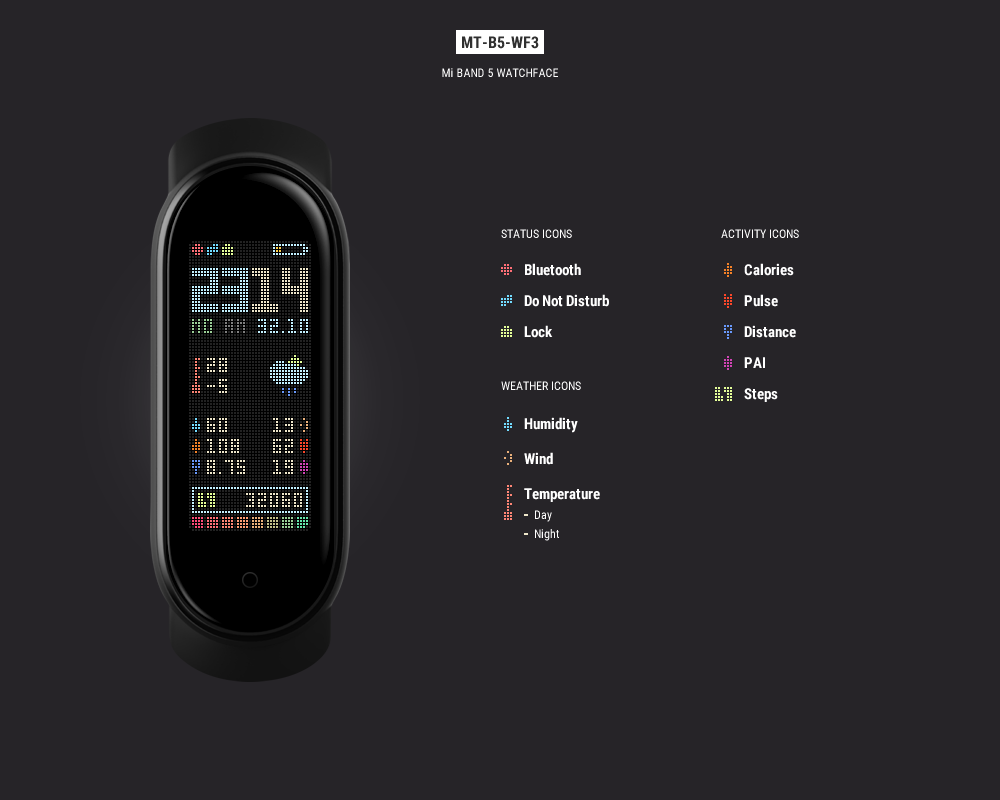
Updates:
24.07.2020 - added black background version: en-black - English (DD.MM) and us-black - English (MM.DD);
19.09.2020 - added en-black-et and us-black-et versions with black background and current temperature;
19.09.2020(2) - added de (DD.MM) and de-black (DD.MM) versions;
Languages (dotted background):
en - English (DD.MM)
ru - Russian (DD.MM)
us - English (MM.DD)
ch - Chinese (DD.MM)
tr - Turkish (DD.MM)
fr - French (DD.MM)
pl - Polish (DD.MM)
lt - Lithuanian (MM.DD)
es - Spanish (DD.MM)
pt - Portuguese (DD.MM)
vi - Vietnamese (DD.MM)
de - German (DD.MM)
Languages (black background):
en-black - English (DD.MM)
us-black - English (MM.DD)
en-black-et - English (DD.MM)
us-black-et - English (MM.DD)
de-black - German (DD.MM)
Note:
If you need some another language (day in two chars), comment below. I'll make your language version for You.
I`ll appreciate if you also example your language description in two chars (MO, TU, etc.) for all 7 days.
Atention:
DO NOT COPY AND DO NOT UPLOAD ANY EDITIONS AND VERSIONS OF THIS FATCHFACE!
I spend hours of my life to design and develop my watch faces. Any pixel and element designed by me. And some users here just get my work, change some minor element and upload it as theyselves.
Stop do that, please! Respect me and my work (and yourselves). Thank you.
Tags
Share this face
Comments
You need to be logged in to post or reply to comments.
Recent community discussions
How do I install apps to Xiaomi Smart Band 10 with iPhone?
Hi, I downloaded the amazfaces app on my iPhone but there is no option for the Smart Band 10, I downloade...
Heart rate ONLY face for Xiaomi Band 10
Unfortunately, you need Windows and Android for that....
Simple watchface for the Redmi Watch 5 Lite with a big font for readability
Oh, thanks asoo, I'll post it there then. I have no idea if the binary will work with the Redmi Watch 5, this was done with Easy Face and in theory the layout should work with th...
Xiaomi Mi Band 4 - Help to find this watch face (solved)
Hello. I used to have this watch face shown in the image, but I don't remember the author's name, and I no longer have the file saved. https://i.imgur.com/II0XZXW.png I'd appreciate some help finding it—or ...
Watch face Xiaomi Redmi Watch 6 NFC
Redmi Watches: https://amazfitwatchfaces.com/redmi-watch/fresh Upload new: https://amazfitwatchfaces.com/upload?d=redmi-watch&next...
Xiaomi Watch S4 - Which Device to select
Thank you for the quick response. A....
Watchfaces for Xiaomi Watch S4
Hello. I recently bough a Xiaomi Watch S4 and i always use this web to download skins. When i looked up i saw it doesnt exist a section for this smartwatch. I wonder if you could create one, teach me how to create my own watchfaces or even ...





Can you make this in Lithuanian language?
Mo- Pr
Tue- An
We- Tr
Thu- Ke
Fr- Pn
Sat- Še (or Se)
Sun- Sek
And date first month/day 16.07.2020 21:06:16 Complaint
1) Go to Mi Fit first, go to Watchfaces (original list) and Install any to Device.
2) Go to Android device file system - Android > data > com.xiaomi.hm.health > files > watch_skin_file: in this folder (watch_skin_file) must be some folder (named by number, I have 59), so go to this created by Mi FIt folder and here create new folder with Watchface name (in this case mt-b5-wf3-**, stars are lang code). Copy downloaded *.bin file to this folder (file must has same name as folder).
3) Go back to Mi Fit (close and reopen the App) and go to Watchface store - but to Administrator (second tab) local watchfaces tab. There you have to see your Watchface (but without preview). Sync it and done!
Try this steps. Good luck! 17.07.2020 06:14:22 Complaint
So I suggest delete any useless folder (watchface) in "59" folder. Keep it less than three, by replacing useless watchfaces.
Steps above have to work. 17.07.2020 08:10:03 Complaint
Just take any infos.xml, open it - rename name of Watchface there was inputed and save it. Keep this xml file togheter with bin file. The XML file describes the Watchface for Mi Fit. 18.07.2020 07:23:57 Complaint
1. In Android device file system - Android > data > com.xiaomi.hm.health > files > watch_skin_file > 59 folder, I created a folder called "mt-b5-wf3-en-104639-ce4aab4d83" and put in the "mt-b5-wf3-en-104639-ce4aab4d83.bin" file. Then copied the file "infos.xml" from another skin folder. Then I went to Mi Fit app, tab Administrator, and I found the skin.
Even I edited the "infos.xml" file to change the name of the skin. 21.07.2020 00:42:17 Complaint
If you upload an update for minor fixes or some new features please let us know in the description. 21.07.2020 08:02:54 Complaint
About Updates, Here is only Language updates passable. 21.07.2020 11:45:14 Complaint
Os it possible to make a Portuguese one?
Date: dd/mm
Date of week:
Monday: Se
Tuesday: Te
Wednesday: Qa
Thursday: Qi
Friday: Sx
Saturday: Sa
Sunday: Do
Thanks and continue your awesome work. 22.07.2020 02:22:12 Complaint
Thanks you very much.
I need to learn how to make those skins 22.07.2020 08:50:19 Complaint
This is Vietnam Language
Mo - T2
Tu - T3
Wed - T4
Thu - T5
Fri - T6
Sat - T7
Sun - CN 22.07.2020 10:09:01 Complaint
DD.MM is better for Vietnamese language 23.07.2020 10:36:55 Complaint
About black background - Using Pixel background in this WF is a feature! But I can make for you black background version! Just note - which one language and date format you need (DD.MM or MM.DD)? 22.07.2020 12:33:55 Complaint
Did you have any document about creating a face?
Im developer and want to make some watch face :3 23.07.2020 10:38:20 Complaint
On the other hand, I even found that if you save the image.gif of an WF in the same folder of .bin file, it shows properly on the Administrator tab in Mi Fit app. So it make easy to choise among all WF dowloaded. 24.07.2020 04:52:06 Complaint
About Image - you are right. But we cant upload Preview Image here.
Could you please make Czech version? Czech uses DD.MM
Monday: Po
Tuesday: Út (Ut)
Wednesday: St
Thursday: Čt (Ct)
Friday: Pá (Pa)
Saturday: So
Sunday: Ne
I doubt you can make it with diacritics, so use the version without diacritics in brackets.
And will there be a version with 24h clock and not 12 h (AM/PM)? :-)
Thanks a lot! 04.08.2020 11:41:25 Complaint
I was also going to ask for a version with brighter colours, but the black background one solved my display issue. Thank you, great job! 19.08.2020 22:25:59 Complaint
Mon - Mo
Tue - Di
Wed - Mi
Thur - Do
Fri - Fr
Sat - Sa
Sun - So 23.08.2020 12:29:49 Complaint
de - German (DD.MM)
MO - MO
TU - DI
WE - MI
TH - DO
FR - FR
SA - SA
SU - SO
many thanks! 10.09.2020 07:15:29 Complaint
We recommend that you register a WeChat or Alipay and attach the payment QR code.
There are many Chinese users of this site. Chinese users mostly use WeChat and Alipay. 19.11.2020 06:01:19 Complaint
But I would like to let you know that most of us (I mean more than 90% people) don't care about humidity or wind. If you can remove that and make fonts of clock bigger, it'll be more useful. (You can remove weather also to get more space). Let me know your thoughts 14.01.2021 06:05:39 Complaint
Can you make it also in Italian language (DD.MM)?
Mon - Lu
Tue - Ma
Wed - Me
Thur - Gi
Fri - Ve
Sat - Sa
Sun - Do
Thank you! 20.01.2021 11:19:15 Complaint
I would appreciate an update to both, normal and black background versions
Can you made the same Watchface for Mi Band 6 ? 01.06.2021 09:11:58 Complaint
https://github.com/ilidio/convert_miband5_to_miband6_watchface 23.03.2023 17:17:32 Complaint
Any chance of bringing this back for Miband 7?
And maybe adding brightness or tap zones? 12.10.2022 14:38:03 Complaint