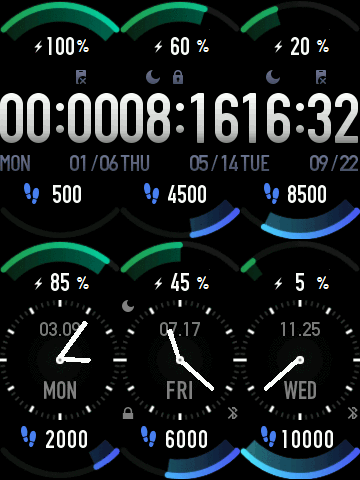
AF band 6 Stock

Mi Band 4 en, ru
请注意,本网站上所有可用的手表面都是我们用户的创作作品,并且与任何官方品牌或商标无关。这些作品是由粉丝为粉丝创作的,灵感来源于流行文化现象、游戏、电影或电视剧。
我们的目标是提供一个创意交流的平台,同时我们也致力于尊重知识产权。如果您拥有本网站上任何内容的版权,并认为该内容侵犯了您的权利,请与我们联系以采取适当措施。

描述
All credits to .Kosmik
/mi-band-5/view/392
/mi-band-4/view/16053
Battery version:
/mi-band-4/view/19695

标签
分享此表盘
评论
您需要登录才能发布或回复评论。
近期 社区论坛 讨论贴
Heart rate ONLY face for Xiaomi Band 10
And even then, after getting my hands on a Windows laptop and an Android phone - I STILL can't get my designed face to upload to the Band 10. I'm using Notify for Xiaomi - I can get other 3rd-party faces to upload, but not all ........ and...
Please help with an issue regarding installing watchfaces on iOS (Band 10)
Hello, An iOS update for AmazFaces has been released, and Band 10 can now be selected. I still haven’t figured out how to install it yet. I think there may be a problem related to Bluetooth. Why am I getting this error, as shown in th...
How do I install apps to Xiaomi Smart Band 10 with iPhone?
Hi, I downloaded the amazfaces app on my iPhone but there is no option for the Smart Band 10, I downloade...
Simple watchface for the Redmi Watch 5 Lite with a big font for readability
Oh, thanks asoo, I'll post it there then. I have no idea if the binary will work with the Redmi Watch 5, this was done with Easy Face and in theory the layout should work with th...
Xiaomi Mi Band 4 - Help to find this watch face (solved)
Hello. I used to have this watch face shown in the image, but I don't remember the author's name, and I no longer have the file saved. https://i.imgur.com/II0XZXW.png I'd appreciate some help finding it—or ...
Watch face Xiaomi Redmi Watch 6 NFC
Redmi Watches: https://amazfitwatchfaces.com/redmi-watch/fresh Upload new: https://amazfitwatchfaces.com/upload?d=redmi-watch&next...
Xiaomi Watch S4 - Which Device to select
Thank you for the quick response. A....





Please convert the above link clock to miband4.
Thanks 29.01.2021 21:28:24 投诉
Your work is amazing.
Thank you for the prompt reply.
Thank you very much for taking the time to implement my request.
Live with the love of goodness
Thanks 30.01.2021 04:45:56 投诉
By far, this is most friendly and modern watchface. 30.01.2021 21:04:14 投诉
/forum/viewtopic.php?t=720
I will try to help you:
Download: MiBandWFTool_2.1.6.zip (unzip and then you will find watchface.exe in it)
Copy a bin watchface (for example «english-ddmm-heart-rate_packed.bin» to this folder.
And then in the console/command prompt execute the command:
watchface.exe english-ddmm-heart-rate_packed.bin (This command is only an example)
Or just drag the file to watchface.exe
And check the folder generated... Make the changes you want. Here you have to study other watchfaces that are in this site... Download all you like it and run it the command
watchface.exe watchface_name.bin
and then to make the watchface again just execute the following command:
Example:
watchface.exe english-ddmm-heart-rate_packed\english-ddmm-heart-rate_packed.json
(check the folder and filename you want) 21.02.2021 21:35:11 投诉
It looks like a little clipboard with an X on it.
What does it mean?
Thanks 24.06.2021 19:23:03 投诉