Jupiter Inspiration by Matt-One

兼容于
47mm 支持的语言
multilingual, en, it
multilingual, en, it
新增: 21.08.2020 15:07
更新日期: 23.08.2020 23:56
146 个用户已加入 收藏
用户须知
请注意,本网站上所有可用的手表面都是我们用户的创作作品,并且与任何官方品牌或商标无关。这些作品是由粉丝为粉丝创作的,灵感来源于流行文化现象、游戏、电影或电视剧。
我们的目标是提供一个创意交流的平台,同时我们也致力于尊重知识产权。如果您拥有本网站上任何内容的版权,并认为该内容侵犯了您的权利,请与我们联系以采取适当措施。
请注意,本网站上所有可用的手表面都是我们用户的创作作品,并且与任何官方品牌或商标无关。这些作品是由粉丝为粉丝创作的,灵感来源于流行文化现象、游戏、电影或电视剧。
我们的目标是提供一个创意交流的平台,同时我们也致力于尊重知识产权。如果您拥有本网站上任何内容的版权,并认为该内容侵犯了您的权利,请与我们联系以采取适当措施。

描述
I just be inspired by the Original WF created by Qdoyz, Thank You. -> /gtr/view/5324
I also be inspired by the watchface created by Jordan Creations Thank You. -> /gtr/view/7709
Just in Italian and English at the moment.
Ver. 1.0->1.1(21/08/20)->1.2(23/08/20)
Questa è la mia prima watchface, abbiate pazienza se dovessero esserci problemi, ma in teoria non ci sono.
ITA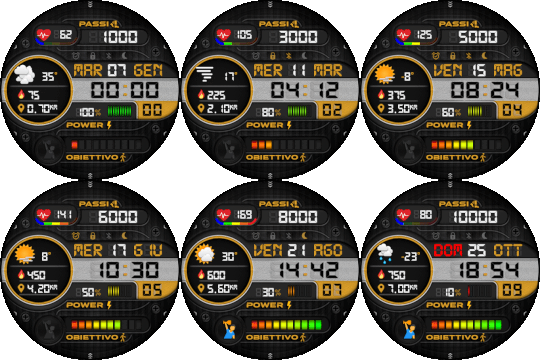 ENG
ENG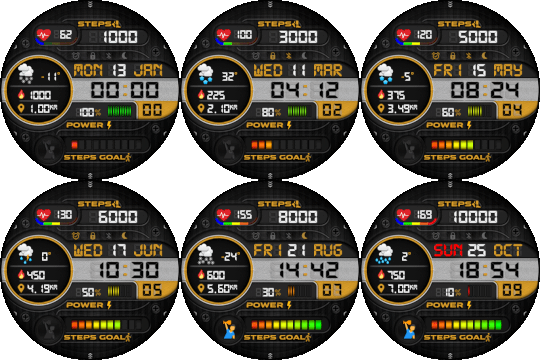
Modifiche effettuate e caratteristiche :
- Lingue Supportate : Italiano ed Inglese
- Look digitale, con caratteri digitali
- Aggiunte varie icone come quella della frequenza
cardiaca, quelle vicino alle sigle come Passi, Power ecc.
- Aggiunte icone del Meteo più grandi per una migliore
visibilità, aggiunta anche la temperatura.
- Aggiunte Calorie consumate e Kilometri percosi
- Aggiunti segmenti colorati sotto la frequenza cardiaca,
in base alla frequenza si colorano di dal blu al rosso.
- Aggiunte "tacchette" batteria più icona %
- Le icone della Sveglia, Bluetooth, Blocco, Non disturbare
sono state raggruppate per una visione migliore.
- Aggiunta Icona al raggiungimento dell'obiettivo
- Modalità 24h. Puoi impostarlo in modalità 12h dalle impostazioni dell'orologio del telefono. Impostazioni->Gestione generale->Data e Ora (nel caso di un Samsung)
FIX v.1.1 :
- Fixati i segmenti colorati della frequenza cardiaca, ora
non mostrano più i singoli colori, ma sono in sequenza
sempre in base ai battiti cardiaci.
FIX v1.2 :
- Fixato un errore con il meteo dove in caso di errore si sovrapponeva un altro quadrante.
I colori generali della watchface appena caricata risultano essere leggermente più scuri, o meno luminosi, se la luminosità automatica è impostata sull'orologio.
ENGLISH TRANSLATE :
Ver. 1.0->1.1(21/08/20)->1.2(23/08/20)
This is my first watchface, so be patient if some bug can occur, in theory there should be no no bug.
FEATURE :
- Supported Languages: Italian and English
- Digital look, with digital fonts
- Added various icons such as heart rate frequency icons,
or near Steps, Power, etc.
- Added bigger Weather icons for better
visibility, also added the temperature.
- Added Calories consumed and Kilometers traveled
- Added colored segments below the heart rate icon,
according to the frequency, they are colored from blue to red.
- Added battery image plus % icon.
- Alarm, Bluetooth, Lock, Do Not Disturb icons
have been grouped for a better view.
- Added icon when reaching the steps goal
- Mode 24h. You can set it in 12h mode from the phone clock settings. Settings-> General Management-> Date and Time (in the case of a Samsung).
FIX v.1.1 :
- Fixed colored heart rate segments, now
they no longer show individual colors, but are sequential
always based on heart rate.
FIX v.1.2 :
- Fixed an error with weather where the dial was overlap
by another dial.
I also be inspired by the watchface created by Jordan Creations Thank You. -> /gtr/view/7709
Just in Italian and English at the moment.
Ver. 1.0->1.1(21/08/20)->1.2(23/08/20)
Questa è la mia prima watchface, abbiate pazienza se dovessero esserci problemi, ma in teoria non ci sono.
ITA
ENGModifiche effettuate e caratteristiche :
- Lingue Supportate : Italiano ed Inglese
- Look digitale, con caratteri digitali
- Aggiunte varie icone come quella della frequenza
cardiaca, quelle vicino alle sigle come Passi, Power ecc.
- Aggiunte icone del Meteo più grandi per una migliore
visibilità, aggiunta anche la temperatura.
- Aggiunte Calorie consumate e Kilometri percosi
- Aggiunti segmenti colorati sotto la frequenza cardiaca,
in base alla frequenza si colorano di dal blu al rosso.
- Aggiunte "tacchette" batteria più icona %
- Le icone della Sveglia, Bluetooth, Blocco, Non disturbare
sono state raggruppate per una visione migliore.
- Aggiunta Icona al raggiungimento dell'obiettivo
- Modalità 24h. Puoi impostarlo in modalità 12h dalle impostazioni dell'orologio del telefono. Impostazioni->Gestione generale->Data e Ora (nel caso di un Samsung)
FIX v.1.1 :
- Fixati i segmenti colorati della frequenza cardiaca, ora
non mostrano più i singoli colori, ma sono in sequenza
sempre in base ai battiti cardiaci.
FIX v1.2 :
- Fixato un errore con il meteo dove in caso di errore si sovrapponeva un altro quadrante.
I colori generali della watchface appena caricata risultano essere leggermente più scuri, o meno luminosi, se la luminosità automatica è impostata sull'orologio.
ENGLISH TRANSLATE :
Ver. 1.0->1.1(21/08/20)->1.2(23/08/20)
This is my first watchface, so be patient if some bug can occur, in theory there should be no no bug.
FEATURE :
- Supported Languages: Italian and English
- Digital look, with digital fonts
- Added various icons such as heart rate frequency icons,
or near Steps, Power, etc.
- Added bigger Weather icons for better
visibility, also added the temperature.
- Added Calories consumed and Kilometers traveled
- Added colored segments below the heart rate icon,
according to the frequency, they are colored from blue to red.
- Added battery image plus % icon.
- Alarm, Bluetooth, Lock, Do Not Disturb icons
have been grouped for a better view.
- Added icon when reaching the steps goal
- Mode 24h. You can set it in 12h mode from the phone clock settings. Settings-> General Management-> Date and Time (in the case of a Samsung).
FIX v.1.1 :
- Fixed colored heart rate segments, now
they no longer show individual colors, but are sequential
always based on heart rate.
FIX v.1.2 :
- Fixed an error with weather where the dial was overlap
by another dial.
标签
digital
digitale
battery meter
weather
weather icon
heartrate
heartrate scale
steps
italy
italiano
distance
calories
ritmo cardiaco
calorie
distanza
km
english
italian
multilingual
goal steps
status
分享此表盘
评论
您需要登录才能发布或回复评论。
近期 社区论坛 讨论贴
convert request for GTS 2 mini
You are so GREAT! Thanks again!...
Adding some options request for gtr4
Amazing thank you sir 🙏...
Convert request for gtr4
Thank you so much...
Please port request for gtr4
It is perfect thank you 🙏...
Snoopy black version GTR 3
Many thanks sir...
Request: "Dash Digital" and “Acrive” style for Amazfit GTR Mini
Thank you asoo! I installed the V2 version on my GTR Mini and it works great. Thanks for your time and for moving the thread to the right section!...
Minimal watchface request for gtr4
Thank you sir i appreciate it...





没有评论。欢迎对此第一个发表评论。