Maikeldevil's work

Compatible with
47mm Supported Languages
en
en
Uploaded: 26.06.2020 22:57
Updated: 23.07.2020 05:47
845 users have this item in favourites
Important Information for Users
Please note that all watch faces available on this site are creative works by our users and are not affiliated with official brands or trademarks. They are created by fans for fans, inspired by popular cultural phenomena, games, movies, or series.
Our goal is to provide a platform for creativity and exchange, but we also strive to respect intellectual rights. If you hold copyright to any content that you believe infringes your rights on this site, please contact us for appropriate action.
Please note that all watch faces available on this site are creative works by our users and are not affiliated with official brands or trademarks. They are created by fans for fans, inspired by popular cultural phenomena, games, movies, or series.
Our goal is to provide a platform for creativity and exchange, but we also strive to respect intellectual rights. If you hold copyright to any content that you believe infringes your rights on this site, please contact us for appropriate action.

Description
* This is Maikeldevil's work & ALL credit goes to Maikedevil !!!
**Please visit Maikeldevil's Original work
/gtr/view/4835
*** Visit all Maikeldevil's collection, /search/gtr/authorID/61253
Again, NOT my work! Just modified Maikedevil's work a little.
**** To keep all similar design in one page, DO NOT want to waste forum space, please refer to the change log below.
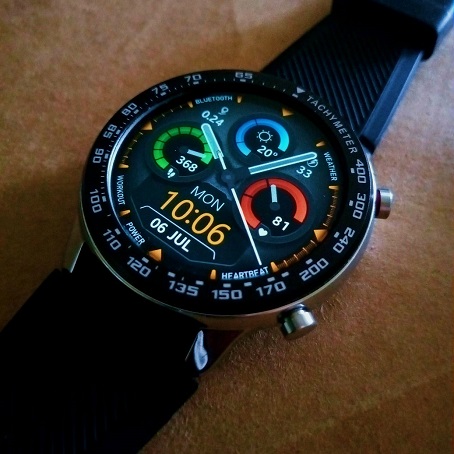
CHANGE LOG from Original design:
#3color
1. 3 color gauge
2. change Calories index to Temperature
3. Change 24 hours to 12 hours
4. Change Batter-saving shortcut to Weather shortcut
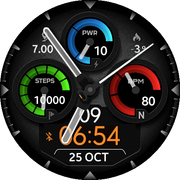
#3color1_no text
5. remove text off gauge
6. N of heartbeat to Heart icon
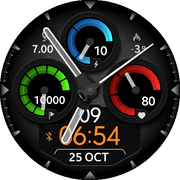
#10 percent
6. Bright up the face to 10%

#No_text_weather
7. Change battery gauge to Weather with icons
8. Move battery out of gauge with power icon
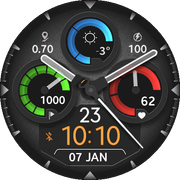
#Makeover
9. Remove Bluetooth icon
10. Remove Lock icon
11. add bluetooth text icon to outer ring
12. add lock text icon to outer ring
13. add DND text icon to outer ring
14. add Alarm text icon to outer ring
15. Weather -touch shortcut to outer ring
16. Workout -Touch shortcut to outer ring
17. Power - Touch shortcut to outer ring
18. Heartbeat - touch shortcut to outer ring
19. Extended Second-hand by 3 pixel
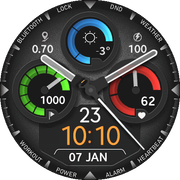
#Makeover Orange pin
20. Minor icon change, and Orange clock marker
21. Face dial down to 7% brightness
22. change DND to red color
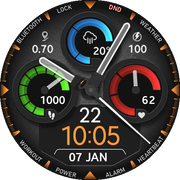
# Date Blinker
23. Change Digital Seconds to DATE
24. Add Blinking time separator
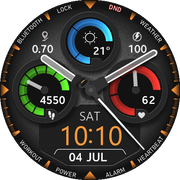
# date_blinker_long_hand
25. long second-hands give more analog focused
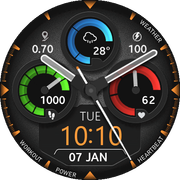
# 3color1_no_text-date
26. Take 3color_no_text and add date instead of seconds
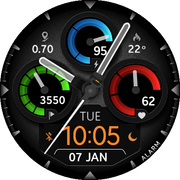
#3color1_no_text-date Reverse:
27. Same as above + reverse Step dial
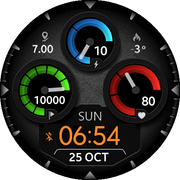
#no analog
28. Remove analog
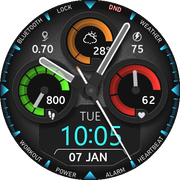
#blueMarker
29. Change Marker and Digital clock to Blue
30. Change weather ring to Orange
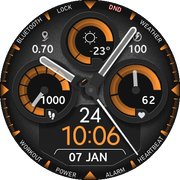
#Orange
31. Modified Makeover to Orange only
**Please visit Maikeldevil's Original work
/gtr/view/4835
*** Visit all Maikeldevil's collection, /search/gtr/authorID/61253
Again, NOT my work! Just modified Maikedevil's work a little.
**** To keep all similar design in one page, DO NOT want to waste forum space, please refer to the change log below.
CHANGE LOG from Original design:
#3color
1. 3 color gauge
2. change Calories index to Temperature
3. Change 24 hours to 12 hours
4. Change Batter-saving shortcut to Weather shortcut
#3color1_no text
5. remove text off gauge
6. N of heartbeat to Heart icon
#10 percent
6. Bright up the face to 10%
#No_text_weather
7. Change battery gauge to Weather with icons
8. Move battery out of gauge with power icon
#Makeover
9. Remove Bluetooth icon
10. Remove Lock icon
11. add bluetooth text icon to outer ring
12. add lock text icon to outer ring
13. add DND text icon to outer ring
14. add Alarm text icon to outer ring
15. Weather -touch shortcut to outer ring
16. Workout -Touch shortcut to outer ring
17. Power - Touch shortcut to outer ring
18. Heartbeat - touch shortcut to outer ring
19. Extended Second-hand by 3 pixel
#Makeover Orange pin
20. Minor icon change, and Orange clock marker
21. Face dial down to 7% brightness
22. change DND to red color
# Date Blinker
23. Change Digital Seconds to DATE
24. Add Blinking time separator
# date_blinker_long_hand
25. long second-hands give more analog focused
# 3color1_no_text-date
26. Take 3color_no_text and add date instead of seconds
#3color1_no_text-date Reverse:
27. Same as above + reverse Step dial
#no analog
28. Remove analog
#blueMarker
29. Change Marker and Digital clock to Blue
30. Change weather ring to Orange
#Orange
31. Modified Makeover to Orange only
Tags
Share this face
Comments
You need to be logged in to post or reply to comments.
Recent community discussions
Minimal amber watchface for gtr4
It is perfect thank you sir i appreciate you 🙏...
Upgrade of Snoopy GTR3
I love it, thanks a lot asoo <3...
Convert request for gtr4
Thank you sir i appreciate it...
Port request gtr4
If you're not going to use the watchface tool, then many times you can upload the entire .zip file to Gemini or another AI tool and tell it to make the edits for you. Thank...
Port request gtr4
Thank you...
Port request for gtr4 [GTR 4]
Thank you...
Simple digital watchface gtr4
Thanks...





Just a reminder, this is Maikedevil's work. Please visit his original creation at the link I provided above. 11.07.2020 07:41:58 Complaint
Please show your support to him. 23.07.2020 05:48:54 Complaint