Fenix Neon

Compatible with
GTR 3 This is paid content!
Click here for details.
Click here for details.
Supported Languages
multilingual, de, en, es, fr, it, pl, pt, ru, th, zh
multilingual, de, en, es, fr, it, pl, pt, ru, th, zh
Uploaded: 08.09.2026 04:25
Updated: 08.09.2026 15:07
2 users have this item in favourites
Important Information for Users
Please note that all watch faces available on this site are creative works by our users and are not affiliated with official brands or trademarks. They are created by fans for fans, inspired by popular cultural phenomena, games, movies, or series.
Our goal is to provide a platform for creativity and exchange, but we also strive to respect intellectual rights. If you hold copyright to any content that you believe infringes your rights on this site, please contact us for appropriate action.
Please note that all watch faces available on this site are creative works by our users and are not affiliated with official brands or trademarks. They are created by fans for fans, inspired by popular cultural phenomena, games, movies, or series.
Our goal is to provide a platform for creativity and exchange, but we also strive to respect intellectual rights. If you hold copyright to any content that you believe infringes your rights on this site, please contact us for appropriate action.

Description
Welcome to my watchface! This is a highly customizable, feature-rich design. Enjoy 70% of the core features completely for FREE forever!
Visit My Website: watch.homecmf.com
Core Features (Free):
12 Auto-Languages: Seamlessly auto-switches between 12 system languages (English, Español, Русский, Português, Italiano, Deutsch, Polski, Français, ภาษาไทย, 日本語, 简体中文/繁體中文) without manual setup.
Massive Customization: Features 6 dynamic data blocks and a Top ARC progress bar. The Top ARC supports 11 metrics, and the mutually exclusive Side ARCs support 10 metrics. Choose from 20 basic metrics: Sunrise, Sunset, Humidity, UV, AQI, Alarm, Heart Rate, Battery, PAI, Training Load, Calories, Steps, Distance, SpO2, Sleep, Stress, Stand Count, Weather, Air Pressure, and Altitude.
Smart Tap Shortcuts: Tap any data block to directly open its corresponding App. Tap the center "Hour" or "Minute" area to launch custom shortcuts (Choose from Calendar, Alarm, Compass, Schedule, To-do, Stopwatch, Timer, and Pomodoro).
Long-Press Gestures & Battery Saver: Long-press any data block to quickly cycle its displayed metric. Long-press the "Seconds" area to hide the active compass/seconds hand, which automatically pauses sensors for extreme battery saving. Long-press the "Month" area to toggle Lunar/Solar calendars (Chinese UI only).
On-Watch Settings (How to Access): Long-press the lower-right "DATE" area to enter the settings page. From here, the One-tap Theme System switches between Neon, Sand Cyan, or Custom, automatically linking the ARC colors and background lines. Customize 2 global text colors (Cyan / Sand Gold), 3 time digit colors (Sand Gold / Neon / Sand Cyan), 3 physical seconds hands, 3 compass styles, plus Metal Gradient and Side Panel toggles. Tap an already active style again to completely hide elements like progress bars or bezels.
Seamless Time Gradient: The hour and minute digits use mirrored gradients that flow into one another, so the whole time block reads as a single continuous color transition instead of two separate rows.
Save & Load Profiles: A built-in memory system provides 3 save slots to easily save and load your favorite layout combinations directly on your watch.
Seamless AOD & Status Toggles: Offers 2 AOD styles featuring moon phase, smoothly transitioning to live seconds upon waking up. Includes handy toggles for City Name and Vibration (replaces vibration with a subtle screen flash for quiet environments), and a thoughtful top-left Bluetooth disconnect warning.
PRO Features & Unlock (30% Exclusive):
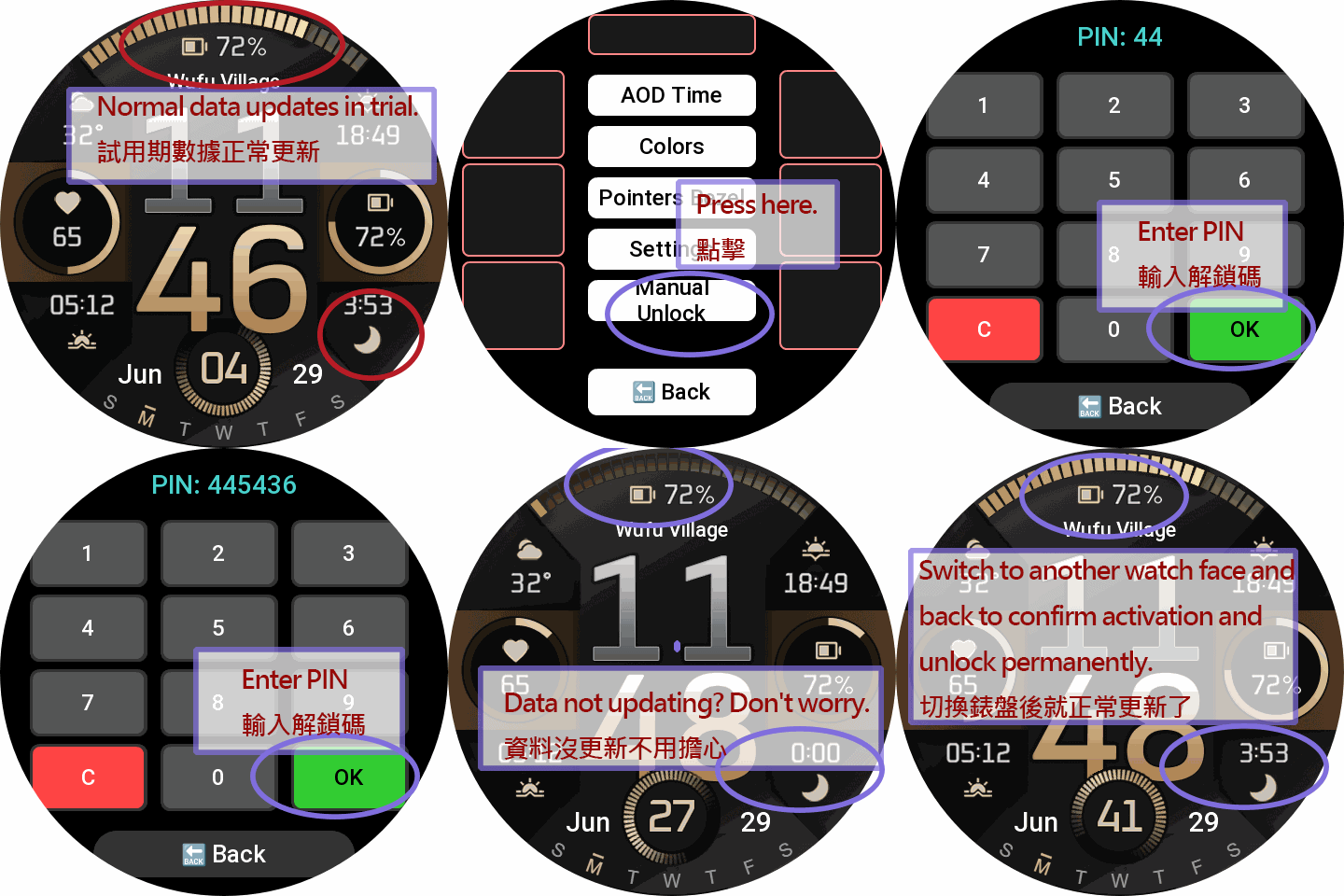
1-Day PRO Trial: Enjoy a full 1-day free trial of basic layouts and all settings.
Exclusive PRO Metrics: Unlocks 7 advanced data metrics for your blocks and ARCs: Next Sun (R/S), BioCharge, VO2 Max, Recovery Time, Fat Burn, Floors, and Wind.
How to Unlock: Scan the QR Code in the watch settings menu (or visit my website) to read the full User Manual. To keep the PRO features after the trial, visit the sponsor page to make a small donation. Once done, contact me with your Device ID, and I will send you a unique 6-digit Unlock PIN to permanently unlock all features!
Enter the PIN on your watch to permanently unlock all features!
Visit My Website: watch.homecmf.com
Core Features (Free):
12 Auto-Languages: Seamlessly auto-switches between 12 system languages (English, Español, Русский, Português, Italiano, Deutsch, Polski, Français, ภาษาไทย, 日本語, 简体中文/繁體中文) without manual setup.
Massive Customization: Features 6 dynamic data blocks and a Top ARC progress bar. The Top ARC supports 11 metrics, and the mutually exclusive Side ARCs support 10 metrics. Choose from 20 basic metrics: Sunrise, Sunset, Humidity, UV, AQI, Alarm, Heart Rate, Battery, PAI, Training Load, Calories, Steps, Distance, SpO2, Sleep, Stress, Stand Count, Weather, Air Pressure, and Altitude.
Smart Tap Shortcuts: Tap any data block to directly open its corresponding App. Tap the center "Hour" or "Minute" area to launch custom shortcuts (Choose from Calendar, Alarm, Compass, Schedule, To-do, Stopwatch, Timer, and Pomodoro).
Long-Press Gestures & Battery Saver: Long-press any data block to quickly cycle its displayed metric. Long-press the "Seconds" area to hide the active compass/seconds hand, which automatically pauses sensors for extreme battery saving. Long-press the "Month" area to toggle Lunar/Solar calendars (Chinese UI only).
On-Watch Settings (How to Access): Long-press the lower-right "DATE" area to enter the settings page. From here, the One-tap Theme System switches between Neon, Sand Cyan, or Custom, automatically linking the ARC colors and background lines. Customize 2 global text colors (Cyan / Sand Gold), 3 time digit colors (Sand Gold / Neon / Sand Cyan), 3 physical seconds hands, 3 compass styles, plus Metal Gradient and Side Panel toggles. Tap an already active style again to completely hide elements like progress bars or bezels.
Seamless Time Gradient: The hour and minute digits use mirrored gradients that flow into one another, so the whole time block reads as a single continuous color transition instead of two separate rows.
Save & Load Profiles: A built-in memory system provides 3 save slots to easily save and load your favorite layout combinations directly on your watch.
Seamless AOD & Status Toggles: Offers 2 AOD styles featuring moon phase, smoothly transitioning to live seconds upon waking up. Includes handy toggles for City Name and Vibration (replaces vibration with a subtle screen flash for quiet environments), and a thoughtful top-left Bluetooth disconnect warning.
PRO Features & Unlock (30% Exclusive):
1-Day PRO Trial: Enjoy a full 1-day free trial of basic layouts and all settings.
Exclusive PRO Metrics: Unlocks 7 advanced data metrics for your blocks and ARCs: Next Sun (R/S), BioCharge, VO2 Max, Recovery Time, Fat Burn, Floors, and Wind.
How to Unlock: Scan the QR Code in the watch settings menu (or visit my website) to read the full User Manual. To keep the PRO features after the trial, visit the sponsor page to make a small donation. Once done, contact me with your Device ID, and I will send you a unique 6-digit Unlock PIN to permanently unlock all features!
Enter the PIN on your watch to permanently unlock all features!
Tags
digital
analog
customizable
multilingual
aod
moonphase
lunar
shortcuts
widgets
date
seconds
compass
weather
humidity
uv
aqi
wind
sunrise
sunset
nextsun
steps
distance
calories
kcal
heartrate
bpm
battery
spo2
bloodoxygen
pai
trainingload
sleep
stress
stand
pressure
barometer
altitude
altimeter
alarm
biocharge
vo2max
recovery
fatburn
floors
hardcore
Share this face
Comments

Unkash
Hi, i dont know where can i see battery %
14.09.2026 18:18:08 Complaint
You need to be logged in to post or reply to comments.
Recent community discussions
Simple digital watchface request for gtr4
Perfect thank you sir...
Creation request gtr4
Can someone please create this face for the gtr4 https://www.tagheuer.com/gb/en/smartwatches/collections/tag-heuer-connected/45-mm/SBT8A87.EB0436.html?utm_source=facebook&utm_...
Minimal amber watchface for gtr4
It is perfect thank you sir i appreciate you 🙏...
Upgrade of Snoopy GTR3
I love it, thanks a lot asoo <3...
Convert request for gtr4
Thank you sir i appreciate it...
Port request gtr4
If you're not going to use the watchface tool, then many times you can upload the entire .zip file to Gemini or another AI tool and tell it to make the edits for you. Thank...
Port request gtr4
Thank you...





