Bip Legacy

Compatible with
GTR 4 Supported Languages
multilingual
multilingual
Uploaded: 26.03.2024 23:37
Updated: 09.09.2024 23:40
37 users have this item in favourites
Important Information for Users
Please note that all watch faces available on this site are creative works by our users and are not affiliated with official brands or trademarks. They are created by fans for fans, inspired by popular cultural phenomena, games, movies, or series.
Our goal is to provide a platform for creativity and exchange, but we also strive to respect intellectual rights. If you hold copyright to any content that you believe infringes your rights on this site, please contact us for appropriate action.
Please note that all watch faces available on this site are creative works by our users and are not affiliated with official brands or trademarks. They are created by fans for fans, inspired by popular cultural phenomena, games, movies, or series.
Our goal is to provide a platform for creativity and exchange, but we also strive to respect intellectual rights. If you hold copyright to any content that you believe infringes your rights on this site, please contact us for appropriate action.

Description
Висмикнув з руснянового форуму.

- Many color options. Color selection - double tap on the "settings" button (gear) - a color palette will open, you can navigate the palette using the buttons on the screen or by rotating the crown.
- Tap zones: weather, heart rate, activity, alarm, date > calendar. Two tap zones, HOURS and MINUTES, have a customizable action.
- Pressing the min/max temperature area switches the display: TEMPERATURES > next sunrise/sunset > pressure.
Long press - opens the corresponding screen: weather, sun or barometer.
- Tapping on the activity area toggles the display: STEPS > CALORIES > DISTANCE > Oxygen > CARDIO (fat burning) > WORKout, long pressing on the activity opens the corresponding screen.
- It is more convenient to switch the activity display by rotating the crown.
- The scale shows the progress of the current activity.
- Automatically change the displayed weather icons to nighttime after sunset and back to daytime after sunrise.
- Vibrate function when you lose contact with your phone (disable). AOD must be enabled for it to work.
- Periodic vibration function (switchable): intervals of 5, 10, 15, 20, 30 and 60 minutes. AOD must be enabled for it to work.
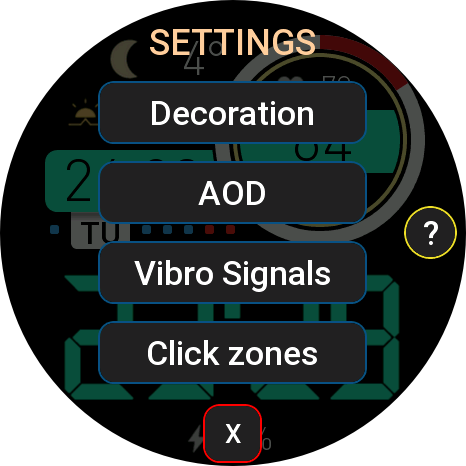
- Long tap on the "settings" button - opens the settings window: you can customize the color, disable tooltips, select barometer units (mmHg / hPa), select AOD mode, enable/disable vibration functions and customize the "HOURS" and "MINUTES" tap zones.
You can choose to launch the following applications for the tap zones - No Action, Timer, Stopwatch, World Clock, Sunrise/Sunset, Barometer, Sleep, Stress, SP02 (Oxygen), Breathing, One Touch Measurement, Exercise, Women's Calendar, Find Phone, Energy Saver, Music, Compass, Dial, Phone, Voice Recorder, Schedule, To Do List, Alarm Clock.
- Triple tap on the "settings" button - activate locking of all tap zones. Disable - long tap on "lock".
Switching activities by scrolling the wheel works even with locked tap-zones.
- Many color options. Color selection - double tap on the "settings" button (gear) - a color palette will open, you can navigate the palette using the buttons on the screen or by rotating the crown.
- Tap zones: weather, heart rate, activity, alarm, date > calendar. Two tap zones, HOURS and MINUTES, have a customizable action.
- Pressing the min/max temperature area switches the display: TEMPERATURES > next sunrise/sunset > pressure.
Long press - opens the corresponding screen: weather, sun or barometer.
- Tapping on the activity area toggles the display: STEPS > CALORIES > DISTANCE > Oxygen > CARDIO (fat burning) > WORKout, long pressing on the activity opens the corresponding screen.
- It is more convenient to switch the activity display by rotating the crown.
- The scale shows the progress of the current activity.
- Automatically change the displayed weather icons to nighttime after sunset and back to daytime after sunrise.
- Vibrate function when you lose contact with your phone (disable). AOD must be enabled for it to work.
- Periodic vibration function (switchable): intervals of 5, 10, 15, 20, 30 and 60 minutes. AOD must be enabled for it to work.
- Long tap on the "settings" button - opens the settings window: you can customize the color, disable tooltips, select barometer units (mmHg / hPa), select AOD mode, enable/disable vibration functions and customize the "HOURS" and "MINUTES" tap zones.
You can choose to launch the following applications for the tap zones - No Action, Timer, Stopwatch, World Clock, Sunrise/Sunset, Barometer, Sleep, Stress, SP02 (Oxygen), Breathing, One Touch Measurement, Exercise, Women's Calendar, Find Phone, Energy Saver, Music, Compass, Dial, Phone, Voice Recorder, Schedule, To Do List, Alarm Clock.
- Triple tap on the "settings" button - activate locking of all tap zones. Disable - long tap on "lock".
Switching activities by scrolling the wheel works even with locked tap-zones.
Tags
Share this face
Comments
You need to be logged in to post or reply to comments.
Recent community discussions
Minimal amber watchface for gtr4
Yeah sorry about that, The first row is day of the week and the year The second row beside the date the month and day of the month the blank part if possible can be world clock that can be turned off 🙏 I was hoping if it is possible...
Upgrade of Snoopy GTR3
I love it, thanks a lot asoo <3...
Convert request for gtr4
Thank you sir i appreciate it...
Port request gtr4
If you're not going to use the watchface tool, then many times you can upload the entire .zip file to Gemini or another AI tool and tell it to make the edits for you. Thank...
Port request gtr4
Thank you...
Port request for gtr4 [GTR 4]
Thank you...
Simple digital watchface gtr4
Thanks...





Just small request if it is available to make area under Heart rate in red color it will means a lot for me as a flag as special version 27.03.2024 01:39:26 Complaint