Vintage

兼容于
GTR 4 支持的语言
multilingual
multilingual
新增: 21.03.2024 16:55
更新日期: 09.09.2024 23:45
112 个用户已加入 收藏
用户须知
请注意,本网站上所有可用的手表面都是我们用户的创作作品,并且与任何官方品牌或商标无关。这些作品是由粉丝为粉丝创作的,灵感来源于流行文化现象、游戏、电影或电视剧。
我们的目标是提供一个创意交流的平台,同时我们也致力于尊重知识产权。如果您拥有本网站上任何内容的版权,并认为该内容侵犯了您的权利,请与我们联系以采取适当措施。
请注意,本网站上所有可用的手表面都是我们用户的创作作品,并且与任何官方品牌或商标无关。这些作品是由粉丝为粉丝创作的,灵感来源于流行文化现象、游戏、电影或电视剧。
我们的目标是提供一个创意交流的平台,同时我们也致力于尊重知识产权。如果您拥有本网站上任何内容的版权,并认为该内容侵犯了您的权利,请与我们联系以采取适当措施。

描述
Висмикнув з руснявого форуму.
- Multilingual version: Russian, English, Ukrainian. The dial language is automatically set to match the system language.
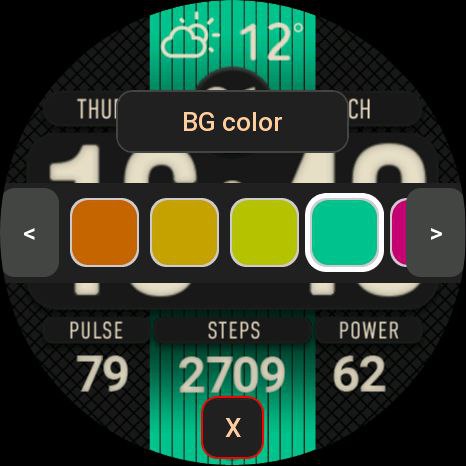
- 24 color themes. Selecting a color - double tap on the Amazfit logo - a color palette will open; you can move through the palette using the buttons on the screen or by rotating the crown.
- The dots flash (on AOD too). When you tap on the dots, blinking is turned off/on. Triple tap - switches blinking frequency: 0.5 or 1 second.
- Smooth seconds hand (can be switched off). Double tap on the dots - disables/enables the display of the second hand.
- When you click on the central activity area, the display switches: STEPS > CALORIES > DISTANCE > OXYGEN, when you long press on the activity, the corresponding screen opens.
- It is more convenient to switch the display of activities by rotating the crown.
- Automatic change of displayed weather icons to night icons after sunset and back to daytime after sunrise.
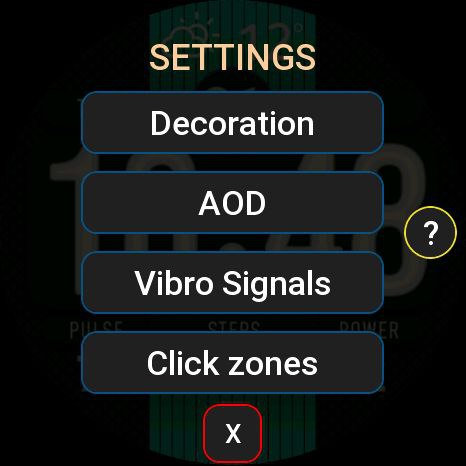
- When you long tap on the Amazfit logo, a settings window opens: you can adjust the background color and brightness, select AOD mode, enable/disable vibration functions and configure the “HOURS” and “MINUTES” tap zones.
For tap zones, you can choose to launch the following applications - No action, Timer, Stopwatch, World clock, Sunrise/sunset, Barometer, Sleep, Stress, SP02 (Oxygen), Breathing, One-touch measurement, Workout, Women's calendar, Find phone, Energy saving , Music, Compass, Dial, Phone, Voice Recorder, Schedule, To-Do List, Alarm Clock.
- Triple tap on the Amazfit logo - enable blocking of all tap zones. Disable - long tap on the logo.
Switching activities by scrolling the wheel also works when tap zones are blocked.
- Multilingual version: Russian, English, Ukrainian. The dial language is automatically set to match the system language.
- 24 color themes. Selecting a color - double tap on the Amazfit logo - a color palette will open; you can move through the palette using the buttons on the screen or by rotating the crown.
- The dots flash (on AOD too). When you tap on the dots, blinking is turned off/on. Triple tap - switches blinking frequency: 0.5 or 1 second.
- Smooth seconds hand (can be switched off). Double tap on the dots - disables/enables the display of the second hand.
- When you click on the central activity area, the display switches: STEPS > CALORIES > DISTANCE > OXYGEN, when you long press on the activity, the corresponding screen opens.
- It is more convenient to switch the display of activities by rotating the crown.
- Automatic change of displayed weather icons to night icons after sunset and back to daytime after sunrise.
- When you long tap on the Amazfit logo, a settings window opens: you can adjust the background color and brightness, select AOD mode, enable/disable vibration functions and configure the “HOURS” and “MINUTES” tap zones.
For tap zones, you can choose to launch the following applications - No action, Timer, Stopwatch, World clock, Sunrise/sunset, Barometer, Sleep, Stress, SP02 (Oxygen), Breathing, One-touch measurement, Workout, Women's calendar, Find phone, Energy saving , Music, Compass, Dial, Phone, Voice Recorder, Schedule, To-Do List, Alarm Clock.
- Triple tap on the Amazfit logo - enable blocking of all tap zones. Disable - long tap on the logo.
Switching activities by scrolling the wheel also works when tap zones are blocked.
标签
分享此表盘
评论

Wahwah
Wow this is very impressive Watchface nice work and thanks for sharing it
21.03.2024 17:19:47 投诉

mrbutthead
Wahwah, The work is not mine, I stole it from the Russians, but the wf is good
21.03.2024 18:17:56 投诉

AWfan
mrbutthead, Fantastic "steal" indeed. The level of customization are nuts. Thanks for sharing!
21.03.2024 23:14:46 投诉

Noigel
Interesting. It`s my favorite WF (used it on GTR 4). Now I install it on Balance.. And.. IT WORKS )))
01.05.2024 16:12:00 投诉

sa713317
GTR mini please ???
14.10.2024 12:18:34 投诉

ZombikJr
hello great shield, very legible good work, can it be done in Polish
20.03.2025 15:49:26 投诉
您需要登录才能发布或回复评论。
近期 社区论坛 讨论贴
Minimal amber watchface for gtr4
Yeah sorry about that, The first row is day of the week and the year The second row beside the date the month and day of the month the blank part if possible can be world clock that can be turned off 🙏 I was hoping if it is possible...
Upgrade of Snoopy GTR3
I love it, thanks a lot asoo <3...
Convert request for gtr4
Thank you sir i appreciate it...
Port request gtr4
If you're not going to use the watchface tool, then many times you can upload the entire .zip file to Gemini or another AI tool and tell it to make the edits for you. Thank...
Port request gtr4
Thank you...
Port request for gtr4 [GTR 4]
Thank you...
Simple digital watchface gtr4
Thanks...





