Vintage

Compatibile con
GTR 4 Idiomas compatibles
multilingual
multilingual
Data aggiunta: 21.03.2024 16:55
Aggiornato il: 09.09.2024 23:45
112 utenti che hanno questo elemento nei preferiti
Informazioni Importanti per gli Utenti
Si prega di notare che tutti i quadranti orologio disponibili su questo sito sono opere creative dei nostri utenti e non sono affiliati con marchi ufficiali o marchi registrati. Sono creati da fan per fan, ispirati da fenomeni culturali popolari, giochi, film o serie.
Il nostro obiettivo è fornire una piattaforma per la creatività e lo scambio, ma ci impegniamo anche a rispettare i diritti intellettuali. Se detiene i diritti d'autore su qualsiasi contenuto che ritiene infranga i suoi diritti su questo sito, contattaci per un'azione appropriata.
Si prega di notare che tutti i quadranti orologio disponibili su questo sito sono opere creative dei nostri utenti e non sono affiliati con marchi ufficiali o marchi registrati. Sono creati da fan per fan, ispirati da fenomeni culturali popolari, giochi, film o serie.
Il nostro obiettivo è fornire una piattaforma per la creatività e lo scambio, ma ci impegniamo anche a rispettare i diritti intellettuali. Se detiene i diritti d'autore su qualsiasi contenuto che ritiene infranga i suoi diritti su questo sito, contattaci per un'azione appropriata.

Descrizione
Висмикнув з руснявого форуму.
- Multilingual version: Russian, English, Ukrainian. The dial language is automatically set to match the system language.
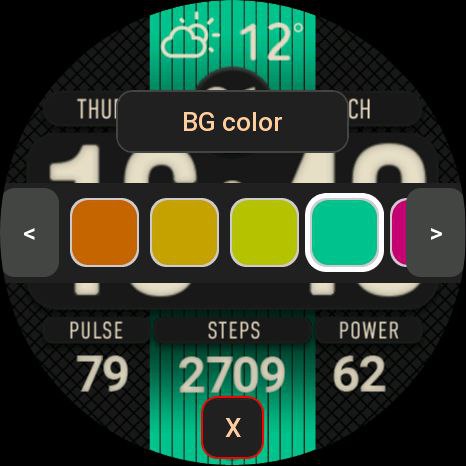
- 24 color themes. Selecting a color - double tap on the Amazfit logo - a color palette will open; you can move through the palette using the buttons on the screen or by rotating the crown.
- The dots flash (on AOD too). When you tap on the dots, blinking is turned off/on. Triple tap - switches blinking frequency: 0.5 or 1 second.
- Smooth seconds hand (can be switched off). Double tap on the dots - disables/enables the display of the second hand.
- When you click on the central activity area, the display switches: STEPS > CALORIES > DISTANCE > OXYGEN, when you long press on the activity, the corresponding screen opens.
- It is more convenient to switch the display of activities by rotating the crown.
- Automatic change of displayed weather icons to night icons after sunset and back to daytime after sunrise.
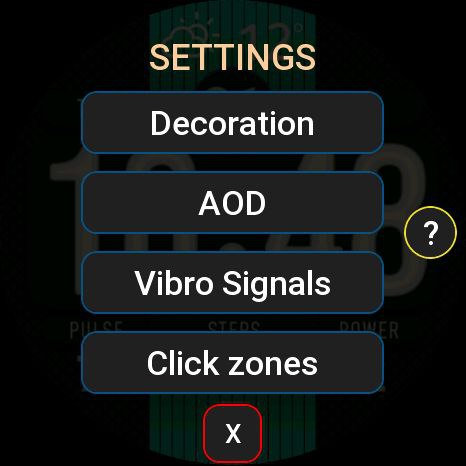
- When you long tap on the Amazfit logo, a settings window opens: you can adjust the background color and brightness, select AOD mode, enable/disable vibration functions and configure the “HOURS” and “MINUTES” tap zones.
For tap zones, you can choose to launch the following applications - No action, Timer, Stopwatch, World clock, Sunrise/sunset, Barometer, Sleep, Stress, SP02 (Oxygen), Breathing, One-touch measurement, Workout, Women's calendar, Find phone, Energy saving , Music, Compass, Dial, Phone, Voice Recorder, Schedule, To-Do List, Alarm Clock.
- Triple tap on the Amazfit logo - enable blocking of all tap zones. Disable - long tap on the logo.
Switching activities by scrolling the wheel also works when tap zones are blocked.
- Multilingual version: Russian, English, Ukrainian. The dial language is automatically set to match the system language.
- 24 color themes. Selecting a color - double tap on the Amazfit logo - a color palette will open; you can move through the palette using the buttons on the screen or by rotating the crown.
- The dots flash (on AOD too). When you tap on the dots, blinking is turned off/on. Triple tap - switches blinking frequency: 0.5 or 1 second.
- Smooth seconds hand (can be switched off). Double tap on the dots - disables/enables the display of the second hand.
- When you click on the central activity area, the display switches: STEPS > CALORIES > DISTANCE > OXYGEN, when you long press on the activity, the corresponding screen opens.
- It is more convenient to switch the display of activities by rotating the crown.
- Automatic change of displayed weather icons to night icons after sunset and back to daytime after sunrise.
- When you long tap on the Amazfit logo, a settings window opens: you can adjust the background color and brightness, select AOD mode, enable/disable vibration functions and configure the “HOURS” and “MINUTES” tap zones.
For tap zones, you can choose to launch the following applications - No action, Timer, Stopwatch, World clock, Sunrise/sunset, Barometer, Sleep, Stress, SP02 (Oxygen), Breathing, One-touch measurement, Workout, Women's calendar, Find phone, Energy saving , Music, Compass, Dial, Phone, Voice Recorder, Schedule, To-Do List, Alarm Clock.
- Triple tap on the Amazfit logo - enable blocking of all tap zones. Disable - long tap on the logo.
Switching activities by scrolling the wheel also works when tap zones are blocked.
Tag
Condividi questo quadrante
Commenti

Wahwah
Wow this is very impressive Watchface nice work and thanks for sharing it
21.03.2024 17:19:47 Segnala

mrbutthead
Wahwah, The work is not mine, I stole it from the Russians, but the wf is good
21.03.2024 18:17:56 Segnala

AWfan
mrbutthead, Fantastic "steal" indeed. The level of customization are nuts. Thanks for sharing!
21.03.2024 23:14:46 Segnala

Noigel
Interesting. It`s my favorite WF (used it on GTR 4). Now I install it on Balance.. And.. IT WORKS )))
01.05.2024 16:12:00 Segnala

sa713317
GTR mini please ???
14.10.2024 12:18:34 Segnala

ZombikJr
hello great shield, very legible good work, can it be done in Polish
20.03.2025 15:49:26 Segnala
Per rispondere ai commenti devi essere loggato .
Discussioni recenti della comunità
Minimal amber watchface for gtr4
Yeah sorry about that, The first row is day of the week and the year The second row beside the date the month and day of the month the blank part if possible can be world clock that can be turned off 🙏 I was hoping if it is possible...
Upgrade of Snoopy GTR3
I love it, thanks a lot asoo <3...
Convert request for gtr4
Thank you sir i appreciate it...
Port request gtr4
If you're not going to use the watchface tool, then many times you can upload the entire .zip file to Gemini or another AI tool and tell it to make the edits for you. Thank...
Port request gtr4
Thank you...
Port request for gtr4 [GTR 4]
Thank you...
Simple digital watchface gtr4
Thanks...





