MOD. (amazfit-gtr-47-wd-v1 BY White_Dragon )

Compatible with
47mm Supported Languages
en
en
Uploaded: 17.02.2020 06:57
755 users have this item in favourites
Important Information for Users
Please note that all watch faces available on this site are creative works by our users and are not affiliated with official brands or trademarks. They are created by fans for fans, inspired by popular cultural phenomena, games, movies, or series.
Our goal is to provide a platform for creativity and exchange, but we also strive to respect intellectual rights. If you hold copyright to any content that you believe infringes your rights on this site, please contact us for appropriate action.
Please note that all watch faces available on this site are creative works by our users and are not affiliated with official brands or trademarks. They are created by fans for fans, inspired by popular cultural phenomena, games, movies, or series.
Our goal is to provide a platform for creativity and exchange, but we also strive to respect intellectual rights. If you hold copyright to any content that you believe infringes your rights on this site, please contact us for appropriate action.

Description
THANK White_Dragon for amazfit-gtr-47-wd-v1
Version RU
/gtr/view/3729
------------------------------------------------------------------
Closed request in this watch face Thank
-------------------------------------------------------------------
Modified
17-02-2020 (1)
Upload ( Alber22 request ) Version 42mm
Not test because I don't have 42mm only Resize and pack
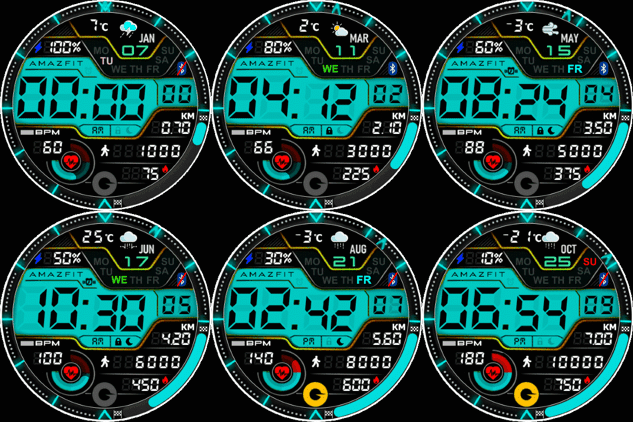
-----------------------------------------------------------------------
16-02-2020 (1)
- Add AM PM ( 12H )
- Add shortcuts weather , HR , steps , power saver
- Change Color and little layout
- Translate to E n g l i s h
- Add Heart rate circle "progress bar"
-------------------------------------------------------------------
Closed request in this watch face Thank
-------------------------------------------------------------------
It works in 24h format.
For the 12 h format to work. must be enabled in phone settings. (Settings-System-Date and Time-Disable 24-hour format.)
---------------------------------------------------------------------
Version RU
/gtr/view/3729
------------------------------------------------------------------
Closed request in this watch face Thank
-------------------------------------------------------------------
Modified
17-02-2020 (1)
Upload ( Alber22 request ) Version 42mm
Not test because I don't have 42mm only Resize and pack
-----------------------------------------------------------------------
16-02-2020 (1)
- Add AM PM ( 12H )
- Add shortcuts weather , HR , steps , power saver
- Change Color and little layout
- Translate to E n g l i s h
- Add Heart rate circle "progress bar"
-------------------------------------------------------------------
Closed request in this watch face Thank
-------------------------------------------------------------------
It works in 24h format.
For the 12 h format to work. must be enabled in phone settings. (Settings-System-Date and Time-Disable 24-hour format.)
---------------------------------------------------------------------
Tags
Share this face
Comments

Starlince
Another excellent Word, buddy!,, Manu thx for that and for you time!,!,,,,
16.02.2020 19:08:58 Complaint

Alber22
In 42 mm please
17.02.2020 00:50:37 Complaint

asoo
uploaded
17.02.2020 07:04:50 Complaint
Alber22
Thanks
24.02.2020 01:25:24 Complaint
You need to be logged in to post or reply to comments.
Recent community discussions
Few changes for gtr4
Thank you for all your help 🙂 have a great weekend...
convert request for GTS 2 mini
You are so GREAT! Thanks again!...
Adding some options request for gtr4
Amazing thank you sir 🙏...
Convert request for gtr4
Thank you so much...
Please port request for gtr4
It is perfect thank you 🙏...
Snoopy black version GTR 3
Many thanks sir...
Request: "Dash Digital" and “Acrive” style for Amazfit GTR Mini
Thank you asoo! I installed the V2 version on my GTR Mini and it works great. Thanks for your time and for moving the thread to the right section!...





