Vapor Sport

Сумісний з
GTR 3 Pro Підтримувані мови
en
en
Завантажено: 16.12.2023 22:04
Оновлено: 26.12.2023 18:47
47 користувачів додали це до обраного
Важлива інформація для користувачів
Зверніть увагу, що всі циферблати, доступні на цьому сайті, є творчими роботами наших користувачів і не пов'язані з офіційними брендами або торговими марками. Вони створюються шанувальниками для шанувальників, надихаються популярними культурними феноменами, іграми, фільмами, або серіалами.
Наша мета - надати платформу для творчості та обміну, але ми також прагнемо поважати інтелектуальні права. Якщо ви володієте авторськими правами на будь-який контент, який, на вашу думку, порушує ваші права на цьому сайті, будь ласка, зв'яжіться з нами для вжиття відповідних заходів.
Зверніть увагу, що всі циферблати, доступні на цьому сайті, є творчими роботами наших користувачів і не пов'язані з офіційними брендами або торговими марками. Вони створюються шанувальниками для шанувальників, надихаються популярними культурними феноменами, іграми, фільмами, або серіалами.
Наша мета - надати платформу для творчості та обміну, але ми також прагнемо поважати інтелектуальні права. Якщо ви володієте авторськими правами на будь-який контент, який, на вашу думку, порушує ваші права на цьому сайті, будь ласка, зв'яжіться з нами для вжиття відповідних заходів.

Опис
Template was a WF seen on facer.io
If the original author requests that WF be removed, the admins can delete it immediately.
So this one is special…
You have a choice of 6 basic colors, but you can change the colors of the hours and minutes and progress steps as you wish, so there are countless combinations
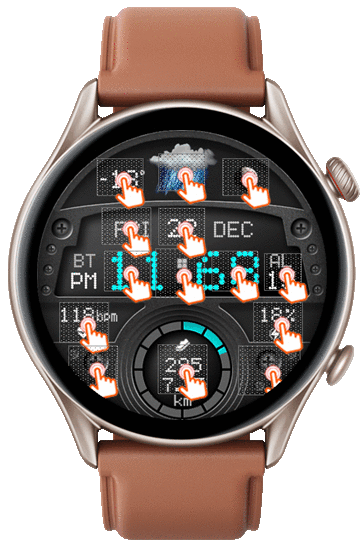
- change the color of the minutes with one click in the center of the WF (on the hours and minutes divider)
- change the color of the hours by double-clicking in the center of the WF (on the hours and minutes divider)
- change the color of the step progress by clicking on the right screw (between 4 and 5 o'clock)
- other shortcuts are in the appropriate places for steps, heart rate, blood oxygen (under the heart rate), calendar (on the date), sleep (on the day of the week), battery saver (on the battery), countdown (on the hour numbers), stopwatch (on the numbers, minutes) sunrise-sunset (on the progress of the moon) air pressure (on the current temp.) and alarm
UPDATE ( 26.12.2023 ):
- on request, added version in FAOD
If the original author requests that WF be removed, the admins can delete it immediately.
So this one is special…
You have a choice of 6 basic colors, but you can change the colors of the hours and minutes and progress steps as you wish, so there are countless combinations
- change the color of the minutes with one click in the center of the WF (on the hours and minutes divider)
- change the color of the hours by double-clicking in the center of the WF (on the hours and minutes divider)
- change the color of the step progress by clicking on the right screw (between 4 and 5 o'clock)
- other shortcuts are in the appropriate places for steps, heart rate, blood oxygen (under the heart rate), calendar (on the date), sleep (on the day of the week), battery saver (on the battery), countdown (on the hour numbers), stopwatch (on the numbers, minutes) sunrise-sunset (on the progress of the moon) air pressure (on the current temp.) and alarm
UPDATE ( 26.12.2023 ):
- on request, added version in FAOD
Теги
Поділиться цим циферблатом
Коментарі
Вам необхідно увійти, щоб залишати коментарі або відповідати на них.
Недавні обговорення в спільноті
Edit request for gtr4
Wow impressive thank you so much it is perfect 👌...
Simple hybrid watchface request for gtr4
Thank you 🙏...
GTR 3 Dynamic Background Creation
Thanks sir super fast. Amazing as Always...
Simple digital watchface request for gtr4
Perfect thank you sir...
Creation request gtr4
Can someone please create this face for the gtr4 https://www.tagheuer.com/gb/en/smartwatches/collections/tag-heuer-connected/45-mm/SBT8A87.EB0436.html?utm_source=facebook&utm_...
Minimal amber watchface for gtr4
It is perfect thank you sir i appreciate you 🙏...
Upgrade of Snoopy GTR3
I love it, thanks a lot asoo <3...





However, this morning it showed wrong time, around 11 minutes ahead, displaying also weird things like 09:68!
Tried to restart the watch to no avail.
One important thing to note is that this is the only WF on y Amazfit that has this problem, all other WF show the correct time, so I guess this must be a bug somewhere in this WF. 10.10.2025 10:27:30 Скарга