Vapor Sport

Compatible with
GTR 3 Pro Idiomas compatibles
en
en
Fecha agregada: 16.12.2023 22:04
Actualizada: 26.12.2023 18:47
47 los usuarios tienen en favoritas
Información Importante para los Usuarios
Tenga en cuenta que todos los diseños de relojes disponibles en este sitio son obras creativas de nuestros usuarios y no están afiliados con marcas o marcas registradas oficiales. Son creados por y para fans, inspirados en fenómenos culturales populares, juegos, películas o series.
Nuestro objetivo es proporcionar una plataforma para la creatividad e intercambio, pero también nos esforzamos por respetar los derechos intelectuales. Si posee derechos de autor sobre cualquier contenido que cree infringe sus derechos en este sitio, contáctenos para tomar medidas apropiadas.
Tenga en cuenta que todos los diseños de relojes disponibles en este sitio son obras creativas de nuestros usuarios y no están afiliados con marcas o marcas registradas oficiales. Son creados por y para fans, inspirados en fenómenos culturales populares, juegos, películas o series.
Nuestro objetivo es proporcionar una plataforma para la creatividad e intercambio, pero también nos esforzamos por respetar los derechos intelectuales. Si posee derechos de autor sobre cualquier contenido que cree infringe sus derechos en este sitio, contáctenos para tomar medidas apropiadas.

Descripción
Template was a WF seen on facer.io
If the original author requests that WF be removed, the admins can delete it immediately.
So this one is special…
You have a choice of 6 basic colors, but you can change the colors of the hours and minutes and progress steps as you wish, so there are countless combinations
- change the color of the minutes with one click in the center of the WF (on the hours and minutes divider)
- change the color of the hours by double-clicking in the center of the WF (on the hours and minutes divider)
- change the color of the step progress by clicking on the right screw (between 4 and 5 o'clock)
- other shortcuts are in the appropriate places for steps, heart rate, blood oxygen (under the heart rate), calendar (on the date), sleep (on the day of the week), battery saver (on the battery), countdown (on the hour numbers), stopwatch (on the numbers, minutes) sunrise-sunset (on the progress of the moon) air pressure (on the current temp.) and alarm
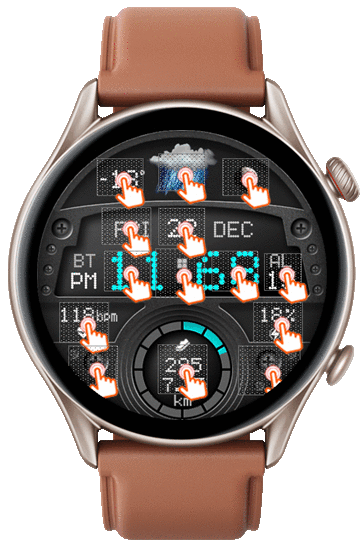
UPDATE ( 26.12.2023 ):
- on request, added version in FAOD
If the original author requests that WF be removed, the admins can delete it immediately.
So this one is special…
You have a choice of 6 basic colors, but you can change the colors of the hours and minutes and progress steps as you wish, so there are countless combinations
- change the color of the minutes with one click in the center of the WF (on the hours and minutes divider)
- change the color of the hours by double-clicking in the center of the WF (on the hours and minutes divider)
- change the color of the step progress by clicking on the right screw (between 4 and 5 o'clock)
- other shortcuts are in the appropriate places for steps, heart rate, blood oxygen (under the heart rate), calendar (on the date), sleep (on the day of the week), battery saver (on the battery), countdown (on the hour numbers), stopwatch (on the numbers, minutes) sunrise-sunset (on the progress of the moon) air pressure (on the current temp.) and alarm
UPDATE ( 26.12.2023 ):
- on request, added version in FAOD
Etiquetas
Comparte este watchface
Comentarios
You need to be logged in to post or reply to comments.
Discusiones recientes de la comunidad
Edit request for gtr4
Wow impressive thank you so much it is perfect 👌...
Simple hybrid watchface request for gtr4
Thank you 🙏...
GTR 3 Dynamic Background Creation
Thanks sir super fast. Amazing as Always...
Simple digital watchface request for gtr4
Perfect thank you sir...
Creation request gtr4
Can someone please create this face for the gtr4 https://www.tagheuer.com/gb/en/smartwatches/collections/tag-heuer-connected/45-mm/SBT8A87.EB0436.html?utm_source=facebook&utm_...
Minimal amber watchface for gtr4
It is perfect thank you sir i appreciate you 🙏...
Upgrade of Snoopy GTR3
I love it, thanks a lot asoo <3...





However, this morning it showed wrong time, around 11 minutes ahead, displaying also weird things like 09:68!
Tried to restart the watch to no avail.
One important thing to note is that this is the only WF on y Amazfit that has this problem, all other WF show the correct time, so I guess this must be a bug somewhere in this WF. 10.10.2025 10:27:30 Queja