VeeValdi ECU

兼容于
GTR 3 支持的语言
multilingual, en, pl
multilingual, en, pl
新增: 25.07.2023 11:49
31 个用户已加入 收藏
用户须知
请注意,本网站上所有可用的手表面都是我们用户的创作作品,并且与任何官方品牌或商标无关。这些作品是由粉丝为粉丝创作的,灵感来源于流行文化现象、游戏、电影或电视剧。
我们的目标是提供一个创意交流的平台,同时我们也致力于尊重知识产权。如果您拥有本网站上任何内容的版权,并认为该内容侵犯了您的权利,请与我们联系以采取适当措施。
请注意,本网站上所有可用的手表面都是我们用户的创作作品,并且与任何官方品牌或商标无关。这些作品是由粉丝为粉丝创作的,灵感来源于流行文化现象、游戏、电影或电视剧。
我们的目标是提供一个创意交流的平台,同时我们也致力于尊重知识产权。如果您拥有本网站上任何内容的版权,并认为该内容侵犯了您的权利,请与我们联系以采取适当措施。

描述
veevaldi_ecu_en – wersja angielskojęzyczna / English version
veevaldi_ecu_pl – wersja polskojęzyczna / Polish version
------------------------------------------------------------------------------------------------------------------
Pola (strefy) dotykowe - skróty // Touch fields (zones) - shortcuts:
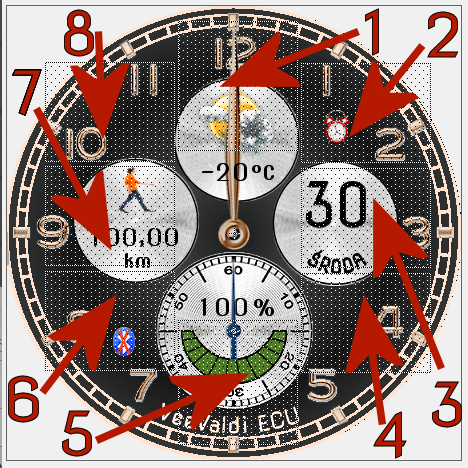
----------------- PL --------------------------------------------------------------------------------------------
„VeeValdi ECU”, to tarcza zegarkowa przeznaczona dla smartwatcha Amazfit GTR 3.
Na głównej tarczy zegarkowej czas jest prezentowany w tylko formie analogowej. Sekundnik porusza się płynnie na małym wewnętrznym cyferblacie. Wyświetlane są także: liczbowo dzień miesiąca, pełna nazwa dnia tygodnia, stan naładowania akumulatora w %, zmieniająca się grafika (obrazek) prezentująca stan naładowania akumulatora oraz dynamicznie zmieniający się obrazek aktualnego stanu pogody, znak braku sygnału bluetooth i ikona aktywności alarmu. Utrata połączenia bluetooth i przywrócenie połączenia sygnalizowane są dodatkowo wibracjami zegarka. Wibracją sygnalizowane są również pełne godziny.
Rodzaj wyświetlanych innych parametrów ustala użytkownik smartwatcha w 2 strefach (polach) edytowalnych.
W strefie edytowalnej, którą jest pole lewe (wewnętrzny lewy cyferblat) można przywołać pokazywanie: pokonanego dystansu w km lub ilości kroków lub ilości spalonych kalorii lub aktualnego pulsu (tętna – BPM). W strefie edytowalnej górnej (wewnętrzny górny cyferblat) ustawić pokazywanie: aktualnej temperatury w °C lub aktualnego wartości ciśnienia atmosferycznego lub siłę wiatru lub wilgotność w % lub poziom (indeks) UV lub dystans w km lub ilość kroków.
Użytkownik może również wybrać rodzaj cyferblatu (tła tarczy zegarka) spośród aż 9 dostępnych.
Wyborów dokonuje się w trybie edycyjnym tarczy zegarkowej.
Aby przejść w tryb edycyjny tarczy zegarkowej należy dotknąć (nacisnąć) palcem środka tarczy zegarka. Pojawi się wówczas ikona pióra, którą również należy dotknąć (nacisnąć). Potem po jednokrotnym lub wielokrotnym dotknięciu wybranej strefy (pola), wybieramy wyświetlany parametr. Można też to zrobić górnym pokrętłem umieszczonym po prawej stronie koperty zegarka. Podobnie postępujemy, gdy chcemy wybrać rodzaj tła tarczy zegarka (cyferblatu). Aby tego dokonać musimy po dotknięciu (naciśnięciu) środka tarczy zegarka przesunąć palcem tarczę z parametrami edytowalnymi w lewo, aż pokaże się kolejna tarcza edycyjna - wyboru (wybór tła). Wyboru dokonujemy podobne jak parametrów edytowalnych.
Zastosowałem także aż 8 pól dotykowych na tarczy zegarka (skrótów). Rozmieszczenie tych obszarów dotykowych pokazuje zamieszczony powyżej obrazek.
Wystarczy tylko dotknąć jeden z wybranych obszarów, aby szybko przejść do:
1 – stanu pogody, aktualnej temperatury i wilgotności,
2 – ustawienia alarmów,
3 – ustawienia odliczania wstecznego,
4 – stopera,
5 – wyświetlania poziomu stresu,
6 – pulsu (tętna, BPM),
7 – ilości kroków itp.,
8 – ciśnienia atmosferycznego.
W trybie AOD prezentowane są tylko: czas formie analogowej i stan naładowania akumulatora w formie zmieniającego się obrazka (jak na głównej tarczy zegarka).
----------------- EN --------------------------------------------------------------------------------------------
"VeeValdi ECU", is a watch face designed for the Amazfit GTR 3 smartwatch.
On the main watch face, time is presented in analog form only. The second hand moves smoothly on the small inner dial. The following are also displayed: numerical day of the month, full name of the day of the week, battery charge status in %, changing graphics (picture) presenting the battery charge status and a dynamically changing image of the current weather condition, a sign of no bluetooth signal and an alarm activity icon. The loss of the bluetooth connection and the restoration of the connection are additionally signaled by the vibration of the watch. Full hours are also signaled by vibration.
The type of other parameters displayed is determined by the smartwatch user in 2 editable zones (fields).
In the editable zone, which is the left field (inner left dial), you can display: the distance covered in km or the number of steps or the number of calories burned or the current pulse (heart rate - BPM). In the upper editable zone (inner upper dial) set the display of: current temperature in °C or current atmospheric pressure value or wind strength or humidity in % or UV level (UV index) or distance in km or number of steps.
The user can also choose the type of dial (background of the watch face) from as many as 9 available.
Selections are made in the watch face editing mode.
To enter the watch face editing mode, touch (press) the center of the watch face with your finger. The pen icon will then appear, which should also be touched (pressed). Then, after touching the selected zone (field) once or multiple times, we select the displayed parameter. You can also do it with the upper watch knob located on the right side of the watch case. We proceed in a similar way when we want to choose the type of background of the watch face (dial). To do this, after touching (pressing) the center of the watch face, move the dial with editable parameters to the left with your finger, until the next edit dial appears - selection (selection of the background). The selection is made similarly to the editable parameters.
I also used as many as 8 touch fields on the watch face (shortcuts). The location of these touch areas is shown in the picture above.
Just touch one of the selected areas to quickly go to:
1 – weather condition, current temperature and humidity,
2 - alarm settings,
3 - countdown settings,
4 - stopwatch,
5 - stress level display,
6 - pulse (heart rate, BPM),
7 - number of steps, etc.,
8 – atmospheric pressure.
In AOD mode, the time is displayed in analog form and the battery charge status in the form of a changing image (as on the main watch face).
veevaldi_ecu_pl – wersja polskojęzyczna / Polish version
------------------------------------------------------------------------------------------------------------------
Pola (strefy) dotykowe - skróty // Touch fields (zones) - shortcuts:
----------------- PL --------------------------------------------------------------------------------------------
„VeeValdi ECU”, to tarcza zegarkowa przeznaczona dla smartwatcha Amazfit GTR 3.
Na głównej tarczy zegarkowej czas jest prezentowany w tylko formie analogowej. Sekundnik porusza się płynnie na małym wewnętrznym cyferblacie. Wyświetlane są także: liczbowo dzień miesiąca, pełna nazwa dnia tygodnia, stan naładowania akumulatora w %, zmieniająca się grafika (obrazek) prezentująca stan naładowania akumulatora oraz dynamicznie zmieniający się obrazek aktualnego stanu pogody, znak braku sygnału bluetooth i ikona aktywności alarmu. Utrata połączenia bluetooth i przywrócenie połączenia sygnalizowane są dodatkowo wibracjami zegarka. Wibracją sygnalizowane są również pełne godziny.
Rodzaj wyświetlanych innych parametrów ustala użytkownik smartwatcha w 2 strefach (polach) edytowalnych.
W strefie edytowalnej, którą jest pole lewe (wewnętrzny lewy cyferblat) można przywołać pokazywanie: pokonanego dystansu w km lub ilości kroków lub ilości spalonych kalorii lub aktualnego pulsu (tętna – BPM). W strefie edytowalnej górnej (wewnętrzny górny cyferblat) ustawić pokazywanie: aktualnej temperatury w °C lub aktualnego wartości ciśnienia atmosferycznego lub siłę wiatru lub wilgotność w % lub poziom (indeks) UV lub dystans w km lub ilość kroków.
Użytkownik może również wybrać rodzaj cyferblatu (tła tarczy zegarka) spośród aż 9 dostępnych.
Wyborów dokonuje się w trybie edycyjnym tarczy zegarkowej.
Aby przejść w tryb edycyjny tarczy zegarkowej należy dotknąć (nacisnąć) palcem środka tarczy zegarka. Pojawi się wówczas ikona pióra, którą również należy dotknąć (nacisnąć). Potem po jednokrotnym lub wielokrotnym dotknięciu wybranej strefy (pola), wybieramy wyświetlany parametr. Można też to zrobić górnym pokrętłem umieszczonym po prawej stronie koperty zegarka. Podobnie postępujemy, gdy chcemy wybrać rodzaj tła tarczy zegarka (cyferblatu). Aby tego dokonać musimy po dotknięciu (naciśnięciu) środka tarczy zegarka przesunąć palcem tarczę z parametrami edytowalnymi w lewo, aż pokaże się kolejna tarcza edycyjna - wyboru (wybór tła). Wyboru dokonujemy podobne jak parametrów edytowalnych.
Zastosowałem także aż 8 pól dotykowych na tarczy zegarka (skrótów). Rozmieszczenie tych obszarów dotykowych pokazuje zamieszczony powyżej obrazek.
Wystarczy tylko dotknąć jeden z wybranych obszarów, aby szybko przejść do:
1 – stanu pogody, aktualnej temperatury i wilgotności,
2 – ustawienia alarmów,
3 – ustawienia odliczania wstecznego,
4 – stopera,
5 – wyświetlania poziomu stresu,
6 – pulsu (tętna, BPM),
7 – ilości kroków itp.,
8 – ciśnienia atmosferycznego.
W trybie AOD prezentowane są tylko: czas formie analogowej i stan naładowania akumulatora w formie zmieniającego się obrazka (jak na głównej tarczy zegarka).
----------------- EN --------------------------------------------------------------------------------------------
"VeeValdi ECU", is a watch face designed for the Amazfit GTR 3 smartwatch.
On the main watch face, time is presented in analog form only. The second hand moves smoothly on the small inner dial. The following are also displayed: numerical day of the month, full name of the day of the week, battery charge status in %, changing graphics (picture) presenting the battery charge status and a dynamically changing image of the current weather condition, a sign of no bluetooth signal and an alarm activity icon. The loss of the bluetooth connection and the restoration of the connection are additionally signaled by the vibration of the watch. Full hours are also signaled by vibration.
The type of other parameters displayed is determined by the smartwatch user in 2 editable zones (fields).
In the editable zone, which is the left field (inner left dial), you can display: the distance covered in km or the number of steps or the number of calories burned or the current pulse (heart rate - BPM). In the upper editable zone (inner upper dial) set the display of: current temperature in °C or current atmospheric pressure value or wind strength or humidity in % or UV level (UV index) or distance in km or number of steps.
The user can also choose the type of dial (background of the watch face) from as many as 9 available.
Selections are made in the watch face editing mode.
To enter the watch face editing mode, touch (press) the center of the watch face with your finger. The pen icon will then appear, which should also be touched (pressed). Then, after touching the selected zone (field) once or multiple times, we select the displayed parameter. You can also do it with the upper watch knob located on the right side of the watch case. We proceed in a similar way when we want to choose the type of background of the watch face (dial). To do this, after touching (pressing) the center of the watch face, move the dial with editable parameters to the left with your finger, until the next edit dial appears - selection (selection of the background). The selection is made similarly to the editable parameters.
I also used as many as 8 touch fields on the watch face (shortcuts). The location of these touch areas is shown in the picture above.
Just touch one of the selected areas to quickly go to:
1 – weather condition, current temperature and humidity,
2 - alarm settings,
3 - countdown settings,
4 - stopwatch,
5 - stress level display,
6 - pulse (heart rate, BPM),
7 - number of steps, etc.,
8 – atmospheric pressure.
In AOD mode, the time is displayed in analog form and the battery charge status in the form of a changing image (as on the main watch face).
标签
analog
seconds
seconds display
second hand
analog second hand
smooth second hand
smooth second pointer
classic
modern type
modern design
elegant
steps
number of steps
distance
km
battery
percentage of Energy
day of week
day name
day
day of the month
temperature
degrees Celsius
humidity
humidity in %
atmospheric pressure
hPa
wind
wind force
weather
weather condition
dynamic weather status icon
changing weather pictures
pulse
heart rate
bpm
calories
burned calories
kcal
kilocalories
energy consumption progress
inner dial with the number of the day of the week
battery charge status graphically
bluetooth
Bluetooth vibration on/off
alarm
AOD
AOD function
editable zones
selection of parameters
editable parameters
editable backgrounds
background selection
active fields
touch fields
shortcuts
分享此表盘
评论

OlegUA
Після просмотру реклами ,загрузки немає
25.07.2023 13:13:32 投诉

demiurg1
OlegUA, I do not really understand. I have no problem downloading this watch face even when I don't log in. I blew it.
10.09.2023 22:06:32 投诉
demiurg1
OlegUA, You should write to the website operator.
10.09.2023 22:08:25 投诉
您需要登录才能发布或回复评论。
近期 社区论坛 讨论贴
Please port request for gtr4
It is perfect thank you 🙏...
Snoopy black version GTR 3
Many thanks sir...
Request: "Dash Digital" and “Acrive” style for Amazfit GTR Mini
Thank you asoo! I installed the V2 version on my GTR Mini and it works great. Thanks for your time and for moving the thread to the right section!...
Minimal watchface request for gtr4
Thank you sir i appreciate it...
Please help find lost face
Someone created this model at their discretion and grouped here several components from the watch manufacturer, and you ...
If it is possible request for gtr4
Very beautiful thank you sir...
Hawker Matador Brown GTR 3
MarioLie Amazing and charmy, thanks a lot for that :)...





