Graph_Heart_Test Version 3 (GTR3)

兼容于
GTR 3 支持的语言
en
en
新增: 14.07.2023 11:11
更新日期: 19.07.2023 11:49
95 个用户已加入 收藏
用户须知
请注意,本网站上所有可用的手表面都是我们用户的创作作品,并且与任何官方品牌或商标无关。这些作品是由粉丝为粉丝创作的,灵感来源于流行文化现象、游戏、电影或电视剧。
我们的目标是提供一个创意交流的平台,同时我们也致力于尊重知识产权。如果您拥有本网站上任何内容的版权,并认为该内容侵犯了您的权利,请与我们联系以采取适当措施。
请注意,本网站上所有可用的手表面都是我们用户的创作作品,并且与任何官方品牌或商标无关。这些作品是由粉丝为粉丝创作的,灵感来源于流行文化现象、游戏、电影或电视剧。
我们的目标是提供一个创意交流的平台,同时我们也致力于尊重知识产权。如果您拥有本网站上任何内容的版权,并认为该内容侵犯了您的权利,请与我们联系以采取适当措施。

描述
Note:
Thank SashaCX75 so much for Editor 8.1If without a good editor like this, It would be difficult to make this watchface. , so who want to donate please donate to sashacx75
(Paypal: [email protected])
----------------------------------------------------------------------------------------------------
This watch face made by modify image 317
----------------------------------------------------------------------
I didn't design it , do not give credit to me.
----------------------------------------------------------------------- This watchface i do it for use by myself
- Please do not request any modify.
- This watch face, I will not accept any requests
- If have request in the comment i will not answer
- who is interest to modify, you can download and edit it by yourself.- All my work will be "FULL AOD". If you don't like it, you can enable watch's standard AOD. Once you enable watch standard AOD, full AOD of watchface will not be displayed. System will be use standard AOD from Watch
- Only tested on GTR3
- If the owner requests it to be removed Admin can delete immediately.
Thank you.
---------------------------------------------------------------------------------------- Shortcut open calendar ( click on day area)
- Shortcut open Sports list ( click on number of step )
- Click Color click on logo ( Amazfit )
---------------------------------------------------------------------------------------
- Shortcuts
(1. Alarm , 2. sunrise/sunset , 3. temperature, 4. countdown , 5.PAI , 6. Steps , 7. Pulse , 8. SP02 , 9.Stopwatch , 10.calendar , 11.sport list )
-----------------------------------------------------------------------------
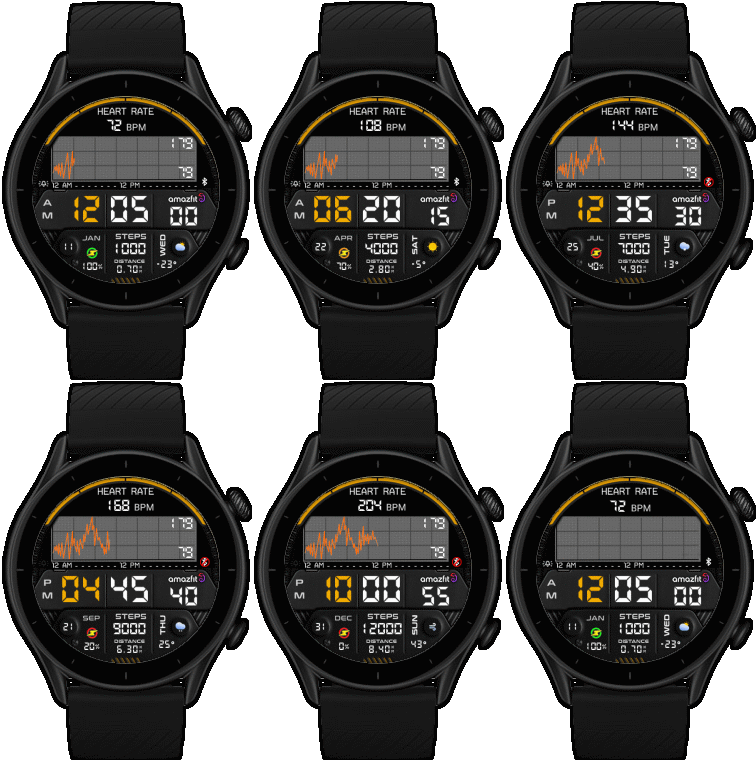 .
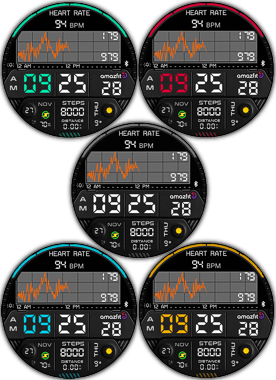
.
17-07-2023
- V 3.0.2.1
- Test Fix issue after reset the watch pulse ( max min ) now show
( but after reset or first open the screen will be black you must to press the button on the top of the watch. to activate the screen. (Do this once after reset or first open), then it can be used normally.
17-07-2023
- Fix some issue about after reset graph not show
- but the max min not show after reset watch, must to select other watchface and select back , " min and max " will be work again ( I think it is issue on FW , I can not fix)
- upload version 3
- Changed way update "center max min" of pulse data by repeating function call every second (it will work when main screen have be changes)
It is not related to the display on the graph. The display will be based on the DEVICE specified in the FW.
14-07-2023 (1) (2)
- Upload Version 2 Add Custom Script Change Color (2)
- Add Full AOD ( graph and Pulse "Highest, lowest of that day" are not display and show BW) (2)
- Click Color click on logo ( Amazfit ) (2)
- Change layout and images
- Add weather, steps, distance, calories, heart rate, battery, date, seconds, Graph_Heart,
- Add Full AOD ( graph and Pulse "Highest, lowest of that day" are not display )
- Shortcut open calendar ( click on day area)
- Shortcut open Sports list ( click on number of step )
Note : After click "change color" the screen will go to black screen , click on screen again to refresh update change color
- Use Custom Script to built this watchface.
This watchface I made to test built "heart rate graphing" script.
From testing on GTR3 for 2 days, it can display the graph and Highest, lowest of that day normally.
However, the results will depend on your activity and wearing the right equipment. Including an auto heart check setting. In this test, I set it to check every 1 minutes.
tested results is as shown below.
If the graph stops working, it is recommended to turn off the clock and turn it back on. The graph will work again. The graph will continue to display the data at the time of restarted. But the data while the graph stop work. it will not show on display.
if use this watchface and reset or power off watch
when the watch turn on again , Graph and max min will stop. can fix by please select other watchface and select back , Graph will be work again
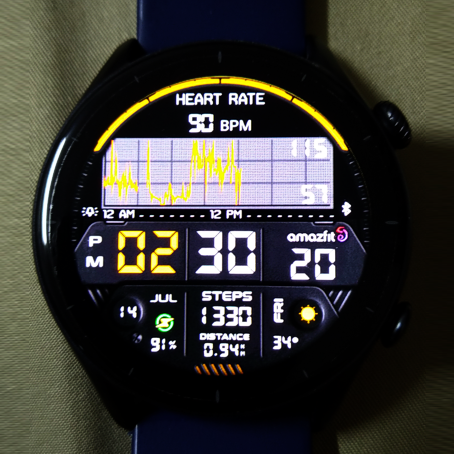
------------------------------------------------------------------------------
it works in 24h format.
for the 12 h format to work. must be enabled in phone settings. (settings-system-date and time-disable 24-hour format.)
标签
分享此表盘
评论
您需要登录才能发布或回复评论。
近期 社区论坛 讨论贴
Convert request for gtr4
Thank you so much...
Please port request for gtr4
It is perfect thank you 🙏...
Snoopy black version GTR 3
Many thanks sir...
Request: "Dash Digital" and “Acrive” style for Amazfit GTR Mini
Thank you asoo! I installed the V2 version on my GTR Mini and it works great. Thanks for your time and for moving the thread to the right section!...
Minimal watchface request for gtr4
Thank you sir i appreciate it...
Please help find lost face
Someone created this model at their discretion and grouped here several components from the watch manufacturer, and you ...
If it is possible request for gtr4
Very beautiful thank you sir...





does anyone else have this problem or just me? 15.07.2023 11:57:37 投诉
Now Thailand is 12:40AM, Graph in my GTR3 will work normal will not need to reset ,
AS far as I tested for about 3 days on the GTR3 still didn't find any issues and I set it to check the pulse every 5 minutes.
However , I am not sure how many days it will work without problems. and not sure on other device 19.07.2023 20:49:19 投诉
As for the reset after midnight I'm not sure that you mean.
But the Graphs will be displayed day by day. The graph will run until 11:59pm.
When the new day arrives, the graph will be empty. and start again at 12:00am 19.07.2023 20:59:34 投诉
So I will close this project 24.07.2023 05:16:43 投诉