Live Sky & Weather_GTR4 / 实时天空和天气_GTR4

Compatible with
GTR 4 Supported Languages
en, ms, pt, ru, uk, zh
en, ms, pt, ru, uk, zh
Uploaded: 18.06.2023 17:50
Updated: 15.07.2023 18:17
60 users have this item in favourites
Important Information for Users
Please note that all watch faces available on this site are creative works by our users and are not affiliated with official brands or trademarks. They are created by fans for fans, inspired by popular cultural phenomena, games, movies, or series.
Our goal is to provide a platform for creativity and exchange, but we also strive to respect intellectual rights. If you hold copyright to any content that you believe infringes your rights on this site, please contact us for appropriate action.
Please note that all watch faces available on this site are creative works by our users and are not affiliated with official brands or trademarks. They are created by fans for fans, inspired by popular cultural phenomena, games, movies, or series.
Our goal is to provide a platform for creativity and exchange, but we also strive to respect intellectual rights. If you hold copyright to any content that you believe infringes your rights on this site, please contact us for appropriate action.

Description
15-07-2023
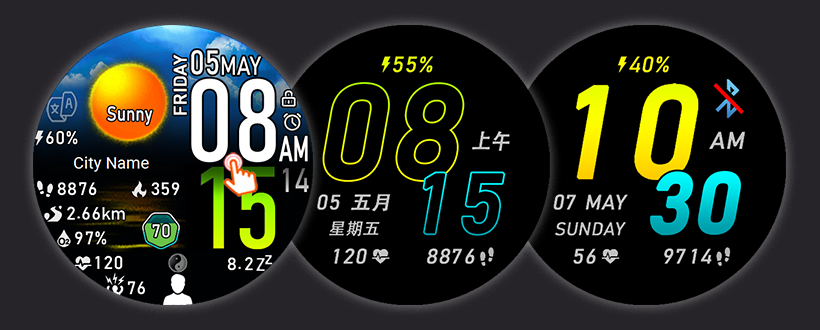
- Add Watch Face special for Malaysia user that include English, Chinese & Malay language, Festival is special set follow Malaysia Festival.
- All Watch Face update to Version 2 with below changer...
i) Selectable font style at AOD display : Hollow Font for battery saving purpose & Solid Font that easy to read under sunlight.
ii) Shortcut for Battery change from "Battery Saver screen" to "Battery Manager" that is more useful for user.
02-07-2023
- Add language Portuguese as request.
29-06-2023
- Add language Russian and Ukrainian Watch Face as request.
*** WF en-ru-uk & en-pt is version without Lunar date and Festival. ***
________________________________________________________________________________________________________________________________
This watch face is designed with beautiful sky background and weather, and almost all shortcut keys are available.
这款表盘采用美丽的天空背景和天气设计,几乎所有快捷键都可用。
Special features for this Watch Face.
此表盘的特殊功能。
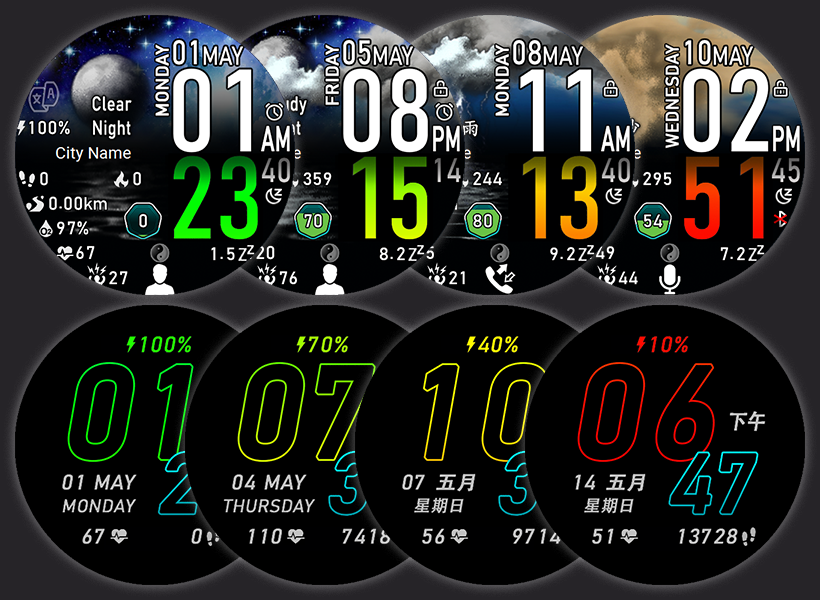
1) Hour / Minute text as battery indicator.
Minutes text in normal mode and hours text in AOD mod will change color from green to red according to battery level. You can easily know the status of your battery without read the battery level text, when those "minutes/hours" text turns red, it's time to charge your watch.
1)小时/分钟字体作为电池指示器。
正常模式下的分钟字体和 息屏模式下的小时字体将根据电池电量从绿色变为红色。 您无需阅读电池电量字体即可轻松了解电池状态,当“分钟/小时”字体变为红色时,就该为手表充电了
2) This watch face was made in a custom scripts to implement some functions that didn't support in Zepp OS1.0 & Zepp OS2.0 versions, as we know...
a) Lunar calendar, solar terms & festivals.
- Not support for the original firmware of the Zepp OS1.0 international version watch.
- Zepp OS2.0 and above, unable to display lunar date and festivals if watch language is not set in Chinese.
- With this watch face, you can on/off Lunar Date & Festival anytime for all firmware & Zepp OS version.
b) Custom scripts to link to un-support shortcut .
- The original firmware doesn't support certain shortcut like Calendar, Choose Workout, Workout History, World Clock, Top Contact...
- With this watch face, almost all page is possible to go.
2)此表盘是用自定义代码制作的,以实现一些在Zepp OS1.0和Zepp OS2.0版本中不支持的功能,正如我们所知.....
a)农历、节气和节日。
- Zepp OS1.0国际版手表原装固件不支持此功能。
- Zepp OS2.0及以上版本,如果手表语言未设置为中文,则无法显示阴历和节日。
- 有了这个表盘,无论您的手表固件属于哪个版本,您都可以随时打开/关闭农历日期和节日。
b)链接到不支持快捷方式的自定义代码
- 原生固件不支持某些快捷方式,例如日历、选择运动、运动记录、世界时钟、热门联系人等等...
- 有了这个表盘,几乎所有页面都可通过快捷键到访。
3) Changeable Weather Description and Watch Face language.
This watch face supports English, Chinese Simplified & Chinese Traditional text.
- Tap on "文/A" icon to on/off or switch the weather description & also Watch Face language (Not the watch language setting).
- The Weekday, Month & AM/PM only change follow watch language setting.
3)可选择性的天气描述和表盘语言。
此表盘支持英文、简体中文和繁体中文
- 点击 "文/A" 图标打开/关闭或切换天气描述和表盘语言(不是手表语言设置)
- 星期、月份和上午/下午仅根据手表语言设置更改。
4) Changeable Sky background and cloud on sky.
- Sky background will change according to the time of day, sunrise sky, sunny sky, sunset sky and night sky.
(The sunrise sky will change EXACTLY ON TIME follow watch sunrise time, the original firmware will only change 30~40 minute later after sunrise time)
- Cloud on sky change according to weather.
4)多变的天空背景和天空中的云彩。
- 天空背景会根据一天中的时间、日出、中午、日落和夜晚而变化。
(日出天空会随着手表日出时间准时更换,原来的固件只能在日出时间后30~40分钟后更换)
- 天空中的云朵将根据天气变化而更换。
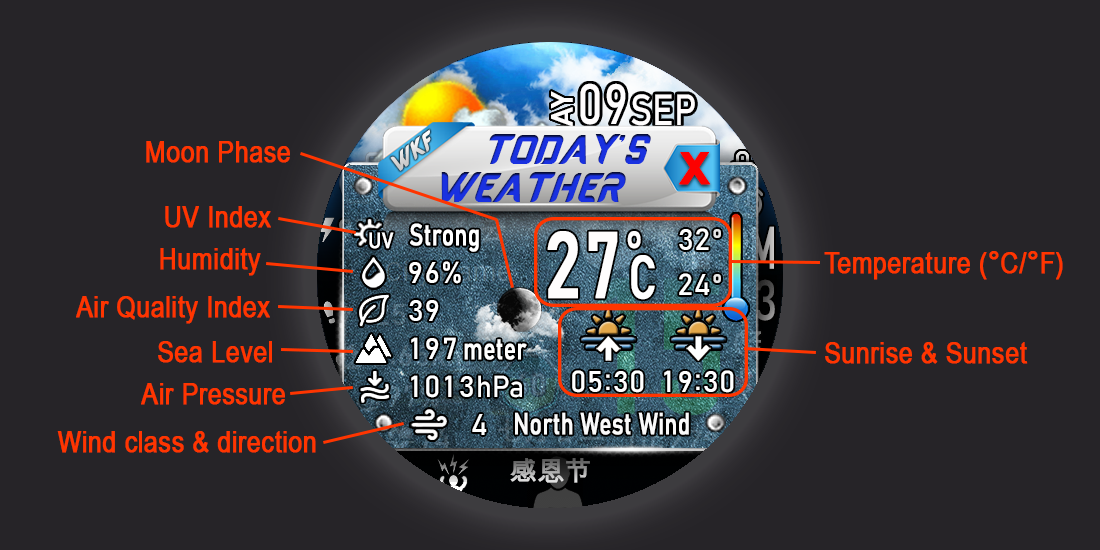
5) "Today's Weather" board.
- Tap on Weather description text to open "Today's Weather" board, you can see more weather information in the board.
- Tap on weather data to open relevant Weather page, Barometer page and Sun & Moon page.
5)“今日天气”板块。
- 点击天气描述文本打开“今日天气”看板,您可以在看板中看到更多天气信息。
- 点击天气数据打开相关的天气页面、气压高度计页面还有太阳和月亮页面。
6) Support Units in Metric & Imperial display in all language, set your watch UNITS to...
- "Metric" will display Distance in km, Altitude in meter, Temperature in Celsius.
- "Imperial" will display Distance in miles, Altitude in feet, Temperature in Fahrenheit.
6)支持所有语言的公制和英制单位显示,将您的手表单位设置为
- “公制” 将显示以公里为距离的单位、以米为高度的单位、以摄氏为温度的单位。
- “英制” 将显示以英里为距离的单位,以英尺为高度的单位,以华氏度为温度的单位。
7) Lunar Date and Festival.
- Tap on Ying Yang icon/Lunar Date to display/hide the Lunar date & Festival.
7)农历日期和节日。
- 点击阴阳图标/农历来显示/隐藏农历日期和节日。
8) Custom Icon (Below Lunar Date)
- Tap to switch the application icons, long press to open relevant application.
- Top Contacts > Recants Call > Voice Memos > Local Music > Phone Music Control > Find My Phone > To Do > Compass > One-Tap Measuring
8)自定义图标(农历下方)
- 点击切换应用程序图标,长按打开相关应用程序。
- 热门联系人 > 最近通话 > 语音备忘录 > 本地音乐 > 手机音乐控制 > 查找我的手机 > 待办事项 > 指南针 > 一键测量
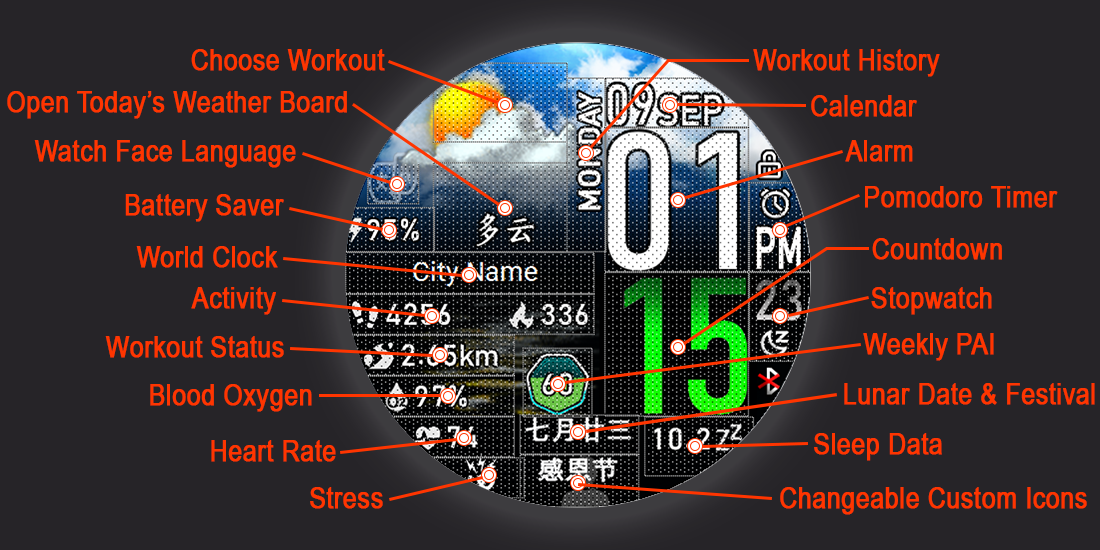
9) Description Shortcuts:
- Tap on Battery -> Battery saver mode
- Tap on Sky above Weather text -> Choose Workout
- Tap on Weekday -> Workout History
- Tap on City -> World Clock
- Tap on Step & Calories -> Activity (Step Today, Fat-Burn Time & Stand Today)
- Tap on Distance -> Workout Status
- Tap on O² -> Blood Oxygen
- Tap on Heart rate -> Heart Rate
- Tap on Stress icon -> Stress
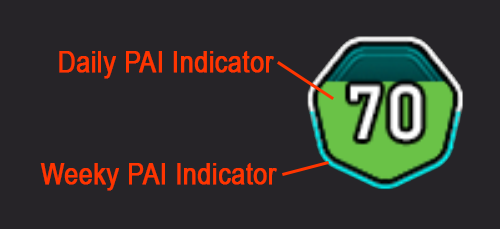
- Tap on Pai -> Weekly PAI
- Tap on Date -> Calendar
- Tap on Hour -> Alarm
- Tap on Minute -> Countdown
- Tap on Second -> Stopwatch
- Tap on AM/PM -> Pomodoro Timer
- Tap on Sleep -> Sleep data
9)描述快捷键:
- 点击电量 -> 省电模式
- 点击天气文字上方的天空 -> 选择运动
- 点击星期 -> 运动记录
- 点击城市 -> 世界时钟
- 点击步数和卡路里 -> 活动(今日步数、燃脂时间和今日站立)
- 点击距离 -> 运动状态
- 点击 O² -> 血氧
- 点击心率 -> 心率
- 点击压力图标 -> 压力
- 点击 PAI -> PAI
- 点击日期 -> 日历
- 点击小时 -> 闹钟
- 点击分钟 -> 倒计时
- 点击秒 -> 秒表
- 点击上午/下午 -> 番茄钟
- 点击睡眠 -> 睡眠数据
Vibration & Message when Bluetooth Connection lost/restored (for this feature to work, AOD must be enabled on the watch).
蓝牙连接丢失/恢复时的振动和消息(要使用此功能,必须在手表上启用息屏显示)
Special thanks...
1) @SashaCX75 - For Watch Face Editor Tool.
2) @chen1092 - For Lunar script sharing.
3) @mirda69 - For night weather icon script sharing.
4) Amazfit Zepp Community team help to solve some script issue.
特别感谢...
1) @SashaCX75 - 于表盘编辑器工具。
2) @chen1092 - 于 Lunar 代码共享。
3) @mirda69 - 于夜间天气图标代码共享。
4) Amazfit Zepp 团队帮助解决了部分代码问题。
This watch face just tested on GTR3 and GTR4.
这个表盘只在 GTR3 和 GTR4 上测试过。
Please do not copy or edit this WF without my permission.
未经我的许可,请勿复制或编辑此表盘
If you want more language, please let me know and give me the translate in your language. I will try my best to add in more language.
Tags
digital
weather
steps
calories
distance
heartrate
battery
date
seconds
custom script
degrees celsius
degrees Fahrenheit
watch face language change
Lunar Date & Festival
Share this face
Comments
You need to be logged in to post or reply to comments.
Recent community discussions
Few changes for gtr4
Thank you for all your help 🙂 have a great weekend...
convert request for GTS 2 mini
You are so GREAT! Thanks again!...
Adding some options request for gtr4
Amazing thank you sir 🙏...
Convert request for gtr4
Thank you so much...
Please port request for gtr4
It is perfect thank you 🙏...
Snoopy black version GTR 3
Many thanks sir...
Request: "Dash Digital" and “Acrive” style for Amazfit GTR Mini
Thank you asoo! I installed the V2 version on my GTR Mini and it works great. Thanks for your time and for moving the thread to the right section!...





You have nothing to thank me for...we are here to help each other