VeeValdi clear

Compatible with
GTR 3 Idiomas compatibles
multilingual, en, pl
multilingual, en, pl
Fecha agregada: 30.05.2023 19:14
13 los usuarios tienen en favoritas
Información Importante para los Usuarios
Tenga en cuenta que todos los diseños de relojes disponibles en este sitio son obras creativas de nuestros usuarios y no están afiliados con marcas o marcas registradas oficiales. Son creados por y para fans, inspirados en fenómenos culturales populares, juegos, películas o series.
Nuestro objetivo es proporcionar una plataforma para la creatividad e intercambio, pero también nos esforzamos por respetar los derechos intelectuales. Si posee derechos de autor sobre cualquier contenido que cree infringe sus derechos en este sitio, contáctenos para tomar medidas apropiadas.
Tenga en cuenta que todos los diseños de relojes disponibles en este sitio son obras creativas de nuestros usuarios y no están afiliados con marcas o marcas registradas oficiales. Son creados por y para fans, inspirados en fenómenos culturales populares, juegos, películas o series.
Nuestro objetivo es proporcionar una plataforma para la creatividad e intercambio, pero también nos esforzamos por respetar los derechos intelectuales. Si posee derechos de autor sobre cualquier contenido que cree infringe sus derechos en este sitio, contáctenos para tomar medidas apropiadas.

Descripción
veevaldi_clear_en – wersja angielskojęzyczna / English version
veevaldi_clear_pl – wersja polskojęzyczna / Polish version
------------------------------------------------------------------------------------------------------------------
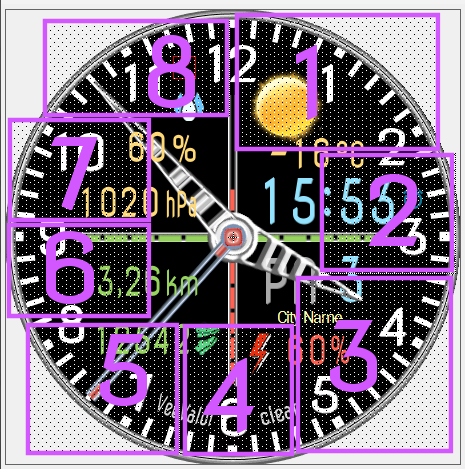
Pola (strefy) dotykowe - skróty // Touch fields (zones) - shortcuts:
 [/url]
----------------- PL --------------------------------------------------------------------------------------------
„VeeValdi clear”, to tarcza zegarkowa przeznaczona dla smartwatcha Amazfit GTR 3.
Na głównej tarczy zegarkowej czas jest prezentowany w formie analogowej i cyfrowej. Wyświetlane są także: liczbowo dzień miesiąca, dwuliterowy skrót nazwy dnia tygodnia, stan naładowania akumulatora w %, czerwone segmenty pionowe prezentujące stan naładowania akumulatora, zielone segmenty poziome prezentujące kroki (pokonany dystans), zmieniające się obrazki aktualnego stanu pogody, aktualna temperatura w °C, bieżące położenie (lokalizacja, nazwa miejscowości – nazwa miejsca), znak braku sygnału bluetooth oraz ikona aktywności alarmu. Utrata połączenia bluetooth i przywrócenie połączenia sygnalizowane są dodatkowo wibracjami zegarka. Wibracją sygnalizowane są również pełne godziny.
Rodzaj wyświetlanych innych parametrów ustala użytkownik smartwatcha w 4 strefach (polach) edytowalnych (*).
W strefie edytowalnej, którą jest pierwsze pole od góry można przywołać pokazywanie parametrów pogody.
W strefie edytowalnej, którą jest drugie pole od góry można ustawić pokazywanie różnych parametrów związanych zarówno z pogodą jaki z aktywnością.
W strefie edytowalnej, którą jest trzecie i czwarte pole od góry można ustawić pokazywanie parametrów aktywności.
Użytkownik może również wybrać aż 5 rodzajów cyferblatów (5 rodzajów tła tarczy zegarka).
Można także wybrać dwa rodzaje wskazówek zegarkowych.
(*) Wyborów wyświetlanych edytowalnych parametrów, tła i wskazówek dokonuje się w trybie edycyjnym tarczy zegarkowej.
Aby przejść w tryb edycyjny tarczy zegarkowej należy dotknąć (nacisnąć) palcem środka tarczy zegarka. Pojawi się wówczas ikona pióra, którą również należy dotknąć (nacisnąć). Potem po jednokrotnym lub wielokrotnym dotknięciu wybranej strefy (pola), wybieramy wyświetlany parametr. Można też to zrobić górnym pokrętłem umieszczonym po prawej stronie koperty zegarka. Podobnie postępujemy, gdy chcemy wybrać rodzaj tła tarczy zegarka (cyferblatu) lub typ wskazówek zegarkowych. Aby tego dokonać musimy po dotknięciu (naciśnięciu) środka tarczy zegarka przesunąć palcem tarczę z parametrami edytowalnymi w lewo, aż pokaże się kolejna tarcza edycyjna - wyboru (najpierw pokaże się dla tła, a potem dla wskazówek zegarkowych). Wyboru dokonujemy podobne jak parametrów edytowalnych.
Zastosowałem także aż 8 pól dotykowych na tarczy zegarka (skrótów). Rozmieszczenie tych obszarów dotykowych pokazuje zamieszczony powyżej obrazek.
Wystarczy tylko dotknąć jeden z wybranych obszarów, aby szybko przejść do:
1 – stanu pogody, aktualnej temperatury i wilgotności,
2 – ustawienia alarmów,
3 – stopera,
4 – ustawienia odliczania wstecznego,
5 – wyświetlania poziomu stresu,
6 – ilości kroków,
7 – ciśnienia atmosferycznego,
8 – pulsu (tętna, BPM),
W tym projekcie zastosowałem płynnie (gładko) poruszającą się wskazówkę sekundnika.
W trybie AOD są pokazywane: czas formie analogowej i cyfrowej oraz stan naładowania akumulatora w %.
----------------- EN --------------------------------------------------------------------------------------------
"VeeValdi clear", is a watch face designed for the Amazfit GTR 3 smartwatch.
On the main watch face, time is presented in analog and digital form. The following are also displayed: numerical day of the month, two-letter abbreviation of the day of the week, battery charge status in %, red vertical segments presenting the battery charge status, green horizontal segments presenting steps (distance covered), changing pictures of the current weather condition, current temperature in °C , current position (location, city name - place name), no bluetooth signal sign and alarm activity icon. The loss of the bluetooth connection and the restoration of the connection are additionally signaled by the vibration of the watch. Full hours are also signaled by vibration.
The type of other parameters displayed is determined by the smartwatch user in 4 editable zones (fields) (*).
In the editable zone, which is the first field from the top, you can display weather parameters.
In the editable zone, which is the second field from the top, you can set the display of various parameters related to both weather and activity.
In the editable zone, which is the third and fourth field from the top, you can set the display of activity parameters.
The user can also choose up to 5 types of dials (5 types of watch face background).
You can also choose two types of watch hands.
(*) Selections to display editable parameters, background and hands are made in watch face edit mode.
To enter the watch face editing mode, touch (press) the center of the watch face with your finger. The pen icon will then appear, which should also be touched (pressed). Then, after touching the selected zone (field) once or multiple times, we select the displayed parameter. You can also do it with the upper dial located on the right side of the watch case. We proceed in a similar way when we want to choose the type of background of the watch face (dial) or the type of watch hands. To do this, after touching (pressing) the center of the watch face, move the dial with editable parameters to the left with your finger, until the next edition - selection dial appears (first it will be shown for the background, and then for the watch hands). The selection is made similarly to the editable parameters.
I also used as many as 8 touch fields on the watch face (shortcuts). The location of these touch areas is shown in the picture above.
Just touch one of the selected areas to quickly go to:
1 – weather condition, current temperature and humidity,
2 - alarm settings,
3 - stopwatch,
4 - countdown settings,
5 - stress level display,
6 - number of steps,
7 - atmospheric pressure,
8 - pulse (heart rate, BPM),
In this project, I used a smoothly moving second hand.
In the AOD mode, the time is shown in analog and digital form and the battery charge status in %.
veevaldi_clear_pl – wersja polskojęzyczna / Polish version
------------------------------------------------------------------------------------------------------------------
Pola (strefy) dotykowe - skróty // Touch fields (zones) - shortcuts:
[/url]----------------- PL --------------------------------------------------------------------------------------------
„VeeValdi clear”, to tarcza zegarkowa przeznaczona dla smartwatcha Amazfit GTR 3.
Na głównej tarczy zegarkowej czas jest prezentowany w formie analogowej i cyfrowej. Wyświetlane są także: liczbowo dzień miesiąca, dwuliterowy skrót nazwy dnia tygodnia, stan naładowania akumulatora w %, czerwone segmenty pionowe prezentujące stan naładowania akumulatora, zielone segmenty poziome prezentujące kroki (pokonany dystans), zmieniające się obrazki aktualnego stanu pogody, aktualna temperatura w °C, bieżące położenie (lokalizacja, nazwa miejscowości – nazwa miejsca), znak braku sygnału bluetooth oraz ikona aktywności alarmu. Utrata połączenia bluetooth i przywrócenie połączenia sygnalizowane są dodatkowo wibracjami zegarka. Wibracją sygnalizowane są również pełne godziny.
Rodzaj wyświetlanych innych parametrów ustala użytkownik smartwatcha w 4 strefach (polach) edytowalnych (*).
W strefie edytowalnej, którą jest pierwsze pole od góry można przywołać pokazywanie parametrów pogody.
W strefie edytowalnej, którą jest drugie pole od góry można ustawić pokazywanie różnych parametrów związanych zarówno z pogodą jaki z aktywnością.
W strefie edytowalnej, którą jest trzecie i czwarte pole od góry można ustawić pokazywanie parametrów aktywności.
Użytkownik może również wybrać aż 5 rodzajów cyferblatów (5 rodzajów tła tarczy zegarka).
Można także wybrać dwa rodzaje wskazówek zegarkowych.
(*) Wyborów wyświetlanych edytowalnych parametrów, tła i wskazówek dokonuje się w trybie edycyjnym tarczy zegarkowej.
Aby przejść w tryb edycyjny tarczy zegarkowej należy dotknąć (nacisnąć) palcem środka tarczy zegarka. Pojawi się wówczas ikona pióra, którą również należy dotknąć (nacisnąć). Potem po jednokrotnym lub wielokrotnym dotknięciu wybranej strefy (pola), wybieramy wyświetlany parametr. Można też to zrobić górnym pokrętłem umieszczonym po prawej stronie koperty zegarka. Podobnie postępujemy, gdy chcemy wybrać rodzaj tła tarczy zegarka (cyferblatu) lub typ wskazówek zegarkowych. Aby tego dokonać musimy po dotknięciu (naciśnięciu) środka tarczy zegarka przesunąć palcem tarczę z parametrami edytowalnymi w lewo, aż pokaże się kolejna tarcza edycyjna - wyboru (najpierw pokaże się dla tła, a potem dla wskazówek zegarkowych). Wyboru dokonujemy podobne jak parametrów edytowalnych.
Zastosowałem także aż 8 pól dotykowych na tarczy zegarka (skrótów). Rozmieszczenie tych obszarów dotykowych pokazuje zamieszczony powyżej obrazek.
Wystarczy tylko dotknąć jeden z wybranych obszarów, aby szybko przejść do:
1 – stanu pogody, aktualnej temperatury i wilgotności,
2 – ustawienia alarmów,
3 – stopera,
4 – ustawienia odliczania wstecznego,
5 – wyświetlania poziomu stresu,
6 – ilości kroków,
7 – ciśnienia atmosferycznego,
8 – pulsu (tętna, BPM),
W tym projekcie zastosowałem płynnie (gładko) poruszającą się wskazówkę sekundnika.
W trybie AOD są pokazywane: czas formie analogowej i cyfrowej oraz stan naładowania akumulatora w %.
----------------- EN --------------------------------------------------------------------------------------------
"VeeValdi clear", is a watch face designed for the Amazfit GTR 3 smartwatch.
On the main watch face, time is presented in analog and digital form. The following are also displayed: numerical day of the month, two-letter abbreviation of the day of the week, battery charge status in %, red vertical segments presenting the battery charge status, green horizontal segments presenting steps (distance covered), changing pictures of the current weather condition, current temperature in °C , current position (location, city name - place name), no bluetooth signal sign and alarm activity icon. The loss of the bluetooth connection and the restoration of the connection are additionally signaled by the vibration of the watch. Full hours are also signaled by vibration.
The type of other parameters displayed is determined by the smartwatch user in 4 editable zones (fields) (*).
In the editable zone, which is the first field from the top, you can display weather parameters.
In the editable zone, which is the second field from the top, you can set the display of various parameters related to both weather and activity.
In the editable zone, which is the third and fourth field from the top, you can set the display of activity parameters.
The user can also choose up to 5 types of dials (5 types of watch face background).
You can also choose two types of watch hands.
(*) Selections to display editable parameters, background and hands are made in watch face edit mode.
To enter the watch face editing mode, touch (press) the center of the watch face with your finger. The pen icon will then appear, which should also be touched (pressed). Then, after touching the selected zone (field) once or multiple times, we select the displayed parameter. You can also do it with the upper dial located on the right side of the watch case. We proceed in a similar way when we want to choose the type of background of the watch face (dial) or the type of watch hands. To do this, after touching (pressing) the center of the watch face, move the dial with editable parameters to the left with your finger, until the next edition - selection dial appears (first it will be shown for the background, and then for the watch hands). The selection is made similarly to the editable parameters.
I also used as many as 8 touch fields on the watch face (shortcuts). The location of these touch areas is shown in the picture above.
Just touch one of the selected areas to quickly go to:
1 – weather condition, current temperature and humidity,
2 - alarm settings,
3 - stopwatch,
4 - countdown settings,
5 - stress level display,
6 - number of steps,
7 - atmospheric pressure,
8 - pulse (heart rate, BPM),
In this project, I used a smoothly moving second hand.
In the AOD mode, the time is shown in analog and digital form and the battery charge status in %.
Etiquetas
analog
digital
dual time
seconds
seconds display
second hand
analog second hand
smooth second hand
smooth second pointer
steps
number of steps
distance
km
battery
percentage of Energy
day of week
day
day of the month
temperature
degrees Celsius
humidity
humidity in %
atmospheric pressure
hPa
wind
wind force
weather
weather condition
dynamic weather status icon
changing weather pictures
pulse
heart rate
bpm
abbreviation of the name of the day
calories
burned calories
kcal
kilocalories
battery charge status graphically
distance progress
step count progress
city name
location
bluetooth
Bluetooth vibration on/off
alarm
AOD
AOD function
editable zones
selection of parameters
editable parameters
editable backgrounds
background selection
editable watch hands - pointers
select the type of watch hands - pointers
active fields
touch fields
shortcuts
Comparte este watchface
Comentarios
You need to be logged in to post or reply to comments.
Discusiones recientes de la comunidad
Convert request for gtr4
Thank you so much...
Please port request for gtr4
It is perfect thank you 🙏...
Snoopy black version GTR 3
Many thanks sir...
Request: "Dash Digital" and “Acrive” style for Amazfit GTR Mini
Thank you asoo! I installed the V2 version on my GTR Mini and it works great. Thanks for your time and for moving the thread to the right section!...
Minimal watchface request for gtr4
Thank you sir i appreciate it...
Please help find lost face
Someone created this model at their discretion and grouped here several components from the watch manufacturer, and you ...
If it is possible request for gtr4
Very beautiful thank you sir...





No comments. Be the first to comment.