VeeValdi Activity

Compatible with
GTR 3 Supported Languages
multilingual, de, en, pl
multilingual, de, en, pl
Uploaded: 13.05.2023 20:32
18 users have this item in favourites
Important Information for Users
Please note that all watch faces available on this site are creative works by our users and are not affiliated with official brands or trademarks. They are created by fans for fans, inspired by popular cultural phenomena, games, movies, or series.
Our goal is to provide a platform for creativity and exchange, but we also strive to respect intellectual rights. If you hold copyright to any content that you believe infringes your rights on this site, please contact us for appropriate action.
Please note that all watch faces available on this site are creative works by our users and are not affiliated with official brands or trademarks. They are created by fans for fans, inspired by popular cultural phenomena, games, movies, or series.
Our goal is to provide a platform for creativity and exchange, but we also strive to respect intellectual rights. If you hold copyright to any content that you believe infringes your rights on this site, please contact us for appropriate action.

Description
veevaldi_activity_de – wersja niemieckojęzyczna / German-language version
veevaldi_activity_en – wersja angielskojęzyczna / English version
veevaldi_activity_pl – wersja polskojęzyczna / Polish version
veevaldi_activity_uk – wersja ukraińskojęzyczna / Ukrainian version
------------------------------------------------------------------------------------------------------------------
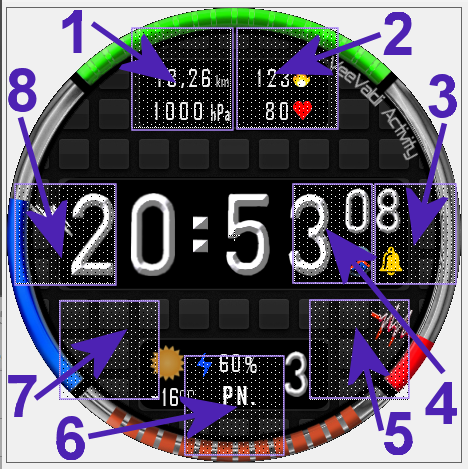
Pola (strefy) dotykowe - skróty // Touch fields (zones) - shortcuts:
----------------- PL --------------------------------------------------------------------------------------------
„VeeValdi Activity”, to tarcza zegarkowa przeznaczona dla smartwatcha Amazfit GTR 3.
Na głównej tarczy zegarkowej czas jest prezentowany w formie cyfrowej. Wyświetlane są także: liczbowo dzień miesiąca, dwuliterowy skrót nazwy dnia tygodnia, stan naładowania akumulatora w %, zmieniająca się ikona (obrazek) aktualnego stanu pogody i temperatura w °C. Na tarczy zegarkowej są 4 łuki. Łuku górny pokazuje aktualny stan kroków (postęp kroków), łuk dolny – ilość spalonych kalorii (postęp w spalaniu kalorii), łuk lewy – stan energii w akumulatorze, łuk prawy – stan pulsu (tętna). Ponadto stan kalorii i stan pulsu prezentowane są obrazkowymi wskaźnikami (błyskawica i kardiogram). Na tarczy zegarka wyświetlane są także: znak braku sygnału bluetooth oraz ikona aktywności alarmu. Utrata połączenia bluetooth i przywrócenie połączenia sygnalizowane są dodatkowo wibracjami zegarka. Wibracją sygnalizowane są również pełne godziny.
Inne parametry użytkownik może wyświetlić na tarczy zegarka według swoich preferencji w 4 strefach (polach) edytowalnych.
Są to: kroki, dystans (km), kalorie (kcal), puls (tętno - BPM), ciśnienie atmosferyczne (hPa), wilgotność (%), siła wiatru, indeks UV.
Użytkownik może również wybrać rodzaj cyferblatu (tła tarczy zegarka) spośród 4 dostępnych.
Wyboru wyświetlanych parametrów i tła dokonuje się w trybie edycyjnym tarczy zegarkowej.
Aby przejść w tryb edycyjny tarczy zegarkowej należy dotknąć (nacisnąć) palcem środka tarczy zegarka. Pojawi się wówczas ikona pióra, którą również należy dotknąć (nacisnąć). Potem po jednokrotnym lub wielokrotnym dotknięciu wybranej strefy (pola), wybieramy wyświetlany parametr. Można też to zrobić górnym pokrętłem umieszczonym po prawej stronie koperty zegarka. Podobnie postępujemy, gdy chcemy wybrać rodzaj tła tarczy zegarka (cyferblatu). Aby tego dokonać musimy po dotknięciu (naciśnięciu) środka tarczy zegarka przesunąć palcem tarczę z parametrami edytowalnymi w lewo, aż pokaże się kolejna tarcza edycyjna - wyboru (dla wyboru tła). Wyboru dokonujemy podobne jak parametrów edytowalnych.
Zastosowałem także aż 8 pól dotykowych na tarczy zegarka (skrótów). Rozmieszczenie tych obszarów dotykowych pokazuje zamieszczony powyżej obrazek.
Wystarczy tylko dotknąć jeden z wybranych obszarów, aby szybko przejść do:
1 – ilości kroków,
2 – pulsu (tętna, BPM),
3 – ustawienia odliczania wstecznego,
4 – stopera,
5 – wyświetlania poziomu stresu,
6 – ciśnienia atmosferycznego,
7 – stanu pogody, aktualnej temperatury i wilgotności,
8 – ustawienia alarmów,
W tym projekcie zastosowałem quasi animację. To napis z nazwą tarczy zegarka – „VeeValdi Activite”. Porusza się on jak wskazówka, czyli po okręgu tarczy zegarka.
W trybie AOD są pokazywane: czas formie cyfrowej, liczbowo dzień miesiąca i stan naładowania akumulatora jako liczba w %, a także znak braku sygnału bluetooth oraz ikona aktywności alarmu.
Oprócz wersji angielskojęzycznej udostepniłem wersje: polską, ukraińską i niemiecką.
----------------- EN --------------------------------------------------------------------------------------------
"VeeValdi Activity", is a watch face designed for the Amazfit GTR 3 smartwatch.
On the main watch face, the time is presented in digital form. The following are also displayed: numerical day of the month, two-letter abbreviation of the day of the week, battery charge level in %, changing icon (picture) of the current weather condition and temperature in °C. There are 4 arcs on the watch face. The upper arch shows the current state of steps (steps progress), the lower arch - the number of calories burned (progress in calorie burning), the left arch - the state of energy in the battery, the right arch - the state of the pulse (heart rate). In addition, the state of calories and the state of the pulse are presented with pictorial indicators (lightning bolt and cardiogram). The watch face also displays the no bluetooth signal sign and the alarm activity icon. The loss of the bluetooth connection and the restoration of the connection are additionally signaled by the vibration of the watch. Full hours are also signaled by vibration.
Other parameters can be displayed on the watch face according to your preferences in 4 editable zones (fields).
These are: steps, distance (km), calories (kcal), pulse (heart rate - BPM), atmospheric pressure (hPa), humidity (%), wind forced, UV index.
The user can also choose the type of dial (background of the watch face) from among the 4 available.
Selection of displayed parameters and background is made in the watch face editing mode.
To enter the watch face editing mode, touch (press) the center of the watch face with your finger. The pen icon will then appear, which should also be touched (pressed). Then, after touching the selected zone (field) once or multiple times, we select the displayed parameter. You can also do it with the upper dial located on the right side of the watch case. We proceed in a similar way when we want to choose the type of background of the watch face (dial). To do this, after touching (pressing) the center of the watch face, move the dial with editable parameters to the left with your finger, until the next edit dial appears - selection (for background selection). The selection is made similarly to the editable parameters.
I also used as many as 8 touch fields on the watch face (shortcuts). The location of these touch areas is shown in the picture above.
Just touch one of the selected areas to quickly go to:
1 - number of steps,
2 - pulse (heart rate, BPM),
3 - countdown settings,
4 - stopwatch,
5 - stress level display,
6 - atmospheric pressure,
7 – weather condition, current temperature and humidity,
8 - alarm settings,
In this project I used quasi animation. This is an inscription with the name of the watch face - "VeeValdi Activite". It moves like the hand of a watch, i.e. around the circle of the watch face.
In AOD mode, the time is shown in digital form, the day of the month numerically and the battery charge status as a number in %, as well as the bluetooth signal loss sign and the alarm activity icon.
In addition to the English-language version, I have made available the following versions: Polish, Ukrainian and German.
veevaldi_activity_en – wersja angielskojęzyczna / English version
veevaldi_activity_pl – wersja polskojęzyczna / Polish version
veevaldi_activity_uk – wersja ukraińskojęzyczna / Ukrainian version
------------------------------------------------------------------------------------------------------------------
Pola (strefy) dotykowe - skróty // Touch fields (zones) - shortcuts:
----------------- PL --------------------------------------------------------------------------------------------
„VeeValdi Activity”, to tarcza zegarkowa przeznaczona dla smartwatcha Amazfit GTR 3.
Na głównej tarczy zegarkowej czas jest prezentowany w formie cyfrowej. Wyświetlane są także: liczbowo dzień miesiąca, dwuliterowy skrót nazwy dnia tygodnia, stan naładowania akumulatora w %, zmieniająca się ikona (obrazek) aktualnego stanu pogody i temperatura w °C. Na tarczy zegarkowej są 4 łuki. Łuku górny pokazuje aktualny stan kroków (postęp kroków), łuk dolny – ilość spalonych kalorii (postęp w spalaniu kalorii), łuk lewy – stan energii w akumulatorze, łuk prawy – stan pulsu (tętna). Ponadto stan kalorii i stan pulsu prezentowane są obrazkowymi wskaźnikami (błyskawica i kardiogram). Na tarczy zegarka wyświetlane są także: znak braku sygnału bluetooth oraz ikona aktywności alarmu. Utrata połączenia bluetooth i przywrócenie połączenia sygnalizowane są dodatkowo wibracjami zegarka. Wibracją sygnalizowane są również pełne godziny.
Inne parametry użytkownik może wyświetlić na tarczy zegarka według swoich preferencji w 4 strefach (polach) edytowalnych.
Są to: kroki, dystans (km), kalorie (kcal), puls (tętno - BPM), ciśnienie atmosferyczne (hPa), wilgotność (%), siła wiatru, indeks UV.
Użytkownik może również wybrać rodzaj cyferblatu (tła tarczy zegarka) spośród 4 dostępnych.
Wyboru wyświetlanych parametrów i tła dokonuje się w trybie edycyjnym tarczy zegarkowej.
Aby przejść w tryb edycyjny tarczy zegarkowej należy dotknąć (nacisnąć) palcem środka tarczy zegarka. Pojawi się wówczas ikona pióra, którą również należy dotknąć (nacisnąć). Potem po jednokrotnym lub wielokrotnym dotknięciu wybranej strefy (pola), wybieramy wyświetlany parametr. Można też to zrobić górnym pokrętłem umieszczonym po prawej stronie koperty zegarka. Podobnie postępujemy, gdy chcemy wybrać rodzaj tła tarczy zegarka (cyferblatu). Aby tego dokonać musimy po dotknięciu (naciśnięciu) środka tarczy zegarka przesunąć palcem tarczę z parametrami edytowalnymi w lewo, aż pokaże się kolejna tarcza edycyjna - wyboru (dla wyboru tła). Wyboru dokonujemy podobne jak parametrów edytowalnych.
Zastosowałem także aż 8 pól dotykowych na tarczy zegarka (skrótów). Rozmieszczenie tych obszarów dotykowych pokazuje zamieszczony powyżej obrazek.
Wystarczy tylko dotknąć jeden z wybranych obszarów, aby szybko przejść do:
1 – ilości kroków,
2 – pulsu (tętna, BPM),
3 – ustawienia odliczania wstecznego,
4 – stopera,
5 – wyświetlania poziomu stresu,
6 – ciśnienia atmosferycznego,
7 – stanu pogody, aktualnej temperatury i wilgotności,
8 – ustawienia alarmów,
W tym projekcie zastosowałem quasi animację. To napis z nazwą tarczy zegarka – „VeeValdi Activite”. Porusza się on jak wskazówka, czyli po okręgu tarczy zegarka.
W trybie AOD są pokazywane: czas formie cyfrowej, liczbowo dzień miesiąca i stan naładowania akumulatora jako liczba w %, a także znak braku sygnału bluetooth oraz ikona aktywności alarmu.
Oprócz wersji angielskojęzycznej udostepniłem wersje: polską, ukraińską i niemiecką.
----------------- EN --------------------------------------------------------------------------------------------
"VeeValdi Activity", is a watch face designed for the Amazfit GTR 3 smartwatch.
On the main watch face, the time is presented in digital form. The following are also displayed: numerical day of the month, two-letter abbreviation of the day of the week, battery charge level in %, changing icon (picture) of the current weather condition and temperature in °C. There are 4 arcs on the watch face. The upper arch shows the current state of steps (steps progress), the lower arch - the number of calories burned (progress in calorie burning), the left arch - the state of energy in the battery, the right arch - the state of the pulse (heart rate). In addition, the state of calories and the state of the pulse are presented with pictorial indicators (lightning bolt and cardiogram). The watch face also displays the no bluetooth signal sign and the alarm activity icon. The loss of the bluetooth connection and the restoration of the connection are additionally signaled by the vibration of the watch. Full hours are also signaled by vibration.
Other parameters can be displayed on the watch face according to your preferences in 4 editable zones (fields).
These are: steps, distance (km), calories (kcal), pulse (heart rate - BPM), atmospheric pressure (hPa), humidity (%), wind forced, UV index.
The user can also choose the type of dial (background of the watch face) from among the 4 available.
Selection of displayed parameters and background is made in the watch face editing mode.
To enter the watch face editing mode, touch (press) the center of the watch face with your finger. The pen icon will then appear, which should also be touched (pressed). Then, after touching the selected zone (field) once or multiple times, we select the displayed parameter. You can also do it with the upper dial located on the right side of the watch case. We proceed in a similar way when we want to choose the type of background of the watch face (dial). To do this, after touching (pressing) the center of the watch face, move the dial with editable parameters to the left with your finger, until the next edit dial appears - selection (for background selection). The selection is made similarly to the editable parameters.
I also used as many as 8 touch fields on the watch face (shortcuts). The location of these touch areas is shown in the picture above.
Just touch one of the selected areas to quickly go to:
1 - number of steps,
2 - pulse (heart rate, BPM),
3 - countdown settings,
4 - stopwatch,
5 - stress level display,
6 - atmospheric pressure,
7 – weather condition, current temperature and humidity,
8 - alarm settings,
In this project I used quasi animation. This is an inscription with the name of the watch face - "VeeValdi Activite". It moves like the hand of a watch, i.e. around the circle of the watch face.
In AOD mode, the time is shown in digital form, the day of the month numerically and the battery charge status as a number in %, as well as the bluetooth signal loss sign and the alarm activity icon.
In addition to the English-language version, I have made available the following versions: Polish, Ukrainian and German.
Tags
digital
seconds
seconds display
modern design
steps
number of steps
distance
km
battery
percentage of Energy
day of week
day
day of the month
temperature
degrees Celsius
humidity
humidity in %
atmospheric pressure
hPa
wind
wind force
weather
weather condition
dynamic weather status icon
changing weather pictures
pulse
heart rate
bpm
pulse state arc
abbreviation of the name of the day
calories
burned calories
kcal
kilocalories
energy consumption progress
steps progress
arc of steps progress
a pointer indication of the pulse status
a pointer indication of the battery status
battery status arc
calorie arc
distance progress
step count progress
calorie counting progress
quasi animation
bluetooth
Bluetooth vibration on/off
alarm
DND
LOCK
AOD
AOD function
quasi animation in AOD
editable zones
selection of parameters
editable parameters
editable backgrounds
background selection
active fields
touch fields
shortcuts
Share this face
Comments

Marco68@
Full Aod ? Thank you
12.06.2023 18:27:47 Complaint

demiurg1
Marco68@, I don't really know what this question is about?
10.09.2023 22:09:38 Complaint
You need to be logged in to post or reply to comments.
Recent community discussions
Simple digital watchface request for gtr4
Perfect thank you sir...
Creation request gtr4
Can someone please create this face for the gtr4 https://www.tagheuer.com/gb/en/smartwatches/collections/tag-heuer-connected/45-mm/SBT8A87.EB0436.html?utm_source=facebook&utm_...
Minimal amber watchface for gtr4
It is perfect thank you sir i appreciate you 🙏...
Upgrade of Snoopy GTR3
I love it, thanks a lot asoo <3...
Convert request for gtr4
Thank you sir i appreciate it...
Port request gtr4
If you're not going to use the watchface tool, then many times you can upload the entire .zip file to Gemini or another AI tool and tell it to make the edits for you. Thank...
Port request gtr4
Thank you...





