Outpost4 VR

Сумісний з
GTR 3 Підтримувані мови
multilingual, de, en, pl, uk
multilingual, de, en, pl, uk
Завантажено: 04.04.2023 13:05
Оновлено: 05.04.2023 18:43
51 користувачів додали це до обраного
Важлива інформація для користувачів
Зверніть увагу, що всі циферблати, доступні на цьому сайті, є творчими роботами наших користувачів і не пов'язані з офіційними брендами або торговими марками. Вони створюються шанувальниками для шанувальників, надихаються популярними культурними феноменами, іграми, фільмами, або серіалами.
Наша мета - надати платформу для творчості та обміну, але ми також прагнемо поважати інтелектуальні права. Якщо ви володієте авторськими правами на будь-який контент, який, на вашу думку, порушує ваші права на цьому сайті, будь ласка, зв'яжіться з нами для вжиття відповідних заходів.
Зверніть увагу, що всі циферблати, доступні на цьому сайті, є творчими роботами наших користувачів і не пов'язані з офіційними брендами або торговими марками. Вони створюються шанувальниками для шанувальників, надихаються популярними культурними феноменами, іграми, фільмами, або серіалами.
Наша мета - надати платформу для творчості та обміну, але ми також прагнемо поважати інтелектуальні права. Якщо ви володієте авторськими правами на будь-який контент, який, на вашу думку, порушує ваші права на цьому сайті, будь ласка, зв'яжіться з нами для вжиття відповідних заходів.

Опис
outpost4_vr_de – wersja niemieckojęzyczna / German-language version
outpost4_vr_en – wersja angielskojęzyczna / English version
outpost4_vr_pl – wersja polskojęzyczna / Polish version
outpost4_vr_uk – wersja ukraińskojęzyczna / Ukrainian version
------------------------------------------------------------------------------------------------------------------
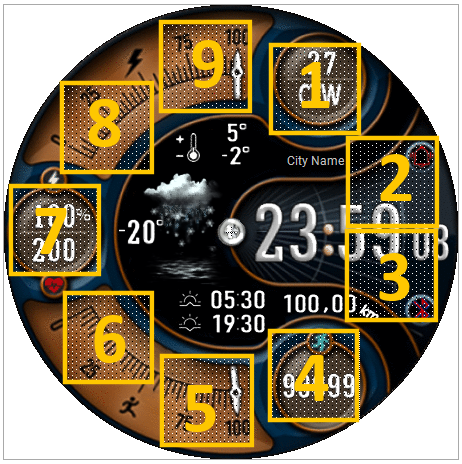
Pola (strefy) dotykowe // Touch fields (zones):
----------------- PL --------------------------------------------------------------------------------------------
„Outpost4 VR”, to tarcza zegarkowa przeznaczona dla smartwatcha Amazfit GTR 3.
Jest to modyfikacja projektu o nazwie „Outpost4”, której autorem jest „mirda69”. Oryginalna wersja jest pod linkiem: /gtr/view/32730 (wcześniejsza wersja dla GTR 2, ale tego samego autora: /gtr/view/18163 ).
Tarcza zegarkowa ma zachowane funkcjonalności jak oryginalna (np. wybierane - edytowalne tła tarczy zegarka), a moja modyfikacja dotyczy:
1) oprócz wersji angielskojęzycznej wprowadziłem wersje: polską, ukraińską i niemiecką,
2) wyświetlanie dystansu w km,
3) wyświetlanie położenia (lokalizacji, nazwy miejscowości),
4) quasi animację – obracający się łeb wkręta umieszczony na środku tarczy zegarka.
Aby przejść w tryb edycyjny tarczy zegarkowej należy dotknąć (nacisnąć) palcem środka tarczy zegarka. Pojawi się wówczas ikona pióra, którą również należy dotknąć (nacisnąć). Potem po jednokrotnym lub wielokrotnym przesunięciu palcem po tarczy zegarka wybieramy element edytowalny, który chcemy zmienić. Zmianę wykonujemy przez dotykanie edytowalnego elementu (w sposób jednokrotny lub wielokrotnie). Można też to zrobić przy pomocy górnego pokrętła umieszczonego po prawej stronie koperty zegarka.
Zmieniłem też nieco pola dotykowe – skróty, a jest ich 9. Rozmieszczenie tych obszarów dotykowych pokazuje zamieszczony powyżej obrazek.
Wystarczy tylko dotknąć jeden z wybranych obszarów, aby szybko przejść do:
1 – ustawienia alarmów,
2 – ustawienia odliczania wstecznego,
3 – stopera,
4 – ilości kroków,
5 – informacji dotyczącej wschodu i zachodu słońca,
6 – wyświetlania poziomu stresu,
7 – pulsu (tętna, BPM),
8 – stanu pogody, aktualnej temperatury i wilgotności,
9 – ciśnienia atmosferycznego,
W trybie AOD na tarczy zegarka wyświetlane są: czas formie cyfrowej, dzień miesiąca, dzień tygodnia i stan naładowania akumulatora jako liczba w %.
--------------------- EN --------------------------------------------------------------------------------------
"Outpost4 VR", is a watch face designed for the Amazfit GTR 3 smartwatch.
It is a modification of the project called "Outpost4" by "mirda69". The original version is at the link: /gtr/view/32730 (earlier version for GTR 2, but by the same author: /gtr/view/18163 ).
The watch face has the same functionalities as the original (e.g. selectable - editable watch face backgrounds), and my modification concerns:
1) in addition to the English version, I introduced the following versions: Polish, Ukrainian and German,
2) displaying the distance in km,
3) position display (location, place name, city name, town name),
4) quasi animation - a rotating screw head placed in the center of the watch face.
To enter the watch face editing mode, touch (press) the center of the watch face with your finger. The pen icon will then appear, which should also be touched (pressed). Then, after one or more swipes on the watch face, we select the editable element that we want to change. The change is made by touching the editable element (once or many times). This can also be done using the upper knob located on the right side of the watch case.
I also changed the touch fields a bit - shortcuts, and there are 9 of them. The arrangement of these touch areas is shown in the picture above.
Just touch one of the selected areas to quickly go to:
1 - alarm settings,
2 - countdown settings,
3 - stopwatch,
4 - number of steps,
5 - information on sunrise and sunset,
6 - stress level display,
7 - pulse (heart rate, BPM),
8 – weather condition, current temperature and humidity,
9 - atmospheric pressure,
In AOD mode, the watch face displays the time in digital form, the day of the month, the day of the week, and the battery charge status as a number in %.
outpost4_vr_en – wersja angielskojęzyczna / English version
outpost4_vr_pl – wersja polskojęzyczna / Polish version
outpost4_vr_uk – wersja ukraińskojęzyczna / Ukrainian version
------------------------------------------------------------------------------------------------------------------
Pola (strefy) dotykowe // Touch fields (zones):
----------------- PL --------------------------------------------------------------------------------------------
„Outpost4 VR”, to tarcza zegarkowa przeznaczona dla smartwatcha Amazfit GTR 3.
Jest to modyfikacja projektu o nazwie „Outpost4”, której autorem jest „mirda69”. Oryginalna wersja jest pod linkiem: /gtr/view/32730 (wcześniejsza wersja dla GTR 2, ale tego samego autora: /gtr/view/18163 ).
Tarcza zegarkowa ma zachowane funkcjonalności jak oryginalna (np. wybierane - edytowalne tła tarczy zegarka), a moja modyfikacja dotyczy:
1) oprócz wersji angielskojęzycznej wprowadziłem wersje: polską, ukraińską i niemiecką,
2) wyświetlanie dystansu w km,
3) wyświetlanie położenia (lokalizacji, nazwy miejscowości),
4) quasi animację – obracający się łeb wkręta umieszczony na środku tarczy zegarka.
Aby przejść w tryb edycyjny tarczy zegarkowej należy dotknąć (nacisnąć) palcem środka tarczy zegarka. Pojawi się wówczas ikona pióra, którą również należy dotknąć (nacisnąć). Potem po jednokrotnym lub wielokrotnym przesunięciu palcem po tarczy zegarka wybieramy element edytowalny, który chcemy zmienić. Zmianę wykonujemy przez dotykanie edytowalnego elementu (w sposób jednokrotny lub wielokrotnie). Można też to zrobić przy pomocy górnego pokrętła umieszczonego po prawej stronie koperty zegarka.
Zmieniłem też nieco pola dotykowe – skróty, a jest ich 9. Rozmieszczenie tych obszarów dotykowych pokazuje zamieszczony powyżej obrazek.
Wystarczy tylko dotknąć jeden z wybranych obszarów, aby szybko przejść do:
1 – ustawienia alarmów,
2 – ustawienia odliczania wstecznego,
3 – stopera,
4 – ilości kroków,
5 – informacji dotyczącej wschodu i zachodu słońca,
6 – wyświetlania poziomu stresu,
7 – pulsu (tętna, BPM),
8 – stanu pogody, aktualnej temperatury i wilgotności,
9 – ciśnienia atmosferycznego,
W trybie AOD na tarczy zegarka wyświetlane są: czas formie cyfrowej, dzień miesiąca, dzień tygodnia i stan naładowania akumulatora jako liczba w %.
--------------------- EN --------------------------------------------------------------------------------------
"Outpost4 VR", is a watch face designed for the Amazfit GTR 3 smartwatch.
It is a modification of the project called "Outpost4" by "mirda69". The original version is at the link: /gtr/view/32730 (earlier version for GTR 2, but by the same author: /gtr/view/18163 ).
The watch face has the same functionalities as the original (e.g. selectable - editable watch face backgrounds), and my modification concerns:
1) in addition to the English version, I introduced the following versions: Polish, Ukrainian and German,
2) displaying the distance in km,
3) position display (location, place name, city name, town name),
4) quasi animation - a rotating screw head placed in the center of the watch face.
To enter the watch face editing mode, touch (press) the center of the watch face with your finger. The pen icon will then appear, which should also be touched (pressed). Then, after one or more swipes on the watch face, we select the editable element that we want to change. The change is made by touching the editable element (once or many times). This can also be done using the upper knob located on the right side of the watch case.
I also changed the touch fields a bit - shortcuts, and there are 9 of them. The arrangement of these touch areas is shown in the picture above.
Just touch one of the selected areas to quickly go to:
1 - alarm settings,
2 - countdown settings,
3 - stopwatch,
4 - number of steps,
5 - information on sunrise and sunset,
6 - stress level display,
7 - pulse (heart rate, BPM),
8 – weather condition, current temperature and humidity,
9 - atmospheric pressure,
In AOD mode, the watch face displays the time in digital form, the day of the month, the day of the week, and the battery charge status as a number in %.
Теги
digital
seconds
seconds display
modern design
steps
distance
km
battery
percentage of Energy
day of week
day
day of the month
temperature
degrees Celsius
weather
weather condition
dynamic weather status icon
pulse
heart rate
bpm
abbreviation of the name of the day
dial indicator of the steps
a pointer indication of the battery status
distance progress
step count progress
citi name
location
quasi animation
bluetooth
Bluetooth vibration on/off
alarm
DND
AOD
AOD function
editable backgrounds
background selection
active fields
touch fields
Поділиться цим циферблатом
Коментарі

Piroska670503
Where can I change the watch face color?
02.10.2026 09:34:09 Скарга
Вам необхідно увійти, щоб залишати коментарі або відповідати на них.
Недавні обговорення в спільноті
Minimal amber watchface for gtr4
It is perfect thank you sir i appreciate you 🙏...
Upgrade of Snoopy GTR3
I love it, thanks a lot asoo <3...
Convert request for gtr4
Thank you sir i appreciate it...
Port request gtr4
If you're not going to use the watchface tool, then many times you can upload the entire .zip file to Gemini or another AI tool and tell it to make the edits for you. Thank...
Port request gtr4
Thank you...
Port request for gtr4 [GTR 4]
Thank you...
Simple digital watchface gtr4
Thanks...





