VeeValdi_AV1DT

Compatible with
GTR 3 Idiomas compatibles
multilingual, en, pl
multilingual, en, pl
Fecha agregada: 22.02.2023 22:37
15 los usuarios tienen en favoritas
Información Importante para los Usuarios
Tenga en cuenta que todos los diseños de relojes disponibles en este sitio son obras creativas de nuestros usuarios y no están afiliados con marcas o marcas registradas oficiales. Son creados por y para fans, inspirados en fenómenos culturales populares, juegos, películas o series.
Nuestro objetivo es proporcionar una plataforma para la creatividad e intercambio, pero también nos esforzamos por respetar los derechos intelectuales. Si posee derechos de autor sobre cualquier contenido que cree infringe sus derechos en este sitio, contáctenos para tomar medidas apropiadas.
Tenga en cuenta que todos los diseños de relojes disponibles en este sitio son obras creativas de nuestros usuarios y no están afiliados con marcas o marcas registradas oficiales. Son creados por y para fans, inspirados en fenómenos culturales populares, juegos, películas o series.
Nuestro objetivo es proporcionar una plataforma para la creatividad e intercambio, pero también nos esforzamos por respetar los derechos intelectuales. Si posee derechos de autor sobre cualquier contenido que cree infringe sus derechos en este sitio, contáctenos para tomar medidas apropiadas.

Descripción
veevaldi_av1dt_en – wersja angielskojęzyczna / English version
veevaldi_av1dt_pl – wersja polskojęzyczna / Polish version
Uwaga: / Attention:
PL: Ciemniejsza wersja tej tarczy zegarkowej jest pod linkiem: /gtr/view/31893 .
EN: A darker version of this watch face is at the link: /gtr/view/31893 .
------------------------------------------------------------------------------------------------------------------
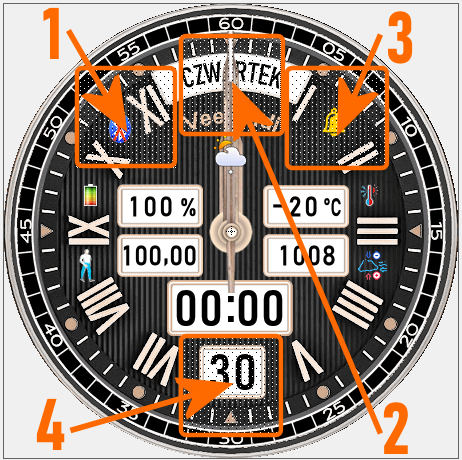
Pola (strefy) dotykowe // Touch fields (zones):
----------------- PL --------------------------------------------------------------------------------------------
„VeeValdi AV1DT”, to tarcza zegarkowa przeznaczona dla smartwatcha Amazfit GTR 3.
Na głównej tarczy zegarkowej czas jest prezentowany w formie analogowej i cyfrowej ( „dual time” ) . Wyświetlane są także: dzień miesiąca i pełna nazwa dnia tygodnia, znak braku sygnału bluetooth oraz ikona aktywności alarmu. Utrata połączenia bluetooth i przywrócenie połączenia sygnalizowane są dodatkowo wibracjami zegarka.
Rodzaj wyświetlanych innych parametrów ustala użytkownik smartwatcha aż w 5 strefach (polach) edytowalnych.
Przykładowo w strefie, którą jest górne lewe pole, stan naładowania akumulatora jest pokazywany liczbowo w %, a w strefie, którą jest górne pole, w sposób graficzny. W tym drugim przypadku poziom naładowania akumulatora prezentuje długość niebieskiej kreski pomiędzy dwiema ikonami – obrazkami akumulatora.
Użytkownik może również wybrać rodzaj wskazówek zegarkowych spośród dwóch dostępnych typów. Wyboru dokonuje się w trybie edycyjnym tarczy zegarkowej.
Aby przejść w tryb edycyjny tarczy zegarkowej należy dotknąć (nacisnąć) palcem środka tarczy zegarka. Pojawi się wówczas ikona pióra, którą również należy dotknąć (nacisnąć). Potem po jednokrotnym lub wielokrotnym dotknięciu wybranej strefy (pola), wybieramy wyświetlany parametr. Można też to zrobić górnym pokrętłem koperty zegarka. Podobnie postępujemy, gdy chcemy wybrać typ wskazówek zegarkowych. Aby tego dokonać musimy po dotknięciu (naciśnięciu) środka tarczy zegarka przesunąć palcem tarczę z parametrami edytowalnymi w lewo, aż pokaże się kolejna tarcza edycyjna. Tym razem będzie to tarcza zmiany typów wskazówek zegarka. Wyboru dokonujemy podobne jak parametrów edytowalnych.
Uwaga:
W każdej ze stref parametrów edytowalnych można wybrać wyświetlanie parametru pustego (wybór: „X X X” ) , czyli brak wyświetlanego parametru. Wygląd tarczy zegarka stanie się wówczas bliższy zegarkowi klasycznemu.
Zastosowałem także 4 pola dotykowe na tarczy zegarka (skróty). Rozmieszczenie tych obszarów dotykowych pokazuje zamieszczony powyżej obrazek.
Wystarczy tylko dotknąć jeden z wybranych obszarów, aby szybko przejść do:
1 – ustawienia odliczania wstecznego,
2 – wyświetlania poziomu stresu,
3 – ustawienia alarmów,
4 – stopera.
W tym projekcie nie zastosowałem żadnej animacji.
W trybie AOD pokazywane są: czas formie analogowej (wskazówkami zegarka) i stan naładowania akumulatora w formie graficznej (jak w jednej z opcji na głównej tarczy zegarka).
Uwaga:
W tym projekcie tarczy zegarkowej skorzystałem z ciekawej porady technicznej od SahaCX75 więc, jeśli komuś spodoba się ta tarcza zegarka i zainstaluje ją w swoim smartwatchu, to proszę o przelanie dla SashaCX75 choćby symbolicznej kwoty pieniędzy na jego konto PayPal. Należy zalogować się na: https://www.paypal.com/signin, a następnie wpisać adres: [email protected] w polu „Wysyłanie pieniędzy”. Każda taka pomoc pomoże mu lepiej przetrwać agresję rosyjską na Ukrainę aż do uzyskania całkowitej wolności.
Można też w inny sposób wesprzeć Ukrainę.
--------------------- EN --------------------------------------------------------------------------------------
"VeeValdi AV1DT", is a watch face designed for the Amazfit GTR 3 smartwatch.
On the main watch face, time is presented in analog and digital form ( "dual time" ) . The day of the month and the full name of the day of the week, the no bluetooth signal sign and the alarm activity icon are also displayed. The loss of the bluetooth connection and the restoration of the connection are additionally signaled by the vibration of the watch.
The type of other parameters displayed is determined by the smartwatch user in as many as 5 editable zones (fields).
For example, in the zone, which is the upper left field, the battery charge status is shown numerically in %, and in the zone, which is the upper left field, graphically. In the latter case, the battery charge level is shown by the length of the blue line between the two icons - pictures of the battery.
The user can also choose the type of watch hands from the two available types. The selection is made in the watch face editing mode.
To enter the watch face editing mode, touch (press) the center of the watch face with your finger. The pen icon will then appear, which should also be touched (pressed). Then, after touching the selected zone (field) once or multiple times, we select the displayed parameter. You can also do it with the upper regulator on the side of the watch case. We do the same when we want to choose the type of watch hands. To do this, after touching (pressing) the center of the watch face, move the dial with editable parameters to the left with your finger until the next edit face appears. This time it will be a dial to change the types of watch hands. The selection is made similarly to the editable parameters.
Attention:
In each of the zones of editable parameters, it is possible to select the display of an empty parameter ( selection: "Empty" ) , i.e. no displayed parameter. The appearance of the watch face will then become closer to a classic watch.
I also used 4 touch fields on the watch face (shortcuts). The location of these touch areas is shown in the picture above.
Just touch one of the selected areas to quickly go to:
1 - countdown settings,
2 - stress level display,
3 - alarm settings,
4 - stopwatch.
I did not use any animation in this project.
In the AOD mode, the time is shown in an analog form (by the hands of the watch) and the battery charge status in a graphical form (as in one of the options on the main watch face).
Attention:
In this watch face project, I used interesting technical advice from SahaCX75, so if someone likes this watch face and installs it in their smartwatch, please transfer at least a symbolic amount of money to SashaCX75 to his PayPal account. Log in to: https://www.paypal.com/signin, and then enter the address: [email protected] in the "Sending money" field. Any such help will help him better survive the Russian aggression against Ukraine until he gains complete freedom.
You can also support Ukraine in other ways.
veevaldi_av1dt_pl – wersja polskojęzyczna / Polish version
Uwaga: / Attention:
PL: Ciemniejsza wersja tej tarczy zegarkowej jest pod linkiem: /gtr/view/31893 .
EN: A darker version of this watch face is at the link: /gtr/view/31893 .
------------------------------------------------------------------------------------------------------------------
Pola (strefy) dotykowe // Touch fields (zones):
----------------- PL --------------------------------------------------------------------------------------------
„VeeValdi AV1DT”, to tarcza zegarkowa przeznaczona dla smartwatcha Amazfit GTR 3.
Na głównej tarczy zegarkowej czas jest prezentowany w formie analogowej i cyfrowej ( „dual time” ) . Wyświetlane są także: dzień miesiąca i pełna nazwa dnia tygodnia, znak braku sygnału bluetooth oraz ikona aktywności alarmu. Utrata połączenia bluetooth i przywrócenie połączenia sygnalizowane są dodatkowo wibracjami zegarka.
Rodzaj wyświetlanych innych parametrów ustala użytkownik smartwatcha aż w 5 strefach (polach) edytowalnych.
Przykładowo w strefie, którą jest górne lewe pole, stan naładowania akumulatora jest pokazywany liczbowo w %, a w strefie, którą jest górne pole, w sposób graficzny. W tym drugim przypadku poziom naładowania akumulatora prezentuje długość niebieskiej kreski pomiędzy dwiema ikonami – obrazkami akumulatora.
Użytkownik może również wybrać rodzaj wskazówek zegarkowych spośród dwóch dostępnych typów. Wyboru dokonuje się w trybie edycyjnym tarczy zegarkowej.
Aby przejść w tryb edycyjny tarczy zegarkowej należy dotknąć (nacisnąć) palcem środka tarczy zegarka. Pojawi się wówczas ikona pióra, którą również należy dotknąć (nacisnąć). Potem po jednokrotnym lub wielokrotnym dotknięciu wybranej strefy (pola), wybieramy wyświetlany parametr. Można też to zrobić górnym pokrętłem koperty zegarka. Podobnie postępujemy, gdy chcemy wybrać typ wskazówek zegarkowych. Aby tego dokonać musimy po dotknięciu (naciśnięciu) środka tarczy zegarka przesunąć palcem tarczę z parametrami edytowalnymi w lewo, aż pokaże się kolejna tarcza edycyjna. Tym razem będzie to tarcza zmiany typów wskazówek zegarka. Wyboru dokonujemy podobne jak parametrów edytowalnych.
Uwaga:
W każdej ze stref parametrów edytowalnych można wybrać wyświetlanie parametru pustego (wybór: „X X X” ) , czyli brak wyświetlanego parametru. Wygląd tarczy zegarka stanie się wówczas bliższy zegarkowi klasycznemu.
Zastosowałem także 4 pola dotykowe na tarczy zegarka (skróty). Rozmieszczenie tych obszarów dotykowych pokazuje zamieszczony powyżej obrazek.
Wystarczy tylko dotknąć jeden z wybranych obszarów, aby szybko przejść do:
1 – ustawienia odliczania wstecznego,
2 – wyświetlania poziomu stresu,
3 – ustawienia alarmów,
4 – stopera.
W tym projekcie nie zastosowałem żadnej animacji.
W trybie AOD pokazywane są: czas formie analogowej (wskazówkami zegarka) i stan naładowania akumulatora w formie graficznej (jak w jednej z opcji na głównej tarczy zegarka).
Uwaga:
W tym projekcie tarczy zegarkowej skorzystałem z ciekawej porady technicznej od SahaCX75 więc, jeśli komuś spodoba się ta tarcza zegarka i zainstaluje ją w swoim smartwatchu, to proszę o przelanie dla SashaCX75 choćby symbolicznej kwoty pieniędzy na jego konto PayPal. Należy zalogować się na: https://www.paypal.com/signin, a następnie wpisać adres: [email protected] w polu „Wysyłanie pieniędzy”. Każda taka pomoc pomoże mu lepiej przetrwać agresję rosyjską na Ukrainę aż do uzyskania całkowitej wolności.
Można też w inny sposób wesprzeć Ukrainę.
--------------------- EN --------------------------------------------------------------------------------------
"VeeValdi AV1DT", is a watch face designed for the Amazfit GTR 3 smartwatch.
On the main watch face, time is presented in analog and digital form ( "dual time" ) . The day of the month and the full name of the day of the week, the no bluetooth signal sign and the alarm activity icon are also displayed. The loss of the bluetooth connection and the restoration of the connection are additionally signaled by the vibration of the watch.
The type of other parameters displayed is determined by the smartwatch user in as many as 5 editable zones (fields).
For example, in the zone, which is the upper left field, the battery charge status is shown numerically in %, and in the zone, which is the upper left field, graphically. In the latter case, the battery charge level is shown by the length of the blue line between the two icons - pictures of the battery.
The user can also choose the type of watch hands from the two available types. The selection is made in the watch face editing mode.
To enter the watch face editing mode, touch (press) the center of the watch face with your finger. The pen icon will then appear, which should also be touched (pressed). Then, after touching the selected zone (field) once or multiple times, we select the displayed parameter. You can also do it with the upper regulator on the side of the watch case. We do the same when we want to choose the type of watch hands. To do this, after touching (pressing) the center of the watch face, move the dial with editable parameters to the left with your finger until the next edit face appears. This time it will be a dial to change the types of watch hands. The selection is made similarly to the editable parameters.
Attention:
In each of the zones of editable parameters, it is possible to select the display of an empty parameter ( selection: "Empty" ) , i.e. no displayed parameter. The appearance of the watch face will then become closer to a classic watch.
I also used 4 touch fields on the watch face (shortcuts). The location of these touch areas is shown in the picture above.
Just touch one of the selected areas to quickly go to:
1 - countdown settings,
2 - stress level display,
3 - alarm settings,
4 - stopwatch.
I did not use any animation in this project.
In the AOD mode, the time is shown in an analog form (by the hands of the watch) and the battery charge status in a graphical form (as in one of the options on the main watch face).
Attention:
In this watch face project, I used interesting technical advice from SahaCX75, so if someone likes this watch face and installs it in their smartwatch, please transfer at least a symbolic amount of money to SashaCX75 to his PayPal account. Log in to: https://www.paypal.com/signin, and then enter the address: [email protected] in the "Sending money" field. Any such help will help him better survive the Russian aggression against Ukraine until he gains complete freedom.
You can also support Ukraine in other ways.
Etiquetas
analog
digital
dual time
seconds
seconds display
second hand
analog second hand
classic
elegant
steps
distance
km
battery
percentage of Energy
day of week
day name
day
day of the month
temperature
degrees Celsius
humidity
humidity in %
atmospheric pressure
hPa
wind
wind force
weather
weather condition
dynamic weather status icon
pulse
heart rate
bpm
calories
burned calories
kcal
kilocalories
dynamic battery charge status graphically
bluetooth
Bluetooth vibration on/off
alarm
AOD
AOD function
editable zones
selection of parameters
editable parameters
editable watch hands - pointers
select the type of watch hands - pointers
active fields
touch fields
Comparte este watchface
Comentarios
You need to be logged in to post or reply to comments.
Discusiones recientes de la comunidad
Minimal amber watchface for gtr4
It is perfect thank you sir i appreciate you 🙏...
Upgrade of Snoopy GTR3
I love it, thanks a lot asoo <3...
Convert request for gtr4
Thank you sir i appreciate it...
Port request gtr4
If you're not going to use the watchface tool, then many times you can upload the entire .zip file to Gemini or another AI tool and tell it to make the edits for you. Thank...
Port request gtr4
Thank you...
Port request for gtr4 [GTR 4]
Thank you...
Simple digital watchface gtr4
Thanks...





No comments. Be the first to comment.