VR MAURICE LACROIX ELIROS DT G3

Compatibile con
GTR 3 Idiomas compatibles
multilingual
multilingual
Data aggiunta: 14.01.2023 14:31
Aggiornato il: 18.01.2023 14:50
14 utenti che hanno questo elemento nei preferiti
Informazioni Importanti per gli Utenti
Si prega di notare che tutti i quadranti orologio disponibili su questo sito sono opere creative dei nostri utenti e non sono affiliati con marchi ufficiali o marchi registrati. Sono creati da fan per fan, ispirati da fenomeni culturali popolari, giochi, film o serie.
Il nostro obiettivo è fornire una piattaforma per la creatività e lo scambio, ma ci impegniamo anche a rispettare i diritti intellettuali. Se detiene i diritti d'autore su qualsiasi contenuto che ritiene infranga i suoi diritti su questo sito, contattaci per un'azione appropriata.
Si prega di notare che tutti i quadranti orologio disponibili su questo sito sono opere creative dei nostri utenti e non sono affiliati con marchi ufficiali o marchi registrati. Sono creati da fan per fan, ispirati da fenomeni culturali popolari, giochi, film o serie.
Il nostro obiettivo è fornire una piattaforma per la creatività e lo scambio, ma ci impegniamo anche a rispettare i diritti intellettuali. Se detiene i diritti d'autore su qualsiasi contenuto che ritiene infranga i suoi diritti su questo sito, contattaci per un'azione appropriata.

Descrizione
vr_maurice_lacroix_eliros_dt_g3 – wersja uniwersalna (multijęzyczna) / universal version (multilingual)
vr_maurice_lacroix_eliros_dt_g3ps – wersja uniwersalna (multijęzyczna) z płynnie poruszającym się sekundnikiem / universal (multi-language) version with a smooth second hand
Uwaga / Attention:
PL: Płynny sekundnik był możliwy dzięki nieocenionej pomocy SashaCX75.
EN: The smooth second hand was made possible by the invaluable help of SashaCX75.
------------------------------------------------------------------------------------------------------------------
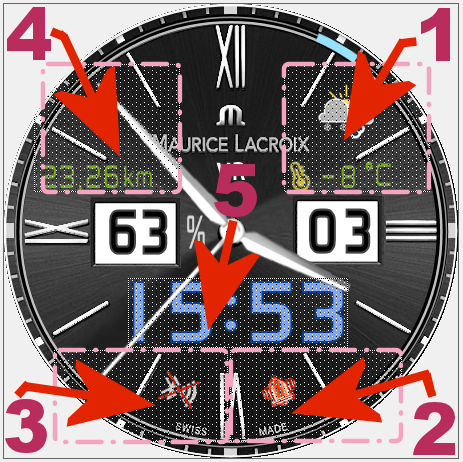
Pola (strefy) dotykowe // Touch fields (zones):
----------------- PL --------------------------------------------------------------------------------------------
„VR MAURICE LACROIX ELIROS DT G3”, to tarcza zegarkowa przeznaczona dla smartwatcha Amazfit GTR 3.
Do projektowania tej tarczy zegarkowej wykorzystałem jeden z moich wcześniejszych projektów dla GTR 2. Starszy projekt jest pod linkiem: /gtr/view/13213 .
Na głównej tarczy zegarkowej czas jest prezentowany w formie analogowej i cyfrowej („dual time”). Wyświetlane są także: dzień miesiąca i stan naładowania akumulatora (liczbowo w %). Wskazywany jest również dzień tygodnia – łukowym wskaźnikiem ustawiającym się pod cyframi godzinowymi od 1 do 7.
Ponadto wyświetlane są: znak braku sygnału bluetooth oraz ikona aktywności alarmu. Utrata połączenia bluetooth i przywrócenie połączenia sygnalizowane są wibracjami zegarka.
Pozostałe wyświetlane elementy i parametry są w wersji edytowalnej, a więc można je zmieniać na tarczy zegarka samodzielnie, według własnych preferencji. Tymi elementami do wyboru są: 3 tła tarcz zegarkowych, 2 rodzaje wskazówek zegarkowych, a także parametry w 3 strefach (polach) edytowalnych.
W strefie (polu edytowalnym) nr 1:
- są to zamiennie wybierane: dystans (km), kroki, kalorie (kcal), puls (tętno, BPM), stanie – „stand”. Po wybraniu „stand” żaden parametr nie jest wyświetlany (bardziej klasyczna wersja tarczy zegarkowej).
W strefie (polu edytowalnym) nr 2
- są to tylko: pogoda (obrazek aktualnego stanu pogody) lub wschód/zachód słońca – „Sunrise/Sunset”. Po wybraniu wschód/zachód słońca – „Sunrise/Sunset” żaden parametr nie jest wyświetlany (bardziej klasyczna wersja tarczy zegarkowej).
W strefie (polu edytowalnym) nr 3
- są to zamiennie wybierane: pogoda - temperatura (°C), ciśnienie atmosferyczne (hPa), siła wiatru, wilgotność (%), indeks UV, wschód/zachód słońca – „Sunrise/Sunset”. Po wybraniu wschód/zachód słońca – „Sunrise/Sunset” żaden parametr nie jest wyświetlany (bardziej klasyczna wersja tarczy zegarkowej).
Wybór wyświetlanego parametru w wybranym polu edycyjnym (strefie) następuje po dotknięciu środka tarczy zegarka, a następnie po dotknięciu ikony pióra, a potem po jednokrotnym lub wielokrotnym dotknięciu wybranego pola (strefy), wybieramy wyświetlany parametr. Podobnie postępujemy, gdy chcemy zmienić tło tarczy zegarka lub wybrać typ wskazówek zegarkowych. Aby tego dokonać musimy wcześniej przesunąć palcem tarczę z parametrami edytowalnymi w lewo i ukażą się kolejne pola edycyjne: zmiany tła, a następnie zmiany typów wskazówek zegarka.
Zastosowałem dodatkowo 5 pól dotykowe (stref dotykowych, czyli skrótów). Rozmieszczenie tych obszarów dotykowych na tarczy zegarka pokazuje zamieszczony powyżej obrazek.
Wystarczy tylko dotknąć jeden z wybranych obszarów, aby szybko przejść do:
1 – pogody – ciśnienia atmosferycznego i innych danych,
2 – stopera,
3 – ustawienia odliczania wstecznego.
4 – ilości kroków itp.,
5 – ustawienia alarmów.
W tym projekcie nie zastosowałem żadnej animacji, aby jak najlepiej prezentowała się grafika samej tarczy zegarkowej.
W trybie AOD pokazywany jest czas w formie analogowej (wskazówkami zegarka) oraz stan naładowania akumulatora w formie szarego (stopniowo zanikającego) pierścienia.
Uwaga:
Jeśli komuś spodoba się ta tarcza zegarka i zainstaluje ją w swoim smartwatchu, to proszę o przelanie dla SashaCX75 choćby symbolicznej kwoty pieniędzy na jego konto PayPal. Należy zalogować się na: https://www.paypal.com/signin, a następnie wpisać adres: [email protected] w polu „Wysyłanie pieniędzy”. Każda taka pomoc pomoże mu lepiej przetrwać agresję rosyjską na Ukrainę i doczekać prawdziwej wolności.
--------------------- EN --------------------------------------------------------------------------------------
"VR MAURICE LACROIX ELIROS DT G3", is a watch face designed for the Amazfit GTR 3 smartwatch.
For the design of this watch face, I used one of my earlier designs for the GTR 2. The older design is at the link: /gtr/view/13213 .
On the main watch face, time is presented in analog and digital form ("dual time" . The day of the month and the battery charge status (in %) are also displayed. The day of the week is also indicated - an arcuate pointer positioned under the hour digits from 1 to 7.
In addition, the no bluetooth signal sign and the alarm activity icon are displayed. The loss of the bluetooth connection and the restoration of the connection are indicated by the vibration of the watch.
Other displayed elements and parameters are editable, so you can change them on the watch face yourself, according to your preferences. These elements to choose from are: 3 backgrounds of watch faces, 2 types of watch hands, as well as parameters in 3 editable zones (fields).
In zone (editable field) No. 1:
- these are alternately selected: distance (km), steps, calories (kcal), pulse (heart rate, BPM), stand. When "stand" is selected, no parameter is displayed (a more classic version of the watch face).
In zone (editable field) No. 2
- these are only: weather (picture of the current weather condition) or sunrise/sunset. After selecting "Sunrise/Sunset", no parameter is displayed (a more classic version of the watch face).
In zone (editable field) No. 3
- these are alternatively selected: weather - temperature (°C), atmospheric pressure (hPa), wind strength, humidity (%), UV index, sunrise/sunset. After selecting "Sunrise/Sunset", no parameter is displayed (a more classic version of the watch face).
The displayed parameter in the selected edit field (zone) is selected after touching the center of the watch face, and then after touching the pen icon, and then after single or multiple touching of the selected field (zone), select the displayed parameter. We do the same when we want to change the background of the watch face or choose the type of watch hands. To do this, we must first move the dial with editable parameters to the left and the following editing fields will appear: background changes, and then changes to the types of watch hands.
I also used 5 touch fields (touch zones, i.e. shortcuts). The location of these touch areas on the watch face is shown in the image above.
Just touch one of the selected areas to quickly go to:
1 - weather – atmospheric pressure and other data,
2 - stopwatch,
3 - countdown settings.
4 - number of steps, etc.,
5 - alarm settings.
In this project, I did not use any animation to make the graphics of the watch face itself look the best.
In the AOD mode, the time is shown in analog form (watch hands - pointers) and the battery charge status in the form of a gray (gradually fading) ring.
Attention:
If someone likes this watch face and installs it in their smartwatch, please transfer at least a symbolic amount of money to SashaCX75 to his PayPal account. Log in to: https://www.paypal.com/signin, and then enter the address: [email protected] in the "Sending money" field. Any such help will help him better survive the Russian aggression against Ukraine and live to see true freedom.
vr_maurice_lacroix_eliros_dt_g3ps – wersja uniwersalna (multijęzyczna) z płynnie poruszającym się sekundnikiem / universal (multi-language) version with a smooth second hand
Uwaga / Attention:
PL: Płynny sekundnik był możliwy dzięki nieocenionej pomocy SashaCX75.
EN: The smooth second hand was made possible by the invaluable help of SashaCX75.
------------------------------------------------------------------------------------------------------------------
Pola (strefy) dotykowe // Touch fields (zones):
----------------- PL --------------------------------------------------------------------------------------------
„VR MAURICE LACROIX ELIROS DT G3”, to tarcza zegarkowa przeznaczona dla smartwatcha Amazfit GTR 3.
Do projektowania tej tarczy zegarkowej wykorzystałem jeden z moich wcześniejszych projektów dla GTR 2. Starszy projekt jest pod linkiem: /gtr/view/13213 .
Na głównej tarczy zegarkowej czas jest prezentowany w formie analogowej i cyfrowej („dual time”). Wyświetlane są także: dzień miesiąca i stan naładowania akumulatora (liczbowo w %). Wskazywany jest również dzień tygodnia – łukowym wskaźnikiem ustawiającym się pod cyframi godzinowymi od 1 do 7.
Ponadto wyświetlane są: znak braku sygnału bluetooth oraz ikona aktywności alarmu. Utrata połączenia bluetooth i przywrócenie połączenia sygnalizowane są wibracjami zegarka.
Pozostałe wyświetlane elementy i parametry są w wersji edytowalnej, a więc można je zmieniać na tarczy zegarka samodzielnie, według własnych preferencji. Tymi elementami do wyboru są: 3 tła tarcz zegarkowych, 2 rodzaje wskazówek zegarkowych, a także parametry w 3 strefach (polach) edytowalnych.
W strefie (polu edytowalnym) nr 1:
- są to zamiennie wybierane: dystans (km), kroki, kalorie (kcal), puls (tętno, BPM), stanie – „stand”. Po wybraniu „stand” żaden parametr nie jest wyświetlany (bardziej klasyczna wersja tarczy zegarkowej).
W strefie (polu edytowalnym) nr 2
- są to tylko: pogoda (obrazek aktualnego stanu pogody) lub wschód/zachód słońca – „Sunrise/Sunset”. Po wybraniu wschód/zachód słońca – „Sunrise/Sunset” żaden parametr nie jest wyświetlany (bardziej klasyczna wersja tarczy zegarkowej).
W strefie (polu edytowalnym) nr 3
- są to zamiennie wybierane: pogoda - temperatura (°C), ciśnienie atmosferyczne (hPa), siła wiatru, wilgotność (%), indeks UV, wschód/zachód słońca – „Sunrise/Sunset”. Po wybraniu wschód/zachód słońca – „Sunrise/Sunset” żaden parametr nie jest wyświetlany (bardziej klasyczna wersja tarczy zegarkowej).
Wybór wyświetlanego parametru w wybranym polu edycyjnym (strefie) następuje po dotknięciu środka tarczy zegarka, a następnie po dotknięciu ikony pióra, a potem po jednokrotnym lub wielokrotnym dotknięciu wybranego pola (strefy), wybieramy wyświetlany parametr. Podobnie postępujemy, gdy chcemy zmienić tło tarczy zegarka lub wybrać typ wskazówek zegarkowych. Aby tego dokonać musimy wcześniej przesunąć palcem tarczę z parametrami edytowalnymi w lewo i ukażą się kolejne pola edycyjne: zmiany tła, a następnie zmiany typów wskazówek zegarka.
Zastosowałem dodatkowo 5 pól dotykowe (stref dotykowych, czyli skrótów). Rozmieszczenie tych obszarów dotykowych na tarczy zegarka pokazuje zamieszczony powyżej obrazek.
Wystarczy tylko dotknąć jeden z wybranych obszarów, aby szybko przejść do:
1 – pogody – ciśnienia atmosferycznego i innych danych,
2 – stopera,
3 – ustawienia odliczania wstecznego.
4 – ilości kroków itp.,
5 – ustawienia alarmów.
W tym projekcie nie zastosowałem żadnej animacji, aby jak najlepiej prezentowała się grafika samej tarczy zegarkowej.
W trybie AOD pokazywany jest czas w formie analogowej (wskazówkami zegarka) oraz stan naładowania akumulatora w formie szarego (stopniowo zanikającego) pierścienia.
Uwaga:
Jeśli komuś spodoba się ta tarcza zegarka i zainstaluje ją w swoim smartwatchu, to proszę o przelanie dla SashaCX75 choćby symbolicznej kwoty pieniędzy na jego konto PayPal. Należy zalogować się na: https://www.paypal.com/signin, a następnie wpisać adres: [email protected] w polu „Wysyłanie pieniędzy”. Każda taka pomoc pomoże mu lepiej przetrwać agresję rosyjską na Ukrainę i doczekać prawdziwej wolności.
--------------------- EN --------------------------------------------------------------------------------------
"VR MAURICE LACROIX ELIROS DT G3", is a watch face designed for the Amazfit GTR 3 smartwatch.
For the design of this watch face, I used one of my earlier designs for the GTR 2. The older design is at the link: /gtr/view/13213 .
On the main watch face, time is presented in analog and digital form ("dual time"
. The day of the month and the battery charge status (in %) are also displayed. The day of the week is also indicated - an arcuate pointer positioned under the hour digits from 1 to 7.In addition, the no bluetooth signal sign and the alarm activity icon are displayed. The loss of the bluetooth connection and the restoration of the connection are indicated by the vibration of the watch.
Other displayed elements and parameters are editable, so you can change them on the watch face yourself, according to your preferences. These elements to choose from are: 3 backgrounds of watch faces, 2 types of watch hands, as well as parameters in 3 editable zones (fields).
In zone (editable field) No. 1:
- these are alternately selected: distance (km), steps, calories (kcal), pulse (heart rate, BPM), stand. When "stand" is selected, no parameter is displayed (a more classic version of the watch face).
In zone (editable field) No. 2
- these are only: weather (picture of the current weather condition) or sunrise/sunset. After selecting "Sunrise/Sunset", no parameter is displayed (a more classic version of the watch face).
In zone (editable field) No. 3
- these are alternatively selected: weather - temperature (°C), atmospheric pressure (hPa), wind strength, humidity (%), UV index, sunrise/sunset. After selecting "Sunrise/Sunset", no parameter is displayed (a more classic version of the watch face).
The displayed parameter in the selected edit field (zone) is selected after touching the center of the watch face, and then after touching the pen icon, and then after single or multiple touching of the selected field (zone), select the displayed parameter. We do the same when we want to change the background of the watch face or choose the type of watch hands. To do this, we must first move the dial with editable parameters to the left and the following editing fields will appear: background changes, and then changes to the types of watch hands.
I also used 5 touch fields (touch zones, i.e. shortcuts). The location of these touch areas on the watch face is shown in the image above.
Just touch one of the selected areas to quickly go to:
1 - weather – atmospheric pressure and other data,
2 - stopwatch,
3 - countdown settings.
4 - number of steps, etc.,
5 - alarm settings.
In this project, I did not use any animation to make the graphics of the watch face itself look the best.
In the AOD mode, the time is shown in analog form (watch hands - pointers) and the battery charge status in the form of a gray (gradually fading) ring.
Attention:
If someone likes this watch face and installs it in their smartwatch, please transfer at least a symbolic amount of money to SashaCX75 to his PayPal account. Log in to: https://www.paypal.com/signin, and then enter the address: [email protected] in the "Sending money" field. Any such help will help him better survive the Russian aggression against Ukraine and live to see true freedom.
Tag
analog
digital
dual time
seconds
seconds display
second hand
analog second hand
classic
modern type
modern design
elegant
steps
distance
km
battery
percentage of Energy
day of week
day
day of the month
temperature
degrees Celsius
humidity
humidity in %
atmospheric pressure
hPa
wind
wind force
weather
weather condition
dynamic weather status icon
pulse
heart rate
bpm
calories
burned calories
kcal
kilocalories
circle progress energy consumption
hand display of the day of the week
changing the battery status ring
bluetooth
Bluetooth vibration on/off
alarm
AOD
AOD function
editable zones
selection of parameters
editable parameters
editable backgrounds
background selection
editable watch hands - pointers
select the type of watch hands - pointers
active fields
touch fields
smooth second hand
smooth second pointer
Condividi questo quadrante
Commenti
Per rispondere ai commenti devi essere loggato .
Discussioni recenti della comunità
Minimal amber watchface for gtr4
It is perfect thank you sir i appreciate you 🙏...
Upgrade of Snoopy GTR3
I love it, thanks a lot asoo <3...
Convert request for gtr4
Thank you sir i appreciate it...
Port request gtr4
If you're not going to use the watchface tool, then many times you can upload the entire .zip file to Gemini or another AI tool and tell it to make the edits for you. Thank...
Port request gtr4
Thank you...
Port request for gtr4 [GTR 4]
Thank you...
Simple digital watchface gtr4
Thanks...





Nessun commento. Commenta per primo.