VeeValdi my sword

兼容于
GTR 3 支持的语言
multilingual, en, pl
multilingual, en, pl
新增: 14.12.2022 13:40
11 个用户已加入 收藏
用户须知
请注意,本网站上所有可用的手表面都是我们用户的创作作品,并且与任何官方品牌或商标无关。这些作品是由粉丝为粉丝创作的,灵感来源于流行文化现象、游戏、电影或电视剧。
我们的目标是提供一个创意交流的平台,同时我们也致力于尊重知识产权。如果您拥有本网站上任何内容的版权,并认为该内容侵犯了您的权利,请与我们联系以采取适当措施。
请注意,本网站上所有可用的手表面都是我们用户的创作作品,并且与任何官方品牌或商标无关。这些作品是由粉丝为粉丝创作的,灵感来源于流行文化现象、游戏、电影或电视剧。
我们的目标是提供一个创意交流的平台,同时我们也致力于尊重知识产权。如果您拥有本网站上任何内容的版权,并认为该内容侵犯了您的权利,请与我们联系以采取适当措施。

描述
veevaldi_my_sword_sh_en – wersja angielskojęzyczna / English version
veevaldi_my_sword_sh_pl – wersja polskojęzyczna / Polish version
------------------------------------------------------------------------------------------------------------------
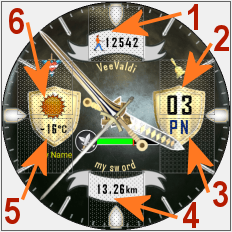
Pola (strefy) dotykowe // Touch fields (zones):
----------------- PL --------------------------------------------------------------------------------------------
„VeeValdi my sword”, to tarcza zegarkowa przeznaczona dla smartwatcha Amazfit GTR 3.
Do projektowania tej tarczy zegarkowej nie wykorzystałem żadnego z moich wcześniejszych projektów.
Ten projekt jest projektem oryginalnym, w którego powstaniu ma spory udział SashaCX75. Dziękuję mu za pomoc.
Jeśli komuś spodoba się ta tarcza zegarka i zainstaluje ją w swoim smartwatchu, to proszę o przelanie na SashaCX75 choćby symbolicznej kwoty pieniędzy na jego konto PayPal. Należy zalogować się na: https://www.paypal.com/signin, a następnie wpisać adres: [email protected] w polu „Wysyłanie pieniędzy”. Każda taka pomoc pomoże mu lepiej przetrwać agresję rosyjską na Ukrainę i doczekać prawdziwej wolności.
Na głównej tarczy zegarkowej czas jest prezentowany tylko w formie analogowej, a wskazówki zegarkowe są w formie rycerskich mieczy. Wyświetlane są także zawsze: dzień miesiąca, dzień tygodnia (jako dwuliterowy skrót), obrazek prezentujący aktualny stan pogody, a pod tym obrazkiem pogody - aktualna temperatura w °C, a poniżej jest pokazywana bieżąca lokalizacja (nazwa miejscowości wg GPS). Stan naładowania akumulatora prezentowany jest zielonym, poziomym paskiem, zakończonym skrzyżowanymi małymi mieczami.
Ponadto wyświetlane są: znak braku sygnału bluetooth oraz ikona aktywności alarmu.
W projekcie są też pola edycyjne wyświetlanych parametrów oraz pole edycyjne wyboru tła tarczy zegarka.
W zastosowanych 2 polach edycyjnych wyświetlanych parametrów można ustawić opcjonalnie takie elementy jak:
- w polu nr 1: ilość wykonanych kroków lub ilość spalonych kalorii (kcal) lub puls (tętno, BPM) lub dystans (km),
- w polu nr 2: pokonany dystans w km lub indeks UV lub wilgotność w % lub ciśnienie atmosferyczne w hPa lub siła wiatru lub ilość wykonanych kroków lub ilość spalonych kalorii (kcal) lub puls (tętno, BPM).
Wybór wyświetlanego parametru w wybranym polu edycyjnym następuje po dotknięciu środka tarczy zegarka, a następnie po dotknięciu ikony pióra, a potem po jednokrotnym lub wielokrotnym dotknięciu wybranej ikonki reprezentującej wyświetlany parametr.
Można też wybrać opcjonalne 2 tła tarczy zegarka. Wykonuje się to tak samo jak wybór edytowalnych parametrów, ale przesuwamy palcem tarczę z polami edytowalnymi w lewo i ukaże się pole edycyjne pozwalające wybrać rodzaj wyświetlanej tarczy zegarka.
Zastosowałem dodatkowo aż 6 pól dotykowych (stref dotykowych, czyli 6 skrótów). Rozmieszczenie tych obszarów dotykowych na tarczy zegarka pokazuje zamieszczony powyżej obrazek.
Wystarczy tylko dotknąć jeden z wybranych obszarów, aby szybko przejść do:
1 – ilości kroków itp.,
2 – ustawienia alarmów,
3– stopera,
4 – ustawienia odliczania wstecznego.
5 – pogody – ciśnienia atmosferycznego i innych danych,
6 – pogody – bieżącej temperatury, wilgotności itp.,
W tym projekcie nie zastosowałem żadnej animacji, aby jak najlepiej prezentowała się grafika samej tarczy zegarkowej.
W trybie AOD pokazywany jest czas w formie analogowej (wskazówkami zegarka, które są szpadami) oraz stan naładowania akumulatora w formie szarego (stopniowo zanikającego) pierścienia.
--------------------- EN --------------------------------------------------------------------------------------
"VeeValdi my sword", is a watch face designed for the Amazfit GTR 3 smartwatch.
I have not used any of my previous designs to design this watch face.
This project is an original project, in which SashaCX75 contributed a lot. I thank him for his help.
If someone likes this watch face and installs it in their smartwatch, I am asking them to transfer to SashaCX75, at least a symbolic amount of money to his PayPal account. You need to log in to: https://www.paypal.com/signin, and then enter the address: [email protected] in the field called "Sending money". Any such help will help him better survive the Russian aggression against Ukraine and live to see true freedom.
On the main watch face, time is presented only in analog form, and the watch hands are in the form of knightly swords. The following are also always displayed: the day of the month, the day of the week (as a two-letter abbreviation), a picture presenting the current weather, and under this weather picture - the current temperature in °C, and below the current location (name of the town according to GPS). The state of charge of the battery is presented by a green, horizontal bar, ending with crossed small swords.
In addition, the no bluetooth signal sign and the alarm activity icon are displayed.
The project also has edit fields for the displayed parameters and an edit field for selecting the background of the watch face.
In the 2 edit fields of the displayed parameters, you can optionally set such elements as:
- in field 1: the number of steps taken or the number of calories burned (kcal) or pulse (heart rate, BPM) or distance (km),
- in field 2: distance traveled in km or UV index or humidity in % or atmospheric pressure in hPa or wind force or number of steps taken or calories burned (kcal) or pulse (heart rate, BPM).
The displayed parameter in the selected edit field is selected after touching the center of the watch face, and then after touching the pen icon, and then after single or multiple touching the selected icon representing the displayed parameter.
You can also select optional 2 watch face backgrounds. This is done in the same way as selecting editable parameters, but swipe the dial with editable fields to the left and an edit box will appear allowing you to select the type of watch face to be displayed.
I also used as many as 6 touch fields (touch zones, i.e. 6 shortcuts). The location of these touch areas on the watch face is shown in the image above.
Just touch one of the selected areas to quickly go to:
1 - number of steps, etc.,
2 - alarm settings,
3– stopwatch,
4 - countdown settings.
5 – weather – atmospheric pressure and other data,
6 - weather - current temperature, humidity, etc.,
In this project, I did not use any animation to make the graphics of the watch face itself look the best.
In the AOD mode, the time is shown in analog form (by the hands of the watch, which are rapiers) and the battery charge status in the form of a gray (gradually fading) ring.
veevaldi_my_sword_sh_pl – wersja polskojęzyczna / Polish version
------------------------------------------------------------------------------------------------------------------
Pola (strefy) dotykowe // Touch fields (zones):
----------------- PL --------------------------------------------------------------------------------------------
„VeeValdi my sword”, to tarcza zegarkowa przeznaczona dla smartwatcha Amazfit GTR 3.
Do projektowania tej tarczy zegarkowej nie wykorzystałem żadnego z moich wcześniejszych projektów.
Ten projekt jest projektem oryginalnym, w którego powstaniu ma spory udział SashaCX75. Dziękuję mu za pomoc.
Jeśli komuś spodoba się ta tarcza zegarka i zainstaluje ją w swoim smartwatchu, to proszę o przelanie na SashaCX75 choćby symbolicznej kwoty pieniędzy na jego konto PayPal. Należy zalogować się na: https://www.paypal.com/signin, a następnie wpisać adres: [email protected] w polu „Wysyłanie pieniędzy”. Każda taka pomoc pomoże mu lepiej przetrwać agresję rosyjską na Ukrainę i doczekać prawdziwej wolności.
Na głównej tarczy zegarkowej czas jest prezentowany tylko w formie analogowej, a wskazówki zegarkowe są w formie rycerskich mieczy. Wyświetlane są także zawsze: dzień miesiąca, dzień tygodnia (jako dwuliterowy skrót), obrazek prezentujący aktualny stan pogody, a pod tym obrazkiem pogody - aktualna temperatura w °C, a poniżej jest pokazywana bieżąca lokalizacja (nazwa miejscowości wg GPS). Stan naładowania akumulatora prezentowany jest zielonym, poziomym paskiem, zakończonym skrzyżowanymi małymi mieczami.
Ponadto wyświetlane są: znak braku sygnału bluetooth oraz ikona aktywności alarmu.
W projekcie są też pola edycyjne wyświetlanych parametrów oraz pole edycyjne wyboru tła tarczy zegarka.
W zastosowanych 2 polach edycyjnych wyświetlanych parametrów można ustawić opcjonalnie takie elementy jak:
- w polu nr 1: ilość wykonanych kroków lub ilość spalonych kalorii (kcal) lub puls (tętno, BPM) lub dystans (km),
- w polu nr 2: pokonany dystans w km lub indeks UV lub wilgotność w % lub ciśnienie atmosferyczne w hPa lub siła wiatru lub ilość wykonanych kroków lub ilość spalonych kalorii (kcal) lub puls (tętno, BPM).
Wybór wyświetlanego parametru w wybranym polu edycyjnym następuje po dotknięciu środka tarczy zegarka, a następnie po dotknięciu ikony pióra, a potem po jednokrotnym lub wielokrotnym dotknięciu wybranej ikonki reprezentującej wyświetlany parametr.
Można też wybrać opcjonalne 2 tła tarczy zegarka. Wykonuje się to tak samo jak wybór edytowalnych parametrów, ale przesuwamy palcem tarczę z polami edytowalnymi w lewo i ukaże się pole edycyjne pozwalające wybrać rodzaj wyświetlanej tarczy zegarka.
Zastosowałem dodatkowo aż 6 pól dotykowych (stref dotykowych, czyli 6 skrótów). Rozmieszczenie tych obszarów dotykowych na tarczy zegarka pokazuje zamieszczony powyżej obrazek.
Wystarczy tylko dotknąć jeden z wybranych obszarów, aby szybko przejść do:
1 – ilości kroków itp.,
2 – ustawienia alarmów,
3– stopera,
4 – ustawienia odliczania wstecznego.
5 – pogody – ciśnienia atmosferycznego i innych danych,
6 – pogody – bieżącej temperatury, wilgotności itp.,
W tym projekcie nie zastosowałem żadnej animacji, aby jak najlepiej prezentowała się grafika samej tarczy zegarkowej.
W trybie AOD pokazywany jest czas w formie analogowej (wskazówkami zegarka, które są szpadami) oraz stan naładowania akumulatora w formie szarego (stopniowo zanikającego) pierścienia.
--------------------- EN --------------------------------------------------------------------------------------
"VeeValdi my sword", is a watch face designed for the Amazfit GTR 3 smartwatch.
I have not used any of my previous designs to design this watch face.
This project is an original project, in which SashaCX75 contributed a lot. I thank him for his help.
If someone likes this watch face and installs it in their smartwatch, I am asking them to transfer to SashaCX75, at least a symbolic amount of money to his PayPal account. You need to log in to: https://www.paypal.com/signin, and then enter the address: [email protected] in the field called "Sending money". Any such help will help him better survive the Russian aggression against Ukraine and live to see true freedom.
On the main watch face, time is presented only in analog form, and the watch hands are in the form of knightly swords. The following are also always displayed: the day of the month, the day of the week (as a two-letter abbreviation), a picture presenting the current weather, and under this weather picture - the current temperature in °C, and below the current location (name of the town according to GPS). The state of charge of the battery is presented by a green, horizontal bar, ending with crossed small swords.
In addition, the no bluetooth signal sign and the alarm activity icon are displayed.
The project also has edit fields for the displayed parameters and an edit field for selecting the background of the watch face.
In the 2 edit fields of the displayed parameters, you can optionally set such elements as:
- in field 1: the number of steps taken or the number of calories burned (kcal) or pulse (heart rate, BPM) or distance (km),
- in field 2: distance traveled in km or UV index or humidity in % or atmospheric pressure in hPa or wind force or number of steps taken or calories burned (kcal) or pulse (heart rate, BPM).
The displayed parameter in the selected edit field is selected after touching the center of the watch face, and then after touching the pen icon, and then after single or multiple touching the selected icon representing the displayed parameter.
You can also select optional 2 watch face backgrounds. This is done in the same way as selecting editable parameters, but swipe the dial with editable fields to the left and an edit box will appear allowing you to select the type of watch face to be displayed.
I also used as many as 6 touch fields (touch zones, i.e. 6 shortcuts). The location of these touch areas on the watch face is shown in the image above.
Just touch one of the selected areas to quickly go to:
1 - number of steps, etc.,
2 - alarm settings,
3– stopwatch,
4 - countdown settings.
5 – weather – atmospheric pressure and other data,
6 - weather - current temperature, humidity, etc.,
In this project, I did not use any animation to make the graphics of the watch face itself look the best.
In the AOD mode, the time is shown in analog form (by the hands of the watch, which are rapiers) and the battery charge status in the form of a gray (gradually fading) ring.
标签
analog
seconds
seconds display
second hand
analog second hand
classic
modern design
experimental
steps
distance
km
battery
day of week
temperature
degrees Celsius
humidity
humidity in %
atmospheric pressure
hPa
wind
wind force
weather
weather condition
dynamic weather status icon
pulse
heart rate
bpm
abbreviation of the name of the day
calories
burned calories
kcal
kilocalories
circle progress energy consumption
dynamic battery charge status icon
changing the battery status ring
bluetooth
alarm
AOD
AOD function
editable zones
selection of parameters
editable parameters
editable backgrounds
background selection
system fonts
active fields
touch fields
分享此表盘
评论
您需要登录才能发布或回复评论。
近期 社区论坛 讨论贴
Adding some options request for gtr4
Amazing thank you sir 🙏...
Convert request for gtr4
Thank you so much...
Please port request for gtr4
It is perfect thank you 🙏...
Snoopy black version GTR 3
Many thanks sir...
Request: "Dash Digital" and “Acrive” style for Amazfit GTR Mini
Thank you asoo! I installed the V2 version on my GTR Mini and it works great. Thanks for your time and for moving the thread to the right section!...
Minimal watchface request for gtr4
Thank you sir i appreciate it...
Please help find lost face
Someone created this model at their discretion and grouped here several components from the watch manufacturer, and you ...





没有评论。欢迎对此第一个发表评论。