VR BULOVA clipper automatic G3

Compatibile con
GTR 3 Idiomas compatibles
multilingual, en, pl
multilingual, en, pl
Data aggiunta: 26.11.2022 10:18
Aggiornato il: 02.12.2022 17:57
21 utenti che hanno questo elemento nei preferiti
Informazioni Importanti per gli Utenti
Si prega di notare che tutti i quadranti orologio disponibili su questo sito sono opere creative dei nostri utenti e non sono affiliati con marchi ufficiali o marchi registrati. Sono creati da fan per fan, ispirati da fenomeni culturali popolari, giochi, film o serie.
Il nostro obiettivo è fornire una piattaforma per la creatività e lo scambio, ma ci impegniamo anche a rispettare i diritti intellettuali. Se detiene i diritti d'autore su qualsiasi contenuto che ritiene infranga i suoi diritti su questo sito, contattaci per un'azione appropriata.
Si prega di notare che tutti i quadranti orologio disponibili su questo sito sono opere creative dei nostri utenti e non sono affiliati con marchi ufficiali o marchi registrati. Sono creati da fan per fan, ispirati da fenomeni culturali popolari, giochi, film o serie.
Il nostro obiettivo è fornire una piattaforma per la creatività e lo scambio, ma ci impegniamo anche a rispettare i diritti intellettuali. Se detiene i diritti d'autore su qualsiasi contenuto che ritiene infranga i suoi diritti su questo sito, contattaci per un'azione appropriata.

Descrizione
vr_bulova_clipper_automatic_g3_en – wersja angielskojęzyczna / English version
vr_bulova_clipper_automatic_g3_pl – wersja polskojęzyczna / Polish version
vr_bulova_clipper_automatic_g3ep_en – wersja angielskojęzyczna ze skrótami / English version with abbreviations
vr_bulova_clipper_automatic_g3ep_pl – wersja polskojęzyczna ze skrótami / Polish version with abbreviations
------------------------------------------------------------------------------------------------------------------
Pola (strefy) dotykowe // Touch fields (zones):
----------------- PL --------------------------------------------------------------------------------------------
„VR BULOVA clipper automatic G3”, to tarcza zegarkowa przeznaczona dla smartwatcha Amazfit GTR 3.
Wykorzystałem moje wcześniejsze 2 projekty dla GTR 2, które są pod linkami:
/gtr/view/19685
/gtr/view/18866 .
Na głównej tarczy zegarkowej czas jest prezentowany w tylko formie analogowej. Wyświetlane są także zawsze: dzień miesiąca, dzień tygodnia (jako dwuliterowy skrót), a małą wskazówką zegarkową na wewnętrznej tarczy zegarkowej wskazywany jest stan naładowania akumulatora. Ponadto wyświetlane są: znak braku sygnału bluetooth oraz ikona aktywności alarmu.
W zastosowanych polach edycyjnych można ustawić opcjonalnie takie edycyjne elementy jak:
- w polu nr 1: ikonę aktualnego stanu pogody lub miesiąc pokazywany cyframi rzymskimi (po wybraniu ikonki kalendarza miesięcznego),
- w polu nr 2: bieżącą temperaturę lub ciśnienie lub nic (pole puste – po wybraniu napisu: „wschód / zachód słońca”, co odpowiada ikonce braku parametru),
- w polu nr 3: pokonany dystans w km lub bieżącą liczbę kroków lub kalorie lub puls (tętno, BPM) lub miesiąc, który jest wskazywany małą wskazówką zegarkową na wewnętrznej tarczy zegarkowej,
- w polu nr 4: miesiąc pokazywany cyframi rzymskimi (po wybraniu ikonki kalendarza miesięcznego) lub rok (po wybraniu ikonki kalendarza rocznego i napisu: „wschód / zachód słońca”).
Wybór wyświetlanego parametru w wybranym polu edycyjnym następuje po dotknięciu środka tarczy zegarka, a następnie po dotknięciu ikony pióra, a potem po jednokrotnym lub wielokrotnym dotknięciu wybranej ikonki reprezentującej wyświetlany parametr.
W projekcie tym zastosowałem dwie animacje, które w sumie prezentują jeden działający mechanizm zębatkowy.
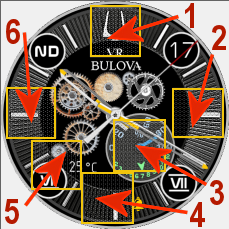
W wersji projektu o nazwie pliku: „vr_bulova_clipper_automatic_g3ep” zastosowałem dodatkowo 6 pól dotykowych (stref dotykowych, czyli 6 skrótów). Rozmieszczenie tych obszarów dotykowych na tarczy zegarka pokazuje zamieszczony powyżej obrazek.
Wystarczy tylko dotknąć jeden z wybranych obszarów, aby szybko przejść do:
1 – ustawienia alarmów,
2– stopera,
3 – ilości kroków itp.,
4 – pogody – ciśnienia atmosferycznego i innych danych,
5 – pogody – bieżącej temperatury, wilgotności itp.,
6 – ustawienia odliczania wstecznego.
W trybie AOD pokazywany jest czas w formie analogowej (wskazówkami zegarka) oraz stan naładowania akumulatora w formie liczbowej w %.
--------------------- EN --------------------------------------------------------------------------------------
"VR BULOVA clipper automatic G3", is a watch face designed for Amazfit GTR 3 smartwatch.
I used my earlier 2 designs for the GTR 2 which are at the links:
/gtr/view/19685
/gtr/view/18866 .
On the main watch face, time is presented in analog form only. The day of the month, the day of the week (as a two-letter abbreviation) are also always displayed, and a small watch hand on the internal watch face indicates the battery charge status. In addition, the no bluetooth signal sign and the alarm activity icon are displayed.
In the applied edit fields, you can optionally set such editing elements as:
- in field 1: the icon of the current weather condition or the month shown in Roman numerals (after selecting the monthly calendar icon),
- in field 2: current temperature or pressure or nothing (empty field - after selecting the inscription: "sunrise / sunset", which corresponds to the icon of the lack of a parameter),
- in field 3: the distance traveled in km or the current number of steps or calories or pulse (heart rate, BPM) or the month, which is indicated by a small watch hand on the inner watch face,
- in field 4: the month shown in Roman numerals (after selecting the monthly calendar icon) or the year (after selecting the annual calendar icon and the inscription: "sunrise / sunset" .
.
The displayed parameter in the selected edit field is selected after touching the center of the watch face, then after touching the pen icon, and then after single or multiple touching the selected icon representing the displayed parameter.
In this project I used two animations, which in total present one working rack and pinion mechanism.
In the version of the project with the file name: "vr_bulova_clipper_automatic_g3ep" I used additional 6 touch fields (touch zones, i.e. 6 shortcuts). The location of these touch areas on the watch face is shown in the image above.
Just touch one of the selected areas to quickly go to:
1 – alarm settings,
2 – stopwatch,
3 – number of steps, etc.,
4 – weather – atmospheric pressure and other data,
5 – weather - current temperature, humidity, etc.,
6 – countdown settings.
In the AOD mode, the time is shown in analog form (watch hands) and the battery charge status in numerical form in %.
vr_bulova_clipper_automatic_g3_pl – wersja polskojęzyczna / Polish version
vr_bulova_clipper_automatic_g3ep_en – wersja angielskojęzyczna ze skrótami / English version with abbreviations
vr_bulova_clipper_automatic_g3ep_pl – wersja polskojęzyczna ze skrótami / Polish version with abbreviations
------------------------------------------------------------------------------------------------------------------
Pola (strefy) dotykowe // Touch fields (zones):
----------------- PL --------------------------------------------------------------------------------------------
„VR BULOVA clipper automatic G3”, to tarcza zegarkowa przeznaczona dla smartwatcha Amazfit GTR 3.
Wykorzystałem moje wcześniejsze 2 projekty dla GTR 2, które są pod linkami:
/gtr/view/19685
/gtr/view/18866 .
Na głównej tarczy zegarkowej czas jest prezentowany w tylko formie analogowej. Wyświetlane są także zawsze: dzień miesiąca, dzień tygodnia (jako dwuliterowy skrót), a małą wskazówką zegarkową na wewnętrznej tarczy zegarkowej wskazywany jest stan naładowania akumulatora. Ponadto wyświetlane są: znak braku sygnału bluetooth oraz ikona aktywności alarmu.
W zastosowanych polach edycyjnych można ustawić opcjonalnie takie edycyjne elementy jak:
- w polu nr 1: ikonę aktualnego stanu pogody lub miesiąc pokazywany cyframi rzymskimi (po wybraniu ikonki kalendarza miesięcznego),
- w polu nr 2: bieżącą temperaturę lub ciśnienie lub nic (pole puste – po wybraniu napisu: „wschód / zachód słońca”, co odpowiada ikonce braku parametru),
- w polu nr 3: pokonany dystans w km lub bieżącą liczbę kroków lub kalorie lub puls (tętno, BPM) lub miesiąc, który jest wskazywany małą wskazówką zegarkową na wewnętrznej tarczy zegarkowej,
- w polu nr 4: miesiąc pokazywany cyframi rzymskimi (po wybraniu ikonki kalendarza miesięcznego) lub rok (po wybraniu ikonki kalendarza rocznego i napisu: „wschód / zachód słońca”).
Wybór wyświetlanego parametru w wybranym polu edycyjnym następuje po dotknięciu środka tarczy zegarka, a następnie po dotknięciu ikony pióra, a potem po jednokrotnym lub wielokrotnym dotknięciu wybranej ikonki reprezentującej wyświetlany parametr.
W projekcie tym zastosowałem dwie animacje, które w sumie prezentują jeden działający mechanizm zębatkowy.
W wersji projektu o nazwie pliku: „vr_bulova_clipper_automatic_g3ep” zastosowałem dodatkowo 6 pól dotykowych (stref dotykowych, czyli 6 skrótów). Rozmieszczenie tych obszarów dotykowych na tarczy zegarka pokazuje zamieszczony powyżej obrazek.
Wystarczy tylko dotknąć jeden z wybranych obszarów, aby szybko przejść do:
1 – ustawienia alarmów,
2– stopera,
3 – ilości kroków itp.,
4 – pogody – ciśnienia atmosferycznego i innych danych,
5 – pogody – bieżącej temperatury, wilgotności itp.,
6 – ustawienia odliczania wstecznego.
W trybie AOD pokazywany jest czas w formie analogowej (wskazówkami zegarka) oraz stan naładowania akumulatora w formie liczbowej w %.
--------------------- EN --------------------------------------------------------------------------------------
"VR BULOVA clipper automatic G3", is a watch face designed for Amazfit GTR 3 smartwatch.
I used my earlier 2 designs for the GTR 2 which are at the links:
/gtr/view/19685
/gtr/view/18866 .
On the main watch face, time is presented in analog form only. The day of the month, the day of the week (as a two-letter abbreviation) are also always displayed, and a small watch hand on the internal watch face indicates the battery charge status. In addition, the no bluetooth signal sign and the alarm activity icon are displayed.
In the applied edit fields, you can optionally set such editing elements as:
- in field 1: the icon of the current weather condition or the month shown in Roman numerals (after selecting the monthly calendar icon),
- in field 2: current temperature or pressure or nothing (empty field - after selecting the inscription: "sunrise / sunset", which corresponds to the icon of the lack of a parameter),
- in field 3: the distance traveled in km or the current number of steps or calories or pulse (heart rate, BPM) or the month, which is indicated by a small watch hand on the inner watch face,
- in field 4: the month shown in Roman numerals (after selecting the monthly calendar icon) or the year (after selecting the annual calendar icon and the inscription: "sunrise / sunset"
.The displayed parameter in the selected edit field is selected after touching the center of the watch face, then after touching the pen icon, and then after single or multiple touching the selected icon representing the displayed parameter.
In this project I used two animations, which in total present one working rack and pinion mechanism.
In the version of the project with the file name: "vr_bulova_clipper_automatic_g3ep" I used additional 6 touch fields (touch zones, i.e. 6 shortcuts). The location of these touch areas on the watch face is shown in the image above.
Just touch one of the selected areas to quickly go to:
1 – alarm settings,
2 – stopwatch,
3 – number of steps, etc.,
4 – weather – atmospheric pressure and other data,
5 – weather - current temperature, humidity, etc.,
6 – countdown settings.
In the AOD mode, the time is shown in analog form (watch hands) and the battery charge status in numerical form in %.
Tag
analog
seconds
second hand
analog second hand
classic
modern type
modern design
experimental
elegant
steps
distance
km
battery
percentage of Energy
day of week
day
day of the month
month
month in roman numerals
full date
year and month and day
day and month
temperature
degrees Celsius
atmospheric pressure
hPa
weather
weather condition
dynamic weather status icon
pulse
heart rate
bpm
abbreviation of the name of the day
dial indicator of the month
watch face with month numbers
battery charge status watch face
a pointer indication of the battery status
animation
bluetooth
alarm
AOD
AOD function
editable zones
active fields
touch fields
Condividi questo quadrante
Commenti
Per rispondere ai commenti devi essere loggato .
Discussioni recenti della comunità
Creation request gtr4
Can someone please create this face for the gtr4 https://www.tagheuer.com/gb/en/smartwatches/collections/tag-heuer-connected/45-mm/SBT8A87.EB0436.html?utm_source=facebook&utm_...
Minimal amber watchface for gtr4
It is perfect thank you sir i appreciate you 🙏...
Upgrade of Snoopy GTR3
I love it, thanks a lot asoo <3...
Convert request for gtr4
Thank you sir i appreciate it...
Port request gtr4
If you're not going to use the watchface tool, then many times you can upload the entire .zip file to Gemini or another AI tool and tell it to make the edits for you. Thank...
Port request gtr4
Thank you...
Port request for gtr4 [GTR 4]
Thank you...





Nessun commento. Commenta per primo.