VR TAG HEUER APG3

Сумісний з
GTR 3 Підтримувані мови
multilingual, en, pl
multilingual, en, pl
Завантажено: 15.11.2022 12:29
Оновлено: 18.11.2022 19:35
37 користувачів додали це до обраного
Важлива інформація для користувачів
Зверніть увагу, що всі циферблати, доступні на цьому сайті, є творчими роботами наших користувачів і не пов'язані з офіційними брендами або торговими марками. Вони створюються шанувальниками для шанувальників, надихаються популярними культурними феноменами, іграми, фільмами, або серіалами.
Наша мета - надати платформу для творчості та обміну, але ми також прагнемо поважати інтелектуальні права. Якщо ви володієте авторськими правами на будь-який контент, який, на вашу думку, порушує ваші права на цьому сайті, будь ласка, зв'яжіться з нами для вжиття відповідних заходів.
Зверніть увагу, що всі циферблати, доступні на цьому сайті, є творчими роботами наших користувачів і не пов'язані з офіційними брендами або торговими марками. Вони створюються шанувальниками для шанувальників, надихаються популярними культурними феноменами, іграми, фільмами, або серіалами.
Наша мета - надати платформу для творчості та обміну, але ми також прагнемо поважати інтелектуальні права. Якщо ви володієте авторськими правами на будь-який контент, який, на вашу думку, порушує ваші права на цьому сайті, будь ласка, зв'яжіться з нами для вжиття відповідних заходів.

Опис
vr_tag_heuer_apg3v1_en – wersja angielskojęzyczna / English version
vr_tag_heuer_apg3v1_pl – wersja polskojęzyczna / Polish version
Uwaga: / Attention:
PL: Wersja oznaczona numerem 1 ma poprawione wyświetlanie bieżącej wartości kalorii.
EN: Version 1 has an improved display of the current calorie value.
------------------------------------------------------------------------------------------------------------------
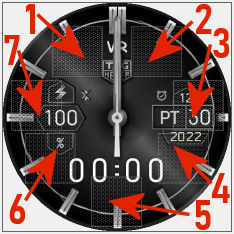
Pola (strefy) dotykowe // Touch fields (zones):
----------------- PL --------------------------------------------------------------------------------------------
„VR TAG HEUER APG3”, to tarcza zegarkowa przeznaczona dla smartwatcha Amazfit GTR 3.
Dla zegarka „TAG HEUER” również i inne osoby wykonywały projekty dla różnych smartwatchy Amazfit. Ja też już zrobiłem wcześniej projekt „VR TAG HEUER G3”. Ten mój wcześniejszy projekt jest pod linkiem: /gtr/view/26638 .
Na głównej tarczy zegarkowej czas jest prezentowany w formie analogowej i cyfrowej. Wyświetlane są: rok, miesiąc, dzień miesiąca i dzień tygodnia. Dzień tygodnia prezentowany jest jako dwuliterowy skrót. Aktualny stan naładowania akumulatora podawany jest liczbowo w %. Pokazywany jest także znak braku sygnału bluetooth oraz ikona aktywności alarmu. W projekcie tym zastosowałem dwie animacje: animowany pierścień oraz animowane kropki dla czasu w wersji cyfrowej.
W tym projekcie zastosowałem 1 strefę edycyjną (z edytowalnymi elementami) oraz aż 7 pól (stref) dotykowych pozwalających szybko przejść do innych parametrów zegarka.
Wystarczy tylko dotknąć jeden z wybranych obszarów (jak na zamieszczonym powyżej obrazku), aby szybko przejść do:
1 – ilości kroków itp.
2 – tętna (pulsu),
3 – ustawienia alarmów,
4 – stopera,
5 – ustawienia odliczania wstecznego,
5 – pogody – ciśnienia atmosferycznego i innych danych,
7 – pogody – bieżącej temperatury, wilgotności itp.
Wybór wyświetlanego parametru w strefie edycyjnej następuje po dotknięciu środka tarczy zegarka, a następnie po dotknięciu ikony pióra.
W strefie z edytowalnymi elementami można wybrać wyświetlanie jednego z następujących parametrów: dystans (km), kroki, puls (tętno, BPM), spalone kalorie (kcal) lub stanie. Wybór stania skutkuje brakiem wyświetlania jakiegokolwiek parametru, a tarcza zegarka staje się wówczas bardziej klasyczna.
W trybie AOD są pokazywane: czas cyfrowo i stan naładowania akumulatora w formie liczbowej w %.
--------------------- EN --------------------------------------------------------------------------------------
"VR TAG HEUER APG3", is a watch face designed for Amazfit GTR 3 smartwatch.
For the "TAG HEUER" watch, other people also made designs for various Amazfit smartwatches. I have also already done the "VR TAG HEUER G3" project before. This earlier project of mine is under the link: /gtr/view/26638 .
On the main watch face, time is presented in analog and digital form. The year, month, day of the month and day of the week are displayed. The day of the week is presented as a two-letter abbreviation. The current state of charge of the battery is given numerically in %. The no bluetooth signal sign and the alarm activity icon are also shown. In this project I used two animations: an animated ring and animated dots for time in the digital version.
In this project, I used 1 editing zone (with editable elements) and as many as 7 touch fields (zones) that allow you to quickly go to other parameters of the watch.
Just touch one of the selected areas (as in the image above) to quickly go to:
1 - number of steps, etc.
2 - heart rate (pulse),
3 - alarm settings,
4 - stopwatch,
5 - countdown settings,
5 – weather – atmospheric pressure and other data,
7 - weather - current temperature, humidity, etc.
The displayed parameter in the editing zone is selected after touching the center of the watch face, and then after touching the pen icon.
In the zone with editable elements, you can choose to display one of the following parameters: distance (km), steps, pulse (heart rate, BPM), calories burned (kcal) or stand. The choice of standing results in no parameter being displayed, and the watch face then becomes more classic.
In AOD mode, the time is displayed digitally and the battery charge status in numerical form in %.
vr_tag_heuer_apg3v1_pl – wersja polskojęzyczna / Polish version
Uwaga: / Attention:
PL: Wersja oznaczona numerem 1 ma poprawione wyświetlanie bieżącej wartości kalorii.
EN: Version 1 has an improved display of the current calorie value.
------------------------------------------------------------------------------------------------------------------
Pola (strefy) dotykowe // Touch fields (zones):
----------------- PL --------------------------------------------------------------------------------------------
„VR TAG HEUER APG3”, to tarcza zegarkowa przeznaczona dla smartwatcha Amazfit GTR 3.
Dla zegarka „TAG HEUER” również i inne osoby wykonywały projekty dla różnych smartwatchy Amazfit. Ja też już zrobiłem wcześniej projekt „VR TAG HEUER G3”. Ten mój wcześniejszy projekt jest pod linkiem: /gtr/view/26638 .
Na głównej tarczy zegarkowej czas jest prezentowany w formie analogowej i cyfrowej. Wyświetlane są: rok, miesiąc, dzień miesiąca i dzień tygodnia. Dzień tygodnia prezentowany jest jako dwuliterowy skrót. Aktualny stan naładowania akumulatora podawany jest liczbowo w %. Pokazywany jest także znak braku sygnału bluetooth oraz ikona aktywności alarmu. W projekcie tym zastosowałem dwie animacje: animowany pierścień oraz animowane kropki dla czasu w wersji cyfrowej.
W tym projekcie zastosowałem 1 strefę edycyjną (z edytowalnymi elementami) oraz aż 7 pól (stref) dotykowych pozwalających szybko przejść do innych parametrów zegarka.
Wystarczy tylko dotknąć jeden z wybranych obszarów (jak na zamieszczonym powyżej obrazku), aby szybko przejść do:
1 – ilości kroków itp.
2 – tętna (pulsu),
3 – ustawienia alarmów,
4 – stopera,
5 – ustawienia odliczania wstecznego,
5 – pogody – ciśnienia atmosferycznego i innych danych,
7 – pogody – bieżącej temperatury, wilgotności itp.
Wybór wyświetlanego parametru w strefie edycyjnej następuje po dotknięciu środka tarczy zegarka, a następnie po dotknięciu ikony pióra.
W strefie z edytowalnymi elementami można wybrać wyświetlanie jednego z następujących parametrów: dystans (km), kroki, puls (tętno, BPM), spalone kalorie (kcal) lub stanie. Wybór stania skutkuje brakiem wyświetlania jakiegokolwiek parametru, a tarcza zegarka staje się wówczas bardziej klasyczna.
W trybie AOD są pokazywane: czas cyfrowo i stan naładowania akumulatora w formie liczbowej w %.
--------------------- EN --------------------------------------------------------------------------------------
"VR TAG HEUER APG3", is a watch face designed for Amazfit GTR 3 smartwatch.
For the "TAG HEUER" watch, other people also made designs for various Amazfit smartwatches. I have also already done the "VR TAG HEUER G3" project before. This earlier project of mine is under the link: /gtr/view/26638 .
On the main watch face, time is presented in analog and digital form. The year, month, day of the month and day of the week are displayed. The day of the week is presented as a two-letter abbreviation. The current state of charge of the battery is given numerically in %. The no bluetooth signal sign and the alarm activity icon are also shown. In this project I used two animations: an animated ring and animated dots for time in the digital version.
In this project, I used 1 editing zone (with editable elements) and as many as 7 touch fields (zones) that allow you to quickly go to other parameters of the watch.
Just touch one of the selected areas (as in the image above) to quickly go to:
1 - number of steps, etc.
2 - heart rate (pulse),
3 - alarm settings,
4 - stopwatch,
5 - countdown settings,
5 – weather – atmospheric pressure and other data,
7 - weather - current temperature, humidity, etc.
The displayed parameter in the editing zone is selected after touching the center of the watch face, and then after touching the pen icon.
In the zone with editable elements, you can choose to display one of the following parameters: distance (km), steps, pulse (heart rate, BPM), calories burned (kcal) or stand. The choice of standing results in no parameter being displayed, and the watch face then becomes more classic.
In AOD mode, the time is displayed digitally and the battery charge status in numerical form in %.
Теги
analog
digital
dual time
seconds
seconds display
second hand
analog second hand
classic
modern type
modern design
elegant
battery
percentage of Energy
day of week
day
day of the month
month
month in numerals
full date
year and month and day
day and month
abbreviation of the name of the day
animation
bluetooth
alarm
AOD
AOD function
editable zones
active fields
touch fields
Поділиться цим циферблатом
Коментарі
Вам необхідно увійти, щоб залишати коментарі або відповідати на них.
Недавні обговорення в спільноті
Creation request gtr4
Can someone please create this face for the gtr4 https://www.tagheuer.com/gb/en/smartwatches/collections/tag-heuer-connected/45-mm/SBT8A87.EB0436.html?utm_source=facebook&utm_...
Minimal amber watchface for gtr4
It is perfect thank you sir i appreciate you 🙏...
Upgrade of Snoopy GTR3
I love it, thanks a lot asoo <3...
Convert request for gtr4
Thank you sir i appreciate it...
Port request gtr4
If you're not going to use the watchface tool, then many times you can upload the entire .zip file to Gemini or another AI tool and tell it to make the edits for you. Thank...
Port request gtr4
Thank you...
Port request for gtr4 [GTR 4]
Thank you...





Немає коментарів. Залиште перший коментар.