NightLights CZ/EN

Compatibile con
47mm Idiomas compatibles
cz
cz
Data aggiunta: 02.03.2020 16:39
1971 utenti che hanno questo elemento nei preferiti
Informazioni Importanti per gli Utenti
Si prega di notare che tutti i quadranti orologio disponibili su questo sito sono opere creative dei nostri utenti e non sono affiliati con marchi ufficiali o marchi registrati. Sono creati da fan per fan, ispirati da fenomeni culturali popolari, giochi, film o serie.
Il nostro obiettivo è fornire una piattaforma per la creatività e lo scambio, ma ci impegniamo anche a rispettare i diritti intellettuali. Se detiene i diritti d'autore su qualsiasi contenuto che ritiene infranga i suoi diritti su questo sito, contattaci per un'azione appropriata.
Si prega di notare che tutti i quadranti orologio disponibili su questo sito sono opere creative dei nostri utenti e non sono affiliati con marchi ufficiali o marchi registrati. Sono creati da fan per fan, ispirati da fenomeni culturali popolari, giochi, film o serie.
Il nostro obiettivo è fornire una piattaforma per la creatività e lo scambio, ma ci impegniamo anche a rispettare i diritti intellettuali. Se detiene i diritti d'autore su qualsiasi contenuto che ritiene infranga i suoi diritti su questo sito, contattaci per un'azione appropriata.

Descrizione
modified dial
czech
english
russian
+calories
+partly colored weather icons
+Red Sunday Day
+stronger stripe of activity
add: CZ/EN Blue version step progress
add: EN Blue version non step progress
add: EN Orange version non step progress
add: EN Neon Green version non step progress
add:EN neon yellow version non step progress
no steps progress
add: EN 12H(AM/PM) neon yellow version non step progress
add: EN 12H(AM/PM) White version non step progress
add: EN 12H(AM/PM) Blue version non step progress
add: EN 12H(AM/PM) Neon Green version non step progress
add: EN 12H(AM/PM) Orange version non step progress
add: EN 12H(AM/PM) Neon Pink version non step progress
add: RU 12H(AM/PM) Neon yellow version non step progress Fixed
add: RU 12H(AM/PM) Neon Green version non step progress Fixed
add: RU 12H(AM/PM) orange version non step progress
add: RU 12H(AM/PM) Neon Red version non step progress
steps progress
add: EN 12H(AM/PM) neon yellow version step progress
add: EN 12H(AM/PM) White version step progress
add: EN 12H(AM/PM) Blue version step progress
add: EN 12H(AM/PM) Neon Green version step progress
add: EN 12H(AM/PM) Neon Pink version step progress
add: EN 12H(AM/PM) Orange version step progress
no steps progress + no calories
add: EN 12H(AM/PM) neon yellow version non step progress + no calories
add: EN 12H(AM/PM) White version non step progress + no calories
add: EN 12H(AM/PM) Blue version non step progress + no calories
add: EN 12H(AM/PM) Neon Green version non step progress + no calories
add: EN 12H(AM/PM) Orange version non step progress + no calories
add: EN 12H(AM/PM) Neon Pink version non step progress + no calories
no steps progress + no calories + no minute strip marker
add: EN 12H(AM/PM) neon yellow version non step progress + no calories + no minute strip marker
add: EN 12H(AM/PM) White version non step progress + no calories + no minute strip marker
add: EN 12H(AM/PM) Blue version non step progress + no calories + no minute strip marker
add: EN 12H(AM/PM) Neon Green version non step progress + no calories + no minute strip marker
add: EN 12H(AM/PM) Orange version non step progress + no calories + no minute strip marker
add: EN 12H(AM/PM) Neon Pink version non step progress + no calories + no minute strip marker
no steps progress + no calories + no minute strip marker+ (weather DAY/NIGHT)
add: EN 12H(AM/PM) White version non step progress + no calories + no minute strip marker + (weather DAY/NIGHT)
add: EN 12H(AM/PM) Blue version non step progress + no calories + no minute strip marker + (weather DAY/NIGHT)
On request
add: EN Blue version non step progress + no calories
add: EN 12H(AM/PM) neon yellow version non step progress + no claories
add: EN 12H(AM/PM) White version non step progress + no calories + no minute strip marker + (weather DAY/NIGHT)
add: EN 12H(AM/PM) White version RED step progress
add: EN 12H(AM/PM) yellow version step progress V2
add: EN 12H(AM/PM) White version - non step progress - smaller time digits
add: EN 12H(AM/PM) Neon Red version non step progress
add: EN 12H(AM/PM) White version - non step progress -no calories - smaller time digits
add: EN 12H(AM/PM) White version non step progress + no calories + no weather
test it EDIT WEATHER DAY/NIGHT
add: EN 12H(AM/PM) Neon Green version non step progress. no calories (weather DAY/NIGHT)
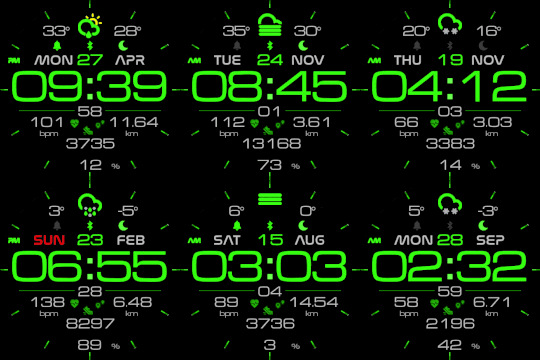
It works in 24h format
For the 12 h format to work. must be enabled in phone settings. (Settings-System-Date and Time-Disable 24-hour format.)
Original version:
Author - nightwatch
czech
english
russian
+calories
+partly colored weather icons
+Red Sunday Day
+stronger stripe of activity
add: CZ/EN Blue version step progress
add: EN Blue version non step progress
add: EN Orange version non step progress
add: EN Neon Green version non step progress
add:EN neon yellow version non step progress
no steps progress
add: EN 12H(AM/PM) neon yellow version non step progress
add: EN 12H(AM/PM) White version non step progress
add: EN 12H(AM/PM) Blue version non step progress
add: EN 12H(AM/PM) Neon Green version non step progress
add: EN 12H(AM/PM) Orange version non step progress
add: EN 12H(AM/PM) Neon Pink version non step progress
add: RU 12H(AM/PM) Neon yellow version non step progress Fixed
add: RU 12H(AM/PM) Neon Green version non step progress Fixed
add: RU 12H(AM/PM) orange version non step progress
add: RU 12H(AM/PM) Neon Red version non step progress
steps progress
add: EN 12H(AM/PM) neon yellow version step progress
add: EN 12H(AM/PM) White version step progress
add: EN 12H(AM/PM) Blue version step progress
add: EN 12H(AM/PM) Neon Green version step progress
add: EN 12H(AM/PM) Neon Pink version step progress
add: EN 12H(AM/PM) Orange version step progress
no steps progress + no calories
add: EN 12H(AM/PM) neon yellow version non step progress + no calories
add: EN 12H(AM/PM) White version non step progress + no calories
add: EN 12H(AM/PM) Blue version non step progress + no calories
add: EN 12H(AM/PM) Neon Green version non step progress + no calories
add: EN 12H(AM/PM) Orange version non step progress + no calories
add: EN 12H(AM/PM) Neon Pink version non step progress + no calories
no steps progress + no calories + no minute strip marker
add: EN 12H(AM/PM) neon yellow version non step progress + no calories + no minute strip marker
add: EN 12H(AM/PM) White version non step progress + no calories + no minute strip marker
add: EN 12H(AM/PM) Blue version non step progress + no calories + no minute strip marker
add: EN 12H(AM/PM) Neon Green version non step progress + no calories + no minute strip marker
add: EN 12H(AM/PM) Orange version non step progress + no calories + no minute strip marker
add: EN 12H(AM/PM) Neon Pink version non step progress + no calories + no minute strip marker
no steps progress + no calories + no minute strip marker+ (weather DAY/NIGHT)
add: EN 12H(AM/PM) White version non step progress + no calories + no minute strip marker + (weather DAY/NIGHT)
add: EN 12H(AM/PM) Blue version non step progress + no calories + no minute strip marker + (weather DAY/NIGHT)
On request
add: EN Blue version non step progress + no calories
add: EN 12H(AM/PM) neon yellow version non step progress + no claories
add: EN 12H(AM/PM) White version non step progress + no calories + no minute strip marker + (weather DAY/NIGHT)
add: EN 12H(AM/PM) White version RED step progress
add: EN 12H(AM/PM) yellow version step progress V2
add: EN 12H(AM/PM) White version - non step progress - smaller time digits
add: EN 12H(AM/PM) Neon Red version non step progress
add: EN 12H(AM/PM) White version - non step progress -no calories - smaller time digits
add: EN 12H(AM/PM) White version non step progress + no calories + no weather
test it EDIT WEATHER DAY/NIGHT
add: EN 12H(AM/PM) Neon Green version non step progress. no calories (weather DAY/NIGHT)
It works in 24h format
For the 12 h format to work. must be enabled in phone settings. (Settings-System-Date and Time-Disable 24-hour format.)
Original version:
Author - nightwatch
Tag
Condividi questo quadrante
Commenti
Per rispondere ai commenti devi essere loggato .
Discussioni recenti della comunità
Few changes for gtr4
Thank you for all your help 🙂 have a great weekend...
convert request for GTS 2 mini
You are so GREAT! Thanks again!...
Adding some options request for gtr4
Amazing thank you sir 🙏...
Convert request for gtr4
Thank you so much...
Please port request for gtr4
It is perfect thank you 🙏...
Snoopy black version GTR 3
Many thanks sir...
Request: "Dash Digital" and “Acrive” style for Amazfit GTR Mini
Thank you asoo! I installed the V2 version on my GTR Mini and it works great. Thanks for your time and for moving the thread to the right section!...





For the 12 h format to work. must be enabled in phone settings. (Settings-System-Date and Time-Disable 24-hour format.) 09.01.2020 18:38:08 Segnala
It works in 24h format.
For the 12 h format to work. must be enabled in phone settings. (Settings-System-Date and Time-Disable 24-hour format.) 09.01.2020 20:21:11 Segnala
add: RU 12H(AM/PM) Neon yellow
add: RU 12H(AM/PM) Neon Green 10.01.2020 17:25:44 Segnala
Sorry I can't speak Russian 10.01.2020 19:10:10 Segnala
add: RU 12H(AM/PM) orange version non step progress
add: RU 12H(AM/PM) Neon Red version non step progress 10.01.2020 22:24:12 Segnala
Can you modify
"nightlights_en_non_step_progres" version without calories, pls 12.01.2020 22:09:56 Segnala
Amazfit no good app many mistakes
add: EN 12H(AM/PM) Neon Green version non step progress. no calories (weather DAY/NIGHT) 19.01.2020 23:33:40 Segnala
for uploadI use the app https://play.google.com/store/apps/details?id=com.mc.amazfit1&hl=cs
Real photo
I wan't "EN 12H(AM/PM) step progress" version, I hope you will add it. 20.01.2020 04:05:39 Segnala
steps progress
add: EN 12H(AM/PM) neon yellow version step progress
add: EN 12H(AM/PM) White version step progress
add: EN 12H(AM/PM) Blue version step progress
add: EN 12H(AM/PM) Neon Green version step progress
add: EN 12H(AM/PM) Neon Pink version step progress
add: EN 12H(AM/PM) Orange version step progress 20.01.2020 13:35:56 Segnala
EN 12H(AM/PM) neon yellow version non step progress + no calories
EN 12H(AM/PM) White version non step progress + no calories
EN 12H(AM/PM) Blue version non step progress + no calories
EN 12H(AM/PM) Neon Green version non step progress + no calories
EN 12H(AM/PM) Orange version non step progress + no calories
EN 12H(AM/PM) Neon Pink version non step progress + no calories 22.01.2020 17:05:00 Segnala
EN 12H(AM/PM) Orange version non step progress ( No minute marker, on 12, 5, 10, 15 etc. ) 23.01.2020 04:06:32 Segnala
Keep up your good work! 24.01.2020 07:18:42 Segnala
add: EN 12H(AM/PM) neon yellow version non step progress + no calories + no minute strip marker
add: EN 12H(AM/PM) White version non step progress + no calories + no minute strip marker
add: EN 12H(AM/PM) Blue version non step progress + no calories + no minute strip marker
add: EN 12H(AM/PM) Neon Green version non step progress + no calories + no minute strip marker
add: EN 12H(AM/PM) Orange version non step progress + no calories + no minute strip marker
add: EN 12H(AM/PM) Neon Pink version non step progress + no calories + no minute strip marker
Thank you! 26.01.2020 01:35:12 Segnala
Is it possible to add a White WEATHER DAY/NIGHT version? With non step progress + no calories + no minute strip marker?
Thank you very very much for your great work! 03.02.2020 00:24:46 Segnala
IOS Unfortunately I do not have. 04.02.2020 17:50:29 Segnala
add: EN 12H(AM/PM) yellow version step progress V2
You rock frigo 08.02.2020 02:12:51 Segnala
Posible spanish versión? 28.03.2020 21:33:13 Segnala
Thanks in avance! 29.07.2020 04:55:13 Segnala
-Peter 08.12.2020 16:14:22 Segnala