NightLights CZ/EN

Compatible with
47mm Supported Languages
cz
cz
Uploaded: 02.03.2020 16:39
1972 users have this item in favourites
Important Information for Users
Please note that all watch faces available on this site are creative works by our users and are not affiliated with official brands or trademarks. They are created by fans for fans, inspired by popular cultural phenomena, games, movies, or series.
Our goal is to provide a platform for creativity and exchange, but we also strive to respect intellectual rights. If you hold copyright to any content that you believe infringes your rights on this site, please contact us for appropriate action.
Please note that all watch faces available on this site are creative works by our users and are not affiliated with official brands or trademarks. They are created by fans for fans, inspired by popular cultural phenomena, games, movies, or series.
Our goal is to provide a platform for creativity and exchange, but we also strive to respect intellectual rights. If you hold copyright to any content that you believe infringes your rights on this site, please contact us for appropriate action.

Description
modified dial
czech
english
russian
+calories
+partly colored weather icons
+Red Sunday Day
+stronger stripe of activity
add: CZ/EN Blue version step progress
add: EN Blue version non step progress
add: EN Orange version non step progress
add: EN Neon Green version non step progress
add:EN neon yellow version non step progress
no steps progress
add: EN 12H(AM/PM) neon yellow version non step progress
add: EN 12H(AM/PM) White version non step progress
add: EN 12H(AM/PM) Blue version non step progress
add: EN 12H(AM/PM) Neon Green version non step progress
add: EN 12H(AM/PM) Orange version non step progress
add: EN 12H(AM/PM) Neon Pink version non step progress
add: RU 12H(AM/PM) Neon yellow version non step progress Fixed
add: RU 12H(AM/PM) Neon Green version non step progress Fixed
add: RU 12H(AM/PM) orange version non step progress
add: RU 12H(AM/PM) Neon Red version non step progress
steps progress
add: EN 12H(AM/PM) neon yellow version step progress
add: EN 12H(AM/PM) White version step progress
add: EN 12H(AM/PM) Blue version step progress
add: EN 12H(AM/PM) Neon Green version step progress
add: EN 12H(AM/PM) Neon Pink version step progress
add: EN 12H(AM/PM) Orange version step progress
no steps progress + no calories
add: EN 12H(AM/PM) neon yellow version non step progress + no calories
add: EN 12H(AM/PM) White version non step progress + no calories
add: EN 12H(AM/PM) Blue version non step progress + no calories
add: EN 12H(AM/PM) Neon Green version non step progress + no calories
add: EN 12H(AM/PM) Orange version non step progress + no calories
add: EN 12H(AM/PM) Neon Pink version non step progress + no calories
no steps progress + no calories + no minute strip marker
add: EN 12H(AM/PM) neon yellow version non step progress + no calories + no minute strip marker
add: EN 12H(AM/PM) White version non step progress + no calories + no minute strip marker
add: EN 12H(AM/PM) Blue version non step progress + no calories + no minute strip marker
add: EN 12H(AM/PM) Neon Green version non step progress + no calories + no minute strip marker
add: EN 12H(AM/PM) Orange version non step progress + no calories + no minute strip marker
add: EN 12H(AM/PM) Neon Pink version non step progress + no calories + no minute strip marker
no steps progress + no calories + no minute strip marker+ (weather DAY/NIGHT)
add: EN 12H(AM/PM) White version non step progress + no calories + no minute strip marker + (weather DAY/NIGHT)
add: EN 12H(AM/PM) Blue version non step progress + no calories + no minute strip marker + (weather DAY/NIGHT)
On request
add: EN Blue version non step progress + no calories
add: EN 12H(AM/PM) neon yellow version non step progress + no claories
add: EN 12H(AM/PM) White version non step progress + no calories + no minute strip marker + (weather DAY/NIGHT)
add: EN 12H(AM/PM) White version RED step progress
add: EN 12H(AM/PM) yellow version step progress V2
add: EN 12H(AM/PM) White version - non step progress - smaller time digits
add: EN 12H(AM/PM) Neon Red version non step progress
add: EN 12H(AM/PM) White version - non step progress -no calories - smaller time digits
add: EN 12H(AM/PM) White version non step progress + no calories + no weather
test it EDIT WEATHER DAY/NIGHT
add: EN 12H(AM/PM) Neon Green version non step progress. no calories (weather DAY/NIGHT)
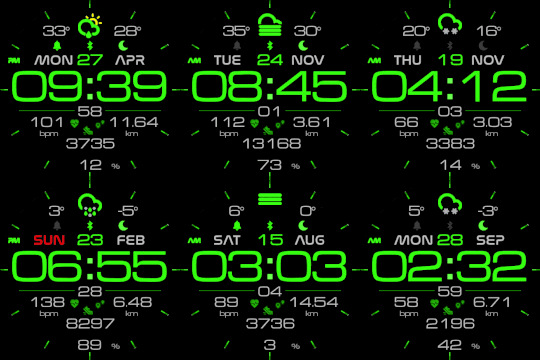
It works in 24h format
For the 12 h format to work. must be enabled in phone settings. (Settings-System-Date and Time-Disable 24-hour format.)
Original version:
Author - nightwatch
czech
english
russian
+calories
+partly colored weather icons
+Red Sunday Day
+stronger stripe of activity
add: CZ/EN Blue version step progress
add: EN Blue version non step progress
add: EN Orange version non step progress
add: EN Neon Green version non step progress
add:EN neon yellow version non step progress
no steps progress
add: EN 12H(AM/PM) neon yellow version non step progress
add: EN 12H(AM/PM) White version non step progress
add: EN 12H(AM/PM) Blue version non step progress
add: EN 12H(AM/PM) Neon Green version non step progress
add: EN 12H(AM/PM) Orange version non step progress
add: EN 12H(AM/PM) Neon Pink version non step progress
add: RU 12H(AM/PM) Neon yellow version non step progress Fixed
add: RU 12H(AM/PM) Neon Green version non step progress Fixed
add: RU 12H(AM/PM) orange version non step progress
add: RU 12H(AM/PM) Neon Red version non step progress
steps progress
add: EN 12H(AM/PM) neon yellow version step progress
add: EN 12H(AM/PM) White version step progress
add: EN 12H(AM/PM) Blue version step progress
add: EN 12H(AM/PM) Neon Green version step progress
add: EN 12H(AM/PM) Neon Pink version step progress
add: EN 12H(AM/PM) Orange version step progress
no steps progress + no calories
add: EN 12H(AM/PM) neon yellow version non step progress + no calories
add: EN 12H(AM/PM) White version non step progress + no calories
add: EN 12H(AM/PM) Blue version non step progress + no calories
add: EN 12H(AM/PM) Neon Green version non step progress + no calories
add: EN 12H(AM/PM) Orange version non step progress + no calories
add: EN 12H(AM/PM) Neon Pink version non step progress + no calories
no steps progress + no calories + no minute strip marker
add: EN 12H(AM/PM) neon yellow version non step progress + no calories + no minute strip marker
add: EN 12H(AM/PM) White version non step progress + no calories + no minute strip marker
add: EN 12H(AM/PM) Blue version non step progress + no calories + no minute strip marker
add: EN 12H(AM/PM) Neon Green version non step progress + no calories + no minute strip marker
add: EN 12H(AM/PM) Orange version non step progress + no calories + no minute strip marker
add: EN 12H(AM/PM) Neon Pink version non step progress + no calories + no minute strip marker
no steps progress + no calories + no minute strip marker+ (weather DAY/NIGHT)
add: EN 12H(AM/PM) White version non step progress + no calories + no minute strip marker + (weather DAY/NIGHT)
add: EN 12H(AM/PM) Blue version non step progress + no calories + no minute strip marker + (weather DAY/NIGHT)
On request
add: EN Blue version non step progress + no calories
add: EN 12H(AM/PM) neon yellow version non step progress + no claories
add: EN 12H(AM/PM) White version non step progress + no calories + no minute strip marker + (weather DAY/NIGHT)
add: EN 12H(AM/PM) White version RED step progress
add: EN 12H(AM/PM) yellow version step progress V2
add: EN 12H(AM/PM) White version - non step progress - smaller time digits
add: EN 12H(AM/PM) Neon Red version non step progress
add: EN 12H(AM/PM) White version - non step progress -no calories - smaller time digits
add: EN 12H(AM/PM) White version non step progress + no calories + no weather
test it EDIT WEATHER DAY/NIGHT
add: EN 12H(AM/PM) Neon Green version non step progress. no calories (weather DAY/NIGHT)
It works in 24h format
For the 12 h format to work. must be enabled in phone settings. (Settings-System-Date and Time-Disable 24-hour format.)
Original version:
Author - nightwatch
Tags
Share this face
Comments
You need to be logged in to post or reply to comments.
Recent community discussions
Minimal amber watchface for gtr4
It is perfect thank you sir i appreciate you 🙏...
Upgrade of Snoopy GTR3
I love it, thanks a lot asoo <3...
Convert request for gtr4
Thank you sir i appreciate it...
Port request gtr4
If you're not going to use the watchface tool, then many times you can upload the entire .zip file to Gemini or another AI tool and tell it to make the edits for you. Thank...
Port request gtr4
Thank you...
Port request for gtr4 [GTR 4]
Thank you...
Simple digital watchface gtr4
Thanks...





For the 12 h format to work. must be enabled in phone settings. (Settings-System-Date and Time-Disable 24-hour format.) 09.01.2020 18:38:08 Complaint
It works in 24h format.
For the 12 h format to work. must be enabled in phone settings. (Settings-System-Date and Time-Disable 24-hour format.) 09.01.2020 20:21:11 Complaint
add: RU 12H(AM/PM) Neon yellow
add: RU 12H(AM/PM) Neon Green 10.01.2020 17:25:44 Complaint
Sorry I can't speak Russian 10.01.2020 19:10:10 Complaint
add: RU 12H(AM/PM) orange version non step progress
add: RU 12H(AM/PM) Neon Red version non step progress 10.01.2020 22:24:12 Complaint
Can you modify
"nightlights_en_non_step_progres" version without calories, pls 12.01.2020 22:09:56 Complaint
Amazfit no good app many mistakes
add: EN 12H(AM/PM) Neon Green version non step progress. no calories (weather DAY/NIGHT) 19.01.2020 23:33:40 Complaint
for uploadI use the app https://play.google.com/store/apps/details?id=com.mc.amazfit1&hl=cs
Real photo
I wan't "EN 12H(AM/PM) step progress" version, I hope you will add it. 20.01.2020 04:05:39 Complaint
steps progress
add: EN 12H(AM/PM) neon yellow version step progress
add: EN 12H(AM/PM) White version step progress
add: EN 12H(AM/PM) Blue version step progress
add: EN 12H(AM/PM) Neon Green version step progress
add: EN 12H(AM/PM) Neon Pink version step progress
add: EN 12H(AM/PM) Orange version step progress 20.01.2020 13:35:56 Complaint
EN 12H(AM/PM) neon yellow version non step progress + no calories
EN 12H(AM/PM) White version non step progress + no calories
EN 12H(AM/PM) Blue version non step progress + no calories
EN 12H(AM/PM) Neon Green version non step progress + no calories
EN 12H(AM/PM) Orange version non step progress + no calories
EN 12H(AM/PM) Neon Pink version non step progress + no calories 22.01.2020 17:05:00 Complaint
EN 12H(AM/PM) Orange version non step progress ( No minute marker, on 12, 5, 10, 15 etc. ) 23.01.2020 04:06:32 Complaint
Keep up your good work! 24.01.2020 07:18:42 Complaint
add: EN 12H(AM/PM) neon yellow version non step progress + no calories + no minute strip marker
add: EN 12H(AM/PM) White version non step progress + no calories + no minute strip marker
add: EN 12H(AM/PM) Blue version non step progress + no calories + no minute strip marker
add: EN 12H(AM/PM) Neon Green version non step progress + no calories + no minute strip marker
add: EN 12H(AM/PM) Orange version non step progress + no calories + no minute strip marker
add: EN 12H(AM/PM) Neon Pink version non step progress + no calories + no minute strip marker
Thank you! 26.01.2020 01:35:12 Complaint
Is it possible to add a White WEATHER DAY/NIGHT version? With non step progress + no calories + no minute strip marker?
Thank you very very much for your great work! 03.02.2020 00:24:46 Complaint
IOS Unfortunately I do not have. 04.02.2020 17:50:29 Complaint
add: EN 12H(AM/PM) yellow version step progress V2
You rock frigo 08.02.2020 02:12:51 Complaint
Posible spanish versión? 28.03.2020 21:33:13 Complaint
Thanks in avance! 29.07.2020 04:55:13 Complaint
-Peter 08.12.2020 16:14:22 Complaint