VeeValdi rippling ring

兼容于
GTR 3 支持的语言
multilingual
multilingual
新增: 06.09.2022 13:52
17 个用户已加入 收藏
用户须知
请注意,本网站上所有可用的手表面都是我们用户的创作作品,并且与任何官方品牌或商标无关。这些作品是由粉丝为粉丝创作的,灵感来源于流行文化现象、游戏、电影或电视剧。
我们的目标是提供一个创意交流的平台,同时我们也致力于尊重知识产权。如果您拥有本网站上任何内容的版权,并认为该内容侵犯了您的权利,请与我们联系以采取适当措施。
请注意,本网站上所有可用的手表面都是我们用户的创作作品,并且与任何官方品牌或商标无关。这些作品是由粉丝为粉丝创作的,灵感来源于流行文化现象、游戏、电影或电视剧。
我们的目标是提供一个创意交流的平台,同时我们也致力于尊重知识产权。如果您拥有本网站上任何内容的版权,并认为该内容侵犯了您的权利,请与我们联系以采取适当措施。

描述
veevaldi_rippling_ring_va – wersja uniwersalna (multijęzyczna) „a” / universal version (multilingual) „a”
veevaldi_rippling_ring_vb – wersja uniwersalna (multijęzyczna) „b” / universal version (multilingual) „b”
PL: Wersja „a” i wersja „b” różnią się tylko rodzajem falującego pierścienia.
EN: Version "a" and version "b" differ only in the type of undulating ring.
------------------------------------------------------------------------------------------------------------------
Pola (strefy) dotykowe // Touch fields (zones):
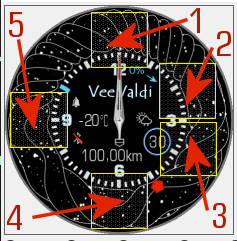
----------------- PL --------------------------------------------------------------------------------------------
„VeeValdi rippling ring”, to tarcza zegarkowa przeznaczona dla smartwatcha Amazfit GTR 3.
Istotą tego projektu jest zastosowana przeze mnie podwójna animacja.
Na głównej tarczy zegarkowej, która jest pomniejszona, czas jest prezentowany wyłącznie w formie analogowej. Są też wyświetlane: dzień miesiąca (liczba w kółku), aktualnie pokonany dystans w km, bieżąca temperatura w °C i obrazek (ikonka) pokazująca aktualny stan pogody. Do zaprezentowania stanu naładowania akumulatora wykorzystałem liczby godzin: od 0 do 10 oraz niebieski wskaźnik poruszający się po wewnętrznym obrysie tarczy zegarka. Wskazaną liczbę (odpowiadającej godzinie) należy przemnożyć przez 10 i jest to wartość naładowania akumulatora w procentach. Na godzinie 12, czyli na godzinie zerowej stan naładowania akumulatora wynosi 0% (0x10=0%).
Przykład:
Jeśli niebieski wskaźnik jest na godzinie 4, to po przemnożeniu przez 10 otrzymamy stan naładowania akumulatora, który w tym przypadku wyniesie 4x10=40%.
Dzień tygodnia pokazywany jest czerwonym wskaźnikiem poruszającym się po zewnętrznym obrysie tarczy zegarka. Ustawia się on na cyfrach od 1 do 7 odpowiadającym dniom tygodnia.
Przykład:
Jeśli czerwony wskaźnik jest na godzinie 5 oznacza to, że jest piątek.
Wyświetlane są także: znak braku sygnału bluetooth oraz ikona aktywności alarmu.
Dość istotnym elementem tego projektu są 2 animacje.
Pierwsza do falujący pierścień w wersji „a” i w wersji „b”.
Druga to zmieniające się, przenikające się dwa napisy „VeeValdi” i „rippling ring” oraz zmieniający się obrazek (ikona) prezentujący aktualny stan naładowania akumulatora.
W tej wersji nie zastosowałem stref edytowalnych.
Zamiast tego zrobiłem 5 pól (stref) dotykowych pozwalających szybko przejść do innych parametrów zegarka.
Wystarczy tylko dotknąć jeden z wybranych obszarów (jak na zamieszczonym powyżej obrazku), aby szybko przejść do:
1 – ilości kroków itp.
2 – ustawienia alarmów,
3 – ustawienia stopera,
4 – ustawienia odliczania wstecznego,
5 – pogody – ciśnienia atmosferycznego i innych danych.
W trybie AOD pokazywane są: czas analogowo, dzień miesiąca (liczbą w kółku) oraz stan naładowania akumulatora w %.
--------------------- EN --------------------------------------------------------------------------------------
"VeeValdi rippling ring" is a watch face designed for the Amazfit GTR 3 smartwatch.
The essence of this project is the double animation I used.
On the main watch face, which is reduced in size, time is only shown in analog form. Also displayed are: the day of the month (number in a circle), the currently traveled distance in km, the current temperature in ° C and a picture (icon) showing the current weather condition. To present the battery charge status, I used the number of hours: from 0 to 10 and a blue indicator moving along the inner contour of the watch face. The indicated number (corresponding to the hour) should be multiplied by 10 and it is the percentage of charge of the battery. At 12 o'clock, which is zero o'clock, the battery charge is 0% (0x10 = 0%).
Example:
If the blue indicator is at 4 o'clock, then after multiplying by 10 we get the battery charge, which in this case will be 4x10 = 40%.
The day of the week is shown by a red indicator moving along the outer contour of the watch face. It is set on the numbers from 1 to 7 corresponding to the days of the week.
Example:
If the red indicator is at 5 o'clock, it means it's Friday.
Also displayed are: a sign of no bluetooth signal and an icon of alarm activity.
Two animations are quite an important element of this project.
The first is an undulating ring in version "a" and version "b".
The second is the changing, interpenetrating two inscriptions "VeeValdi" and "rippling ring" and a changing image (icon) showing the current battery charge status.
I did not use editable zones in this version.
Instead, I made 5 touch fields (zones) that allow you to quickly switch to other parameters of the watch.
You only need to touch one of the selected areas (as in the picture above) to quickly go to:
1 - number of steps, etc.
2 - alarm settings,
3 - stopwatch settings,
4 - countdown settings,
5 - weather - atmospheric pressure and other data.
In AOD mode, the following are displayed: analog time, day of the month (a number in a circle) and the battery charge level in %.
veevaldi_rippling_ring_vb – wersja uniwersalna (multijęzyczna) „b” / universal version (multilingual) „b”
PL: Wersja „a” i wersja „b” różnią się tylko rodzajem falującego pierścienia.
EN: Version "a" and version "b" differ only in the type of undulating ring.
------------------------------------------------------------------------------------------------------------------
Pola (strefy) dotykowe // Touch fields (zones):
----------------- PL --------------------------------------------------------------------------------------------
„VeeValdi rippling ring”, to tarcza zegarkowa przeznaczona dla smartwatcha Amazfit GTR 3.
Istotą tego projektu jest zastosowana przeze mnie podwójna animacja.
Na głównej tarczy zegarkowej, która jest pomniejszona, czas jest prezentowany wyłącznie w formie analogowej. Są też wyświetlane: dzień miesiąca (liczba w kółku), aktualnie pokonany dystans w km, bieżąca temperatura w °C i obrazek (ikonka) pokazująca aktualny stan pogody. Do zaprezentowania stanu naładowania akumulatora wykorzystałem liczby godzin: od 0 do 10 oraz niebieski wskaźnik poruszający się po wewnętrznym obrysie tarczy zegarka. Wskazaną liczbę (odpowiadającej godzinie) należy przemnożyć przez 10 i jest to wartość naładowania akumulatora w procentach. Na godzinie 12, czyli na godzinie zerowej stan naładowania akumulatora wynosi 0% (0x10=0%).
Przykład:
Jeśli niebieski wskaźnik jest na godzinie 4, to po przemnożeniu przez 10 otrzymamy stan naładowania akumulatora, który w tym przypadku wyniesie 4x10=40%.
Dzień tygodnia pokazywany jest czerwonym wskaźnikiem poruszającym się po zewnętrznym obrysie tarczy zegarka. Ustawia się on na cyfrach od 1 do 7 odpowiadającym dniom tygodnia.
Przykład:
Jeśli czerwony wskaźnik jest na godzinie 5 oznacza to, że jest piątek.
Wyświetlane są także: znak braku sygnału bluetooth oraz ikona aktywności alarmu.
Dość istotnym elementem tego projektu są 2 animacje.
Pierwsza do falujący pierścień w wersji „a” i w wersji „b”.
Druga to zmieniające się, przenikające się dwa napisy „VeeValdi” i „rippling ring” oraz zmieniający się obrazek (ikona) prezentujący aktualny stan naładowania akumulatora.
W tej wersji nie zastosowałem stref edytowalnych.
Zamiast tego zrobiłem 5 pól (stref) dotykowych pozwalających szybko przejść do innych parametrów zegarka.
Wystarczy tylko dotknąć jeden z wybranych obszarów (jak na zamieszczonym powyżej obrazku), aby szybko przejść do:
1 – ilości kroków itp.
2 – ustawienia alarmów,
3 – ustawienia stopera,
4 – ustawienia odliczania wstecznego,
5 – pogody – ciśnienia atmosferycznego i innych danych.
W trybie AOD pokazywane są: czas analogowo, dzień miesiąca (liczbą w kółku) oraz stan naładowania akumulatora w %.
--------------------- EN --------------------------------------------------------------------------------------
"VeeValdi rippling ring" is a watch face designed for the Amazfit GTR 3 smartwatch.
The essence of this project is the double animation I used.
On the main watch face, which is reduced in size, time is only shown in analog form. Also displayed are: the day of the month (number in a circle), the currently traveled distance in km, the current temperature in ° C and a picture (icon) showing the current weather condition. To present the battery charge status, I used the number of hours: from 0 to 10 and a blue indicator moving along the inner contour of the watch face. The indicated number (corresponding to the hour) should be multiplied by 10 and it is the percentage of charge of the battery. At 12 o'clock, which is zero o'clock, the battery charge is 0% (0x10 = 0%).
Example:
If the blue indicator is at 4 o'clock, then after multiplying by 10 we get the battery charge, which in this case will be 4x10 = 40%.
The day of the week is shown by a red indicator moving along the outer contour of the watch face. It is set on the numbers from 1 to 7 corresponding to the days of the week.
Example:
If the red indicator is at 5 o'clock, it means it's Friday.
Also displayed are: a sign of no bluetooth signal and an icon of alarm activity.
Two animations are quite an important element of this project.
The first is an undulating ring in version "a" and version "b".
The second is the changing, interpenetrating two inscriptions "VeeValdi" and "rippling ring" and a changing image (icon) showing the current battery charge status.
I did not use editable zones in this version.
Instead, I made 5 touch fields (zones) that allow you to quickly switch to other parameters of the watch.
You only need to touch one of the selected areas (as in the picture above) to quickly go to:
1 - number of steps, etc.
2 - alarm settings,
3 - stopwatch settings,
4 - countdown settings,
5 - weather - atmospheric pressure and other data.
In AOD mode, the following are displayed: analog time, day of the month (a number in a circle) and the battery charge level in %.
标签
analog
seconds
seconds display
second hand
analog second hand
classic
modern type
modern design
experimental
elegant
distance
km
battery
percentage of Energy
day of week
day of the week in numerical form
day
day of the month
temperature
degrees Celsius
weather
weather condition
dynamic weather status icon
dial indicator of the day of the week
hand display of the day of the week
battery charge status watch face
a pointer indication of the battery status
dynamic battery charge status icon
animation
bluetooth
alarm
AOD
AOD function
active fields
touch fields
分享此表盘
评论
您需要登录才能发布或回复评论。
近期 社区论坛 讨论贴
convert request for GTS 2 mini
You are so GREAT! Thanks again!...
Adding some options request for gtr4
Amazing thank you sir 🙏...
Convert request for gtr4
Thank you so much...
Please port request for gtr4
It is perfect thank you 🙏...
Snoopy black version GTR 3
Many thanks sir...
Request: "Dash Digital" and “Acrive” style for Amazfit GTR Mini
Thank you asoo! I installed the V2 version on my GTR Mini and it works great. Thanks for your time and for moving the thread to the right section!...
Minimal watchface request for gtr4
Thank you sir i appreciate it...





Thanks for appreciating. It's nice and motivating. Regards. 09.09.2022 19:17:54 投诉