VeeValdi tentacles

Compatível com
GTR 3 Idiomas suportados
multilingual, en, pl
multilingual, en, pl
Data adicionada: 30.08.2022 21:42
33 usuários tem esse item em favoritos
Informação Importante para os Usuários
Por favor, note que todos os mostradores de relógio disponíveis neste site são obras criativas dos nossos usuários e não estão afiliados com marcas oficiais ou marcas registradas. São criados por fãs para fãs, inspirados em fenômenos culturais populares, jogos, filmes ou séries.
Nosso objetivo é fornecer uma plataforma para criatividade e troca, mas também nos esforçamos para respeitar os direitos intelectuais. Se você detém direitos autorais sobre qualquer conteúdo que acredita infringir seus direitos neste site, por favor, entre em contato conosco para ações apropriadas.
Por favor, note que todos os mostradores de relógio disponíveis neste site são obras criativas dos nossos usuários e não estão afiliados com marcas oficiais ou marcas registradas. São criados por fãs para fãs, inspirados em fenômenos culturais populares, jogos, filmes ou séries.
Nosso objetivo é fornecer uma plataforma para criatividade e troca, mas também nos esforçamos para respeitar os direitos intelectuais. Se você detém direitos autorais sobre qualquer conteúdo que acredita infringir seus direitos neste site, por favor, entre em contato conosco para ações apropriadas.

Descrição
veevaldi_tentacles_en – wersja angielskojęzyczna / English version
veevaldi_tentacles_pl – wersja polskojęzyczna / Polish version
------------------------------------------------------------------------------------------------------------------
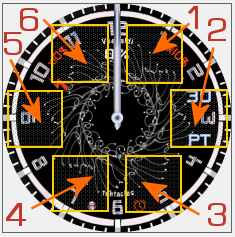
Pola (strefy) dotykowe // Touch fields (zones):
----------------- PL --------------------------------------------------------------------------------------------
„VeeValdi tentacles”, to tarcza zegarkowa przeznaczona dla smartwatcha Amazfit GTR 3.
Istotą tego projektu jest zastosowana przeze mnie dość interesująca animacja.
Na głównej tarczy zegarkowej czas jest prezentowany wyłącznie w formie analogowej. Są też wyświetlane: dzień miesiąca i dzień tygodnia (dwuliterowy skrót). Do zaprezentowania stanu naładowania akumulatora wykorzystałem liczby godzin: od 0 do 10. Ten stan wskazuje czerwona błyskawica mająca formę wskazówki zegarkowej. Wskazaną przez błyskawicę liczbę (odpowiadającej godzinie) należy przemnożyć przez 10 i jest to wartość naładowania akumulatora w procentach. Na godzinie 12, czyli na godzinie zerowej stan naładowania akumulatora wynosi 0% (0x10=0%).
Przykład:
Jeśli błyskawica wskazuje godzinę 4, to po przemnożeniu przez 10 otrzymamy stan naładowania akumulatora, który w tym przypadku wyniesie 4x10=40%.
Wyświetlane są także: znak braku sygnału bluetooth oraz ikona aktywności alarmu.
W tej wersji nie zastosowałem stref edytowalnych, tak jak w innych moich projektach.
Zamiast tego zrobiłem 6 pól (stref) dotykowych pozwalających szybko przejść do innych parametrów zegarka.
Wystarczy tylko dotknąć jeden z wybranych obszarów (jak na zamieszczonym powyżej obrazku), aby szybko przejść do:
1 – ustawienia alarmów,
2 – ustawienia odliczania wstecznego,
3 – stopera,
4 – pogody – ciśnienia atmosferycznego i innych danych,
5 – pogody – temperatury w °C, wilgotności w % i innych danych,
6 – ilości kroków itp.
W trybie AOD pokazywane są: czas cyfrowo oraz graficznie stan naładowania akumulatora, odpowiednio poprzez zmieniający się obrazek akumulatora.
--------------------- EN --------------------------------------------------------------------------------------
"VeeValdi tentacles" is a watch face designed for the Amazfit GTR 3 smartwatch.
The essence of this project is quite interesting animation I used.
On the main watch face, time is only shown in analog form. The day of the month and the day of the week (two-letter abbreviation) are also displayed. I used the number of hours from 0 to 10 to present the battery charge status. This status is indicated by a red lightning bolt in the form of a watch hand. The number indicated by the lightning bolt (corresponding to the hour) should be multiplied by 10, which is the percentage of battery charge. At 12 o'clock, which is zero o'clock, the battery charge is 0% (0x10 = 0%).
Example:
If the lightning indicates 4 o'clock, then after multiplying by 10 we get the battery charge, which in this case will be 4x10 = 40%.
Also displayed are: a sign of no bluetooth signal and an icon of alarm activity.
I didn't use editable zones in this version like in my other projects.
Instead, I made 6 touch fields (zones) that allow you to quickly switch to other parameters of the watch.
You only need to touch one of the selected areas (as in the picture above) to quickly go to:
1 - alarm settings,
2 - countdown settings,
3 - stopwatch,
4 - weather - atmospheric pressure and other data,
5 - weather - temperature in ° C, humidity in % and other data,
6 - number of steps etc.
In the AOD mode, the following are displayed: time digitally and graphically the battery charge status, respectively through the changing battery image.
veevaldi_tentacles_pl – wersja polskojęzyczna / Polish version
------------------------------------------------------------------------------------------------------------------
Pola (strefy) dotykowe // Touch fields (zones):
----------------- PL --------------------------------------------------------------------------------------------
„VeeValdi tentacles”, to tarcza zegarkowa przeznaczona dla smartwatcha Amazfit GTR 3.
Istotą tego projektu jest zastosowana przeze mnie dość interesująca animacja.
Na głównej tarczy zegarkowej czas jest prezentowany wyłącznie w formie analogowej. Są też wyświetlane: dzień miesiąca i dzień tygodnia (dwuliterowy skrót). Do zaprezentowania stanu naładowania akumulatora wykorzystałem liczby godzin: od 0 do 10. Ten stan wskazuje czerwona błyskawica mająca formę wskazówki zegarkowej. Wskazaną przez błyskawicę liczbę (odpowiadającej godzinie) należy przemnożyć przez 10 i jest to wartość naładowania akumulatora w procentach. Na godzinie 12, czyli na godzinie zerowej stan naładowania akumulatora wynosi 0% (0x10=0%).
Przykład:
Jeśli błyskawica wskazuje godzinę 4, to po przemnożeniu przez 10 otrzymamy stan naładowania akumulatora, który w tym przypadku wyniesie 4x10=40%.
Wyświetlane są także: znak braku sygnału bluetooth oraz ikona aktywności alarmu.
W tej wersji nie zastosowałem stref edytowalnych, tak jak w innych moich projektach.
Zamiast tego zrobiłem 6 pól (stref) dotykowych pozwalających szybko przejść do innych parametrów zegarka.
Wystarczy tylko dotknąć jeden z wybranych obszarów (jak na zamieszczonym powyżej obrazku), aby szybko przejść do:
1 – ustawienia alarmów,
2 – ustawienia odliczania wstecznego,
3 – stopera,
4 – pogody – ciśnienia atmosferycznego i innych danych,
5 – pogody – temperatury w °C, wilgotności w % i innych danych,
6 – ilości kroków itp.
W trybie AOD pokazywane są: czas cyfrowo oraz graficznie stan naładowania akumulatora, odpowiednio poprzez zmieniający się obrazek akumulatora.
--------------------- EN --------------------------------------------------------------------------------------
"VeeValdi tentacles" is a watch face designed for the Amazfit GTR 3 smartwatch.
The essence of this project is quite interesting animation I used.
On the main watch face, time is only shown in analog form. The day of the month and the day of the week (two-letter abbreviation) are also displayed. I used the number of hours from 0 to 10 to present the battery charge status. This status is indicated by a red lightning bolt in the form of a watch hand. The number indicated by the lightning bolt (corresponding to the hour) should be multiplied by 10, which is the percentage of battery charge. At 12 o'clock, which is zero o'clock, the battery charge is 0% (0x10 = 0%).
Example:
If the lightning indicates 4 o'clock, then after multiplying by 10 we get the battery charge, which in this case will be 4x10 = 40%.
Also displayed are: a sign of no bluetooth signal and an icon of alarm activity.
I didn't use editable zones in this version like in my other projects.
Instead, I made 6 touch fields (zones) that allow you to quickly switch to other parameters of the watch.
You only need to touch one of the selected areas (as in the picture above) to quickly go to:
1 - alarm settings,
2 - countdown settings,
3 - stopwatch,
4 - weather - atmospheric pressure and other data,
5 - weather - temperature in ° C, humidity in % and other data,
6 - number of steps etc.
In the AOD mode, the following are displayed: time digitally and graphically the battery charge status, respectively through the changing battery image.
Tags
analog
digital
seconds
seconds display
second hand
analog second hand
modern type
modern design
futuristic
battery
percentage of Energy
day of week
day
day of the month
abbreviation of the name of the day
battery charge status watch face
a pointer indication of the battery status
dynamic battery charge status icon
animation
bluetooth
alarm
AOD
AOD function
active fields
touch fields
Compatilhar este watch face
Comentários
Você precisa estar logado para postar ou responder aos comentários.
Discussões recentes na comunidade
Adding some options request for gtr4
Amazing thank you sir 🙏...
Convert request for gtr4
Thank you so much...
Please port request for gtr4
It is perfect thank you 🙏...
Snoopy black version GTR 3
Many thanks sir...
Request: "Dash Digital" and “Acrive” style for Amazfit GTR Mini
Thank you asoo! I installed the V2 version on my GTR Mini and it works great. Thanks for your time and for moving the thread to the right section!...
Minimal watchface request for gtr4
Thank you sir i appreciate it...
Please help find lost face
Someone created this model at their discretion and grouped here several components from the watch manufacturer, and you ...





Sem comentários. Seja o primeiro a comentar.