VR Czapek & Cie QdB G3

兼容于
GTR 3 支持的语言
multilingual
multilingual
新增: 22.07.2022 14:13
11 个用户已加入 收藏
用户须知
请注意,本网站上所有可用的手表面都是我们用户的创作作品,并且与任何官方品牌或商标无关。这些作品是由粉丝为粉丝创作的,灵感来源于流行文化现象、游戏、电影或电视剧。
我们的目标是提供一个创意交流的平台,同时我们也致力于尊重知识产权。如果您拥有本网站上任何内容的版权,并认为该内容侵犯了您的权利,请与我们联系以采取适当措施。
请注意,本网站上所有可用的手表面都是我们用户的创作作品,并且与任何官方品牌或商标无关。这些作品是由粉丝为粉丝创作的,灵感来源于流行文化现象、游戏、电影或电视剧。
我们的目标是提供一个创意交流的平台,同时我们也致力于尊重知识产权。如果您拥有本网站上任何内容的版权,并认为该内容侵犯了您的权利,请与我们联系以采取适当措施。

描述
vr_czapek&cie_qdb_g3 – wersja uniwersalna (multijęzyczna) / universal version (multilingual)
------------------------------------------------------------------------------------------------------------------
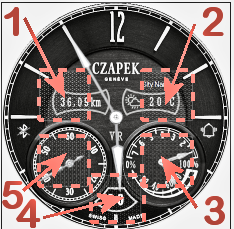
Pola (strefy) dotykowe // Touch fields (zones):
----------------- PL --------------------------------------------------------------------------------------------
„VR Czapek & Cie QdB G3”, to tarcza zegarkowa przeznaczona dla smartwatcha Amazfit GTR 3.
To jest zmodyfikowany projekt mojego wcześniejszego projektu tarczy zegarkowej do GTR 2
( /gtr/view/17652 ).
Opis wcześniejszej wersji tej tarczy znajduje się pod wyżej podanym linkiem.
Ta tarcza zegarkowa ma nieco inne funkcjonalności.
Na głównej tarczy zegarkowej czas jest prezentowany tylko w formie analogowej. Są 2 małe, wewnętrzne tarcze. Na lewej jest sekundnik, a na prawej dzień tygodnia i stan naładowania akumulatora. Pomiędzy nimi wyświetlany jest aktualny dzień miesiąca (w formie liczbowej).
Są też dwa wewnętrzne pola. Na lewym jest podawany przebyty dystans w km, a na prawym ikonka prezentująca aktualny stan pogody i temperatura w °C. Nad prawym polem wyświetlana jest bieżąca lokalizacja.
Pokazywany jest także znak braku sygnału bluetooth oraz ikona aktywności alarmu.
W tej wersji nie zastosowałem stref edytowalnych, tak jak w innych moich projektach.
Zamiast tego zrobiłem 5 pól (stref) dotykowych pozwalających szybko przejść do innych parametrów zegarka.
Wystarczy tylko dotknąć jeden z wybranych obszarów (jak na zamieszczonym powyżej obrazku), aby szybko przejść do:
1 – ilości kroków,
2 – pogody – ciśnienia atmosferycznego i innych danych,
3 – pulsu (tętna, czyli pomiaru BPM).
4 – ustawienia alarmów,
5 – ustawienia odliczania wstecznego
W trybie AOD są pokazywane: czas analogowo, stan naładowania akumulatora w % oraz bieżąca lokalizacja.
--------------------- EN --------------------------------------------------------------------------------------
" VR Czapek & Cie QdB G3" is a watch face designed for the Amazfit GTR 3 smartwatch.
This is a modified design of my earlier GTR 2 watch face design
( /gtr/view/17652 ).
A description of the earlier version of this shield can be found at the link above.
This watch face has slightly different functionalities.
On the main watch face, time is only shown in analog form. There are 2 small inner shields. There is a second hand on the left and the day of the week and the battery charge status on the right. Between them, the current day of the month is displayed (in numerical form).
There are also two inner fields. The left shows the distance traveled in km, and the right one shows the current weather and temperature in ° C. The current location is displayed above the right field.
The no bluetooth signal and the alarm activity icon are also shown.
I didn't use editable zones in this version like in my other projects.
Instead, I made 5 touch fields (zones) that allow you to quickly switch to other parameters of the watch.
You only need to touch one of the selected areas (as in the picture above) to quickly go to:
1 - number of steps,
2 - weather - atmospheric pressure and other data,
3 - pulse (heart rate, i.e. BPM measurement).
4 - alarm settings,
5 - countdown settings
In AOD mode, the following are displayed: analog time, battery charge level in% and current location.
------------------------------------------------------------------------------------------------------------------
Pola (strefy) dotykowe // Touch fields (zones):
----------------- PL --------------------------------------------------------------------------------------------
„VR Czapek & Cie QdB G3”, to tarcza zegarkowa przeznaczona dla smartwatcha Amazfit GTR 3.
To jest zmodyfikowany projekt mojego wcześniejszego projektu tarczy zegarkowej do GTR 2
( /gtr/view/17652 ).
Opis wcześniejszej wersji tej tarczy znajduje się pod wyżej podanym linkiem.
Ta tarcza zegarkowa ma nieco inne funkcjonalności.
Na głównej tarczy zegarkowej czas jest prezentowany tylko w formie analogowej. Są 2 małe, wewnętrzne tarcze. Na lewej jest sekundnik, a na prawej dzień tygodnia i stan naładowania akumulatora. Pomiędzy nimi wyświetlany jest aktualny dzień miesiąca (w formie liczbowej).
Są też dwa wewnętrzne pola. Na lewym jest podawany przebyty dystans w km, a na prawym ikonka prezentująca aktualny stan pogody i temperatura w °C. Nad prawym polem wyświetlana jest bieżąca lokalizacja.
Pokazywany jest także znak braku sygnału bluetooth oraz ikona aktywności alarmu.
W tej wersji nie zastosowałem stref edytowalnych, tak jak w innych moich projektach.
Zamiast tego zrobiłem 5 pól (stref) dotykowych pozwalających szybko przejść do innych parametrów zegarka.
Wystarczy tylko dotknąć jeden z wybranych obszarów (jak na zamieszczonym powyżej obrazku), aby szybko przejść do:
1 – ilości kroków,
2 – pogody – ciśnienia atmosferycznego i innych danych,
3 – pulsu (tętna, czyli pomiaru BPM).
4 – ustawienia alarmów,
5 – ustawienia odliczania wstecznego
W trybie AOD są pokazywane: czas analogowo, stan naładowania akumulatora w % oraz bieżąca lokalizacja.
--------------------- EN --------------------------------------------------------------------------------------
" VR Czapek & Cie QdB G3" is a watch face designed for the Amazfit GTR 3 smartwatch.
This is a modified design of my earlier GTR 2 watch face design
( /gtr/view/17652 ).
A description of the earlier version of this shield can be found at the link above.
This watch face has slightly different functionalities.
On the main watch face, time is only shown in analog form. There are 2 small inner shields. There is a second hand on the left and the day of the week and the battery charge status on the right. Between them, the current day of the month is displayed (in numerical form).
There are also two inner fields. The left shows the distance traveled in km, and the right one shows the current weather and temperature in ° C. The current location is displayed above the right field.
The no bluetooth signal and the alarm activity icon are also shown.
I didn't use editable zones in this version like in my other projects.
Instead, I made 5 touch fields (zones) that allow you to quickly switch to other parameters of the watch.
You only need to touch one of the selected areas (as in the picture above) to quickly go to:
1 - number of steps,
2 - weather - atmospheric pressure and other data,
3 - pulse (heart rate, i.e. BPM measurement).
4 - alarm settings,
5 - countdown settings
In AOD mode, the following are displayed: analog time, battery charge level in% and current location.
标签
analog
seconds
seconds display
second hand
analog second hand
classic
modern type
modern design
elegant
distance
km
battery
percentage of Energy
day of week
day of the week in numerical form
day
day of the month
temperature
degrees Celsius
weather
weather condition
dynamic weather status icon
dial indicator of the day of the week
day of the week watch face
hand display of the day of the week
inner dial with the number of the day of the week
battery charge status watch face
a pointer indication of the battery status
bluetooth
alarm
AOD
AOD function
active fields
touch fields
分享此表盘
评论
您需要登录才能发布或回复评论。
近期 社区论坛 讨论贴
Few changes for gtr4
Thank you for all your help 🙂 have a great weekend...
convert request for GTS 2 mini
You are so GREAT! Thanks again!...
Adding some options request for gtr4
Amazing thank you sir 🙏...
Convert request for gtr4
Thank you so much...
Please port request for gtr4
It is perfect thank you 🙏...
Snoopy black version GTR 3
Many thanks sir...
Request: "Dash Digital" and “Acrive” style for Amazfit GTR Mini
Thank you asoo! I installed the V2 version on my GTR Mini and it works great. Thanks for your time and for moving the thread to the right section!...





没有评论。欢迎对此第一个发表评论。