VR MONTBLANC classic extended

Сумісний з
GTR 2 Підтримувані мови
multilingual, en, pl
multilingual, en, pl
Завантажено: 05.01.2022 14:29
Оновлено: 05.01.2022 17:15
117 користувачів додали це до обраного
Важлива інформація для користувачів
Зверніть увагу, що всі циферблати, доступні на цьому сайті, є творчими роботами наших користувачів і не пов'язані з офіційними брендами або торговими марками. Вони створюються шанувальниками для шанувальників, надихаються популярними культурними феноменами, іграми, фільмами, або серіалами.
Наша мета - надати платформу для творчості та обміну, але ми також прагнемо поважати інтелектуальні права. Якщо ви володієте авторськими правами на будь-який контент, який, на вашу думку, порушує ваші права на цьому сайті, будь ласка, зв'яжіться з нами для вжиття відповідних заходів.
Зверніть увагу, що всі циферблати, доступні на цьому сайті, є творчими роботами наших користувачів і не пов'язані з офіційними брендами або торговими марками. Вони створюються шанувальниками для шанувальників, надихаються популярними культурними феноменами, іграми, фільмами, або серіалами.
Наша мета - надати платформу для творчості та обміну, але ми також прагнемо поважати інтелектуальні права. Якщо ви володієте авторськими правами на будь-який контент, який, на вашу думку, порушує ваші права на цьому сайті, будь ласка, зв'яжіться з нами для вжиття відповідних заходів.

Опис
vr_montblanc_classic_extended_en – wersja angielskojęzyczna / English version
vr_montblanc_classic_extended_pl – wersja polskojęzyczna / Polish version
vr_montblanc_classic_ext_AOD-neon_en – neonowe wskazówki AOD - neon watch hands AOD / wersja PL / English version
vr_montblanc_classic_ext_AOD-neon_pl – neonowe wskazówki AOD - neon watch hands AOD / wersja PL / Polish version
-------------------------------------------------------------------------------------------------------------------
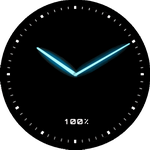
neonowe wskazówki zegarka w trybie AOD / neon watch hands in AOD mode
------------------------------------------------------------------------------------------------------------------
Spodobała mi się tarcza zegarkowa „Montblanc” - autor: Master22119. Link do oryginalnego projektu: /gtr/view/20489 .
Postanowiłem wykonać nieco poprawioną i zmodyfikowaną wersję tej tarczy zegarkowej. Dodałem też strefy edytowalne. Do pobrania jest wersja polskojęzyczna i angielskojęzyczna. Oprócz wyświetlanego czasu w postaci analogowej, na głównej tarczy zegarkowej pokazywane są zawsze: aktualny dzień miesiąca (numerycznie), dzień tygodnia i zmieniający się pierścień pokazujący aktualny stan naładowania akumulatora. Wyświetlanie pozostałych parametrów ustawiane jest w 4 strefach edytowalnych.
Jeśli w smartwatchu funkcja AOD jest aktywna, wówczas wyświetlana jest inna tarcza zegarkowa, a na niej pokazywany jest czas w postaci analogowej oraz stan naładowania akumulatora (liczba %).
Oto możliwe ustawienia w strefach edytowalnych:
W strefie nr 1 można wybrać wyświetlanie: dystansu (km), kroków, tętna (pulsu, bpm), kalorii (kcal) lub „stanie” („stand up”). Po wybraniu „stania” („stand up”) pole to jest wyłączane, a tarcza zegarka staje się bardziej klasyczna.
W strefie nr 2 można wybrać wyświetlanie: aktualnej temperatury (°C), indeksu UV, wilgotności (%), siły wiatru, ciśnienia (hPa) lub „wschód słońca” („sunrise”). Po wybraniu „wschodu słońca” („sunrise”) pole to jest wyłączane, a tarcza zegarka staje się bardziej klasyczna.
W strefie nr 3 można wybrać wyświetlanie: obrazka prezentującego aktualny stan pogody lub „wschód słońca” („sunrise”). Po wybraniu „wschodu słońca” („sunrise”) pole to jest wyłączane, a tarcza zegarka staje się bardziej klasyczna.
W strefie nr 4 można wybrać wyświetlanie: stanu naładowania akumulatora (liczba %) lub „stanie” („stand up”). „Stanie” („stand up”) jest opcją domyślną i gdy jest wybrane, wówczas pole to jest wyłączane, a tarcza zegarka staje się bardziej klasyczna.
Na tarczy zegarkowej pokazywany jest także znak braku zasięgu bluetooth oraz aktywności alarmu.
Moja nazwa tej tarczy zegarkowej: „VR MONTBLANC classic extended”.
---
Przykłady z wyjaśnieniami dotyczącymi korzystania ze stref edytowalnych, można znaleźć w innych moich projektach tarcz zegarkowych, np.:
1) /gtr/view/17919
2) /gtr/view/17054
----------------- ENG -------------------------------------------------------------------------------------------
I like the "Montblanc" watch face by Master22119. Link to the original project: /gtr/view/20489 .
I decided to make a slightly revised and modified version of this watch face. I've also added editable zones. There is a Polish and English version available for download. In addition to the analog time display, the main watch face always shows the current day of the month (numerically), the day of the week and a changing ring showing the current battery charge level. The display of other parameters is set in 4 editable zones.
If the AOD function is active in the smartwatch, then another watch face is displayed, and it shows the time in analog form and the battery charge status (number%).
Here are the possible settings in the editable zones:
In zone 1, you can choose to display: distance (km), steps, heart rate (pulse, bpm), calories (kcal) or "stand up". When "stand up" is selected, this field is disabled and the watch face becomes more classic.
In zone 2, you can choose to display: current temperature (° C), UV index, humidity (%), wind force, pressure (hPa) or "sunrise". When "sunrise" is selected, the field is turned off and the watch face becomes more classic.
In zone 3, you can choose to display: a picture presenting the current weather condition or "sunrise". When "sunrise" is selected, the field is turned off and the watch face becomes more classic.
In zone 4, you can choose to display: battery charge status (numer %) or "stand up". "Stand up" is the default option and when selected, the field is turned off and the watch face becomes more classic.
The watch face also shows the sign of no bluetooth range and alarm activity.
My name for this watch face: "VR MONTBLANC classic extended".
---
Examples with explanations on how to use editable zones can be found in my other watch face designs, e.g .:
1) /gtr/view/17919
2) /gtr/view/17054
vr_montblanc_classic_extended_pl – wersja polskojęzyczna / Polish version
vr_montblanc_classic_ext_AOD-neon_en – neonowe wskazówki AOD - neon watch hands AOD / wersja PL / English version
vr_montblanc_classic_ext_AOD-neon_pl – neonowe wskazówki AOD - neon watch hands AOD / wersja PL / Polish version
-------------------------------------------------------------------------------------------------------------------
neonowe wskazówki zegarka w trybie AOD / neon watch hands in AOD mode
------------------------------------------------------------------------------------------------------------------
Spodobała mi się tarcza zegarkowa „Montblanc” - autor: Master22119. Link do oryginalnego projektu: /gtr/view/20489 .
Postanowiłem wykonać nieco poprawioną i zmodyfikowaną wersję tej tarczy zegarkowej. Dodałem też strefy edytowalne. Do pobrania jest wersja polskojęzyczna i angielskojęzyczna. Oprócz wyświetlanego czasu w postaci analogowej, na głównej tarczy zegarkowej pokazywane są zawsze: aktualny dzień miesiąca (numerycznie), dzień tygodnia i zmieniający się pierścień pokazujący aktualny stan naładowania akumulatora. Wyświetlanie pozostałych parametrów ustawiane jest w 4 strefach edytowalnych.
Jeśli w smartwatchu funkcja AOD jest aktywna, wówczas wyświetlana jest inna tarcza zegarkowa, a na niej pokazywany jest czas w postaci analogowej oraz stan naładowania akumulatora (liczba %).
Oto możliwe ustawienia w strefach edytowalnych:
W strefie nr 1 można wybrać wyświetlanie: dystansu (km), kroków, tętna (pulsu, bpm), kalorii (kcal) lub „stanie” („stand up”). Po wybraniu „stania” („stand up”) pole to jest wyłączane, a tarcza zegarka staje się bardziej klasyczna.
W strefie nr 2 można wybrać wyświetlanie: aktualnej temperatury (°C), indeksu UV, wilgotności (%), siły wiatru, ciśnienia (hPa) lub „wschód słońca” („sunrise”). Po wybraniu „wschodu słońca” („sunrise”) pole to jest wyłączane, a tarcza zegarka staje się bardziej klasyczna.
W strefie nr 3 można wybrać wyświetlanie: obrazka prezentującego aktualny stan pogody lub „wschód słońca” („sunrise”). Po wybraniu „wschodu słońca” („sunrise”) pole to jest wyłączane, a tarcza zegarka staje się bardziej klasyczna.
W strefie nr 4 można wybrać wyświetlanie: stanu naładowania akumulatora (liczba %) lub „stanie” („stand up”). „Stanie” („stand up”) jest opcją domyślną i gdy jest wybrane, wówczas pole to jest wyłączane, a tarcza zegarka staje się bardziej klasyczna.
Na tarczy zegarkowej pokazywany jest także znak braku zasięgu bluetooth oraz aktywności alarmu.
Moja nazwa tej tarczy zegarkowej: „VR MONTBLANC classic extended”.
---
Przykłady z wyjaśnieniami dotyczącymi korzystania ze stref edytowalnych, można znaleźć w innych moich projektach tarcz zegarkowych, np.:
1) /gtr/view/17919
2) /gtr/view/17054
----------------- ENG -------------------------------------------------------------------------------------------
I like the "Montblanc" watch face by Master22119. Link to the original project: /gtr/view/20489 .
I decided to make a slightly revised and modified version of this watch face. I've also added editable zones. There is a Polish and English version available for download. In addition to the analog time display, the main watch face always shows the current day of the month (numerically), the day of the week and a changing ring showing the current battery charge level. The display of other parameters is set in 4 editable zones.
If the AOD function is active in the smartwatch, then another watch face is displayed, and it shows the time in analog form and the battery charge status (number%).
Here are the possible settings in the editable zones:
In zone 1, you can choose to display: distance (km), steps, heart rate (pulse, bpm), calories (kcal) or "stand up". When "stand up" is selected, this field is disabled and the watch face becomes more classic.
In zone 2, you can choose to display: current temperature (° C), UV index, humidity (%), wind force, pressure (hPa) or "sunrise". When "sunrise" is selected, the field is turned off and the watch face becomes more classic.
In zone 3, you can choose to display: a picture presenting the current weather condition or "sunrise". When "sunrise" is selected, the field is turned off and the watch face becomes more classic.
In zone 4, you can choose to display: battery charge status (numer %) or "stand up". "Stand up" is the default option and when selected, the field is turned off and the watch face becomes more classic.
The watch face also shows the sign of no bluetooth range and alarm activity.
My name for this watch face: "VR MONTBLANC classic extended".
---
Examples with explanations on how to use editable zones can be found in my other watch face designs, e.g .:
1) /gtr/view/17919
2) /gtr/view/17054
Теги
analog
second hand
analog second hand
classic
modern type
modern design
elegant
steps
distance
km
battery
percentage of Energy
day of week
day
day of the month
temperature
degrees Celsius
humidity
humidity in %
atmospheric pressure
hPa
wind
wind force
weather
weather condition
dynamic weather status icon
pulse
heart rate
bpm
abbreviation of the name of the day
calories
burned calories
kcal
kilocalories
dial indicator of energy
circle progress energy consumption
bluetooth
alarm
DND
AOD
AOD function
editable zones
Поділиться цим циферблатом
Коментарі

brexalex
Very compliments.
05.01.2022 15:28:25 Скарга

demiurg1
brexalex, Thank you very much. I'm glad you like it. Additionally, I put the version with neon watch hands in AOD mode.
05.01.2022 17:35:18 Скарга
Вам необхідно увійти, щоб залишати коментарі або відповідати на них.
Недавні обговорення в спільноті
Simple digital watchface request for gtr4
Perfect thank you sir...
Creation request gtr4
Can someone please create this face for the gtr4 https://www.tagheuer.com/gb/en/smartwatches/collections/tag-heuer-connected/45-mm/SBT8A87.EB0436.html?utm_source=facebook&utm_...
Minimal amber watchface for gtr4
It is perfect thank you sir i appreciate you 🙏...
Upgrade of Snoopy GTR3
I love it, thanks a lot asoo <3...
Convert request for gtr4
Thank you sir i appreciate it...
Port request gtr4
If you're not going to use the watchface tool, then many times you can upload the entire .zip file to Gemini or another AI tool and tell it to make the edits for you. Thank...
Port request gtr4
Thank you...





