Casio F-91W GTR2

Compatibile con
GTR 2 Idiomas compatibles
en, ru
en, ru
Data aggiunta: 23.02.2021 00:35
Aggiornato il: 11.03.2021 14:36
643 utenti che hanno questo elemento nei preferiti
Informazioni Importanti per gli Utenti
Si prega di notare che tutti i quadranti orologio disponibili su questo sito sono opere creative dei nostri utenti e non sono affiliati con marchi ufficiali o marchi registrati. Sono creati da fan per fan, ispirati da fenomeni culturali popolari, giochi, film o serie.
Il nostro obiettivo è fornire una piattaforma per la creatività e lo scambio, ma ci impegniamo anche a rispettare i diritti intellettuali. Se detiene i diritti d'autore su qualsiasi contenuto che ritiene infranga i suoi diritti su questo sito, contattaci per un'azione appropriata.
Si prega di notare che tutti i quadranti orologio disponibili su questo sito sono opere creative dei nostri utenti e non sono affiliati con marchi ufficiali o marchi registrati. Sono creati da fan per fan, ispirati da fenomeni culturali popolari, giochi, film o serie.
Il nostro obiettivo è fornire una piattaforma per la creatività e lo scambio, ma ci impegniamo anche a rispettare i diritti intellettuali. Se detiene i diritti d'autore su qualsiasi contenuto che ritiene infranga i suoi diritti su questo sito, contattaci per un'azione appropriata.

Descrizione
Here comes yet another GTR port, the famous Casio F-91W!
This is based on /gtr/view/12454 from Kulon-24 ( /ucp/158429 )
I believe the original author is jcmgenesis ( /ucp/304918 ) at /gtr/view/8022
All kudos to both of them for making this possible!
Some stuff changed as usual:
No border

Russian

PAI

Sunrise/Sunset

Edge
(Might look a bit weird in the preview below but on the watch it is perfect as it integrates beautifully and seamlessly with the black edge of the watch)
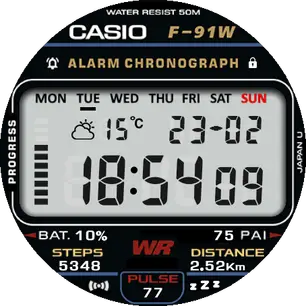
Edge Sunrise/Sunset

Edge 12h
This is based on /gtr/view/12454 from Kulon-24 ( /ucp/158429 )
I believe the original author is jcmgenesis ( /ucp/304918 ) at /gtr/view/8022
All kudos to both of them for making this possible!
Some stuff changed as usual:
- Added Weather icons
- Moved Bluetooth icon to the bottom left
- Added DND icon at the bottom right
- Added Lock icon just under the steps progress bar
- AOD shows time in matching style
No border
Russian
PAI
- Added PAI
- Steps progress changed to battery progress
- Steps progress is now blue circle progress
Sunrise/Sunset
Edge
(Might look a bit weird in the preview below but on the watch it is perfect as it integrates beautifully and seamlessly with the black edge of the watch)
- Made everything bigger
- Steps progress shows a faint shadow of how many bars you have left
- Alarm replaced by PAI and moved to the upper left as an icon only
Edge Sunrise/Sunset
Edge 12h
- Alarm reinstated
- Automatic 12/24h detection (when enabled in the phone)

Enjoy!
Tag
casio
f-91w
f91w
f-91
f91
digital
classic
80s
steps
steps progress
battery
distance
heartrate
pulse
status icons
alarm
dnd
weather
date
weekday
Condividi questo quadrante
Commenti
Per rispondere ai commenti devi essere loggato .
Discussioni recenti della comunità
Edit request for gtr4
Wow impressive thank you so much it is perfect 👌...
Simple hybrid watchface request for gtr4
Thank you 🙏...
GTR 3 Dynamic Background Creation
Thanks sir super fast. Amazing as Always...
Simple digital watchface request for gtr4
Perfect thank you sir...
Creation request gtr4
Can someone please create this face for the gtr4 https://www.tagheuer.com/gb/en/smartwatches/collections/tag-heuer-connected/45-mm/SBT8A87.EB0436.html?utm_source=facebook&utm_...
Minimal amber watchface for gtr4
It is perfect thank you sir i appreciate you 🙏...
Upgrade of Snoopy GTR3
I love it, thanks a lot asoo <3...





here are the days of the week https://ds02.infourok.ru/uploads/ex/03e7/00014fee-2f9539bb/img3.jpg 24.02.2021 16:38:05 Segnala
Alarm - будильник
Distance - расстояние
Battery - батарея 24.02.2021 16:58:12 Segnala
- with the no border version can you enlarge everything to make it edge to edge?
- also on the no border version, I'm not sure about everyone else, but I don't use the alarm on the watch, it would be great if you could put the PAI data there instead
- finally, on the progress bars (no border version again), do you think there is a way of showing how far you have left to go? Just a thought.
Thanks again, keep up the good work 03.03.2021 01:01:35 Segnala
- It was my first thought when I removed it but it is difficult to develop without a tool as you need to move everything around to fit the new size.
- That's easy to change
- I'm not quite sure what you mean exactly, do you want the number of steps left? Or a kind of reversed progress bar? Or blank spaces somehow so you know how many black bars you have left to fill in? 03.03.2021 12:28:24 Segnala
Yeah, on the last one, keep it as is but adding the blank spaces so you know how many bars are left to fill in. You know how on the original Casio's you can see the faint shading of the unused pixels. 04.03.2021 01:53:19 Segnala
I have a request.
1. PAI -> Alarm replaced
2. "AM,PM" Mark on the screen
please... please... please... ... 09.03.2021 10:22:47 Segnala
I'm investigating about 'Battery Image Progress'. I found out, there is a 9 squares on 92% battery.
I had unpacked your WF with tool, and here is the what i think.
0~10% = 1 square(red)
11~20% = 2 squares
21~30% = 3 squares
31~40% = 4 squares
41~50% = 5 squares
51~60% = 6 squares
61~70% = 7 squares
71~80% = 8 squares
81~90% = 9 squares
91~100% = 10 squares(full)
If i'm right, 10 squares must be showed on 92%, but is not.
Actually, I'd got the same problem with GTR47 when i designed my own WF.
Maybe this problem had occured just me. But if you have a time, check it please. Thank you again! 18.03.2021 14:47:29 Segnala
Anyway it looks amazing! 20.04.2021 18:23:02 Segnala