What software do you use for making/preparing the graphics for your watchfaces?
I mainly use paint.net. For my last wf I also used Inkscape (for curved font).
I'm looking forward to read what you're using!
-
- Administrator
-
-
Support Ukraine
If you experience any problems with the forum (it is not visible, there is no way to post messages, or some functionality does not work), please let us know. If you have problems with registration or you did not receive confirmation letter, let us know and we will activate your account manually.
If you get an "The submitted form was invalid. Try submitting again" error, delete cookies, then try again.
What software do you use [Mi Band]
Moderators: Internal error, Watchmens
-
hyippiemon
- WF maker
- Posts: 6
- Joined: 16 Aug 2019, 04:05
- Has thanked: 2 times
- Been thanked: 1 time
- Contact:
-
GIK-Team

- root
- Posts: 1026
- Joined: 22 Mar 2018, 10:00
- Location: Ukraine
- Has thanked: 1155 times
- Been thanked: 278 times
- Contact:
paint.net too!
"sometimes it's scary but it's still just you and me” — Leaving Laurel
Figma
Very good tool for UI design and it's free for use.
Adobe XD is also a good free alternative.
You can check my examples here:
https://amazfitwatchfaces.com/ucp/108865
Very good tool for UI design and it's free for use.
Adobe XD is also a good free alternative.
You can check my examples here:
https://amazfitwatchfaces.com/ucp/108865
-
Jackall Digital
- WF maker
- Posts: 46
- Joined: 20 Jan 2020, 14:21
- Location: Ljubljana
- Has thanked: 1 time
- Been thanked: 14 times
- Contact:

One tool that I found extremely usefull is PNGgauntlet. This little tool optimizes images by reducing their size and keeps the quality but it doesn't reduce the final .bin file size, at least it made no difference on my tilted watch face.
But why is the tool useful to me? Well it made my preview images go from this:
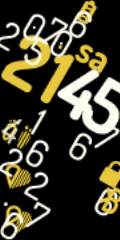
To this, which will now make posting the watch face previews much easier for me.
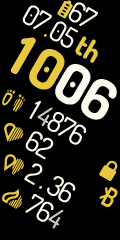
Sadly there's nothing I can do to improve the quality of the tilted / angled elements in mi band 4 to look like it does in the preview.
But why is the tool useful to me? Well it made my preview images go from this:
To this, which will now make posting the watch face previews much easier for me.
Sadly there's nothing I can do to improve the quality of the tilted / angled elements in mi band 4 to look like it does in the preview.
-
SandraMichael
- Posts: 6
- Joined: 17 Feb 2020, 16:46
- Location: Berlin
- Has thanked: 8 times
- Been thanked: 2 times
- Contact:
You can place angled black rectangles that are 1 pixel larger than the numbers behind the numbers and make the rest of the PNG transparent. Then the numbers are sharp. When packing the .bin there is no more semi-transparency, therefore the edges fray.
Who is online
Users browsing this forum: No registered users and 17 guests