Pagina 1 di 1
[T-Rex Pro]Black Screen when upload a skin
Inviato: 25 ott 2022, 12:07
da Fearless-Week
I was dealing with this problem for three days now and I still dont know whats wrong. I was using the SashaCX75 editor (AmazFit Watchface Editor 2) and never had a problem.
The skin looks well with the editor but when I upload it to the watch I get a black screen. Pretty scary cause the watch seems dead.
Here I attached the log from the skin and the skin if anyone want to try it. Any help would be appreciated
Re: [T-Rex Pro]Black Screen when upload a skin
Inviato: 25 ott 2022, 13:32
da asoo
As far as I've tried checking .json, I can't see anything wrong.
There is only one thing I think that might be the reason why Seeing a black screen is that your preview file is not 0002.png but I'm not exactly sure if it's the cause of the problem. as far as I can remember. GTR2 if the backgorund screen doesn't use 0001 or 0002 sometimes the watchface won't open. and shows a black screen on the real device.
But I'm not sure if the Preview image doesn't use 0002, it will make the watchface can not open or not , and the same requirements on GTR2 is issue in T-rex Pro or not.
On official edit tool , the background screen and preview files are always 0001 and or 0002.
Sample file. Test move preview file to 0002.png file.
I can not test on real device because I do not have T-RexPro
Re: [T-Rex Pro]Black Screen when upload a skin
Inviato: 26 ott 2022, 00:24
da Fearless-Week
Thanks for answering asoo!. I tried what you said, with the preview file as 0002, corrected every value and still have a black screen. In T-Rex Pro (I think) 0001 must be the background image.
Here is the file, corrected with the preview image as 0002, in case someone would like to test it.
Re: [T-Rex Pro]Black Screen when upload a skin
Inviato: 26 ott 2022, 02:13
da asoo
Fearless-Week ha scritto: 26 ott 2022, 00:24
Thanks for answering asoo!. I tried what you said, with the preview file as 0002, corrected every value and still have a black screen. In T-Rex Pro (I think) 0001 must be the background image.
Here is the file, corrected with the preview image as 0002, in case someone would like to test it.
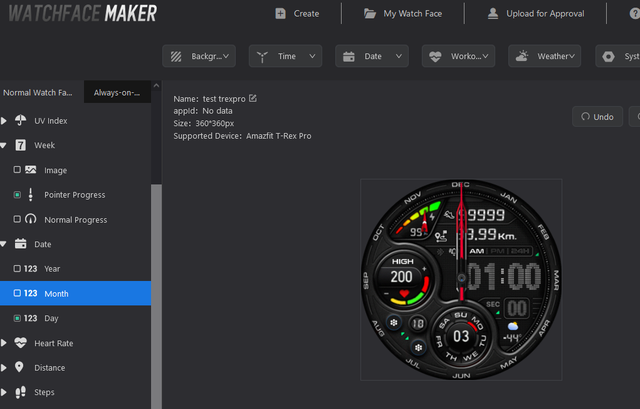
This watch face is created from the official edit tool.
Since the official edit tool doesn't have a month pointer, this dial doesn't have a month pointer.
you can try installing this watchface on your watch to check it work or not , If it works, try to fix it with SashaCX75's request tool again.
Re: [T-Rex Pro]Black Screen when upload a skin
Inviato: 26 ott 2022, 14:39
da Fearless-Week
asoo ha scritto: 26 ott 2022, 02:13
This watch face is created from the official edit tool.
Seems like that editor make this skin work. Thanks! Im going to try to fix the month pointer with the SashaCX75's editor and then I will report what happend
EDIT
Seems like its the SashaCX75 pack the skin differently, with your edition now the skin works!!
Thanks so much!. Now I will need to find that editor you are using. Thanks again!
Re: [T-Rex Pro]Black Screen when upload a skin
Inviato: 26 ott 2022, 15:00
da asoo
Fearless-Week ha scritto: 26 ott 2022, 14:39
asoo ha scritto: 26 ott 2022, 02:13
This watch face is created from the official edit tool.
Seems like that editor make this skin work. Thanks! Im going to try to fix the month pointer with the SashaCX75's editor and then I will report what happend
EDIT
Seems like its the SashaCX75 pack the skin differently, with your edition now the skin works!!
Thanks so much!. Now I will need to find that editor you are using. Thanks again!
official editer :
https://watchface.zepp.com/create
You must be registered with zepp to use it.
https://developer.zepp.com/os/home
Re: [T-Rex Pro]Black Screen when upload a skin
Inviato: 26 ott 2022, 15:01
da Fearless-Week
Again, thanks so much!