I am looking for some good digital watch faces that have 12H time, Miles (if distance is part of it) and fahrenheit for the weather.
and a mm/dd date format.
-
- Administrator
-
-
Support Ukraine
If you experience any problems with the forum (it is not visible, there is no way to post messages, or some functionality does not work), please let us know. If you have problems with registration or you did not receive confirmation letter, let us know and we will activate your account manually.
If you get an "The submitted form was invalid. Try submitting again" error, delete cookies, then try again.
Watch Faces with 12H, Miles, mm/dd, and Fahrenheit?
Moderators: Internal error, Watchmens

Shameless Plug - https://amazfitwatchfaces.com/bip/view/?id=14171
12H, Km (watchfaces can't display miles) and F weather. Date is spelled out including week day.
12H, Km (watchfaces can't display miles) and F weather. Date is spelled out including week day.
You can find many watchfaces if you search with the "mile" keyword.
I have also made a watchface with 12H, mile and ℉ at someone's request: https://amazfitwatchfaces.com/bip/view/?id=15441
But as stupdude2 pointed out, it looks like that watchface displays the distance in kilometers only.
I have not tested before whether the distance is displayed in miles correctly, since I do not use imperial units...
I have also made a watchface with 12H, mile and ℉ at someone's request: https://amazfitwatchfaces.com/bip/view/?id=15441
But as stupdude2 pointed out, it looks like that watchface displays the distance in kilometers only.
I have not tested before whether the distance is displayed in miles correctly, since I do not use imperial units...
-
cloud12077
- WF maker
- Posts: 8
- Joined: 24 Nov 2018, 03:08
- Contact:
Just got my Bip today and having a blast with it. I found a Watchface that I really like, but I can't figure out how to change temperature from C to F and distance from Km to Mi.
I followed a youtube video that showed how to unpack the .bin file and I have everything in the editor, but nothing in the json seems to show switching between imperial and metric.
Any thoughts on how I can do this?
I followed a youtube video that showed how to unpack the .bin file and I have everything in the editor, but nothing in the json seems to show switching between imperial and metric.
Any thoughts on how I can do this?
-
TXK

- Posts: 299
- Joined: 10 Apr 2018, 05:15
- Location: china
- Has thanked: 149 times
- Been thanked: 97 times
- Contact:
You can set it in APP.cloud12077 wrote: 24 Nov 2018, 03:10Just got my Bip today and having a blast with it. I found a Watchface that I really like, but I can't figure out how to change temperature from C to F and distance from Km to Mi.
I followed a youtube video that showed how to unpack the .bin file and I have everything in the editor, but nothing in the json seems to show switching between imperial and metric.
Any thoughts on how I can do this?
And the weather forecast is also switched in APP.
-
cloud12077
- WF maker
- Posts: 8
- Joined: 24 Nov 2018, 03:08
- Contact:
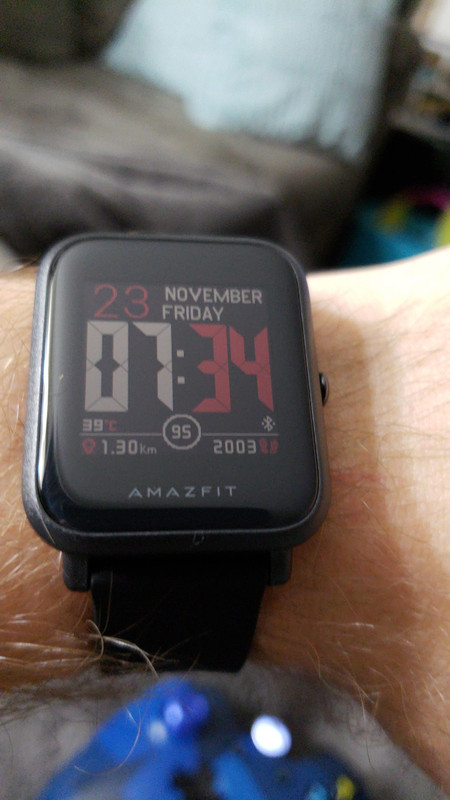
I have it set in the app, but it still shows up on my watch as C and Km rather than F and Mi.
-
cloud12077
- WF maker
- Posts: 8
- Joined: 24 Nov 2018, 03:08
- Contact:
Just noticed the temperature is correct (must be an image with the C I'll have to change), only the distance is different than what the app says.
-
TXK
- Posts: 299
- Joined: 10 Apr 2018, 05:15
- Location: china
- Has thanked: 149 times
- Been thanked: 97 times
- Contact:
cloud12077 wrote: 24 Nov 2018, 11:14I have it set in the app, but it still shows up on my watch as C and Km rather than F and Mi.
emmmm~
This "C" "km" is a picture, so only by unraveling this dial file and modifying the dial can the unit of measurement be displayed correctly.
Another way:
Look for a dial with "F". For example:
Https://amazfitwatchfaces.com/bip/view/?Id=12663
or
Look for a dial without "F" \ "C" . For example:
https://amazfitwatchfaces.com/bip/view/?id=13716
-
cloud12077
- WF maker
- Posts: 8
- Joined: 24 Nov 2018, 03:08
- Contact:
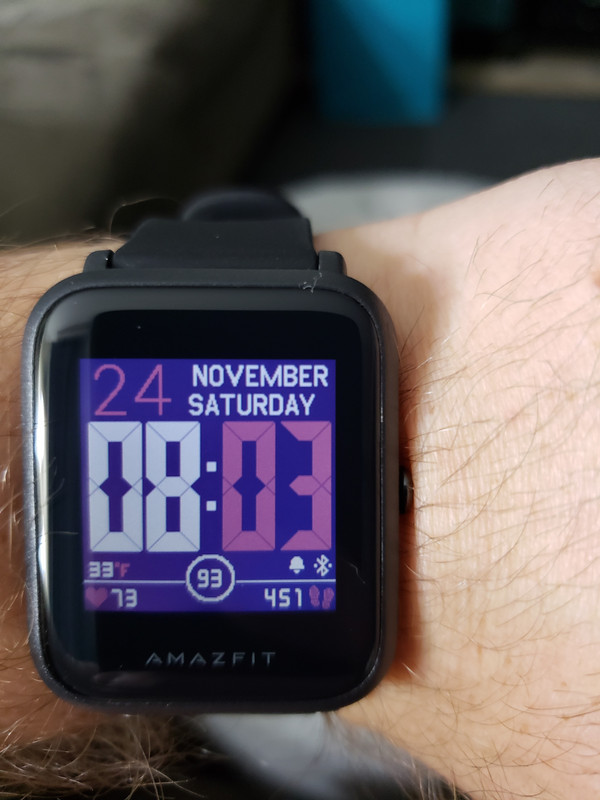
Thank you. Got it figured out. I was able to modify the distance (since I didn't care about that) and found the image I needed to edit to F.
-
ph34rful
Sent you a PMcloud12077 wrote: 24 Nov 2018, 14:04Thank you. Got it figured out. I was able to modify the distance (since I didn't care about that) and found the image I needed to edit to F.
-
mbrown3
I created (edited) a watchface that also shows up as C rather than F, but it is NOT part of the image. I used the WF Editor by ilgruppotester. The watch is set to display Fahrenheit but it still shows the little C. When I toggle off the temperature display, the C disappears. When I re-enable it, the C comes back with the number, though the temperature is actually accurate (when I switch to show C in the watch settings, the numerical value changes. When I change it to F, it changes to the correct value, but still shows C). Anyone have any ideas?
-
rob22
that new watch face looks good. did you submit it? I was looking for one like that. thanks
-
SharkEmperor
- WF maker
- Posts: 5
- Joined: 01 Jan 2019, 03:01
- Contact:
Nice Work! Which watch face did you start with? I like the look of it.
-
cloud12077
- WF maker
- Posts: 8
- Joined: 24 Nov 2018, 03:08
- Contact:
Search for Mike76, he made the original. Here is my dropbox link to my modified verison.
https://www.dropbox.com/s/fhotgo7cays7d ... e.bin?dl=0
https://www.dropbox.com/s/fhotgo7cays7d ... e.bin?dl=0
-
cloud12077
- WF maker
- Posts: 8
- Joined: 24 Nov 2018, 03:08
- Contact:
I modified and updated my watch face, which has been uploaded and found here:
https://amazfitwatchfaces.com/bip/view/?id=18507
https://amazfitwatchfaces.com/bip/view/?id=18507
Here you can find mm/dd, Fahrenheit and true 12h display (12:00 instead of 00:00):
https://amazfitwatchfaces.com/bip/view/?id=12663
Please download EN-watchfaces.zip and you will find thousands of variations. Read the discription carefully how to download and feel free to ask me if there are questions.
Regards
https://amazfitwatchfaces.com/bip/view/?id=12663
Please download EN-watchfaces.zip and you will find thousands of variations. Read the discription carefully how to download and feel free to ask me if there are questions.
Regards
Who is online
Users browsing this forum: No registered users and 1 guest