
This tool is suitable for the following watches models:
- Honor Watch Magic
- HUAWEI Watch GT
- HUAWEI Watch GT2
For a quick start in creating your first watch faces, we recommend you to take the following steps:
- choose the design and elements that will be displayed on the watch face;
- create images of the elements of the watch face based on the requirements (see the table);
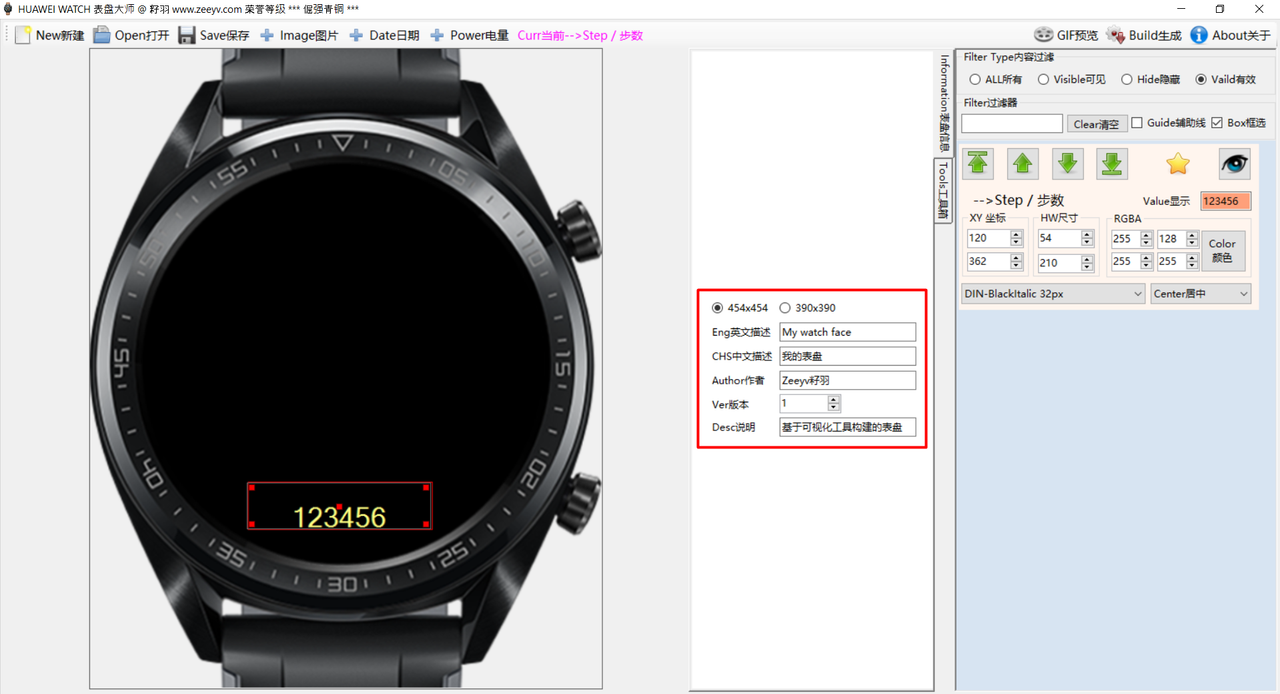
- open the tool and fill in the parameters of the new watch face (see the screenshot).
screenshot 1
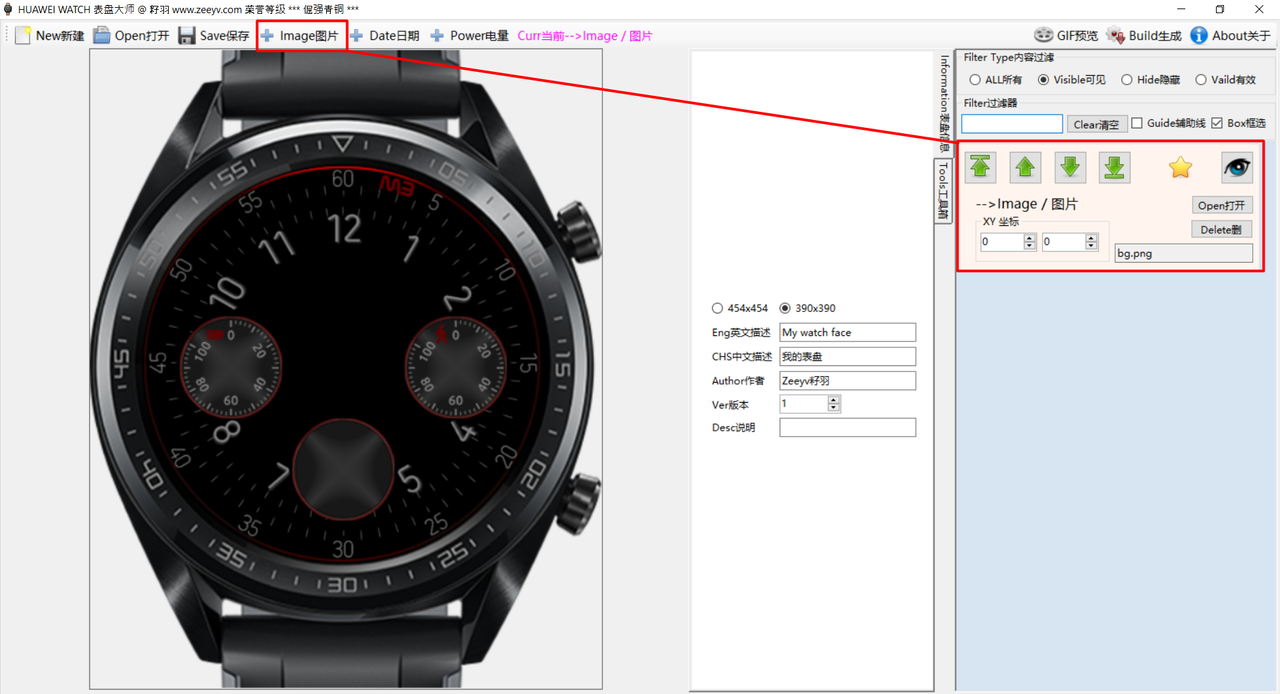
- add a picture;
- in the XY fields indicate the location of the element on the canvas;
- use the arrows to move the element through the layers.
screenshot 2
Here you can choose any of the interactive elements such as: time, pulse, steps, weather. You can also set the font, its size, color and other parameters.
screenshot 3

Table: Component type
| Type | Remark | Param |
|---|---|---|
| Image | Show a image | XY,Image |
| Percent data | Show a picture base on percent; Or show a angle by percent |
XY,Image,Angle,Width |
| Number | Show a digital value | XY,HW,Color,Align |
| Sequence image | Show one image in a sequence. Example: there are 7 images in week, you can show one. |
XY,Images |
Table: Component list
| Type | Description | Count | Start | Resource | Remark |
|---|---|---|---|---|---|
| Percent data | Second percent | Suitable for sequence pictures | sec.png | With 60 seconds as 100%, the current second as a percentage of 60 seconds | |
| Minute percent | min.png | With 60 minutes as 100%, the current minute as a percentage of 60 minutes | |||
| Hour 12 percent | hour.png | With 12 hours to 100%, the current clock is the percentage of 12 hours. | |||
| Date percent | date.png | With 31 days as 100%, the current log accounts for 31 days as a percentage. | |||
| Week percent | week.png | With 7 days as 100%, the current week as a percentage of 7 days | |||
| Power percent | power.png | With 100% electricity, the current actual electricity accounts for 100% of the total. | |||
| Heart rate percent | heart.png | With a maximum heart rate of 255 to 100%, the current actual heart rate is the percentage of 255. | |||
| Calorie percent | cal.png | Calorie target converted by the number of steps obtained from APP is 100%. Current calorie value as a percentage of target value is calculated as 100% over 100%. | |||
| Standup percent | stand.png | The target number of standing times is 12 to 100%, and the percentage of current standing times to the target number of standing times is more than 100%. | |||
| Strenth percent | str.png | The target of medium and high strength is 30 to 100%, and the current percentage of medium and high strength time in medium and high strength target is 100% when it exceeds 100%. | |||
| Step percent | step.png | The number of steps obtained from APP is 100%, and the percentage of actual steps in the number of steps is 100%. | |||
| Vo2Max percent | vo.png | The maximum oxygen uptake was 80 to 100%, and the current maximum oxygen uptake data accounted for the percentage of the maximum. | |||
| Number | Step number | Step number | |||
| Calorie | Calorie | ||||
| heart rate | heart rate | ||||
| Heart rate max | Maximum heart rate | ||||
| Heart rate min | Minimum heart rate | ||||
| Medium and high strength time | Medium and high strength time | ||||
| Temperature | Temperature, automatically switching Celsius Fahrenheit with settings | ||||
| PM2.5 | PM2.5 | ||||
| AQI | Air Pollution Index | ||||
| Pressure | pressure | ||||
| Altitude | altitude | ||||
| Power index | Electric quantity | ||||
| Number of Standing | Number of Standing | ||||
| Maximum oxygen uptake | Maximum oxygen uptake | ||||
| date | date | ||||
| month[text] | Month | ||||
| Sequence image | AMPM | 2 | pm | 0:am 1:pm | |
| month | 12 | month | 1:january 2:february | ||
| Week | 7 | week | 1:Monday 2:Tuesday | ||
| Weather | 11 | weather | 0:unkown1:sunny_day2:sunny_night 3:overcast4:cloudy5:rain6:thunder 7:snow8:dust_storm9:hazy 10:forg |
||
| Power image | 11 | power | 0-10, which means 0%, 10%, 20%, 30, respectively. 100% | ||
| Heart rate area | 6 | heart | Heart rate area. | ||
| Message reader | 2 | msg | Whether there is only news; 0 no, 1 yes; | ||
| Temperature type | 2 | tempt | 0 degrees Celsius, 1 degrees Fahrenheit | ||
| Step 1 | 10 | step | Number of steps | ||
| Step 2 | 10 | step | Step Dozens Number | ||
| Step 3 | 10 | step | Step Hundred-digit Number | ||
| Step 4 | 10 | step | Step thousands of digits | ||
| Step 5 | 10 | step | Steps in tens of thousands of digits | ||
| 12 Hour HIGH | 10 | time | Ten-digit hours (twelve-hour system) | ||
| 12 Hour LOW | 10 | time | Ten-digit hours (twelve-hour system) | ||
| 24 Hour HIGH | 10 | time | Ten-digit hours (24-hour system) | ||
| 24 Hour LOW | 10 | time | Ten-digit hours (24-hour system) | ||
| Hour HIGH | 10 | time | The 10-digit value of the hour, according to the system settings to determine the 24-hour system or 12-hour system | ||
| Hour LOW | 10 | time | The 10-digit value of the hour, according to the system settings to determine the 24-hour system or 12-hour system | ||
| Minite HIGH | 10 | time | Ten-digit value of minutes | ||
| Minite LOW | 10 | time | Number of minutes | ||
| Second HIGH | 10 | time | Ten-digit number of seconds | ||
| Second LOW | 10 | time | Number of seconds | ||
| Date HIGH | 10 | time | Date high | ||
| Date LOW | 10 | time | Date lows | ||
Link to the last tool: https://drive.google.com/drive/folders/ ... NFNHnDXc2J