分页: 2 / 2
Re: Share your today's watchface
发表于 : 02 9月 2020, 10:58
由 urieleugenio
Testament 写了: 02 9月 2020, 06:12
How to change the .bin size or rearrange it ?
I'm not sure I know what you mean.
You can keep the BIN file size down by keeping down the size of the images that make the BIN file (low number of images and / or small size of images), if that's your question.
Re: Share your today's watchface
发表于 : 02 9月 2020, 11:05
由 Testament
urieleugenio 写了: 02 9月 2020, 10:58
Testament 写了: 02 9月 2020, 06:12
How to change the .bin size or rearrange it ?
I'm not sure I know what you mean.
You can keep the BIN file size down by keeping down the size of the images that make the BIN file (low number of images and / or small size of images), if that's your question.
Yes , I know that I am unable to decrease the size and length of the image , it turns too small and looks very bad in my band . Can you please help ?
Re: Share your today's watchface
发表于 : 02 9月 2020, 12:00
由 urieleugenio
Testament 写了: 02 9月 2020, 11:05
Yes , I know that I am unable to decrease the size and length of the image , it turns too small and looks very bad in my band . Can you please help ?
I've had watch faces with 100 images, and I was still far from the BIN size limit, are you using an animation with big images and lots of frames?
Try to reuse images too, using the same numbers for hours tens, hours ones, minutes tens and minutes ones.
Use images with a background (no transparency) for smaller size, or cut them to size.
Lastly, you may try the Palette mode on Ivpokka's tool, it's meant to readuce BIN file size (but it can lower image quality).
Re: Share your today's watchface
发表于 : 02 9月 2020, 16:08
由 Testament
urieleugenio 写了: 02 9月 2020, 12:00
Testament 写了: 02 9月 2020, 11:05
Yes , I know that I am unable to decrease the size and length of the image , it turns too small and looks very bad in my band . Can you please help ?
I've had watch faces with 100 images, and I was still far from the BIN size limit, are you using an animation with big images and lots of frames?
Try to reuse images too, using the same numbers for hours tens, hours ones, minutes tens and minutes ones.
Use images with a background (no transparency) for smaller size, or cut them to size.
Lastly, you may try the Palette mode on Ivpokka's tool, it's meant to readuce BIN file size (but it can lower image quality).
So I should check the dimensions .
Re: Share your today's watchface
发表于 : 02 9月 2020, 21:54
由 Jackall Digital
You can optimise images, lower the size and keep the quality, if they aren't by using PNGgauntlet (free software), I'm not saying that it will help but it might. I also advise you to check my videos as they will save you time - like trying to make the perfect design from the start only to find out that it doesn't work like you want it to after you code it.
Re: Share your today's watchface
发表于 : 03 9月 2020, 02:06
由 Testament
Jackall Digital 写了: 02 9月 2020, 21:54
You can optimise images, lower the size and keep the quality, if they aren't by using PNGgauntlet (free software), I'm not saying that it will help but it might. I also advise you to check my videos as they will save you time - like trying to make the perfect design from the start only to find out that it doesn't work like you want it to after you code it.
Hi friend , can you please give me the link to your videos . Thanks
Re: Share your today's watchface
发表于 : 03 9月 2020, 12:56
由 Jackall Digital
Testament 写了: 03 9月 2020, 02:06
Hi friend , can you please give me the link to your videos . Thanks
There you go. And I'm currently making a video that'll focus on coding the progress bar
https://www.youtube.com/watch?v=AATx7YB ... HST_ZN7moS
Re: Share your today's watchface
发表于 : 03 9月 2020, 13:01
由 Testament
Thanks , will it contain all the coding processes to be added and to correct them
Re: Share your today's watchface / watchface making process
发表于 : 04 9月 2020, 11:17
由 Testament
How can I get any GIF from the watchface that I made ? Does it makes it by itself or we have to make our own ?
Re: Share your today's watchface / watchface making process
发表于 : 06 9月 2020, 07:39
由 Jackall Digital
The .gif and .png of the watch face is made automatically when you compile the .json file.
edit: the steps progress video is also up. I didn't make a watch face specifically for this case, but I have shown what you need to do to implement it - and there's a bonus that you can use in steps progress that not many people know about!
https://youtu.be/QSUVXfx0r7o
Re: Share your today's watchface / watchface making process
发表于 : 06 9月 2020, 10:57
由 Testament
Jackall Digital 写了: 06 9月 2020, 07:39
The .gif and .png of the watch face is made automatically when you compile the .json file.
edit: the steps progress video is also up. I didn't make a watch face specifically for this case, but I have shown what you need to do to implement it - and there's a bonus that you can use in steps progress that not many people know about!
https://youtu.be/QSUVXfx0r7o
Thanks for the video and the information .
Re: Share your today's watchface
发表于 : 03 1月 2021, 07:30
由 sdurio416
francesseSA 写了: 01 9月 2020, 02:54
Can we use other tools then using Photoshop or other similar programs ?
I use Inkscape to create mine. I create a raw svg file then export the pngs I need.
Re: Share your today's watchface
发表于 : 30 3月 2021, 13:32
由 laurenince525
Re: Share your today's watchface / watchface making process
发表于 : 05 4月 2021, 15:01
由 1337
Re: Share your today's watchface / watchface making process
发表于 : 06 4月 2021, 10:49
由 1337
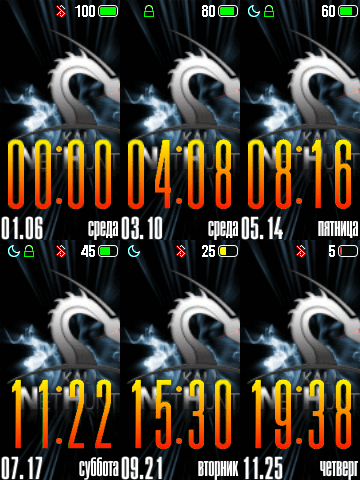
 here is mine at the moment