Page 5 of 5
How to install watchfaces (Bip, Verge Lite, GTR, GTS, T-Rex, Cor, Mi Band 4)
Posted: 05 Aug 2019, 19:49
by GIK-Team
Detailed instructions for installing custom watch faces on Amazfit GTR, GTS, T-Rex, Verge Lite, Amazfit Bip smartwatches, and Cor and Mi Band 4 smart bracelets.
Note! At the moment, the instruction is relevant only for Zepp (Amazfit)
For a successful installation, you need to connect your gadget to a smartphone on Android or IOS with the Amazfit (Zepp) app installed. You also need to have installed file manager and pre-download the watch face that you would like to set on your watch.
Installation for Android
- First, you need to install one of the stock watch faces available in Zepp (Amazfit)/Mifit (if you have already installed one, you may skip this step).
- Open the folder with the downloaded watch face in the file manager with the path:
- Zepp (Amazfit) /Android/data/com.huami.watch.hmwatchmanager/files/watch_skin_local/
- Mi Fit /Android/data/com.xiaomi.hm.health/files/watch_skin_local/
There you will find folders with downloaded stock watch faces.
- Go to any of these folders and find the .bin file. Copy the .bin file name.
- Name example for bin: 4lIYUjzg3Vwqt8tJU9sYLeOSqUSAreJNzUxJhxgM.bin
- Name example for zip: UQkNrGEQmaPvYbLmGseWkOkUCHDDkOBf.zip
- Go to the custom watch face and rename it using the name of the standard watch face.
- Copy the watch face file with the new name and transfer it to the folder from step 3 with a replacement.
- Open the Zepp (Amazfit)/Mifit app and install the stock watch face, which file you replaced.
This method does not work on android 11 and above!
Note! The preview image will not change.
Android apps
AmazFaces app
Gadgetbridge (Android)
Notify & Fitness for Amazfit (Android)
Amazfit Replacer (Android)
Installation for iOS
You may also use
our application or other, such as
AmazTools (iOS), to install watch faces
This manual is current at the time of writing.
If you notice any inaccuracies or mistakes, please, let us know.
Re: How to install watchfaces (Bip, Verge Lite, GTR, GTS, T-Rex, Cor, Mi Band 4)
Posted: 14 Jan 2024, 10:28
by Frank_MB
Thank you for getting back to me. I am in developer mode and now more questions.
1. Does every watch face have a QR Code?
2. Where do I get the QR Code from your web site?
3. Do I have to ask the watchface designer make a QR Code?
4. How do you use the Zepp App to scan a QR code or can any QR Code app can be used?
Thank you again for all your help.
Re: How to install watchfaces (Bip, Verge Lite, GTR, GTS, T-Rex, Cor, Mi Band 4)
Posted: 14 Jan 2024, 10:57
by GIK-Team
Frank_MB wrote: 14 Jan 2024, 10:28
Thank you for getting back to me. I am in developer mode and now more questions.
1. Does every watch face have a QR Code?
2. Where do I get the QR Code from your web site?
3. Do I have to ask the watchface designer make a QR Code?
4. How do you use the Zepp App to scan a QR code or can any QR Code app can be used?
Thank you again for all your help.
1. Not every watch face comes with a QR code. QR codes are available for watch faces where direct installation through the Zepp app is supported.
2. You can find the QR code on the download page of a watch face on our website. If the watch face supports installation via QR code, you will see a 'QR Code' button near the download option.
3. You do not need to ask the watch face designer to create a QR code. The QR codes are generated automatically for supported watch faces on our site.
4. To scan a QR code, use the Zepp app in developer mode. While other QR code scanning apps can recognize the code, they won't facilitate the installation of the watch face on your device. Below each QR code on our site, you will find instructions on how to use the Zepp app for scanning and installing the watch face.
Re: How to install watchfaces (Bip, Verge Lite, GTR, GTS, T-Rex, Cor, Mi Band 4)
Posted: 08 Aug 2024, 22:32
by radrick01
I have android 12, how do I install it?
Re: How to install watchfaces (Bip, Verge Lite, GTR, GTS, T-Rex, Cor, Mi Band 4)
Posted: 08 Dec 2024, 12:12
by Chaboy
Hi, i have an iphone and the app version is 4.6.383.
my problem is, when I tried to download it and click on view ads, the ad does not show and thus preventing me to install the watchface.
can anyone help me? i have a GTR 47mm
Re: How to install watchfaces (Bip, Verge Lite, GTR, GTS, T-Rex, Cor, Mi Band 4)
Posted: 08 Dec 2024, 15:30
by GIK-Team
Chaboy wrote: 08 Dec 2024, 12:12
Hi, i have an iphone and the app version is 4.6.383.
my problem is, when I tried to download it and click on view ads, the ad does not show and thus preventing me to install the watchface.
can anyone help me? i have a GTR 47mm
viewtopic.php?t=1709
Re: How to install watchfaces (Bip, Verge Lite, GTR, GTS, T-Rex, Cor, Mi Band 4)
Posted: 27 Jul 2025, 05:24
by nklkhanna
Hello guys, I'm new here. I recently bought Amazfit BIP 6 and was able to scan and install custom watch faces from this side 2 times. But now I'm unable to.
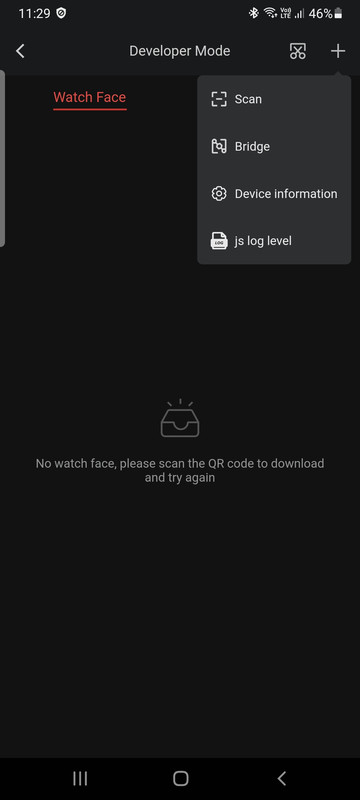
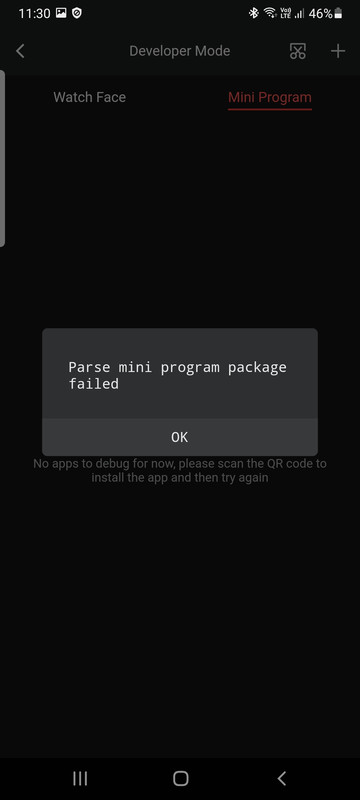
I took screenshot of the desired watchface and scanned it in developer mode, but I'm getting this error "Parse mini program package failed"
I tried going back to stock watchface and doing it again but still the same error.
I'm using samsung S22 running android 15 and zepp app version is 9.9.6.
Can you someone help and guide me? What m I doing wrong ?
Thanks

Re: How to install watchfaces (Bip, Verge Lite, GTR, GTS, T-Rex, Cor, Mi Band 4)
Posted: 27 Jul 2025, 09:28
by asoo
nklkhanna wrote: 27 Jul 2025, 05:24
Hello guys, I'm new here. I recently bought Amazfit BIP 6 and was able to scan and install custom watch faces from this side 2 times. But now I'm unable to.
I took screenshot of the desired watchface and scanned it in developer mode, but I'm getting this error "Parse mini program package failed"
I tried going back to stock watchface and doing it again but still the same error.
I'm using samsung S22 running android 15 and zepp app version is 9.9.6.
Can you someone help and guide me? What m I doing wrong ?
Thanks
Here are some suggestions:
1. You should also mention which watch face you installed and had problems with.
2. It is recommended to post in the "Amazfit Bip series" forum
viewforum.php?f=6
According to the topic related to your problem.
3. Generating QR code for installation Once you generate it, the QR code will only be valid for a certain period of time and cannot be stored for long-term use. Therefore, if you have generated it for a long time, please refresh and re-generate it.
4. Since bip6 uses zeppOS to operate, if you want to see how to install it, please see the topic: "Create a QR Code and Sync to device that use zeppOS by using the Zepp app"
viewtopic.php?t=3873
Re: How to install watchfaces (Bip, Verge Lite, GTR, GTS, T-Rex, Cor, Mi Band 4)
Posted: 27 Jul 2025, 16:26
by nklkhanna
asoo wrote: 27 Jul 2025, 09:28
nklkhanna wrote: 27 Jul 2025, 05:24
Hello guys, I'm new here. I recently bought Amazfit BIP 6 and was able to scan and install custom watch faces from this side 2 times. But now I'm unable to.
I took screenshot of the desired watchface and scanned it in developer mode, but I'm getting this error "Parse mini program package failed"
I tried going back to stock watchface and doing it again but still the same error.
I'm using samsung S22 running android 15 and zepp app version is 9.9.6.
Can you someone help and guide me? What m I doing wrong ?
Thanks
Here are some suggestions:
1. You should also mention which watch face you installed and had problems with.
2. It is recommended to post in the "Amazfit Bip series" forum
viewforum.php?f=6
According to the topic related to your problem.
3. Generating QR code for installation Once you generate it, the QR code will only be valid for a certain period of time and cannot be stored for long-term use. Therefore, if you have generated it for a long time, please refresh and re-generate it.
4. Since bip6 uses zeppOS to operate, if you want to see how to install it, please see the topic: "Create a QR Code and Sync to device that use zeppOS by using the Zepp app"
viewtopic.php?t=3873
Thanks for the reply and guidance, I'll try with fresh QR code and get back on the forum links you mentioned.

Re: How to install watchfaces (Bip, Verge Lite, GTR, GTS, T-Rex, Cor, Mi Band 4)
Posted: 10 Nov 2025, 15:24
by icemanstrike
Hello, I'm new here and wanted to know if I can download the files and use the assets file to watchface maker? I have the active 2 square.
Re: How to install watchfaces (Bip, Verge Lite, GTR, GTS, T-Rex, Cor, Mi Band 4)
Posted: 10 Nov 2025, 15:54
by asoo
icemanstrike wrote: 10 Nov 2025, 15:24
Hello, I'm new here and wanted to know if I can download the files and use the assets file to watchface maker? I have the active 2 square.
you can use "Watch face editor for Amazfit watch on ZeppOS"
viewtopic.php?t=2743
for unpack and bring image in assets to do that you want.
Next time, please post in an area that matches your question and device, for a more organized search.
Area for "Active device"
viewforum.php?f=176
Re: How to install watchfaces (Bip, Verge Lite, GTR, GTS, T-Rex, Cor, Mi Band 4)
Posted: 10 Nov 2025, 23:29
by icemanstrike
asoo wrote: 10 Nov 2025, 15:54
icemanstrike wrote: 10 Nov 2025, 15:24
Hello, I'm new here and wanted to know if I can download the files and use the assets file to watchface maker? I have the active 2 square.
you can use "Watch face editor for Amazfit watch on ZeppOS"
viewtopic.php?t=2743
for unpack and bring image in assets to do that you want.
Next time, please post in an area that matches your question and device, for a more organized search.
Area for "Active device"
viewforum.php?f=176
Thanks for the link! I have an Active 2 and was trying to find square designs for it, but all I can see are circle designs in active device. I checked that GTS 3 and GTS 4 watch faces are compatible with the Active 2, which is why I downloaded the files for GTS. However, I’m not sure how to use the assets file.
Re: How to install watchfaces (Bip, Verge Lite, GTR, GTS, T-Rex, Cor, Mi Band 4)
Posted: 11 Nov 2025, 09:05
by asoo
icemanstrike wrote: 10 Nov 2025, 23:29
asoo wrote: 10 Nov 2025, 15:54
icemanstrike wrote: 10 Nov 2025, 15:24
Hello, I'm new here and wanted to know if I can download the files and use the assets file to watchface maker? I have the active 2 square.
you can use "Watch face editor for Amazfit watch on ZeppOS"
viewtopic.php?t=2743
for unpack and bring image in assets to do that you want.
Next time, please post in an area that matches your question and device, for a more organized search.
Area for "Active device"
viewforum.php?f=176
Thanks for the link! I have an Active 2 and was trying to find square designs for it, but all I can see are circle designs in active device. I checked that GTS 3 and GTS 4 watch faces are compatible with the Active 2, which is why I downloaded the files for GTS. However, I’m not sure how to use the assets file.
Please post in the correct forum.
I told you earlier. It seems you don't care about what I said.
The image files in the assets folder are encrypted and cannot be used.
You must unpack with "Watch face editor for Amazfit watch on ZeppOS". When you unpack them, the files in the assets folder will be decrypted.
The program used to edit them is in the post I replied to you earlier.
Next time, if you post in the wrong forum, I won't reply.
Your question is not related to the main topic so your question
It will confuse this thread, because your question not related to this topic.
Re: How to install watchfaces (Bip, Verge Lite, GTR, GTS, T-Rex, Cor, Mi Band 4)
Posted: 07 Jan 2026, 13:45
by Fearless-Week
Got myself a Bip 6 and I was trying for hours to setup a custom skin. I did everything suggested and didnt worked, I just got this error : "Parse mini program package failed", every single time I scan a QR. The same error that nklkhanna already has.
If this matters, Im using Zepp v9.15.2. I was trying to find an older version but it was impossible to find, even I have tried to install an xAPK, didnt worked.
Re: How to install watchfaces (Bip, Verge Lite, GTR, GTS, T-Rex, Cor, Mi Band 4)
Posted: 07 Jan 2026, 13:56
by asoo
Fearless-Week wrote: 07 Jan 2026, 13:45
Got myself a Bip 6 and I was trying for hours to setup a custom skin. I did everything suggested and didnt worked, I just got this error : "Parse mini program package failed", every single time I scan a QR. The same error that nklkhanna already has.
If this matters, Im using Zepp v9.15.2. I was trying to find an older version but it was impossible to find, even I have tried to install an xAPK, didnt worked.
I think what you posted probably isn't relevant to this topic.
I suggest you check out this thread:
viewtopic.php?t=3873
It might be helpful to you to some extent.
I also use Zepp V9.15.2 and was able to install the watchface on my Bip 6 via QR code without any problems.
I expect that if you follow the steps correctly, it should install successfully.
Re: How to install watchfaces (Bip, Verge Lite, GTR, GTS, T-Rex, Cor, Mi Band 4)
Posted: 07 Jan 2026, 14:36
by Fearless-Week
thanks asoo for your replying and Im sorry to bother you but... I did exactly what that link you posted since yesterday.
I think twice before making any post on any forum, if I cant find a way to do it by myself, I ask.
This is what I got
Re: How to install watchfaces (Bip, Verge Lite, GTR, GTS, T-Rex, Cor, Mi Band 4)
Posted: 07 Jan 2026, 14:57
by asoo
Fearless-Week wrote: 07 Jan 2026, 14:36
thanks asoo for your replying and Im sorry to bother you but... I did exactly what that link you posted since yesterday.
I think twice before making any post on any forum, if I cant find a way to do it by myself, I ask.
This is what I got
The problem you attached the image for can only be guessed to be caused by several things:
1. If you created the QR code yourself, it's possible that:
You created the zpk file incorrectly.
2. The server where you hosted the file is experiencing problems or does not support direct downloads.
If you used a QR code on this website, the problem may be due to:
1. The QR code has expired.
QR codes created on this website have a limited lifespan; you cannot save them for permanent use.
If it expires, you need to create a new one by refresh that page.
That's all I can answer for now. I will not answer this question further in this thread as it will confuse the main topic.
As I said before, your question should not be in this topic.
I have already provided a link to the correct topic. Please ask your question in that topic.
viewtopic.php?t=3873
P.S. The entire problem analysis is based on the assumption that you need to understand the process of correctly creating a zpk file and understand how to host files on a server.
And in case you host files on this website, you must understand that the resulting QR code is not permanent.
Re: How to install watchfaces (Bip, Verge Lite, GTR, GTS, T-Rex, Cor, Mi Band 4)
Posted: 07 Jan 2026, 20:18
by Fearless-Week
No, that wasnt the problem at all, it wasnt an expired QR and it wasnt a zpk that I never created. Even more, I dont have any idea how to upload a zpk file to this device.
As I suspected its because of the version. So, this is what I did (to everyone who has the same problem as me): "Parse mini program package failed"
I downgraded to Zepp v9.8.2.
How did I did that?. I downloaded the apkm, de-compiled and then recompiled again. Uninstalled the previous version v9.15.2 and then I now can upload every skin from this device without any problems using any QR.
Re: How to install watchfaces (Bip, Verge Lite, GTR, GTS, T-Rex, Cor, Mi Band 4)
Posted: 08 Jan 2026, 01:02
by asoo
Fearless-Week wrote: 07 Jan 2026, 20:18
No, that wasnt the problem at all, it wasnt an expired QR and it wasnt a zpk that I never created. Even more, I dont have any idea how to upload a zpk file to this device.
As I suspected its because of the version. So, this is what I did (to everyone who has the same problem as me): "Parse mini program package failed"
I downgraded to Zepp v9.8.2.
How did I did that?. I downloaded the apkm, de-compiled and then recompiled again. Uninstalled the previous version v9.15.2 and then I now can upload every skin from this device without any problems using any QR.
Congratulations on resolving the issue.
However, I'm still surprised because I'm also using Zepp Version 9.15.2 and was able to install it via QR code on Bip6 and Balance without any problems.
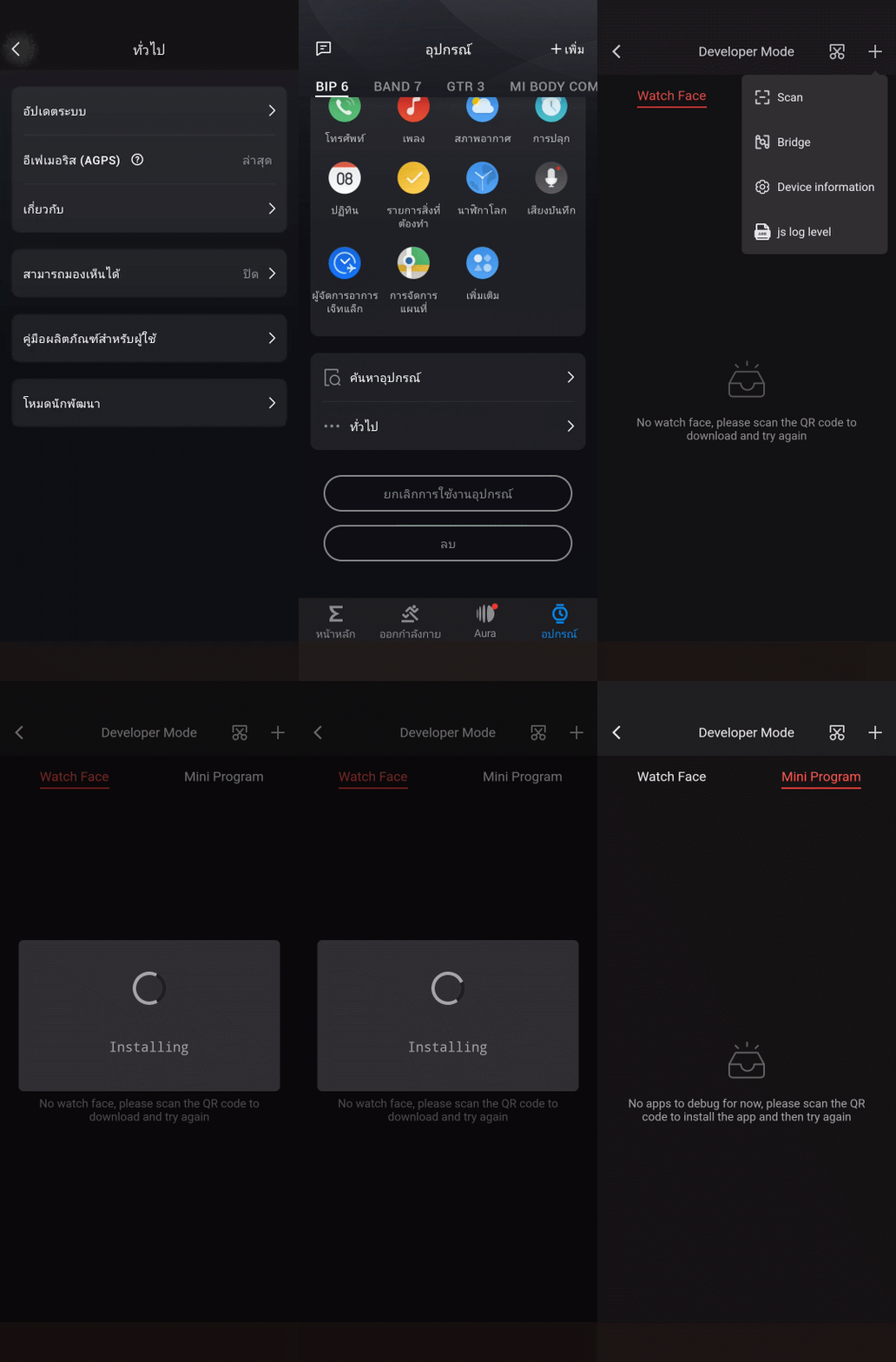
- PreviewAnimation2.gif (2.56 MiB) Viewed 6024 times
Re: How to install watchfaces (Bip, Verge Lite, GTR, GTS, T-Rex, Cor, Mi Band 4)
Posted: 14 Jan 2026, 14:29
by JAGGER
Since the update to the new Zepp app v9.15.2, it no longer works for me either. I scan directly from the browser on the website. The scanner displays the error message: "parse mini program package failed". If I use the Amazface app, watch the ad, save the QR code, and then scan it directly on my phone, it works with the same watch face. Greetings from Germany