Hello!
I haven’t been able to change faces on my watch (Verge Lite) since the last phone (Samsung A40) update.
I get this message: "You do not have any standard watch face installed. Go to the service app and install the first watch face"
I did what's in the tutorial video (i install first watch face in the Mi-Fit and i try Zepp), but it didn't help either.
What the problem? Please help me.
Have A Nice Day!
-
- Administrator
-
-
Support Ukraine
If you experience any problems with the forum (it is not visible, there is no way to post messages, or some functionality does not work), please let us know. If you have problems with registration or you did not receive confirmation letter, let us know and we will activate your account manually.
If you get an "The submitted form was invalid. Try submitting again" error, delete cookies, then try again.
I cant change face. [Verge Lite]
Moderators: Internal error, Watchmens
-
GIK-Team

- root
- Posts: 1031
- Joined: 22 Mar 2018, 10:00
- Location: Ukraine
- Has thanked: 1162 times
- Been thanked: 279 times
- Contact:
What application are we talking about?Atia wrote: 08 Apr 2021, 13:48Hello!
I haven’t been able to change faces on my watch (Verge Lite) since the last phone (Samsung A40) update.
I get this message: "You do not have any standard watch face installed. Go to the service app and install the first watch face"
I did what's in the tutorial video (i install first watch face in the Mi-Fit and i try Zepp), but it didn't help either.
What the problem? Please help me.
Have A Nice Day!
"sometimes it's scary but it's still just you and me” — Leaving Laurel
I select the face with the AMAZFACES app, and I exchange it using the Mi-Fit app. I tried now the Zepp too but does not work. It worked until the phone was updated (yesterday).
-
Stas

- Posts: 188
- Joined: 22 Jan 2019, 21:18
- Location: Ukraine
- Has thanked: 4 times
- Been thanked: 34 times
- Contact:
Can you describe the problem in more detail and how do you use direct install or replace?
Atia wrote: 09 Apr 2021, 02:09I select the face with the AMAZFACES app, and I exchange it using the Mi-Fit app. I tried now the Zepp too but does not work. It worked until the phone was updated (yesterday).
So far:
1. I run AmazFaces app on phone
2. I select Verge Lite face
3. Download... (Replacing the standard dial)
The face to be replaced and the service application have been released ... I launched the Mi-Fit application and changed the selected face ...
Now:
1. I run AmazFaces app on phone
2. I select Verge Lite face
3: The service application and the message "You do not have any standard watch faces installed. Go to the service app and install the first watch face" are displayed... I go the service app and install first face, but It does not solve the problem
I reinstalled the apps (Mi-Fit, AmazFaces) but that didn't solve the problem either ...
1. I run AmazFaces app on phone
2. I select Verge Lite face
3. Download... (Replacing the standard dial)
The face to be replaced and the service application have been released ... I launched the Mi-Fit application and changed the selected face ...
Now:
1. I run AmazFaces app on phone
2. I select Verge Lite face
3: The service application and the message "You do not have any standard watch faces installed. Go to the service app and install the first watch face" are displayed... I go the service app and install first face, but It does not solve the problem
I reinstalled the apps (Mi-Fit, AmazFaces) but that didn't solve the problem either ...
-
Stas
- Posts: 188
- Joined: 22 Jan 2019, 21:18
- Location: Ukraine
- Has thanked: 4 times
- Been thanked: 34 times
- Contact:
Try to enable using the Mi Fit application in the setting and
update the app to version 2.5.149 beta
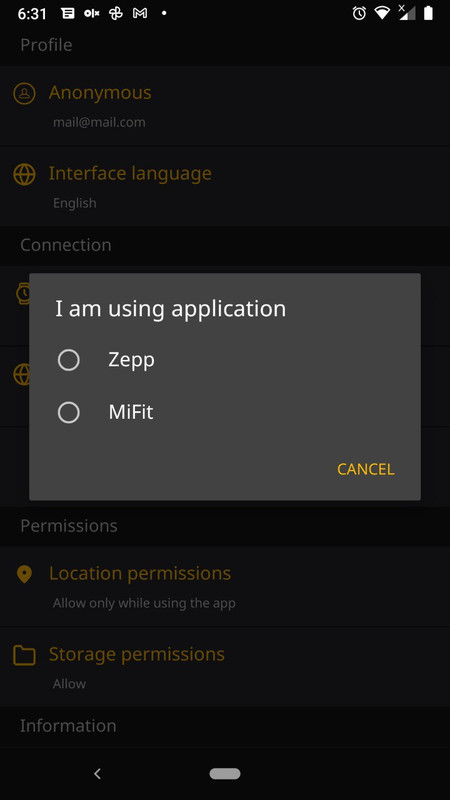
update the app to version 2.5.149 beta
Atia wrote: 09 Apr 2021, 09:34So far:
1. I run AmazFaces app on phone
2. I select Verge Lite face
3. Download... (Replacing the standard dial)
The face to be replaced and the service application have been released ... I launched the Mi-Fit application and changed the selected face ...
Now:
1. I run AmazFaces app on phone
2. I select Verge Lite face
3: The service application and the message "You do not have any standard watch faces installed. Go to the service app and install the first watch face" are displayed... I go the service app and install first face, but It does not solve the problem
I reinstalled the apps (Mi-Fit, AmazFaces) but that didn't solve the problem either ...
It doesn't work that way either. But it's not a problem. I can replace faces without AmazFaces application.
Thanks!
Thanks!
Who is online
Users browsing this forum: No registered users and 1 guest