• Administrator
  •  
    Support Ukraine
    If you experience any problems with the forum (it is not visible, there is no way to post messages, or some functionality does not work), please let us know. If you have problems with registration or you did not receive confirmation letter, let us know and we will activate your account manually.
    If you get an "The submitted form was invalid. Try submitting again" error, delete cookies, then try again.
     

AmazFit WatchFace editor 2 for Windows

This forum is designed to discuss and develop tools creating watch faces.

Moderators: asoo, lvpokka, Internal error, Watchmens

Forum rules
All communication in this branch should only be in English.
To discuss tools that are not in this section, use the “Watchfaces tools (discussion)” forum.
Post Reply
User avatar
SashaCX75
Posts: 812
Joined: 26 Oct 2019, 15:18
Location: Ukraine
Has thanked: 13 times
Been thanked: 1007 times
Contact:

AmazFit WatchFace editor 2 for Windows

Post by SashaCX75 »

Graphics editor for working with dials Amazfit
The editor supports watch faces from GTR 2(e), GTS 2 (GTS 2e / Zepp E Square), T-Rex Pro, Zepp E Circle.
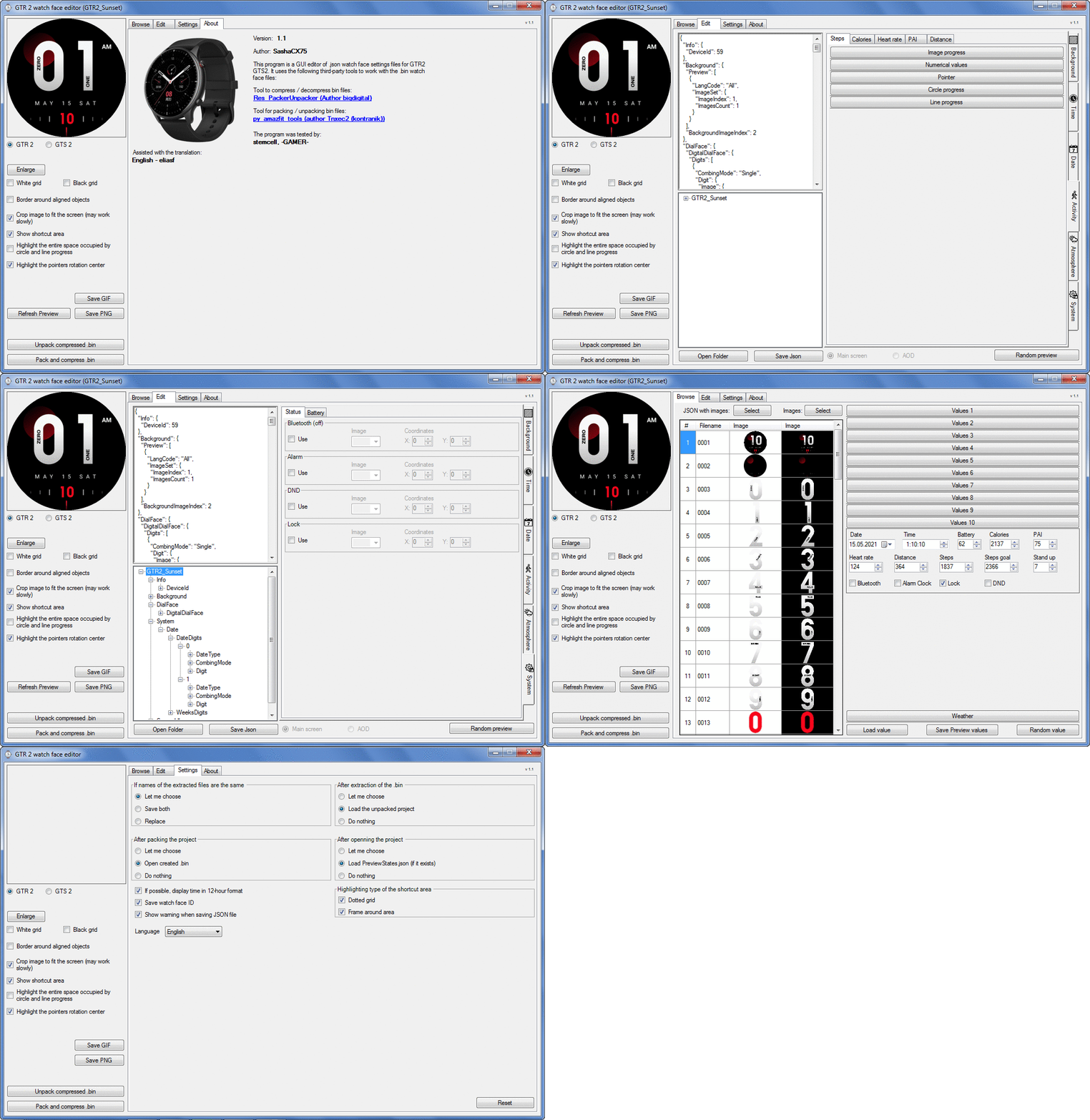
Screenshot
Screenshot
Image
Note: It is advisable to unpack the program to the root of the disk.
Not all dials can be unpacked.

The drawing order of elements cannot be changed. The only exception is if you move the second hand from the center, it will be drawn under the hour and minute hands.

If the .bin file is not created, then you need to look for errors in the .log file. Most often this happens when images have the wrong format.

Version 7.3
List of changes
Fixed known display bugs.
v 7.2
Fixed date display errors in editable zones.
Added support for the Hungarian language.
v 7.1
For distance added support for separate images for miles and kilometers.
v 7.0
Added support for independent coordinates for a set of pictures (segments).
v 6.0
Added support for Zepp E Circle
Added the ability to convert watch faces between different models (GTR 2 (e), Zepp E Circle, T-Rex Pro)
v 5.1
Added the ability to create and update preview images of editable zones.
v 5.0
Added support for editable zones.
v 4.1
Added the ability to display the time in the system font.
Added the ability to display the date in the system font.
Added the ability to change the order of layers.
Added the ability to overlay the clock image on the saved png and gif files (enabled in the settings).
v 4.0
Added support for the system font (inscription at an angle and in a circle).
Added support for the Sunrise parameter (not working correctly for all cities).
Added support for ActivityGoal parameter.
Added the ability to display the goal of steps.
Added support for the Icon parameter.
Added the ability to display circular and linear progress at the same time.
v 3.1
Fixed errors when displaying the distance.
Fixed errors when displaying temperature.
Added French.
Added Italian language.
v 3.0
Added support for T-Rex Pro.
Added support for new elements (StandUp, fat burning, UV index, humidity, wind, pressure).
Found bugs fixed.
v 2.1
Fixed bugs in display AOD.
Fixed bug when using pictures for circular progress.
v 2.0
Added support for AOD.
Added Chinese translation.
v 1
It can work with elements: time, date, statuses, weather, battery, steps, calories, heart rate, PAI, path.
Added English translation.
v 1.2 Added Spanish language
Old versions
Pictures created when unpacking and unpacking bin files are created by the parser and may differ from the images created in the editor. I have nothing to do with these files and am not responsible for their content.

When you turn on the "Follow ..." radio button, the right alignment and center alignment in the editor is displayed incorrectly.
The preview in the editor may differ from the image on the watch. I advise you to check the dial on a real device.

Editable zones do not work on the T-Rex Pro.

The editor does not work with GTS 2 mini (GTS U) watch faces and I do not know how to make such watch faces.

Until the Zepp app has an official watch face with animations or shortcuts, these features cannot be added to the editor.
Shortcuts work on dials converted from GTR (GTS) to GTR 2 (GTS 2). But with this method of creating dials, not all functions work correctly.

GTR (GTS, T-Rex) to GTR2 (GTS 2, T-Rex Pro) converter
GTR (GTS, T-Rex) to GTR2 (GTS 2, T-Rex Pro) Converter & Editor

Because I bought a GTR 3, the program will no longer be updated.

Donate to the author - PayPal: [email protected].
Last edited by SashaCX75 on 01 Jun 2022, 07:19, edited 32 times in total.
zecxzec
Posts: 1
Joined: 07 Mar 2021, 12:45
Location: Korea
Has thanked: 1 time
Been thanked: 3 times
Contact:

Post by zecxzec »

Thank you for your cooperation!!!
Can you add gts2 mini to new program??
Is it possible??
Anyway i respect your abilities!
zyfish
WF maker
Posts: 11
Joined: 24 Aug 2020, 10:55
Location: china
Has thanked: 1 time
Contact:

Post by zyfish »

thank you very much.
User avatar
SashaCX75
Posts: 812
Joined: 26 Oct 2019, 15:18
Location: Ukraine
Has thanked: 13 times
Been thanked: 1007 times
Contact:

Post by SashaCX75 »

zecxzec wrote: 07 Mar 2021, 12:54
Can you add gts2 mini to new program??
No. gts2 mini watch faces are different from gts2 watch faces. The unpacking utility used in the editor cannot work with gts2 mini watch faces.
demiurg1
WF maker
Posts: 114
Joined: 23 Feb 2020, 22:49
Location: Poland
Has thanked: 23 times
Been thanked: 17 times
Contact:

Post by demiurg1 »

SashaCX75, Thanks for another great watch face editing tool. Previously I used the version for the GTR 47 and now I can for the GTR 2. Thanks again. I'd like to buy you a very large beer. If you lived in Poland, I probably could do it. :)
demiurg1
WF maker
Posts: 114
Joined: 23 Feb 2020, 22:49
Location: Poland
Has thanked: 23 times
Been thanked: 17 times
Contact:

Post by demiurg1 »

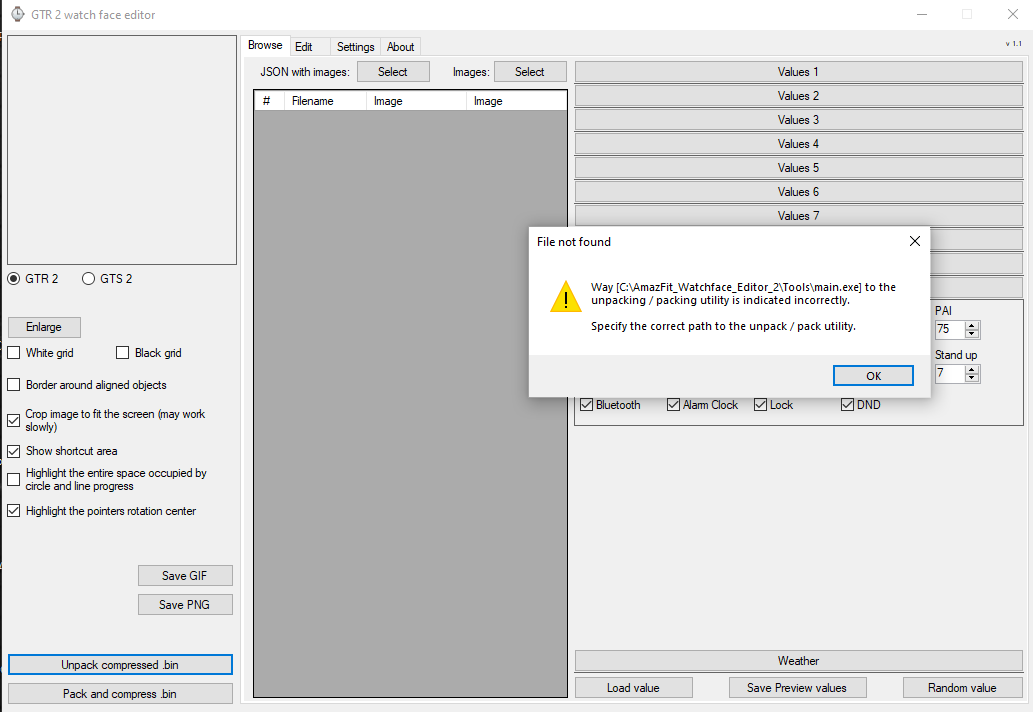
A note was written "It is advisable to unpack the program to the root of the disk." I understand that the folder with the "AmazFit_Watchface_Editor_2" tool must be on the "C" drive in the root directory (folder). Is it only in it? Can a subdirectory be used?
User avatar
SashaCX75
Posts: 812
Joined: 26 Oct 2019, 15:18
Location: Ukraine
Has thanked: 13 times
Been thanked: 1007 times
Contact:

Post by SashaCX75 »

demiurg1 wrote: 07 Mar 2021, 20:15
tool must be on the "C" drive in the root directory (folder). Is it only in it? Can a subdirectory be used?
You can unpack it to another folder.
It's just that sometimes people created a lot of folders with long names and then there were problems. After that, such a warning appeared.
demiurg1
WF maker
Posts: 114
Joined: 23 Feb 2020, 22:49
Location: Poland
Has thanked: 23 times
Been thanked: 17 times
Contact:

Post by demiurg1 »

SashaCX75
OKAY. Thanks. I will use a folder with the short name "C: \ programs \ AmazFit_Watchface_Editor_2". If something is wrong, I will throw "AmazFit_Watchface_Editor_2" into the main folder and write about it.
demiurg1
WF maker
Posts: 114
Joined: 23 Feb 2020, 22:49
Location: Poland
Has thanked: 23 times
Been thanked: 17 times
Contact:

Post by demiurg1 »

For SashaCX75
I just tried from the root directory (folder) and there was a problem. At this link I put a zipped file with the error information (LOG file).
https://www.dropbox.com/s/gkm7um6yehifk ... e.zip?dl=0

It will be there for a few days and then I will delete it
Image
mickdu59
WF maker
Posts: 3
Joined: 18 Feb 2021, 18:24
Location: France
Contact:

Post by mickdu59 »

hello, how to download it, you have a link for GTS 2 ? thank you
User avatar
asoo
Posts: 2106
Joined: 03 Jan 2019, 01:48
Location: ͼͽ Thailand ͼͽ
Has thanked: 404 times
Been thanked: 2022 times

Post by asoo »

mickdu59 wrote: 08 Mar 2021, 05:06
hello, how to download it, you have a link for GTS 2 ? thank you
Spoiler
Image
- Link download is in the first post ( click at "Version 1.1 " )
- you can select GTR2 GTS2 in the program
ͼͽ To request please use the interrelated forum in action ͼͽ
Please do not PM to me for requests ported watchface.
demiurg1
WF maker
Posts: 114
Joined: 23 Feb 2020, 22:49
Location: Poland
Has thanked: 23 times
Been thanked: 17 times
Contact:

Post by demiurg1 »

Yes, the link to these versions is at the top of this post.
demiurg1
WF maker
Posts: 114
Joined: 23 Feb 2020, 22:49
Location: Poland
Has thanked: 23 times
Been thanked: 17 times
Contact:

Post by demiurg1 »

Info for SashaCX75
It seems that the error I have shown is not a directory (folder) problem, but the error is due to the contents of the bin file. This is what it looks like after reading the LOG file to which I previously provided the link.
User avatar
eliasf
Posts: 23
Joined: 29 Jan 2021, 18:10
Location: GR
Has thanked: 5 times
Been thanked: 5 times
Contact:

Post by eliasf »

demiurg1 wrote: 08 Mar 2021, 10:03
Info for SashaCX75
It seems that the error I have shown is not a directory (folder) problem, but the error is due to the contents of the bin file. This is what it looks like after reading the LOG file to which I previously provided the link.
You probably changed the folder name after unzipping all your files.
Either delete everything, then reinstall and do not change the folder name after reinstalling.

If the problem persists go into Settings.json in the root folder of the program and make sure this line:

Code: Select all

  "pack_unpack_dir": "C:\\xxxxxxxxxxx\\Tools\\main.exe",
corresponds to your actual path.
wolfgangausw

Post by wolfgangausw »

Hello SashaCX75,

first of all thanks for the GTR2 editor.

My question is how to display the bluetooth status on the idl screen.
I tried to copy the bluetooth sector to the IDLE area. Unfortunately without success.
User avatar
SashaCX75
Posts: 812
Joined: 26 Oct 2019, 15:18
Location: Ukraine
Has thanked: 13 times
Been thanked: 1007 times
Contact:

Post by SashaCX75 »

demiurg1
Make sure to extract all files from the archive. Go to the program settings and click the "Reset" button. Restart the program.
User avatar
SashaCX75
Posts: 812
Joined: 26 Oct 2019, 15:18
Location: Ukraine
Has thanked: 13 times
Been thanked: 1007 times
Contact:

Post by SashaCX75 »

wolfgangausw
The watch displays the icon only when the bluetooth connection is broken.
Naddus
Posts: 1
Joined: 23 Jan 2021, 11:31
Location: Germany
Contact:

Post by Naddus »

Will there be a editor for gts 2 mini in future too? Or where can I found one? Thanks.
User avatar
SashaCX75
Posts: 812
Joined: 26 Oct 2019, 15:18
Location: Ukraine
Has thanked: 13 times
Been thanked: 1007 times
Contact:

Post by SashaCX75 »

Naddus
Support for gts 2 mini watch faces is not planned.
KoltesPunti
WF maker
Posts: 12
Joined: 31 Oct 2019, 06:33
Has thanked: 1 time
Contact:

Post by KoltesPunti »

Nice Job mate ;)

Is there a function for the Starimage on GTS2? (like on the gts)
wolfgangausw

Post by wolfgangausw »

Naddus

"The watch displays the icon only when the bluetooth connection is broken."

Yes, I lnow. I want to show the broken connection on the idle screen.
Pal57
WF maker
Posts: 4
Joined: 09 Feb 2021, 21:10
Location: San Marino
Contact:

Post by Pal57 »

Hi and thanks for the new app for GTR 2.
When making a new watch face from scratch, how can I put a new image, like a second hand png, without erasing all the other images.
It looks like every time I put a new image png it starts up new face.
MichaRe
WF maker
Posts: 3
Joined: 10 Aug 2020, 11:39
Location: Germany
Has thanked: 6 times
Contact:

Post by MichaRe »

Thank you so much Sasha :D :D :D !
User avatar
SashaCX75
Posts: 812
Joined: 26 Oct 2019, 15:18
Location: Ukraine
Has thanked: 13 times
Been thanked: 1007 times
Contact:

Post by SashaCX75 »

KoltesPunti
If by "Starimage" we mean the image that appears when the goal of the steps is reached, then it is not yet known how to show it.
User avatar
SashaCX75
Posts: 812
Joined: 26 Oct 2019, 15:18
Location: Ukraine
Has thanked: 13 times
Been thanked: 1007 times
Contact:

Post by SashaCX75 »

wolfgangausw wrote: 08 Mar 2021, 17:06
@Naddus
Yes, I lnow. I want to show the broken connection on the idle screen.
My editor doesn't support idle screen (AOD) yet. And, as far as I know, in this mode you cannot display status icons, including bluetooth.
Post Reply

Return to “Watchfaces tools”

Who is online

Users browsing this forum: No registered users and 2 guests